
The Grand Theft Auto series, particularly GTA V, stands as a monumental achievement in open-world gaming. Its sprawling urban landscapes, intricate narratives, and dynamic gameplay offer countless hours of entertainment. Yet, for a significant segment of its player base, the vanilla game is merely a canvas—a starting point for boundless creativity and personalization through modifications, or “mods.” Modding Grand Theft Auto V has become a sophisticated subculture, transforming the game in myriad ways, from enhancing graphics and introducing new vehicles to entirely reimagining missions and adding functionalities Rockstar never envisioned.
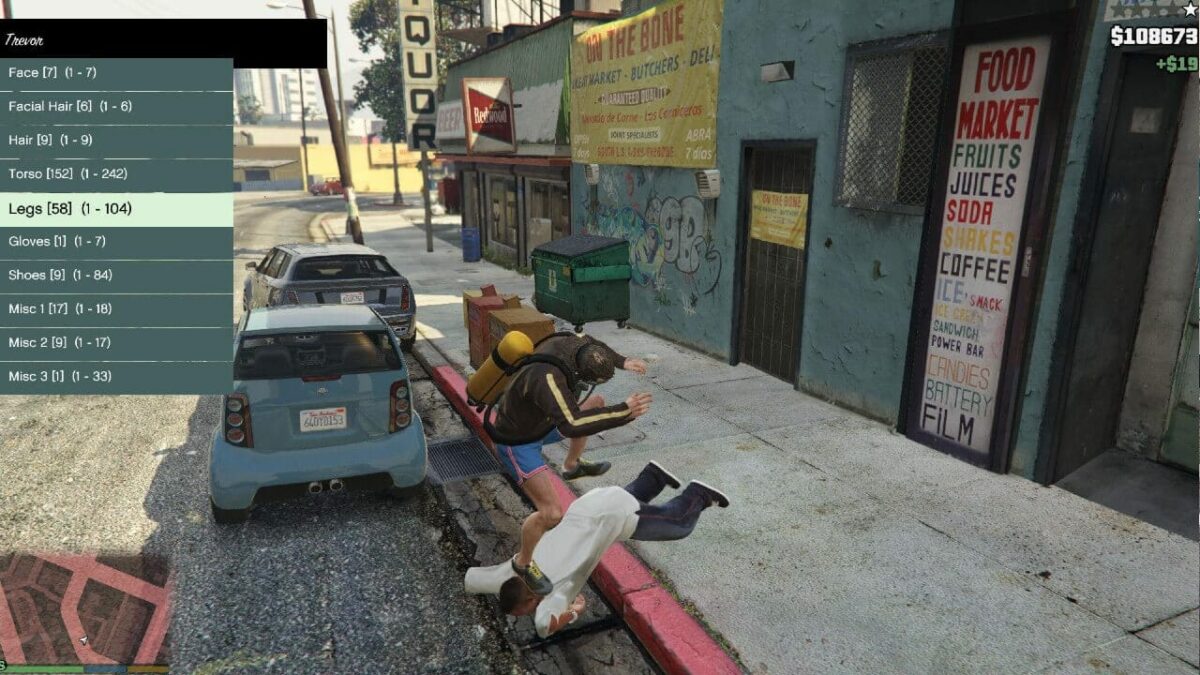
This guide delves into the intricate world of GTA V mod installation, providing a professional and insightful look at the processes, tools, and best practices involved. It’s a journey into empowering players to tailor their virtual experience, demanding a methodical approach to technical execution and an understanding of potential pitfalls. For tech enthusiasts and gamers alike, mastering GTA V modding is not just about changing a car’s skin; it’s about pushing the boundaries of what a game can be, leveraging third-party tools to unlock new dimensions of digital interaction.
The Allure of Modding: Why Players Customize GTA V
The motivation behind modding GTA V is multifaceted, driven by desires for enhanced realism, expanded content, or simply a fresh take on a familiar world. It represents a powerful intersection of gaming and software customization, where the user becomes an active participant in the game’s evolution.
Enhancing Gameplay and Aesthetics
One of the primary draws of modding is the ability to dramatically alter the game’s visual fidelity and core gameplay mechanics. Graphic overhauls, for instance, can elevate GTA V’s already impressive visuals to near photorealistic levels, leveraging advanced shader models, texture packs, and weather systems. Players can experience Los Santos under dynamic lighting conditions, with hyper-realistic reflections and environmental details that push modern hardware to its limits. Beyond aesthetics, gameplay mods introduce entirely new mechanics: realistic driving physics, complex AI behaviors for pedestrians and police, or even survival elements that transform the game into a hardcore simulation. These enhancements breathe new life into an aging title, making replays feel fresh and engaging.
Expanding Creative Horizons
Mods aren’t just about polishing what’s already there; they’re about adding entirely new layers of content and functionality. This includes custom vehicles, weapons, character models, and even entire new districts or maps created by the community. For those who enjoy role-playing, mods can facilitate complex scenarios, allowing players to embody different personas, run virtual businesses, or participate in elaborate community-driven events. The creative freedom offered by modding extends to scripting new missions, implementing advanced physics engines for destruction, or even building complex mini-games within the GTA V framework. This transforms the game from a fixed product into a dynamic, user-generated platform limited only by imagination and technical skill.
Understanding the Risks and Rewards
While the rewards of a personalized GTA V experience are substantial, it’s crucial to approach modding with an awareness of the inherent risks. Improper installation can lead to game instability, crashes, or even corrupt save files. Furthermore, using certain types of mods, particularly those that confer unfair advantages in online multiplayer (GTA Online), is strictly against Rockstar’s terms of service and can result in permanent bans. The risk-reward balance necessitates a careful, informed approach, prioritizing single-player modding, ensuring file backups, and sourcing mods from reputable communities to minimize exposure to malicious code or game-breaking incompatibilities. The technical acumen required involves understanding file structures, directory management, and compatibility layers, reinforcing modding as a tech-centric endeavor.
Essential Preparations Before You Mod
Embarking on your modding journey requires meticulous preparation. Skipping these crucial preliminary steps can lead to frustration, corrupted game files, and hours of troubleshooting. Think of these as the foundational elements for a stable and enjoyable modded experience.
Backing Up Your Game Files: A Crucial First Step
Before any modification, creating a complete backup of your GTA V installation is paramount. This acts as a safety net, allowing you to revert to a pristine, unmodded state if anything goes awry. There are several ways to do this:
-
Copy the entire game folder: Locate your GTA V installation directory (often
C:Program FilesRockstar GamesGrand Theft Auto VorC:Program Files (x86)SteamsteamappscommonGrand Theft Auto V) and copy its entire contents to a separate location on your hard drive. -
Utilize Steam’s backup feature: If you own the game on Steam, you can use its built-in backup and restore functionality.
-
Specific file backups: At minimum, identify and back up key files that mods frequently overwrite, such as
update.rpf,common.rpf, and the game’s executable (GTAV.exe,GTA5.exe,PlayGTAV.exe).
This backup ensures that you can always return to a working game, safeguarding your investment and progress.
Acquiring the Right Tools: Script Hook V, OpenIV, and More
Successful modding hinges on having the correct toolkit. These are the foundational utilities that facilitate the injection and management of mods:
-
Script Hook V: Developed by Alexander Blade, Script Hook V is arguably the most essential tool for modding. It allows custom scripts (mods written in .NET, LUA, or native code) to interact with the game engine. Many mods rely on it to function. It often comes with a native trainer for in-game adjustments.
-
Script Hook V .NET: An extension for Script Hook V, this allows mods written in .NET languages (like C#) to run. Many popular script mods utilize this.
-
OpenIV: This powerful archive editor is indispensable for installing visual and model mods. It allows users to browse, edit, and replace files within GTA V’s
.rpfarchives (e.g.,update.rpf,x64a.rpf,common.rpf). OpenIV includes an “ASI Manager” to install necessary ASI loaders and custom drivers, and critically, a “Mods Folder” creation option, which redirects game file modifications to a separate directory, leaving original game files untouched – a vital feature for safe modding. -
Mod Managers: While not strictly necessary for all mods, tools like
GTA V Mod Managercan help organize, enable, and disable various mods, making management easier, especially for extensive mod lists. -
Heap Adjuster & Gameconfig: These are crucial for preventing crashes when running many streamed assets (like custom cars). They increase memory limits and adjust game configurations to handle the additional load.
Always download these tools from their official sources or reputable modding sites (e.g., GTA5-Mods.com) to ensure authenticity and avoid malicious software.
Navigating Game Versions and Compatibility
GTA V is continually updated by Rockstar, which can frequently break mod compatibility. Script Hook V and OpenIV often require updates to match new game patches.
-
Stay informed: Before updating your game or installing new mods, check modding forums and the changelogs for Script Hook V and OpenIV to see if they support your current game version.
-
Disable auto-updates: For Steam users, consider disabling automatic updates for GTA V to maintain a stable modding environment. You can manually update when your core modding tools are ready.
-
Version management: Some advanced modders maintain separate installations of GTA V for different modding profiles or game versions, though this requires significant storage. Understanding the concept of a
modsfolder created by OpenIV is key here, as it isolates your changes and makes updates less painful if done correctly.
Step-by-Step Mod Installation: A Practical Walkthrough
With preparations complete, we can now dive into the actual installation processes for different types of mods. Precision and attention to detail are paramount here.
Installing Script Mods: Leveraging Script Hook V and .NET
Script mods typically add new functionalities, mechanics, or trainers to the game.
-
Install Script Hook V:
-
Download the latest version.
-
Extract the contents. You’ll usually find
ScriptHookV.dll,dinput8.dll(the ASI loader), andNativeTrainer.asi. -
Copy
ScriptHookV.dllanddinput8.dllinto your GTA V root directory (whereGTAV.exeis located). -
(Optional) Copy
NativeTrainer.asiif you want an in-game trainer for testing or casual use.
-
-
Install Script Hook V .NET (if required by your mods):
-
Download the latest version.
-
Extract
ScriptHookVDotNet.asi,ScriptHookVDotNet.dll, andScriptHookVDotNet2.dll(or similar files depending on version). -
Copy these files into your GTA V root directory.
-
-
Install individual script mods:
-
Many script mods come as
.asifiles,.csfiles (for C# scripts), or folders containing multiple files. -
For
.asimods: Copy the.asifile into your GTA V root directory. -
For
.cs(C#) or other script files/folders: Create ascriptsfolder in your GTA V root directory (if it doesn’t exist) and place these files/folders inside it. Some mods might have specific installation instructions, always follow them.
-

Integrating Visual and Model Mods with OpenIV
Visual mods (textures, ENBs) and model mods (cars, weapons, peds) usually require OpenIV to modify the game’s .rpf archives.
-
Install OpenIV: Download, install, and run OpenIV. The first time you run it, it will ask you to locate your GTA V installation.
-
Set up the “mods” folder: Inside OpenIV, go to
Tools > ASI Managerand install the “ASI Loader” and “OpenIV.asi”. Critically, ensure the “mods” folder is set up. This allows OpenIV to redirect modifications to a separatemodsfolder in your GTA V directory, safeguarding your original game files. Always make changes within themodsfolder structure (e.g.,modsupdateupdate.rpf). -
Navigate to the target
.rpfarchive: Most vehicle and texture mods involve modifyingupdate.rpfor specificx64archives. For example, to install a custom car, you might navigate tomodsupdatex64dlcpackspatchday<latest_number>dlc.rpfx64levelsgta5vehicles.rpf. -
Enable “Edit Mode”: Click the “Edit Mode” button in OpenIV (top right) to make changes.
-
Replace or add files:
-
Replace existing models/textures: Drag and drop the downloaded
.yft,.ytd,.ydd(for cars) or.otd,.oft(for textures) files directly into the relevant OpenIV window, replacing the vanilla files. -
Add-on mods (new cars, objects): These typically involve placing a new
dlcpackfolder intomodsupdatex64dlcpacksand then editing thedlclist.xmlfile (found inmodsupdateupdate.rpfcommondata) to register the new content. You’ll add a line like<Item>dlcpacks:newcarfolder</Item>. Always ensure you are editing thedlclist.xmlwithin yourmodsfolder, not the original.
-
-
Close “Edit Mode” when finished.
Utilizing Mod Managers for Streamlined Management
For extensive mod collections, a dedicated mod manager can be invaluable. Tools like GTA V Mod Manager or LSPDFR Mod Manager (if you’re into law enforcement roleplay) allow you to:
-
Enable/disable mods: Quickly activate or deactivate specific mods without manual file manipulation.
-
Create profiles: Switch between different mod setups for varied gameplay experiences.
-
Install/uninstall packages: Many managers support one-click installation for mod packages designed for them.
While not all mods are compatible with every manager, they offer a significant quality-of-life improvement for serious modders, streamlining the process and reducing potential conflicts.
Common Mod Types and Their Installation Specifics
-
ENB/ReShade: These post-processing injectors are installed separately, often by copying files directly into your GTA V root directory. Follow their specific instructions carefully.
-
Character Skins/Peds: Similar to vehicle models, these are typically installed via OpenIV, replacing existing character models or added as new ones.
-
Sound Mods: Usually involve replacing
.awcfiles within.rpfarchives using OpenIV. -
Map Mods: Can be complex, often involving new
.rpfarchives added asdlcpacksand requiring updates todlclist.xmlandextratitleupdatedata.meta.
Always prioritize reading the mod’s specific installation instructions, as nuances exist for almost every mod.
Maintaining Your Modded Game and Troubleshooting Common Issues
Modding is an ongoing process of maintenance and problem-solving. A successful modded experience often requires vigilance and an understanding of how to address common issues.
Best Practices for a Stable Modding Environment
-
Install mods incrementally: Avoid installing dozens of mods at once. Install one or two, test them thoroughly, and then proceed with more. This makes it easier to pinpoint the source of a problem.
-
Keep tools updated: Ensure Script Hook V, OpenIV, and any mod managers are always updated to match your game version.
-
Read mod descriptions and comments: The mod page often contains vital information about compatibility, known bugs, and troubleshooting tips from other users.
-
Organize your mods: Create a structured folder system for your downloaded mods, noting their source and version. This helps track what you’ve installed.
-
Periodically clean up: Remove unused or outdated mods to reduce potential conflicts and improve performance.
-
Use the “mods” folder: Reiterate the importance of using OpenIV’s “mods” folder functionality to keep original game files untouched, making it easier to revert changes.
Addressing Conflicts and Crashes
Crashes and instability are the most common challenges in modding.
-
Identify recent changes: If your game starts crashing, think about the last mod you installed or updated. Uninstall it to see if the problem resolves.
-
Check compatibility: Ensure all your mods are compatible with each other and your game version. Some mods might explicitly state they conflict with others.
-
Verify game files: Steam and Rockstar Launcher have options to verify game file integrity. If your game is crashing, try this after backing up your
modsfolder. This will revert altered vanilla files to their original state, which can help diagnose if the issue is with your modded files or core game files. -
Consult log files: Script Hook V often generates log files (
ScriptHookV.log,ScriptHookVDotNet.log) in your GTA V root directory that can provide clues about which script is causing issues. -
Increase Heap and Gameconfig limits: As mentioned, if you have many add-on vehicles or streamed assets, a
Heap Adjusterand an updatedGameconfigare essential to prevent memory-related crashes.
Staying Ahead of Game Updates and Mod Compatibility
Rockstar’s official game updates can be a modder’s bane.
-
Disable automatic updates: For Steam and Epic Games Store, disable automatic updates for GTA V to control when your game version changes.
-
Monitor modding communities: Stay active on forums like GTA5-Mods.com and Nexus Mods. Mod developers usually announce compatibility updates for their tools and mods shortly after a Rockstar patch.
-
Be patient: After a game update, it often takes a few days or weeks for Script Hook V, OpenIV, and other essential tools to be updated. Attempting to run a modded game on an incompatible version will almost certainly lead to crashes.
-
Utilize your backup: In the worst-case scenario, if an update breaks everything and mod support lags, you can always reinstall from your clean backup.
The Future of GTA Modding: Community, Innovation, and Responsible Practices
The GTA modding scene is a testament to the enduring power of community-driven innovation in technology and gaming. It’s a dynamic ecosystem that continues to evolve, pushing the boundaries of what’s possible within a game world.
The Vibrant Modding Community and Resource Hubs
The strength of GTA V modding lies in its vast and dedicated community. Websites like GTA5-Mods.com, Nexus Mods, and various Discord servers serve as central hubs for sharing mods, tutorials, and troubleshooting advice. These platforms foster collaboration, allowing modders to showcase their creations, receive feedback, and continually refine their work. Forums are invaluable resources for finding solutions to obscure errors, discovering new tools, and staying abreast of the latest developments. This communal aspect not only fuels the creation of new content but also ensures that the knowledge and tools required for modding remain accessible to new entrants, fostering a vibrant, self-sustaining tech culture around the game.
Legal and Ethical Considerations: Modding Safely and Respectfully
While modding offers immense creative freedom, it operates within legal and ethical boundaries set by Rockstar Games.
-
GTA Online vs. Single Player: Rockstar explicitly prohibits modifications that interfere with GTA Online to preserve fair play and prevent cheating. Using mods in GTA Online will almost certainly result in a ban. Therefore, modding should be strictly confined to the single-player experience. Many mod managers offer a quick way to switch between modded single-player and clean online modes.
-
Copyright and Intellectual Property: Modders should be mindful of copyright when creating or distributing content. While many mods are original creations, incorporating copyrighted material without permission can lead to legal issues.
-
Respectful Content: The modding community generally encourages the creation of respectful content, avoiding anything that promotes hate speech, discrimination, or illegal activities. Adhering to these unwritten rules ensures the community remains welcoming and positive. Responsible modding isn’t just about technical skill; it’s about being a good digital citizen.
Evolution of Modding Tools and Techniques
The landscape of modding tools and techniques is always advancing. With each new Grand Theft Auto title, or even major updates to existing ones, modders and tool developers adapt and innovate. Future developments could include:
-
AI-powered modding tools: Streamlining content creation through generative AI for textures, models, or even script generation.
-
Enhanced mod managers: More sophisticated tools that handle complex dependencies, automatic conflict resolution, and integrated version control.
-
Cloud-based modding environments: Potentially allowing easier sharing and management of mod profiles across different machines.
-
Deeper integration with game engines: As games become more open-ended, developers might provide official SDKs (Software Development Kits) that facilitate safer and more robust modding experiences, learning from the vibrant user-generated content scenes of games like GTA V.
In conclusion, installing GTA V mods is a deeply rewarding tech endeavor that transforms a beloved game into a uniquely personal experience. It demands patience, technical understanding, and a commitment to best practices. By embracing the tools, respecting the community, and understanding the risks, players can unlock an unparalleled level of customization, ensuring that the legacy of Grand Theft Auto V continues to evolve and inspire for years to come.
aViewFromTheCave is a participant in the Amazon Services LLC Associates Program, an affiliate advertising program designed to provide a means for sites to earn advertising fees by advertising and linking to Amazon.com. Amazon, the Amazon logo, AmazonSupply, and the AmazonSupply logo are trademarks of Amazon.com, Inc. or its affiliates. As an Amazon Associate we earn affiliate commissions from qualifying purchases.