
In an increasingly digital and geographically dispersed world, the tools that bridge the physical and virtual divide become invaluable. Among the many innovations that have transformed how we work, learn, and collaborate, the digital whiteboard stands out as a powerful canvas for collective thought. Within this landscape, Zoom Whiteboard has emerged as a cornerstone of virtual collaboration, transforming the traditional brainstorming session into an interactive, real-time digital experience. Far more than just a blank screen, it’s a dynamic workspace designed to foster creativity, streamline communication, and enhance productivity for teams operating from anywhere.
At its core, Zoom Whiteboard is a cloud-based visual collaboration platform that allows users to ideate, draw, annotate, and share content in real time, whether they are in a live Zoom meeting or working asynchronously. It extends beyond the basic screen-sharing capabilities of traditional video conferencing, offering a persistent, expansive digital canvas where ideas can take shape, evolve, and be revisited. This tool is not just about drawing lines; it’s about creating a shared mental space where diverse perspectives can converge, problems can be deconstructed, and solutions can be collaboratively built.
The Evolution of Collaboration: From Physical Boards to Digital Canvas
The concept of a whiteboard is deeply ingrained in human collaboration. From the chalkboards of ancient classrooms to the dry-erase boards dominating modern meeting rooms, a shared surface for visual thinking has always been fundamental. However, the advent of remote work and global teams exposed critical limitations in this traditional model, necessitating a digital transformation.
The Limitations of Traditional Whiteboards in a Remote World
Physical whiteboards, while excellent for in-person ideation, inherently struggle with geographical boundaries. Remote participants are either excluded or relegated to passive observation, unable to contribute directly. Furthermore, capturing and distributing the content of a physical whiteboard often involves taking photos, transcribing notes, or manually redrawing, leading to inefficiencies, potential loss of detail, and a lack of real-time interactivity for those not physically present. The content is static, difficult to edit collaboratively after the session, and lacks the dynamic nature required for ongoing projects. These challenges highlighted an urgent need for a more inclusive, accessible, and persistent solution.
The Rise of Virtual Collaboration Tools
The shift towards virtual collaboration tools gained significant momentum with the widespread adoption of video conferencing platforms. Early iterations allowed for basic screen sharing and annotation, but these were often ephemeral, tied to the meeting duration, and lacked the robust features of a dedicated collaborative canvas. The demand for a persistent, interactive, and feature-rich digital space for brainstorming, planning, and design spurred the development of specialized virtual whiteboards. Zoom, leveraging its dominant position in video conferencing, integrated and significantly enhanced its own whiteboard offering, recognizing it as a critical component for effective hybrid and remote teamwork. This evolution represents a leap from mere communication to genuine co-creation, offering a dynamic environment where ideas can flourish unbounded by physical space or time.
Zoom Whiteboard Unpacked: Core Features and Functionality
Zoom Whiteboard differentiates itself through a robust suite of features designed to replicate and enhance the physical whiteboard experience in a digital realm. Its design philosophy centers on intuitive tools that empower users to express ideas freely and collaboratively.
Infinite Canvas and Diverse Toolset
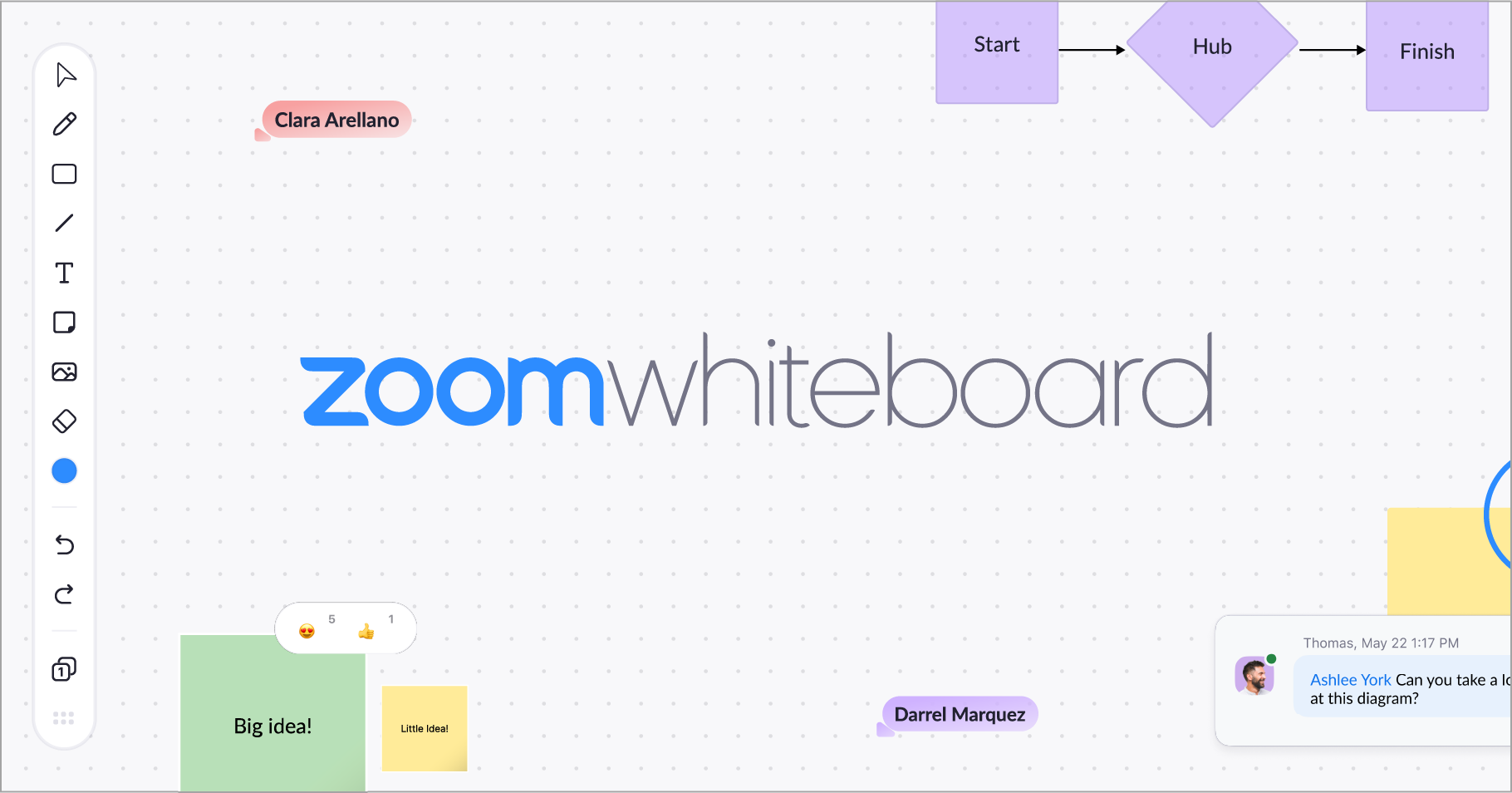
One of the most striking features is the infinite canvas. Unlike a physical whiteboard with finite boundaries, Zoom Whiteboard provides an unbounded digital space that can expand horizontally and vertically, allowing teams to explore complex ideas without running out of room. This eliminates the need to erase and redraw, preserving the entire history of thought.
The diverse toolset empowers users with various ways to articulate ideas:
-
Pens and Markers: Customizable in color and thickness, perfect for freehand drawing, sketching, and annotation.
-
Shapes: Pre-defined geometric shapes (circles, squares, arrows, lines) for creating diagrams, flowcharts, and structured layouts.
-
Text Boxes: For typing clear, legible text, labels, and explanations, ensuring readability that freehand writing often lacks.
-
Sticky Notes: Digital equivalents of sticky notes, ideal for quick ideas, brainstorming, voting, and agile methodologies. They can be color-coded and easily moved around.
-
Images: Users can upload images directly to the canvas, integrating visual references, mockups, and existing assets into the collaborative space.
-
Emojis/Reactions: A fun and quick way for participants to provide feedback or express agreement without interrupting the flow.
Real-time Collaboration and Co-creation
The essence of Zoom Whiteboard lies in its real-time collaborative capabilities. Multiple participants can simultaneously interact with the canvas, drawing, typing, and moving elements. Each participant’s cursor is visible, showing who is doing what, which fosters a sense of shared ownership and dynamic interaction. This synchronous co-creation is crucial for live brainstorming sessions, design reviews, and problem-solving workshops, allowing ideas to evolve organically as a collective effort. The ability to see others’ contributions instantly promotes active engagement and reduces passive observation.
Content Management and Export Options
Unlike ephemeral physical whiteboards, Zoom Whiteboard content is persistent. Whiteboards can be saved, named, and organized within the Zoom environment, allowing teams to revisit and continue working on them across multiple sessions. This continuity is vital for projects that span days or weeks. For sharing and documentation, whiteboards can be easily exported in various formats, such as PNG, JPG, or PDF. This simplifies the process of distributing meeting outcomes, project plans, or workshop results to stakeholders, ensuring everyone has access to the final collaborative output without manual transcription.
Templates and Pre-built Frameworks for Efficiency
To kickstart collaboration and guide structured thinking, Zoom Whiteboard offers a selection of pre-built templates. These templates cover a wide range of common use cases, such as:
-
Brainstorming frameworks: (e.g., SWOT analysis, Mind Maps)
-
Project management tools: (e.g., Kanban boards, User Story Mapping)
-
Design thinking exercises: (e.g., Empathy Maps, Persona development)
-
Meeting agendas: (e.g., Icebreakers, Retrospectives)
These templates provide a structured starting point, saving time and ensuring consistency, while still offering the flexibility for teams to customize them to their specific needs.
Beyond Brainstorming: Practical Applications in Diverse Scenarios
While brainstorming is a primary use case, Zoom Whiteboard’s versatility extends to numerous professional and educational contexts, making it an indispensable tool for diverse teams and functions.
Enhancing Remote Meetings and Workshops
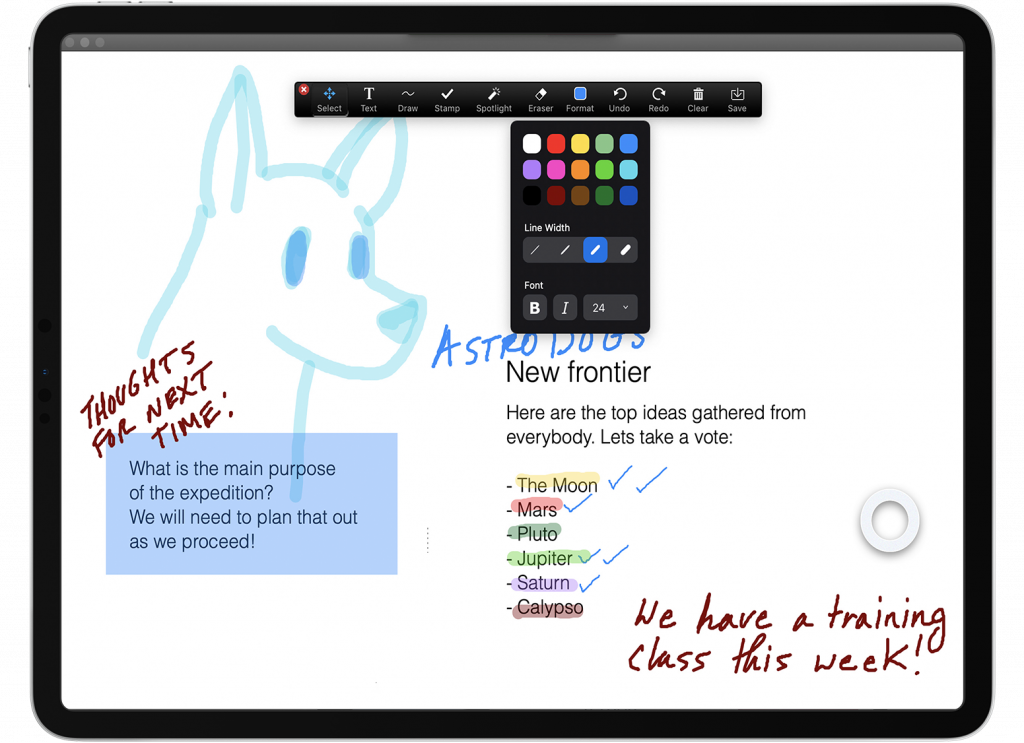
For virtual meetings, Zoom Whiteboard transforms passive attendance into active participation. Teams can collaboratively set agendas, capture meeting notes in real-time, vote on ideas, and assign action items directly on the canvas. In workshops, it facilitates engaging activities like icebreakers, problem-solving challenges, and group exercises, ensuring that all remote participants can contribute equally and visibly.
Facilitating Educational and Training Sessions
Educators can use Zoom Whiteboard to explain complex concepts visually, draw diagrams, solve problems step-by-step, and engage students in interactive learning activities. Students, in turn, can collaboratively work on group projects, present their findings, or even engage in creative writing or art exercises. For corporate training, it’s excellent for interactive workshops, role-playing scenarios, and illustrating training content.
Streamlining Project Planning and Design Sprints
Project managers can utilize the infinite canvas for detailed project planning, creating visual timelines, breaking down tasks, and assigning responsibilities. In design sprints, teams can move from ideation to wireframing and prototyping on the same canvas, mapping user journeys, creating mockups, and iterating rapidly in a highly visual and collaborative manner.
Creative Ideation and Problem Solving
Beyond structured frameworks, Zoom Whiteboard is a powerful platform for pure creative ideation. Teams can freely sketch, mind map, and connect disparate ideas. For problem-solving, it allows for visual problem decomposition, root cause analysis, and the development of multiple potential solutions in a clear, shared space.
Integration and Accessibility: Seamless Workflow and User Experience
A key factor in the effectiveness of any collaboration tool is its seamless integration into existing workflows and its accessibility across various platforms. Zoom Whiteboard excels in both these areas, ensuring a smooth and intuitive user experience.
Native Integration within the Zoom Ecosystem
One of Zoom Whiteboard’s biggest advantages is its native integration within the broader Zoom ecosystem. It can be launched directly from a Zoom meeting, shared with participants, and accessed afterwards through the Zoom client or web portal. This deep integration means users don’t need to switch between multiple applications, reducing friction and streamlining the collaborative process. Whiteboards can be created before, during, or after a meeting, and are persistently linked to the user’s Zoom account, making them easily discoverable and manageable. This cohesive experience reinforces Zoom’s position as a comprehensive communication and collaboration platform.
Cross-Platform Accessibility
Zoom Whiteboard is designed for accessibility across a range of devices and operating systems. Users can access and interact with whiteboards on:
-
Desktop applications: For Windows and macOS, offering a full-featured experience.
-
Web browsers: Providing flexibility for users who prefer not to download the desktop client or are using public computers.
-
Mobile apps: For iOS and Android, allowing for on-the-go viewing and basic interaction, though drawing can be more challenging without a stylus.
-
Zoom Rooms and Whiteboard devices: For an optimized, large-screen, touch-enabled experience in dedicated collaboration spaces, bringing a physical-digital hybrid.
This cross-platform support ensures that teams can collaborate effectively regardless of their preferred device or location, promoting inclusivity and flexibility in work environments.
Security and Data Privacy Considerations
As with any cloud-based collaboration tool, security and data privacy are paramount. Zoom has implemented robust security measures for its Whiteboard feature, including:
-
Access controls: Whiteboards can be shared with specific users or teams, and permissions can be set (viewer, editor) to control who can interact with the content.
-
Encryption: Data at rest and in transit is encrypted, protecting the integrity and confidentiality of the collaborative work.
-
Compliance standards: Zoom adheres to various industry-standard compliance frameworks, ensuring that the platform meets stringent security and privacy requirements.
For organizations handling sensitive information, these security features provide reassurance that their collaborative work on Zoom Whiteboard remains protected.
The Future of Digital Whiteboarding: Innovations and Impact
The journey of digital whiteboarding is far from over. As technology continues to evolve and hybrid work models become the norm, we can anticipate further innovations that will make tools like Zoom Whiteboard even more intelligent, intuitive, and impactful.
AI-Powered Enhancements and Smart Features
The integration of Artificial Intelligence (AI) holds immense potential for the future of digital whiteboards. Imagine features like:
-
Smart shape recognition: Automatically converting rough sketches into perfect geometric shapes or professional-looking diagrams.
-
Handwriting recognition: Transcribing handwritten notes into editable text, enhancing readability and searchability.
-
Content summarization: AI analyzing whiteboard content to generate meeting summaries, action item lists, or key takeaways.
-
Intelligent organization: Suggesting ways to group related ideas, create connections, or even identify patterns within unstructured content.
-
Real-time translation: Allowing multicultural teams to collaborate seamlessly by translating text and notes instantly.
These AI enhancements would further reduce manual effort, increase efficiency, and unlock new levels of insight from collaborative sessions.
The Role of Whiteboards in Hybrid Work Models
Hybrid work, where employees split their time between remote and office environments, is a complex challenge. Digital whiteboards like Zoom Whiteboard are crucial for bridging this divide. They ensure that both in-office and remote participants have an equally engaging and effective collaborative experience. Dedicated Zoom Whiteboard devices in physical meeting rooms can seamlessly connect with remote participants’ digital canvases, creating a truly unified workspace. This hybrid approach allows teams to leverage the benefits of both in-person interaction and remote flexibility without sacrificing collaboration quality.

Driving Productivity and Creativity in the Digital Age
Ultimately, the trajectory of Zoom Whiteboard and similar tools is towards fostering greater productivity and unlocking unprecedented levels of creativity. By removing geographical barriers, providing persistent canvases, integrating intelligent features, and ensuring accessibility, these platforms empower teams to:
-
Accelerate innovation: By enabling rapid ideation and iteration.
-
Improve decision-making: Through transparent, visual problem-solving.
-
Enhance engagement: By making collaboration interactive and inclusive.
-
Preserve institutional knowledge: By archiving collaborative work for future reference.
As businesses and educational institutions continue to navigate the complexities of the digital age, Zoom Whiteboard stands as a testament to the power of technology in transforming how we think, create, and achieve together. It is not just a tool; it is a catalyst for collective genius, shaping the future of work and learning one digital stroke at a time.
aViewFromTheCave is a participant in the Amazon Services LLC Associates Program, an affiliate advertising program designed to provide a means for sites to earn advertising fees by advertising and linking to Amazon.com. Amazon, the Amazon logo, AmazonSupply, and the AmazonSupply logo are trademarks of Amazon.com, Inc. or its affiliates. As an Amazon Associate we earn affiliate commissions from qualifying purchases.