
In the dynamic world of display technology, where every millisecond counts, terms like “Variable OD” often surface, particularly when discussing high-performance monitors from brands like ASUS. For many users, especially gamers and creative professionals, understanding these technical specifications is crucial for optimizing their visual experience. While “OD” might seem cryptic, in the context of modern displays, it almost invariably refers to “OverDrive,” a technology designed to enhance pixel response times. When combined with “Variable,” it signifies a sophisticated, adaptive approach to this crucial display function.
At its core, Variable OD (OverDrive) in ASUS monitors represents an advanced display feature that dynamically adjusts the voltage sent to liquid crystal pixels. The primary goal is to accelerate the transition of these pixels between different color states, thereby reducing motion blur and ghosting artifacts. This is particularly vital in fast-paced content, such as competitive gaming, where even a slight blur can impact performance and immersion. ASUS, a leading manufacturer in gaming and professional displays, has refined its OverDrive implementations to provide a smoother, more responsive visual experience tailored to a wide range of scenarios, often integrating it with other adaptive synchronization technologies like NVIDIA G-Sync or AMD FreeSync.

Unpacking the “OD”: Understanding OverDrive Technology
To fully grasp the significance of Variable OD, it’s essential to first understand the foundational concept of OverDrive technology itself. The performance of any LCD (Liquid Crystal Display) panel is heavily influenced by how quickly its liquid crystal molecules can change orientation, which directly dictates how fast a pixel can transition from one color to another.
The Problem of Motion Blur and Ghosting
Standard LCD panels, without any acceleration, inherently suffer from a phenomenon known as “response time.” This is the time it takes for a pixel to change its color state, typically measured in milliseconds (ms) from gray-to-gray (GtG). If a pixel takes too long to respond, especially during rapid on-screen movement, the previous image state might still be visible while the new one is trying to form. This overlap creates a lingering trail or “ghost” of the moving object, leading to motion blur and a less sharp image. This effect is particularly pronounced in high-refresh-rate displays where new frames are presented very quickly, but the pixels aren’t fast enough to keep up.
How OverDrive Tackles Response Times
OverDrive technology directly addresses this response time issue. It works by applying a temporary, higher-than-normal voltage to the liquid crystal cells when they need to transition between colors. Think of it like giving the pixels a temporary “kick” or an extra push. This burst of voltage causes the liquid crystals to change their orientation more rapidly than they would under standard voltage conditions, effectively shortening the pixel response time. The goal is to make the pixels transition quickly enough to match the refresh rate of the monitor, ensuring that each new frame is displayed cleanly without interference from the previous one.
The Role of Voltage in Pixel Transitions
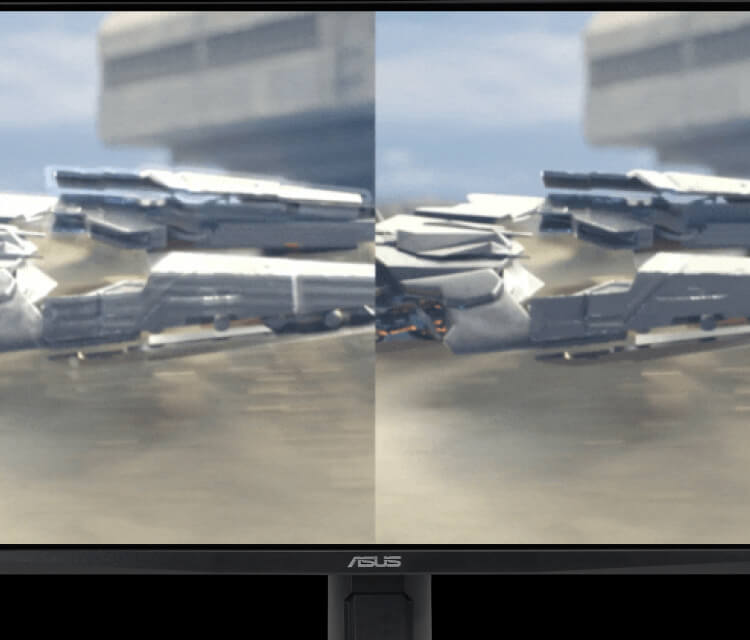
The precise amount of voltage and the duration for which it’s applied are critical. Too little OverDrive, and you still get motion blur. Too much, and you risk “overshoot,” a phenomenon where the pixel overshoots its target color state before settling back, creating an artifact known as “inverse ghosting” or “coronas.” This appears as a light or dark halo around moving objects, which can be even more distracting than regular motion blur. The challenge for monitor manufacturers like ASUS is to find the perfect balance – enough OverDrive to be effective, but not so much that it introduces new visual artifacts. Early OverDrive implementations often had fixed settings, which might work well for one refresh rate but perform poorly at others, highlighting the need for a more intelligent solution.
The Evolution to “Variable” OverDrive
The fixed nature of traditional OverDrive settings presented a significant limitation, especially with the advent of adaptive synchronization technologies and varying frame rates. This led to the development of “Variable” OverDrive, a more sophisticated and dynamic approach to pixel acceleration.
The Limitations of Fixed OverDrive Settings
In monitors with fixed OverDrive, a single voltage profile is applied regardless of the monitor’s current refresh rate or the content’s frame rate. While this might be optimized for a specific refresh rate (e.g., the monitor’s maximum refresh rate), it often leads to suboptimal performance in other scenarios. For instance, if a fixed OverDrive setting is tuned for 144Hz, it might cause severe inverse ghosting artifacts when the monitor is operating at a lower refresh rate, such as 60Hz or even 90Hz. This is because at lower refresh rates, the pixels have more time to transition, and the aggressive voltage boost becomes excessive, causing them to overshoot their target color and then correct, creating visible artifacts. Users were often forced to manually adjust OverDrive settings based on their activity, which was cumbersome and impractical.
Adapting to Variable Refresh Rates (VRR)
The true catalyst for Variable OverDrive was the widespread adoption of Variable Refresh Rate (VRR) technologies like NVIDIA G-Sync and AMD FreeSync. These technologies allow the monitor’s refresh rate to dynamically synchronize with the GPU’s frame rate, eliminating screen tearing and stuttering. However, this dynamic refresh rate presents a challenge for traditional OverDrive. If the monitor’s refresh rate is constantly changing, a fixed OverDrive setting will inevitably lead to either insufficient pixel acceleration (at high refresh rates) or excessive overshoot (at low refresh rates).
Variable OverDrive addresses this directly by dynamically adjusting the OverDrive strength in real-time based on the current refresh rate of the display. When the refresh rate is high, the OverDrive is more aggressive to ensure pixels transition fast enough. When the refresh rate drops, the OverDrive strength is reduced to prevent overshoot and inverse ghosting. This intelligent adaptation ensures that the optimal pixel response is maintained across the entire VRR range.
Dynamic Optimization for Smoother Gameplay
The implementation of Variable OD means that users no longer have to compromise or manually tinker with settings. The monitor’s scaler chip constantly monitors the incoming refresh rate signal and applies a pre-calibrated OverDrive profile that matches that specific refresh rate. This dynamic optimization results in a consistently smoother and clearer image, free from motion blur and distracting artifacts, regardless of whether the game is running at 30 frames per second or 144+ frames per second. For competitive gamers, this seamless visual clarity translates directly into a tangible advantage, allowing for quicker target acquisition and better situational awareness.
Benefits and Challenges of ASUS Variable OD
ASUS has been at the forefront of display technology, implementing sophisticated OverDrive solutions across its diverse range of monitors, from the entry-level to high-end ROG (Republic of Gamers) series. Understanding the benefits and potential challenges of their Variable OD implementation provides a clearer picture for consumers.
Enhanced Visual Clarity and Gaming Performance
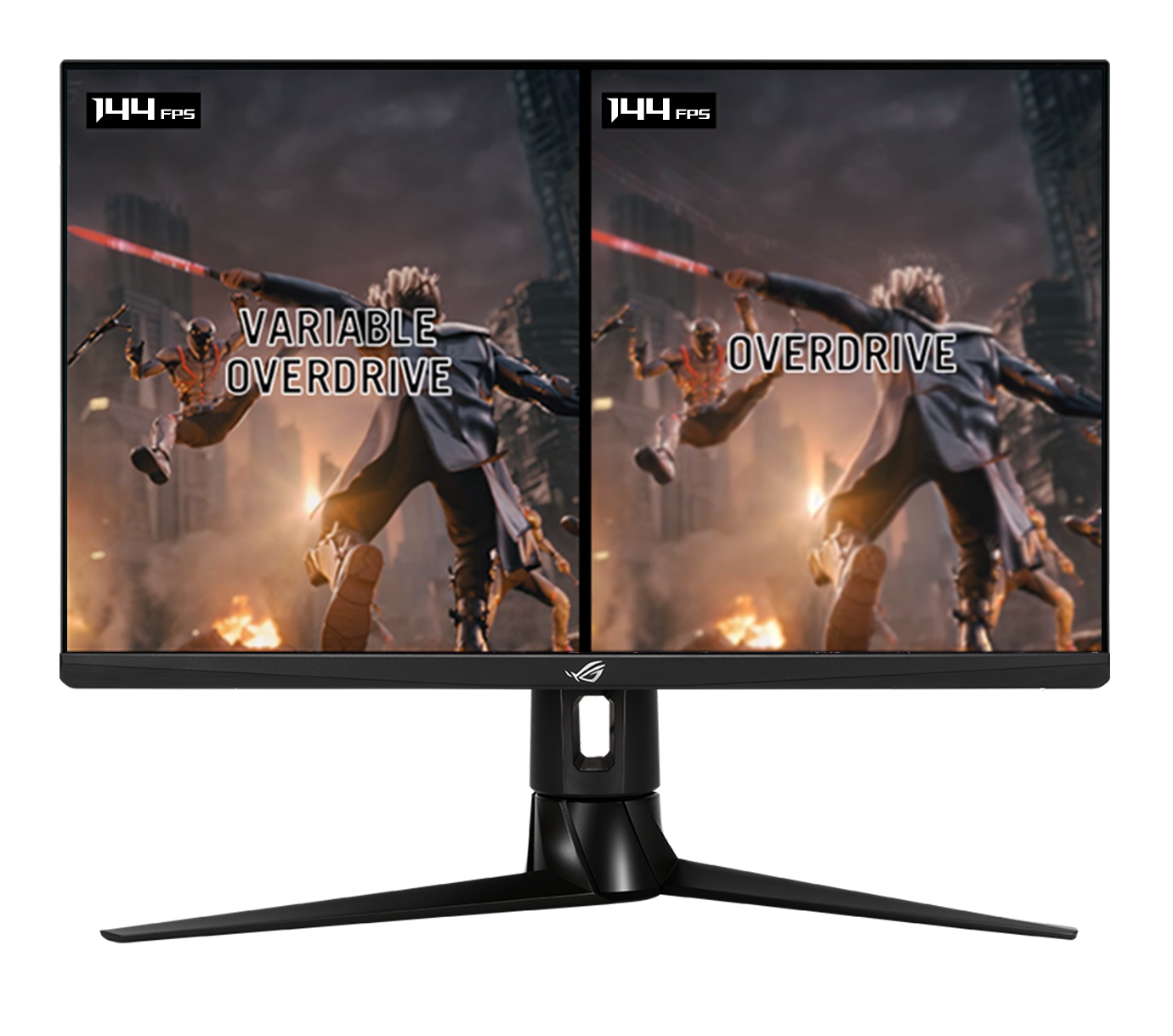
The most immediate and significant benefit of well-implemented Variable OD, like that found in ASUS monitors, is a dramatic improvement in visual clarity during fast-motion scenes. By ensuring pixels transition quickly and accurately, it virtually eliminates motion blur and ghosting, making fast-moving objects appear sharp and distinct. For gamers, this means:
-
Improved Target Acquisition: Enemies or objects moving quickly on screen are easier to track and aim at.
-
Reduced Eye Strain: A clearer image with less blur reduces the cognitive load on the eyes, allowing for longer, more comfortable gaming sessions.
-
Greater Immersion: The absence of distracting visual artifacts leads to a more immersive and realistic gaming experience.
Beyond gaming, this enhanced clarity also benefits anyone working with fast-moving content, such as video editors or animators, who require precise visual feedback.
Minimizing Inverse Ghosting and Artifacts
One of the primary challenges with earlier OverDrive technologies was the trade-off between reducing motion blur and introducing inverse ghosting. Variable OD specifically addresses this by adapting its strength. ASUS monitors, through careful calibration and advanced scaler algorithms, aim to strike an optimal balance. By adjusting the voltage application based on the refresh rate, they significantly mitigate the risk of overshoot and the resulting inverse ghosting artifacts. This is particularly crucial when the monitor is operating at lower frame rates, where an overly aggressive fixed OverDrive would cause severe issues. ASUS’s commitment to fine-tuning ensures that their Variable OD solutions deliver clean pixel transitions across the entire operational range of the display.
Finding the Sweet Spot: Calibration and User Experience
While Variable OD is designed to be largely automatic, the “sweet spot” for pixel response can still be subjective and vary slightly between individual panels or user preferences. ASUS often provides multiple levels of OverDrive control, sometimes under proprietary names like “Trace Free” (which we’ll discuss further), within their monitor’s On-Screen Display (OSD).
-
User Choice: While the “variable” aspect manages the dynamic adjustment, ASUS usually offers general settings (e.g., Off, Level 20, Level 40, Level 60, Level 80, Level 100 for Trace Free) that allow users to select an overall baseline aggressiveness. A higher level typically means more aggressive OverDrive.
-
Testing and Observation: It’s often recommended for users to experiment with these settings to find what looks best to their eyes, especially when pairing the monitor with a specific GPU and games. The ideal setting minimizes both ghosting and inverse ghosting, providing the cleanest image possible.
-
Panel Variation: Due to manufacturing tolerances, two identical monitor models might behave slightly differently. What’s perfect on one might be slightly off on another, making personal calibration valuable.
How ASUS Implements and Optimizes Variable OD
ASUS leverages its engineering prowess to integrate Variable OD seamlessly into its monitor lineup, often alongside other proprietary technologies aimed at enhancing visual fidelity and gaming performance.
ASUS Trace Free and GameVisual Technologies
ASUS typically brands its OverDrive feature as “Trace Free.” This setting is found within the monitor’s On-Screen Display (OSD) and usually offers a range of values, often from 0 to 100 in increments of 20, or a few predefined levels (e.g., Standard, Advanced, Extreme). A higher Trace Free value indicates a more aggressive OverDrive. When a monitor supports Variable OverDrive in conjunction with VRR, the selected Trace Free level acts as a baseline, and the monitor’s internal scaler then dynamically adjusts the actual voltage application around that baseline to optimize for the current refresh rate.
Beyond Trace Free, ASUS also offers “GameVisual” presets. These are optimized display modes (e.g., Racing, RTS/RPG, FPS, sRGB, Cinema) that automatically adjust various display parameters, including brightness, contrast, color saturation, and sometimes even the Trace Free setting, to suit different content types. While GameVisual doesn’t directly control the variable aspect of OverDrive, selecting a gaming-focused preset often activates or recommends a Trace Free level that is suitable for competitive play.
Navigating Monitor OSD Settings
Accessing and adjusting the Variable OD settings on an ASUS monitor is straightforward:
-
Enter the OSD Menu: Typically done by pressing a dedicated button or navigating a joystick on the monitor’s bezel or rear.
-
Navigate to Image/Color/Gaming Section: The Trace Free setting is usually found under a “Image,” “Color,” or “Gaming” section, or sometimes directly under “OD” or “Response Time.”
-
Adjust Trace Free: Select the desired Trace Free level. For monitors with true Variable OD, this will act as the master setting, with the monitor’s internal logic handling the dynamic adjustments based on VRR.
-
Test and Observe: It’s crucial to test different settings with your preferred content, especially games, to visually assess the impact on motion clarity and the presence of any inverse ghosting artifacts. Many users find a mid-range setting (e.g., Trace Free 60 or 80) to be the best balance.
Best Practices for Configuring Variable OD
To get the most out of ASUS’s Variable OD implementation:
-
Enable VRR (G-Sync/FreeSync): Ensure that your graphics card drivers are up to date and that G-Sync or FreeSync is enabled in your GPU control panel and on your monitor. Variable OD performs best when working in conjunction with adaptive sync.
-
Start with a Moderate Trace Free Setting: Begin with a mid-range Trace Free value (e.g., 60 or 80). Avoid starting with the maximum (100) as it is often too aggressive and can lead to noticeable inverse ghosting, especially at lower refresh rates.
-
Test with a Range of Content: Don’t just test with one game. Different games and applications will push the monitor in different ways. Also, consider using dedicated motion blur test patterns (e.g., UFO Test) to objectively assess ghosting and inverse ghosting.
-
Prioritize Consistency: The goal is consistent clarity across the entire refresh rate range supported by your monitor and graphics card. If you notice inverse ghosting at lower frame rates, reduce the Trace Free setting. If you still see motion blur at high frame rates, try increasing it, but cautiously.
-
Update Firmware: Keep your monitor’s firmware updated, if applicable. Manufacturers often release updates that improve OverDrive algorithms and overall display performance.
Is Variable OD Essential for Your Setup?
The necessity of Variable OD depends largely on your usage patterns and the type of content you consume. While it’s a significant advancement, its impact is more pronounced for certain users.
For Competitive Gamers and Enthusiasts
For competitive gamers, especially in fast-paced genres like first-person shooters (FPS) or racing simulations, Variable OD is undeniably a critical feature. In these scenarios, split-second decisions and precise movements dictate success, and even the slightest motion blur can be a disadvantage. A monitor with well-tuned Variable OD ensures maximum clarity, allowing for better target tracking, reduced eye fatigue during intense sessions, and an overall more responsive feel. Paired with high refresh rates and low input lag, Variable OD completes the trifecta for a superior competitive gaming experience. Enthusiasts who demand the absolute best visual fidelity and smoothness will also find Variable OD a non-negotiable feature.
For Casual Users and Creative Professionals
For casual users who primarily browse the web, watch movies, or engage in less demanding gaming, the benefits of Variable OD might be less immediately obvious. While it still contributes to a generally cleaner image, the impact isn’t as critical as it is for competitive gaming. A good quality monitor with decent response times might suffice for these use cases.
Creative professionals, such as graphic designers, video editors, or photographers, prioritize color accuracy, resolution, and panel uniformity. While reduced motion blur is always welcome, particularly in video editing, it usually takes a backseat to accurate color reproduction and high pixel density. That said, as display technology improves, these features become more integrated, and a monitor offering excellent color performance with effective Variable OD provides a comprehensive solution for professionals who also engage in media consumption or light gaming.
Future Trends in Display Technology
The evolution of Variable OD highlights a broader trend in display technology: the pursuit of perfection in motion handling. As refresh rates climb to 360Hz and beyond, and new panel technologies like OLED become more prevalent, the challenge of pixel response time will continue to be a focus. Future iterations of OverDrive might integrate even more sophisticated AI-driven algorithms to predict pixel transitions or leverage new materials for even faster response. The goal remains the same: to deliver an image so clear and fluid that the user forgets they are looking at a display, fully immersing them in the content. ASUS, along with other industry leaders, will undoubtedly continue to push these boundaries, making Variable OD a standard expectation rather than a premium feature in the years to come.
aViewFromTheCave is a participant in the Amazon Services LLC Associates Program, an affiliate advertising program designed to provide a means for sites to earn advertising fees by advertising and linking to Amazon.com. Amazon, the Amazon logo, AmazonSupply, and the AmazonSupply logo are trademarks of Amazon.com, Inc. or its affiliates. As an Amazon Associate we earn affiliate commissions from qualifying purchases.