
In the landscape of modern academia and digital content creation, the way we attribute information is as critical as the information itself. The Modern Language Association (MLA) format has long been the gold standard for scholars, students, and writers in the humanities. However, as we move deeper into the 2020s, the MLA format is no longer just a set of rules on a printed page; it has evolved into a sophisticated framework for data management and digital integrity. Understanding “what is the MLA format” today requires a deep dive into the software, automation tools, and digital standards that streamline the research process.
This guide explores the technical foundations of the MLA 9th Edition, the software ecosystems that support it, and how technology has transformed citation from a manual chore into a seamless digital workflow.
Understanding the Technical Framework of MLA 9
Before diving into the software, one must understand the structural logic of the MLA format. At its core, the MLA style is a system for documenting sources in scholarly writing. In the tech world, we might view it as a “schema” for metadata. It provides a consistent way to categorize information so that any reader—or any search algorithm—can trace a claim back to its original source.
The Philosophy of “Containers” as Data Modules
The most significant shift in recent MLA updates is the concept of “containers.” In technical terms, a container is a nested data structure. For example, a television episode (the source) exists within a series (the container), which might exist on a streaming platform like Netflix (a second container).
MLA format uses this modular approach to handle the infinite variety of digital media we consume today. Whether you are citing a YouTube video, a tweet, or an academic database, the container system allows you to plug metadata—author, title, date, and location—into a predictable sequence. This modularity is what makes the MLA format so compatible with modern bibliographic software.
The Logic of In-Text Citations
In-Text citations function like hyperlinks in a document’s code. They are brief pointers that lead the reader to the full entry in the “Works Cited” list. By using the author’s last name and a page number (or a timestamp for digital media), the MLA format creates a streamlined user experience (UX) for the reader, ensuring the narrative flow isn’t interrupted by excessive technical data while maintaining full transparency.
Automating the Layout: Formatting in Modern Word Processors
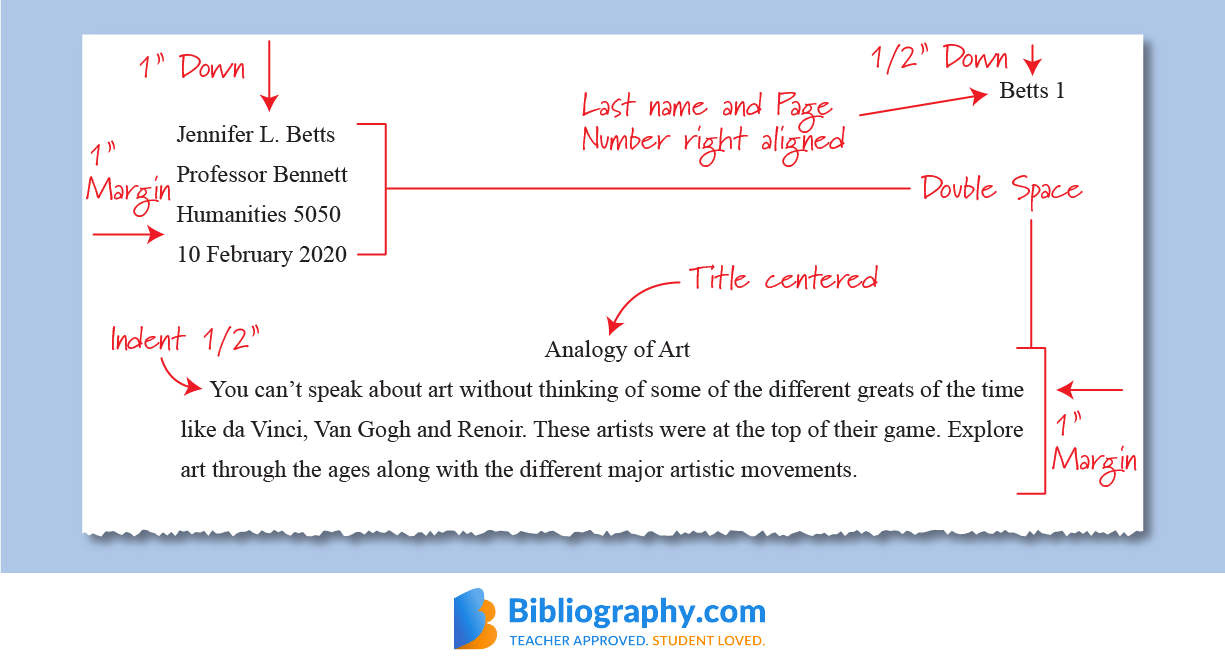
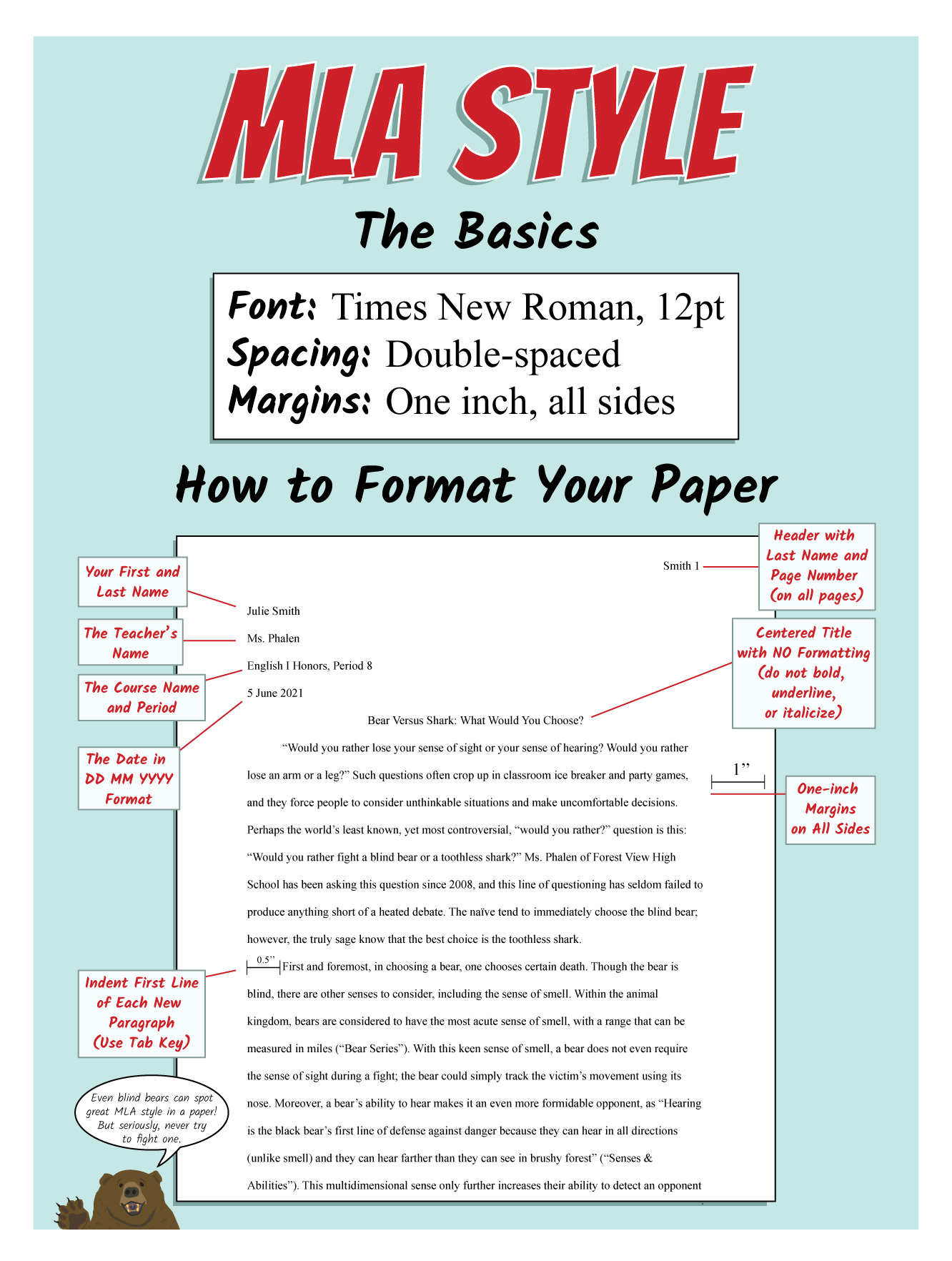
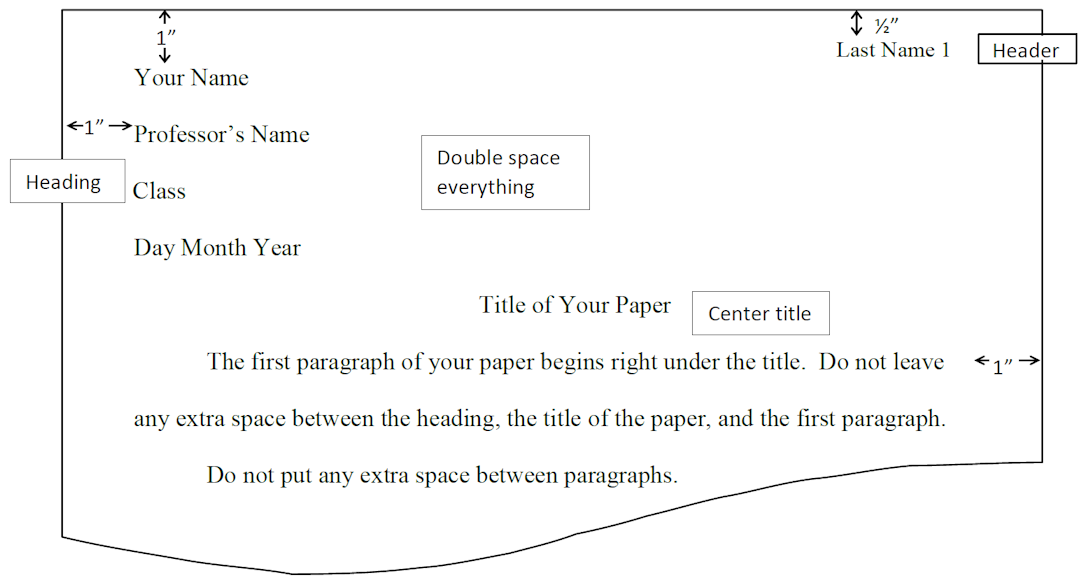
Achieving the perfect MLA layout is a primary concern for any digital writer. While the rules are specific—1-inch margins, double-spacing, and Times New Roman font—manually adjusting these settings for every document is inefficient. Mastering the “Tech” of MLA involves using the automation features within word processors like Microsoft Word, Google Docs, and Scrivener.
Setting Up Your Workspace in Google Docs and Microsoft Word
Most modern word processors offer “Styles” panes that act as the CSS (Cascading Style Sheets) of your document. Instead of highlighting text and changing the font size repeatedly, savvy users define a “Normal” style that defaults to 12pt Times New Roman with a 2.0 line spacing.
-
Margins and Interoperability: Both Word and Docs allow you to set default margins to 1 inch. In a collaborative environment, ensuring these settings are locked prevents “formatting drift” when files are shared across different operating systems.
-
The Running Header: Technology makes the MLA header effortless. By using the “Insert Page Number” function and right-aligning it with your surname, the software dynamically updates the page count, ensuring accuracy even as your document grows or undergoes significant edits.
Leveraging Templates and Add-ons
For those who want to skip the manual setup, the Google Docs Template Gallery and Microsoft Office’s cloud library offer pre-formatted MLA templates. These are essentially “boilerplate code” for your essays. Additionally, add-ons like “Styles” for Google Docs allow for one-click transformations of raw text into a polished, MLA-compliant document.
The Citation Tech Stack: Software and AI Management Tools
The days of manually typing out a Works Cited page are largely over. A robust “Tech Stack” for research allows writers to capture, organize, and cite sources automatically. This not only saves time but significantly reduces the margin for human error in punctuation and sequencing.
Bibliographic Management Software (Zotero, Mendeley)
Tools like Zotero and Mendeley are the powerhouses of academic tech. These applications function as personal databases for your research.
-
Browser Extensions: By installing a Zotero connector in Chrome or Firefox, you can “scrape” the metadata from a scholarly article or a news website with a single click. The software identifies the author, publication date, and DOI (Digital Object Identifier), storing it in a structured format.
-
Word Processor Integration: These tools offer plugins that integrate directly into your writing software. When you need to cite a source, you hit a hotkey, select the source from your library, and the software inserts the in-text citation and builds the Works Cited page in real-time.
The Rise and Risk of AI Citation Generators
Websites like EasyBib or Citation Machine have evolved to use machine learning to identify source types. While highly efficient, they are not infallible. Users must understand that these tools are “black boxes” of logic; if the website being cited has messy metadata, the AI will produce an incorrect citation.
The professional approach involves using these tools as a starting point, then auditing the output against the official MLA Handbook. In the tech niche, this is known as “Human-in-the-loop” (HITL) processing, where automation does the heavy lifting, but human oversight ensures quality control.
Digital Security and Ethical Sourcing in the Information Era
In the context of technology, the MLA format serves a secondary purpose: it is a tool for digital security and intellectual property protection. Proper citation is the primary defense against accusations of plagiarism, which in the digital age can be detected in seconds by sophisticated algorithms.
Avoiding Algorithmic Plagiarism Detection
Platforms like Turnitin and Copyleaks use massive databases and AI to compare your work against billions of web pages and previously submitted papers. If your MLA formatting is incorrect—for example, if you fail to use quotation marks or a proper in-text citation for a paraphrased idea—these algorithms will flag your work as a “match.”
Mastering MLA format is essentially a way to “green-light” your document through these security checks. By providing clear technical pointers to your sources, you demonstrate that your work is an original synthesis of existing data rather than a copy-paste derivative.
Verifying Digital Sources and Metadata
The MLA 9th Edition emphasizes the use of DOIs and permalinks. In the world of tech, a URL is often “brittle”—it can break or change as websites are redesigned. A DOI, however, is a permanent digital fingerprint for a piece of content. Using DOIs in your MLA citations ensures that your research remains accessible and verifiable even decades after publication, contributing to the “link integrity” of the academic web.
Future-Proofing Your Research: Adaptive Formatting and Online Repositories
As we look toward the future of digital publishing, the MLA format continues to adapt to new technologies. We are moving away from static PDFs and toward dynamic, web-based research papers.
Adaptive Formatting for Online Repositories
Many researchers now publish their work on platforms like GitHub, ResearchGate, or personal blogs. In these environments, the MLA format must be adapted for HTML and Markdown. While the core rules of “what is the MLA format” remain the same, the execution changes. For instance, instead of a page number in an in-text citation, a digital writer might use a timestamp or a paragraph number to provide a more precise “anchor” for the reader in a non-paginated digital space.
The Role of Metadata in Open Access
The future of the MLA format is deeply tied to Open Access (OA) movements. When work is formatted correctly, its metadata becomes “machine-readable.” This means that search engines and academic indexers can easily categorize your work, making it more discoverable. In this sense, MLA formatting is a form of Search Engine Optimization (SEO) for the academic world.
Conclusion
So, what is the MLA format? It is more than just a style guide; it is a vital technological protocol for the clear communication of ideas. In an era defined by information overload and the rapid spread of misinformation, the MLA format provides the structural integrity needed to build a credible digital footprint.
By leveraging modern word processors, bibliographic software, and a “digital-first” mindset, writers can master the MLA format not as a series of rigid rules, but as a dynamic toolset. Whether you are a student using Zotero to organize a thesis or a tech journalist citing peer-reviewed studies on AI, the MLA format ensures that your work is standardized, professional, and built to last in the digital ecosystem.
aViewFromTheCave is a participant in the Amazon Services LLC Associates Program, an affiliate advertising program designed to provide a means for sites to earn advertising fees by advertising and linking to Amazon.com. Amazon, the Amazon logo, AmazonSupply, and the AmazonSupply logo are trademarks of Amazon.com, Inc. or its affiliates. As an Amazon Associate we earn affiliate commissions from qualifying purchases.