
In the rapidly evolving landscape of software engineering, the complexity of managing projects has grown exponentially. Gone are the days when a developer could manually manage a few library files and compile code with a simple command-line script. Modern software development involves hundreds of dependencies, complex testing suites, and multifaceted deployment environments. This is where Apache Maven enters the frame.
Maven is a powerful project management and comprehension tool that has become the backbone of Java-based software development. Based on the concept of a Project Object Model (POM), Maven can manage a project’s build, reporting, and documentation from a central piece of information. For developers, DevOps engineers, and software architects, understanding Maven is not just a luxury—it is a fundamental requirement for building scalable, maintainable, and professional-grade applications.
1. The Core Philosophy and Architecture of Maven
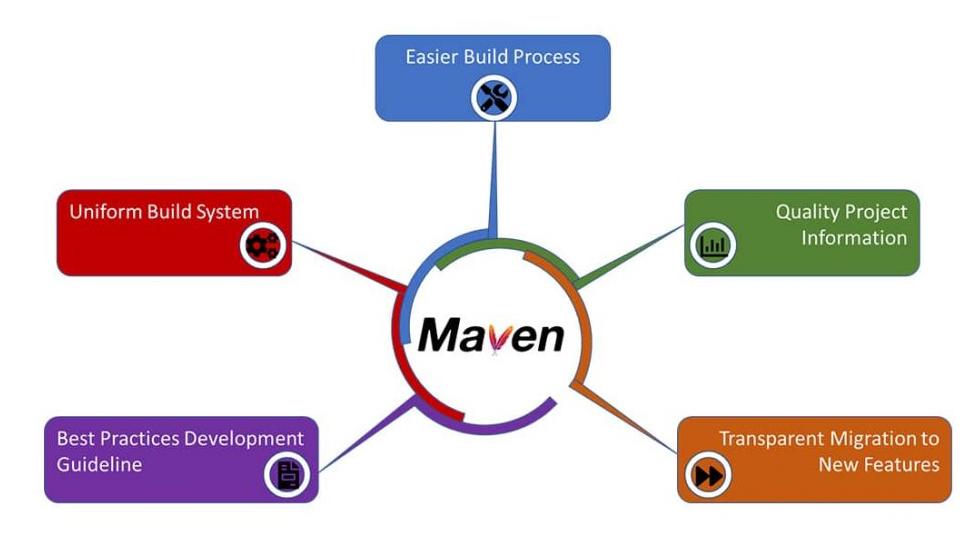
At its heart, Maven is built on the principle of “Convention over Configuration.” Before Maven rose to prominence, tools like Apache Ant required developers to write exhaustive scripts defining exactly how to compile code, where to put it, and how to package it. Maven changed the game by providing a predefined project structure and a standard lifecycle.
The Project Object Model (POM)
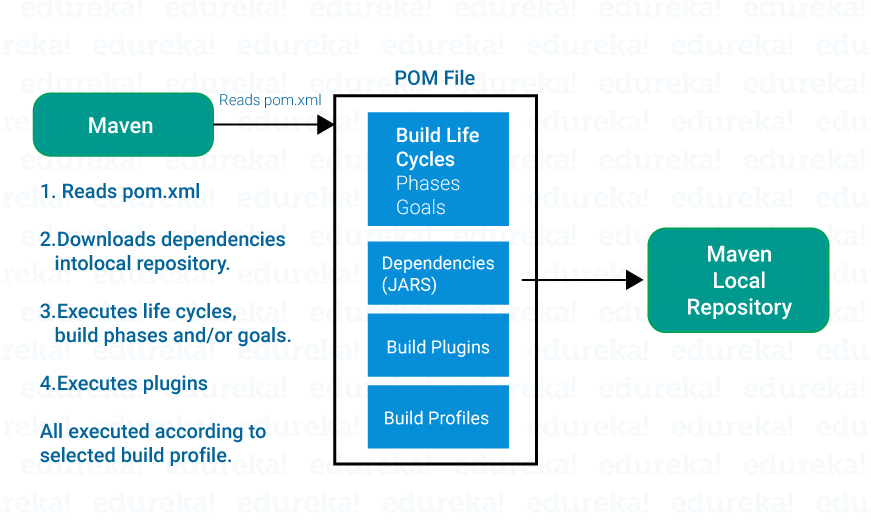
The fundamental unit of work in Maven is the pom.xml file. This XML file resides in the project’s root directory and contains information about the project and various configuration details used by Maven to build the project. The POM includes directives for dependencies, plugins, goals, and profiles. When you execute a Maven command, Maven searches for the POM in the current directory, reads its configuration, and executes the requested task.
The Standard Directory Layout
One of Maven’s greatest strengths is its insistence on a standard directory layout. By following a uniform structure, any developer familiar with Maven can jump into a new project and instantly understand where the source code, test cases, and configuration files are located.
-
src/main/java: Contains the Java source code. -
src/main/resources: Contains configuration files or images. -
src/test/java: Contains unit tests. -
target: The directory where Maven places all compiled code and packaged JARs.
Dependency Management and Transitivity
Perhaps the most “magical” aspect of Maven for new users is its automated dependency management. In the past, developers had to manually download JAR files and add them to their classpath. Maven automates this via “coordinates” (GroupId, ArtifactId, and Version).
Furthermore, Maven handles “transitive dependencies.” If your project depends on Library A, and Library A depends on Library B, Maven automatically identifies, downloads, and includes Library B in your project. This prevents “JAR Hell,” a common issue where conflicting versions of libraries cause runtime errors.
2. Navigating the Maven Build Lifecycle and Phases
Maven operates on a clearly defined build lifecycle. This lifecycle consists of a sequence of phases that define the order in which tasks are executed. Understanding these phases is crucial for automating the software development pipeline.
The Three Built-in Lifecycles
Maven features three distinct lifecycles:
-
Default: Handles project deployment and build.
-
Clean: Handles project cleaning (removing the
targetdirectory). -
Site: Handles the creation of the project’s site documentation.
Key Phases in the Default Lifecycle
The Default lifecycle is the one developers interact with most frequently. It consists of several phases, including:
-
Validate: Ensures the project is correct and all necessary information is available.
-
Compile: Compiles the source code of the project.
-
Test: Runs tests using a suitable unit testing framework (like JUnit). These tests should not require the code to be packaged or deployed.
-
Package: Takes the compiled code and packages it in its distributable format, such as a JAR or WAR file.
-
Verify: Runs any checks on results of integration tests to ensure quality criteria are met.
-
Install: Installs the package into the local repository, for use as a dependency in other projects locally.
-
Deploy: Done in the build environment, copies the final package to the remote repository for sharing with other developers and projects.
Understanding Goal Execution
Each phase in the lifecycle is composed of “goals.” A goal represents a specific task that contributes to the building and managing of a project. For instance, the mvn compile command executes the compile goal of the compiler plugin. This modularity allows Maven to be incredibly flexible; you can bind different goals to different phases to customize the build process without breaking the standardized workflow.
3. Repositories and the Maven Ecosystem
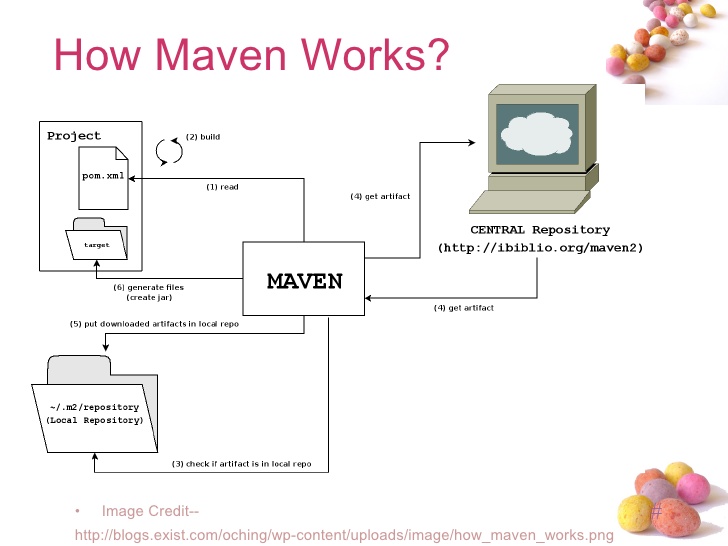
Maven’s ability to manage dependencies relies on its sophisticated repository system. A repository is essentially a directory where all the project jars, library jars, plugins, or any other project-specific artifacts are stored and can be easily used by Maven.
Local, Central, and Remote Repositories
Maven categorizes repositories into three types:
-
Local Repository: This is a directory on your own computer (usually found in
~/.m2/repository). When you run a build, Maven first looks here for your dependencies. If they are already there, it won’t download them again. -
Central Repository: This is a community-provided repository (repo.maven.apache.org). If a dependency isn’t in your local repository, Maven automatically reaches out to the Central Repository to download it. It contains a vast majority of the world’s open-source Java libraries.
-
Remote Repository: Many organizations set up their own private remote repositories (using tools like Sonatype Nexus or JFrog Artifactory). This is used to host proprietary libraries that shouldn’t be shared publicly or to act as a proxy for the Central repository to speed up downloads and ensure security.
Maven Plugins: The Engines of Action
Maven is, at its core, a plugin execution framework. Almost every action Maven performs is handled by a plugin. There are two types of plugins:
-
Build Plugins: Executed during the build and configured in the
<build/>element of the POM. -
Reporting Plugins: Executed during the site generation and configured in the
<reporting/>element.
Common plugins include the maven-compiler-plugin for compiling code and the maven-surefire-plugin for running unit tests. This architecture makes Maven highly extensible, allowing developers to write their own plugins to handle unique build requirements.
4. Maven in the Modern Tech Stack: CI/CD and DevOps
While Maven is a “build tool,” its utility extends far into the realm of DevOps and Continuous Integration/Continuous Deployment (CI/CD). In a modern tech environment, Maven acts as the bridge between raw code and a deployable artifact.
Integration with CI/CD Pipelines
Tools like Jenkins, GitLab CI, and GitHub Actions have first-class support for Maven. Because Maven uses a standardized set of commands (like mvn clean install), it is incredibly easy to automate. A typical pipeline might trigger a Maven build every time a developer pushes code to a repository. If the mvn test phase fails, the pipeline stops, ensuring that “broken” code never reaches production.
Maven vs. Gradle: Choosing the Right Tool
While Maven remains the industry standard, Gradle has emerged as a strong competitor. Gradle uses a Domain-Specific Language (DSL) based on Groovy or Kotlin instead of XML.
-
Maven’s Advantage: It is strictly standardized. Every Maven project looks the same, making it better for large organizations with many teams. It is “opinionated,” which reduces the time spent on build-script maintenance.
-
Gradle’s Advantage: It is often faster due to incremental builds and offers more flexibility for highly complex, non-standard build logic.
For most enterprise Java applications, Maven remains the preferred choice due to its stability and the ease with which new developers can understand the project structure.
5. Best Practices for Professional Maven Management
To truly master Maven, developers must move beyond basic commands and adopt industry best practices that ensure project health and security.
Managing Versioning and Snapshots
Maven distinguishes between “Release” versions and “Snapshot” versions. A Snapshot is a version that is still under active development (e.g., 1.0.0-SNAPSHOT). Maven will always check the remote repository for a newer version of a Snapshot every time a build is run. Conversely, once a version is labeled a “Release” (e.g., 1.0.0), it is considered immutable. Understanding this distinction is vital for maintaining consistent environments across a development team.
Dependency Scopes
Not all dependencies are needed at all times. Maven allows you to define “scopes” to optimize the build:
-
Compile: The default scope; needed in all phases.
-
Provided: Needed for compiling but expected to be provided by the runtime environment (like the Servlet API provided by Tomcat).
-
Runtime: Not needed for compilation but needed for execution.
-
Test: Only needed for compiling and running tests.
Using the correct scope keeps the final deployment package (JAR/WAR) lean and prevents unnecessary library bloat.
Security and Vulnerability Scanning
In the modern security climate, including external libraries carries risks. Maven integrates seamlessly with tools like OWASP Dependency-Check. These tools scan the pom.xml and alert developers if they are using libraries with known security vulnerabilities (CVEs). This makes Maven an essential part of a “Shift-Left” security strategy, where security is addressed early in the development lifecycle.
Conclusion
Apache Maven is more than just a tool for compiling code; it is a comprehensive framework for managing the entire lifecycle of a software project. By providing a standardized structure, automated dependency management, and a robust plugin ecosystem, Maven allows developers to focus on writing code rather than wrestling with build scripts.
As software grows more complex and the demand for rapid, automated deployment increases, Maven’s role as a reliable, predictable, and scalable build tool becomes even more critical. Whether you are a solo developer or part of a global enterprise team, mastering Maven is a definitive step toward professionalizing your development workflow and ensuring the long-term success of your software projects.
aViewFromTheCave is a participant in the Amazon Services LLC Associates Program, an affiliate advertising program designed to provide a means for sites to earn advertising fees by advertising and linking to Amazon.com. Amazon, the Amazon logo, AmazonSupply, and the AmazonSupply logo are trademarks of Amazon.com, Inc. or its affiliates. As an Amazon Associate we earn affiliate commissions from qualifying purchases.