
For millions of users worldwide, the Android experience is synonymous with the Google Play Store. However, for those within the Samsung ecosystem, there is a parallel universe of software, aesthetics, and optimization known as the Galaxy Store. To understand what the Samsung app store looks like is to understand the evolution of Samsung’s “One UI” design philosophy—a blend of minimalism, accessibility, and high-tech sophistication. Unlike the generic layout of standard app repositories, the Galaxy Store is meticulously crafted to feel like a premium extension of the hardware it lives on.

The Visual Identity and Design Language of the Galaxy Store
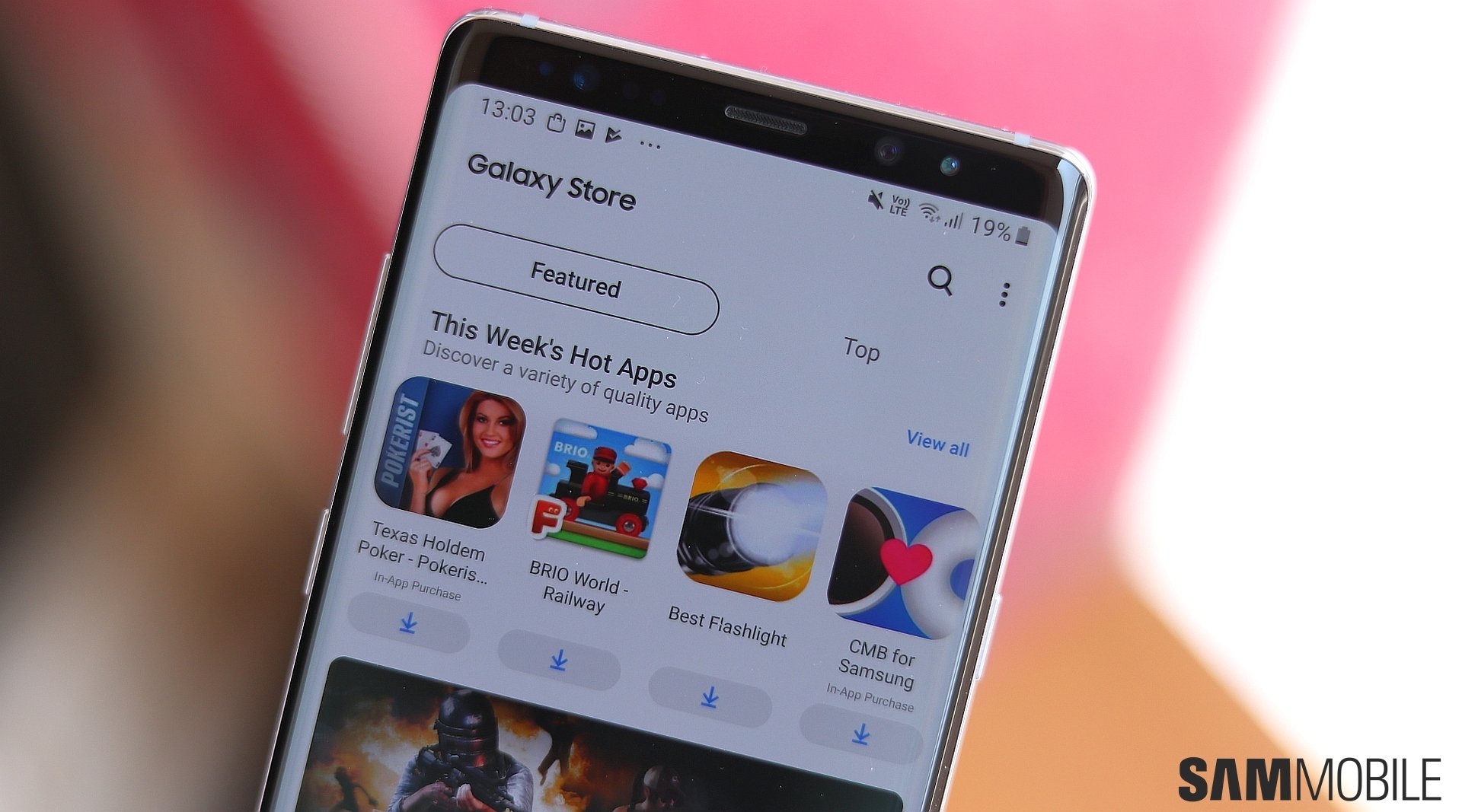
When you first launch the Galaxy Store, the most immediate impression is one of visual cohesion. Samsung has moved away from the cluttered, icon-heavy designs of the past, embracing a design language that mirrors the One UI interface found on Galaxy smartphones and tablets.
One UI Integration and Aesthetic Fluidity
The Galaxy Store utilizes “One UI” principles, which prioritize “reachability.” This means that the top third of the screen is often reserved for viewing and information, while the bottom two-thirds are dedicated to interaction. This design choice is particularly evident on the store’s landing page, where large, bold typography greets the user, and interactive carousels are positioned within easy reach of the thumb. The use of “Samsung One,” the company’s proprietary typeface, provides a clean, modern look that is highly legible across various screen densities.
Rounded Geometry and Translucent Elements
The interface is characterized by soft, rounded corners on every element—from app icons to promotional banners. This mirrors the physical curves of Galaxy devices. Furthermore, the store makes elegant use of Gaussian blur and translucency. When navigating through different menus, the background often maintains a sense of depth, creating a layered UI that feels more sophisticated than a flat, static list. Whether in Light Mode or the deeply optimized Dark Mode, the colors are vibrant but balanced, ensuring that promotional artwork “pops” without overwhelming the user’s vision.
Navigating the Interface: Tabs and Discovery
The architecture of the Galaxy Store is divided into distinct silos that allow users to pivot between different types of content seamlessly. The bottom navigation bar is the primary anchor, usually featuring three to four main sections: “Games,” “Apps,” and “Menu” (which contains updates and settings).
The Gaming Hub and Immersive Multimedia
Samsung places a heavy emphasis on mobile gaming. The “Games” tab is not just a list; it is a curated experience. What it looks like is more akin to a digital storefront like Steam or the Epic Games Store rather than a traditional mobile directory. Users are greeted with high-resolution auto-playing video trailers, “Instant Play” sections where games can be tested without downloading, and specific categories for “Galaxy-Exclusive” titles. The layout here uses a darker, more cinematic palette to distinguish it from the productivity-focused sections of the store.
Curated Apps and “Made for Samsung”
The “Apps” tab focuses on utility and lifestyle. What distinguishes the look of this section is the “Made for Samsung” category. These are apps specifically optimized for Galaxy hardware, such as Adobe Lightroom for Samsung or Canva. These listings often feature unique badges and detailed infographics explaining how the app utilizes specific Samsung features like the S Pen or the Fold’s inner display. The grid layout is spacious, avoiding the “wall of icons” fatigue often found in lesser app stores.
Themes, Wallpapers, and Watch Faces
Perhaps the most visually distinct part of the Samsung app store is the section dedicated to customization. Samsung treats personalization as a first-class citizen. This area looks like a high-end digital gallery. Large, full-screen previews allow users to see exactly how a new theme or “Always On Display” (AOD) will look on their lock screen. The categorization here is highly visual, using mood-based tags like “Minimal,” “Nature,” or “Cyberpunk” to guide the user through thousands of assets.
Under the Hood: Functionality and Security Features
The “look” of an app store is not just about its banners; it is about how it communicates information regarding the health and safety of the device. The Galaxy Store integrates its technical functions into the UI in a way that feels transparent and non-intrusive.
Optimized App Management and Updates
When a user navigates to the “My Apps” or “Updates” section, the interface shifts to a high-density list designed for efficiency. Here, the look is more clinical but no less polished. Small progress rings surround the icons of apps currently being updated, and a “Update All” button is prominently displayed at the top. This section also serves as the gateway for system-level updates—such as the Samsung Keyboard or the Camera controller—reminding the user that the Galaxy Store is the heartbeat of their device’s software ecosystem.
Security Visuals and User Trust
Samsung integrates its “Knox” security branding into the store’s visual identity. When viewing an app’s detail page, a “Verified by Play Protect” or a Samsung-specific security badge is often visible near the download button. This provides a visual cue of safety. The permissions list is also formatted into a readable, modern UI component rather than a frightening wall of text, helping users understand exactly what data an app will access before they hit “Install.”
The Personalization Engine and User Profiles
A major component of what the Galaxy Store looks like today is driven by AI-driven personalization. No two users see exactly the same storefront; the layout morphs based on your usage patterns, installed apps, and even the specific model of your device.
Tailored Recommendations and Dynamic Banners
The top “Hero” banner is dynamic. If you are a power user who frequently uses the S Pen, the store will likely showcase creative suites and note-taking apps. If you own a Galaxy Watch, the store will prioritize watch faces and fitness trackers. This creates a “boutique” feel. The store looks less like a warehouse of software and more like a personal shopper that understands your hardware configuration.
The Rewards and Subscriptions Dashboard
The “Menu” or “Profile” section of the Galaxy Store features a dedicated “Samsung Rewards” dashboard. This looks like a digital wallet interface, showing accumulated points, active coupons, and tiered membership status. By incorporating elements of gamification—such as progress bars for rewards and colorful “gift” icons—Samsung keeps the user engaged with the financial aspect of the store without it feeling like a dry transaction log.
Comparing the Aesthetics: Galaxy Store vs. Google Play
To truly describe what the Samsung App Store looks like, one must compare it to its primary neighbor: the Google Play Store. While both serve the same fundamental purpose, their visual philosophies are worlds apart.
Layout Density and Information Architecture
The Google Play Store utilizes “Material You” design, which focuses on large, flat color blocks and a very airy layout. The Galaxy Store, by contrast, feels more “dense” and “pro.” While Google emphasizes white space, Samsung emphasizes feature discovery. The Galaxy Store feels more integrated with the hardware’s specific capabilities—such as the “Edge Panel” or “Flex Mode”—with UI elements that specifically highlight these hardware-software synergies.
The Distinction of Content Curation
Visually, the Google Play Store is a catch-all. The Galaxy Store looks like a curated collection of premium experiences. By limiting its focus to Samsung-compatible software and exclusive partnerships (like those with Epic Games or Microsoft), the store maintains a more consistent visual quality. The icons are often more uniform in shape (the “squircle”), and the promotional imagery follows a stricter set of design guidelines, resulting in a storefront that feels more like a cohesive “brand experience” than a chaotic open market.
In conclusion, the Samsung app store—the Galaxy Store—looks like a sophisticated, hardware-aware portal. It is a masterclass in One UI design, prioritizing reachability, dark-mode optimization, and high-quality multimedia. It isn’t just a place to download apps; it is a visual extension of the Galaxy brand, designed to make the digital experience feel as premium as the glass and metal of the device itself.
aViewFromTheCave is a participant in the Amazon Services LLC Associates Program, an affiliate advertising program designed to provide a means for sites to earn advertising fees by advertising and linking to Amazon.com. Amazon, the Amazon logo, AmazonSupply, and the AmazonSupply logo are trademarks of Amazon.com, Inc. or its affiliates. As an Amazon Associate we earn affiliate commissions from qualifying purchases.