
The release of Windows 11 marked one of the most significant visual departures in the history of Microsoft’s operating system. With its centered taskbar, simplified Start menu, and the removal of many legacy “power user” features, the update left a segment of the user base feeling alienated. For years, the go-to solution for restoring a classic desktop experience was StartIsBack. However, as Windows 11 transitioned from early preview builds to a stable global release, many users discovered that their favorite customization tool no longer functioned as intended.
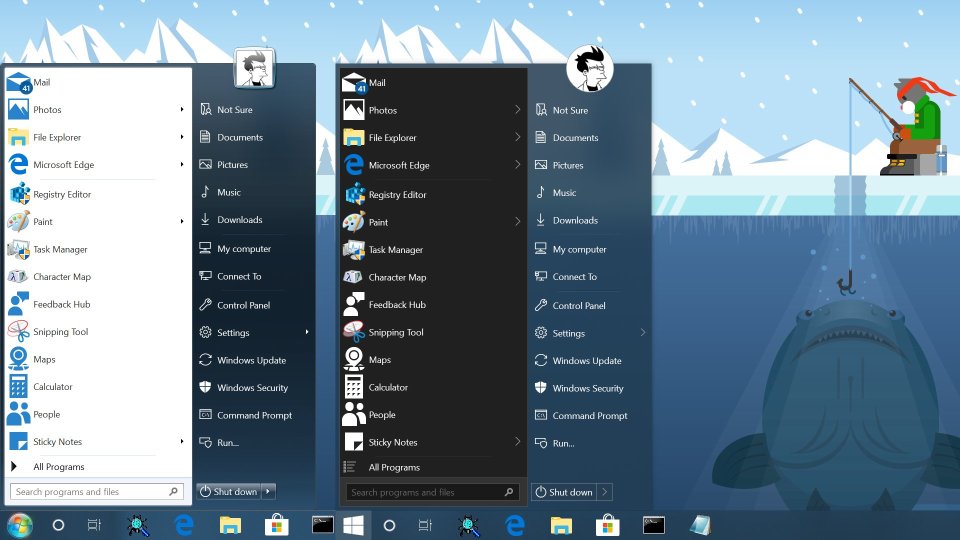
Understanding the last version of Windows 11 that StartIsBack worked on requires a deep dive into the technical architecture of the “Sun Valley” update and the subsequent pivot by developers to meet the requirements of a modernized Windows shell.
Understanding the StartIsBack Legacy and the Windows 11 Barrier
To understand why StartIsBack encountered a wall with Windows 11, one must first appreciate its role in the Windows ecosystem. For over a decade, StartIsBack provided a lightweight, highly efficient way to bring back the Windows 7-style Start menu to Windows 8 and Windows 10. Unlike other “theming” apps that consumed significant system resources, StartIsBack functioned by hooking into existing system files to re-enable dormant legacy code.
The Evolution of StartIsBack for Desktop Customization
Originally released for Windows 8, StartIsBack was a response to the controversial “Metro” UI. It allowed users to bypass the tile-based Start screen entirely. When Windows 10 arrived, the software evolved into StartIsBack++, refining its ability to offer taskbar transparency, custom icon sets, and a streamlined menu that avoided the bloat of the Windows 10 “Live Tiles.” Its success was rooted in its invisibility; it felt like a native part of the OS rather than a third-party skin.
Why Windows 11 Changed the Game for Shell Extensions
Windows 11 was more than just a fresh coat of paint. Microsoft completely rebuilt the Taskbar using modern code (UWP/XAML) and moved away from the legacy Win32 code that had powered the taskbar since Windows 95. Because StartIsBack relied on modifying the legacy Win32 taskbar code, the fundamental shift in Windows 11 meant that the old hooks used by StartIsBack++ were no longer present. The “Sun Valley” UI project effectively deleted the code that StartIsBack++ needed to function.
Identifying the Last Functional Version for Windows 11
Many users attempting to upgrade from Windows 10 to Windows 11 wondered if they could bring their customization settings with them. The short answer is that StartIsBack++ (the Windows 10 version) reached its functional limit during the very earliest stages of the Windows 11 development cycle.
The Breakpoint: From StartIsBack++ to StartAllBack
The technical “last version” of Windows 11 that StartIsBack++ could semi-reliably run on was the Windows 11 Insider Preview Build 22000.x (the very first dev builds released in mid-2021). Even then, the experience was riddled with “Explorer.exe” crashes and graphical glitches. Once Microsoft moved toward the final retail build of Windows 11 (Version 21H2, Build 22000.194), the developer officially deprecated StartIsBack++ for Windows 11 in favor of a brand-new product: StartAllBack.
Early Windows 11 Insider Builds and the Final Compatibility Wall
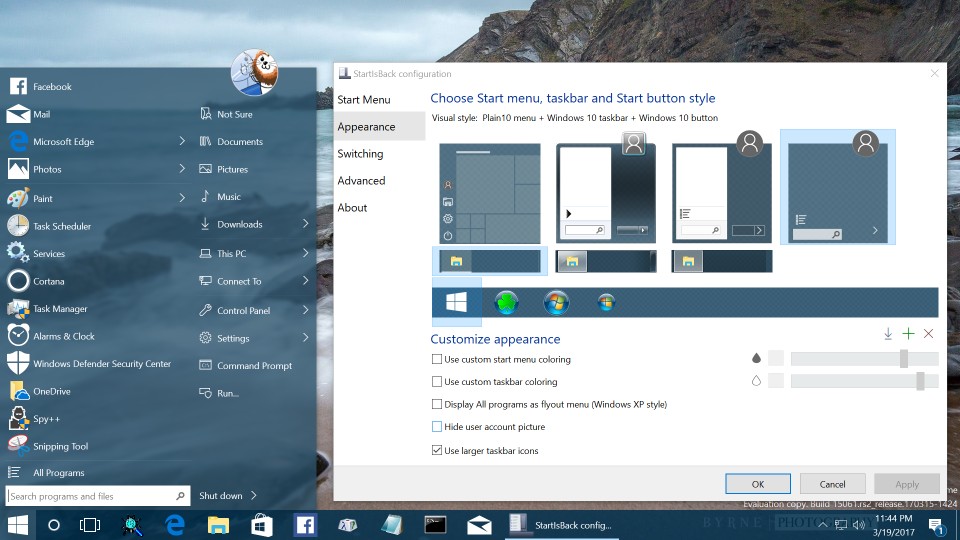
During the transition period, users found that StartIsBack++ version 2.9.15 was the final iteration intended for Windows 10. While some managed to force-install it on early Windows 11 builds by disabling certain shell features, the results were unstable. The compatibility wall was hit when Microsoft finalized the “New Taskbar” logic, which lacked the right-click functionality and drag-and-drop capabilities of its predecessor. At this point, StartIsBack++ could no longer inject its code into the system, leading the developer to announce that a complete rewrite was necessary to support the new OS architecture.
Technical Deep Dive: Why Legacy Software Fails on Modern Windows Kernels
The failure of legacy customization tools on Windows 11 isn’t a matter of lazy development; it is a matter of fundamental software engineering. When an operating system changes how it renders its primary interface, third-party tools that “hook” into that interface must be completely re-engineered.
The Move from Win32 to XAML-based Taskbars
For decades, the Windows Taskbar was a Win32 window. StartIsBack worked by intercepting messages sent to this window. In Windows 11, the taskbar is a modern XAML island. This new taskbar is essentially a “plugin” to the desktop environment rather than a hard-coded part of the Explorer process in the way it used to be. Because StartIsBack was designed to communicate with Win32 components, it found itself speaking a language that the Windows 11 taskbar no longer understood. This is why many users saw a “double taskbar” or a completely frozen screen when trying to run old versions of the software.
Context Menu Overhauls and Explorer.exe Dependencies
Another major hurdle was the revamped context menu (the right-click menu). Windows 11 introduced a simplified menu that requires an additional click (“Show more options”) to see legacy commands. StartIsBack++ relied on the old context menu architecture to provide its settings and shortcuts. When Microsoft encapsulated the old menus within a new UI layer, the “hooks” used by StartIsBack were buried too deep to be accessible without causing system instability. This necessitated the transition to StartAllBack, which was designed from the ground up to peel back these new layers of Windows 11.
Transitioning to StartAllBack: The Modern Successor
Recognizing that Windows 11 was a “breaking change,” the developers behind StartIsBack released StartAllBack. This is not merely an update to the old software; it is a specialized tool designed specifically for the Windows 11 environment. It picks up exactly where StartIsBack left off, providing the functionality that the older software lost during the OS transition.
Key Features for Power Users
StartAllBack restores the features that Microsoft removed in the initial release of Windows 11. This includes the ability to move the taskbar to the top or sides of the screen—a feature that was notoriously absent from Windows 11 for a long time. It also restores the classic “Small Taskbar Icons” and the “Never Combine” taskbar button setting, which many professionals rely on for rapid multitasking. By utilizing StartAllBack, users essentially get the performance of Windows 11 with the usability of Windows 10 or 7.
Enhancing Productivity with Enhanced Taskbar Controls
Beyond simple aesthetics, StartAllBack addresses the functional gaps of Windows 11. It restores the classic Control Panel applets to the Explorer navigation bar and brings back the classic Windows 7 search box style. For users who found the Windows 11 “Start” menu to be too restrictive (lending itself more to a mobile-phone-style app drawer), StartAllBack provides a highly customizable, folder-based Start menu that supports nested shortcuts and advanced search filtering.
Future-Proofing Your Windows 11 Customization
As Windows 11 continues to evolve through “Moment” updates and annual version releases (like 23H2 and the upcoming 24H2), the cat-and-mouse game between Microsoft and shell extension developers continues. Users must remain vigilant about software updates to ensure their system remains stable.
Security Implications of Shell Modifications
From a digital security perspective, using tools like StartIsBack or StartAllBack is generally considered safe, provided they are downloaded from official sources. These tools do not modify the Windows kernel; they operate at the user-interface level. However, because they interact closely with Explorer.exe, a major Windows update can occasionally cause a “boot loop” if the customization tool is out of date. It is a professional best practice to disable or update these tools before performing a major Windows version upgrade.

Balancing Aesthetic Preference with OS Stability
The ultimate goal for any power user is to create a workspace that maximizes efficiency without sacrificing the stability of the operating system. While StartIsBack reached its end of life with the transition to Windows 11, the philosophy behind it lives on. By understanding that StartIsBack++ belongs to the Windows 10 era and StartAllBack belongs to the Windows 11 era, users can avoid technical headaches and maintain a streamlined, professional desktop environment. As Microsoft moves closer to “Windows 12” and further AI integration, the demand for tools that offer a “classic” and “distraction-free” interface will only continue to grow.
aViewFromTheCave is a participant in the Amazon Services LLC Associates Program, an affiliate advertising program designed to provide a means for sites to earn advertising fees by advertising and linking to Amazon.com. Amazon, the Amazon logo, AmazonSupply, and the AmazonSupply logo are trademarks of Amazon.com, Inc. or its affiliates. As an Amazon Associate we earn affiliate commissions from qualifying purchases.