
In the complex ecosystem of the modern internet, understanding the specific queries that lead users to your digital doorstep is more than a curiosity—it is a technical necessity. For developers, data analysts, and SEO specialists, the question “what keywords is my website ranking for?” serves as the starting point for a deep dive into search engine algorithms, data indexing, and technical optimization. Mapping your website’s keyword profile is a diagnostic process that reveals how search engine crawlers perceive your site’s relevance, authority, and information architecture.
Identifying these keywords requires a shift from guesswork to data-driven analysis. It involves leveraging sophisticated software suites, interpreting API-driven data, and understanding the nuances of Search Engine Results Pages (SERPs). This guide explores the technical frameworks and tools required to uncover your website’s ranking profile and how to use that data to refine your technical SEO strategy.

1. The Mechanics of Search Data: Understanding Indexing and Ranking Logic
To understand why your website ranks for specific terms, one must first understand the technical journey of a webpage from discovery to the results page. Search engines like Google utilize automated programs known as “spiders” or “crawlers” (such as Googlebot) to traverse the web. These bots parse the HTML structure of your site, cataloging text, metadata, and media.
How Search Crawlers Map Your Site’s Vocabulary
Crawlers do not simply “read” a page; they decompose it into a series of data points. When a crawler hits your server, it analyzes the Header tags (H1–H6), the density of specific terms, and the contextual relationships between words. This technical mapping determines which “buckets” of information your site belongs to. If your site ranks for keywords you didn’t explicitly target, it is often because the crawler’s Natural Language Processing (NLP) algorithms have identified latent themes in your technical documentation or content blocks that align with specific user queries.
The Role of Latent Semantic Indexing (LSI) and Entities
Modern search algorithms have moved beyond simple keyword matching. They now utilize Latent Semantic Indexing and entity recognition to understand the “aboutness” of a page. For instance, if your website frequently mentions “Python,” “TensorFlow,” and “Neural Networks,” the algorithm identifies your site as an authority in Artificial Intelligence, even if you never explicitly use the phrase “AI software.” Understanding this technical nuance is vital when auditing your rankings, as it explains the clusters of related terms your site likely occupies.
2. Essential Software for Real-Time Keyword Discovery
Uncovering your ranking profile is impossible without the right technical stack. Fortunately, the tech industry offers a range of tools—from first-party diagnostic consoles to third-party competitive intelligence platforms—that provide high-granularity data on keyword performance.
Leveraging Google Search Console for First-Party Data
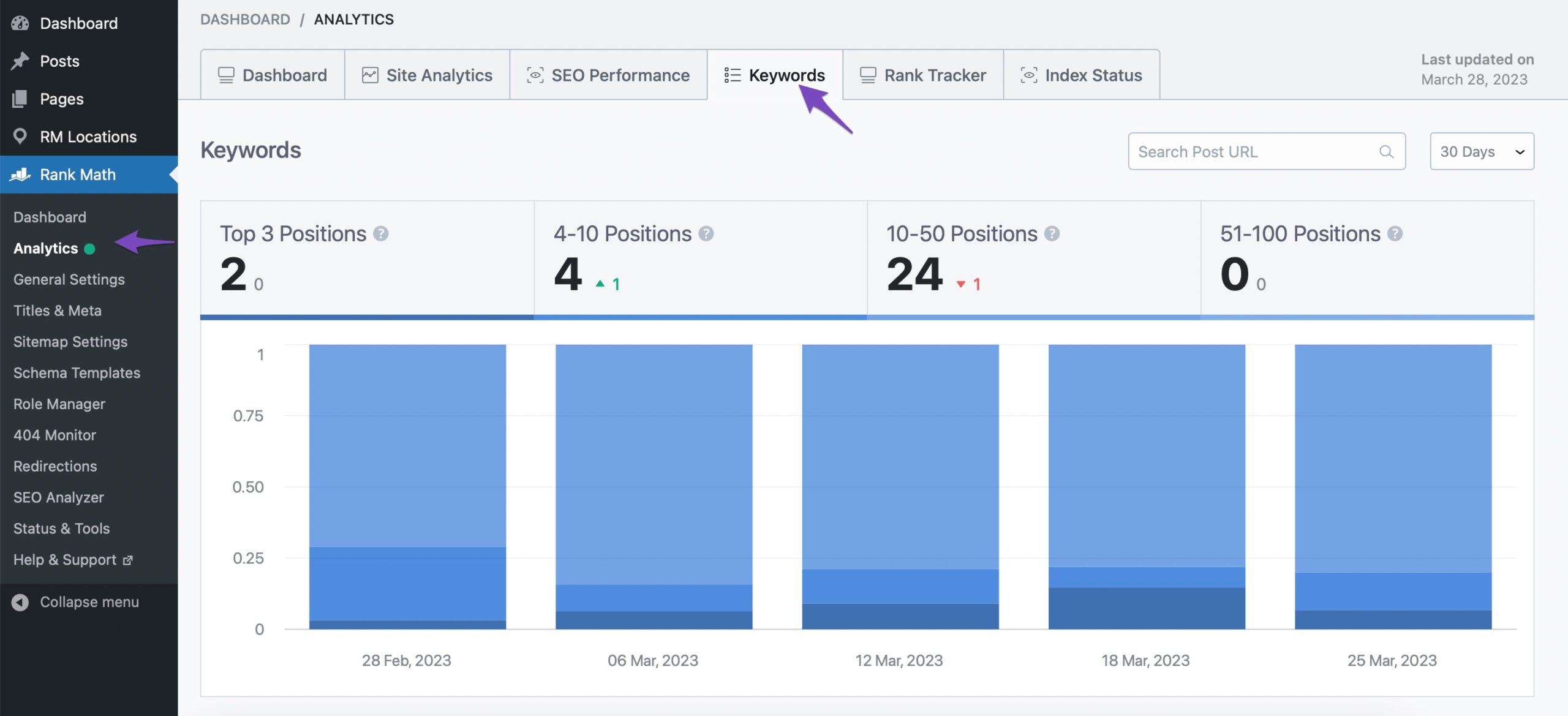
Google Search Console (GSC) is the most authoritative source for keyword data because it comes directly from the source. The “Performance” report within GSC provides a technical breakdown of “Queries”—the exact terms users typed into Google before clicking on your site.
-
Total Clicks and Impressions: This data shows how often your site appeared in the SERPs for specific terms and how often users engaged.
-
Average Position: This is a critical metric for developers. It tracks the numerical rank of your URLs for specific strings, allowing you to see technical fluctuations in real-time.
-
Filtering by Page: By filtering queries by specific URLs, you can diagnose whether your technical documentation or landing pages are hitting their intended targets.
Professional SEO Suites: Ahrefs, Semrush, and Moz
While GSC shows you what you are already winning, third-party software like Ahrefs or Semrush provides a broader view of the competitive landscape. These tools maintain massive databases of billions of keywords, updated via constant web crawling. They allow you to see your “Organic Keywords” profile, which includes keywords where you might rank on page 10—data that GSC sometimes obscures. These platforms offer technical features like “Keyword Gap Analysis,” which compares your site’s ranking footprint against competitors to identify missing technical content.
Open-Source and API-Based Tracking Solutions
For organizations with custom needs, leveraging APIs (such as the Google Search Console API or DataForSeo) allows for the creation of custom dashboards. By piping keyword ranking data into environments like BigQuery or Looker Studio, technical teams can correlate keyword fluctuations with server updates, site migrations, or algorithm shifts. This programmatic approach allows for automated monitoring of “Volatility,” alerting developers when a core update causes a sudden drop in keyword rankings.
3. Technical Indicators: Differentiating Between Intent and Volume
Once you have a list of keywords your site ranks for, the next technical step is categorizing that data. Not all rankings are created equal; some represent high-value technical queries, while others may be “junk” traffic resulting from tangential mentions.
Interpreting Impression Data vs. Click-Through Rates (CTR)
A high number of impressions with a low CTR often indicates a technical or structural mismatch. For example, your site might rank on Page 1 for a high-volume technical term, but if your Meta Title and Description (the snippets defined in your HTML) do not align with the user’s “Search Intent,” they will not click. Analyzing the delta between impressions and clicks allows you to identify which keywords require better “on-page” technical optimization to capture the user’s attention.
Assessing Keyword Difficulty through Algorithmic Metrics
In the tech world, “Keyword Difficulty” (KD) is a metric used by software to estimate how hard it is to rank for a term based on the backlink profile and domain authority of the current top 10 results. When auditing your rankings, you should look for “low-hanging fruit”—keywords where you rank on the second page (positions 11–20) with low KD scores. Moving these keywords to the first page often requires minor technical adjustments, such as improving internal linking structures or updating the page’s Schema markup.
4. Advanced Diagnostics: Why Your Site Ranks for Unintended Terms
Sometimes, a keyword audit reveals that a website is ranking for terms that are irrelevant to its core mission. This is often a symptom of technical debt or architectural flaws within the site’s backend.
Identifying Keyword Cannibalization in Your Architecture
Keyword cannibalization occurs when multiple URLs on your site are competing for the same technical query. From a crawler’s perspective, this creates confusion; the algorithm doesn’t know which page is the “canonical” or authoritative source. If your keyword report shows two different pages flickering in and out of the rankings for the same term, you have a technical conflict. This is usually resolved by implementing rel="canonical" tags or merging the content of the two pages to consolidate ranking power.
The Impact of Technical Metadata on Search Queries
Often, a site will rank for terms found in the technical metadata that aren’t visible to the average user. This includes Image Alt-text, File Names (e.g., technical-spec-v2.pdf), and Comment sections in the code if they are being indexed. If your site is ranking for “unintended” terms, it is worth performing a technical audit of your non-visible elements to ensure that your site’s “hidden” vocabulary isn’t diluting your primary keyword focus.
5. Optimizing Your Tech Stack for Better Keyword Performance
The final phase of managing keyword rankings is using the gathered data to inform technical optimizations. Ranking for a keyword is the first step; maintaining and improving that rank requires a robust technical infrastructure.
Improving Site Speed and Core Web Vitals for Ranking Stability
Google has explicitly stated that technical performance—specifically Core Web Vitals (LCP, FID, CLS)—is a ranking factor. If your keyword data shows a slow decline in positions despite your content remaining relevant, the issue may be technical performance. High latency, slow server response times, and cumulative layout shifts can penalize your rankings. By optimizing your CSS delivery, leveraging Content Delivery Networks (CDNs), and minimizing JavaScript execution time, you provide a technical foundation that supports higher keyword rankings.
Schema Markup: Giving Context to Your Site’s Keywords
To help search engines better understand the keywords you want to rank for, you should utilize Structured Data (Schema.org). By adding JSON-LD scripts to your HTML, you can explicitly tell search engines what your data represents. For instance, using SoftwareApplication schema helps the algorithm understand that your “keywords” are related to a downloadable tool rather than just a blog post. This technical clarity often leads to “Rich Snippets” in the SERPs—such as star ratings or price points—which significantly increase the click-through rate for your ranking keywords.
Conclusion
Understanding “what keywords my website is ranking for” is a continuous process of technical discovery and refinement. It requires a sophisticated blend of software tools, data analysis, and an understanding of the underlying search algorithms. By identifying your current ranking profile through Google Search Console and professional SEO suites, diagnosing technical conflicts like cannibalization, and optimizing your site’s infrastructure, you can turn raw keyword data into a powerful roadmap for digital growth. In the competitive landscape of the tech industry, the ability to decode and manipulate these search signals is what separates dominant platforms from the rest of the noise.
aViewFromTheCave is a participant in the Amazon Services LLC Associates Program, an affiliate advertising program designed to provide a means for sites to earn advertising fees by advertising and linking to Amazon.com. Amazon, the Amazon logo, AmazonSupply, and the AmazonSupply logo are trademarks of Amazon.com, Inc. or its affiliates. As an Amazon Associate we earn affiliate commissions from qualifying purchases.