
Navigating the regulations for standardized tests like the SAT can be a complex endeavor, especially when it comes to permitted tools. For many students, the calculator is a crucial companion for the math sections, offering a pathway to solving intricate problems efficiently. However, not just any calculator will do. The College Board, the organization behind the SAT, has stringent guidelines concerning which devices are allowed, and understanding these rules is paramount to avoiding disqualification and ensuring a smooth test-taking experience. This article delves into what constitutes an “approved calculator” for the SAT, exploring the technical specifications, popular models, and best practices for leveraging this essential gadget.

Understanding the SAT Calculator Policy
The SAT calculator policy is designed to ensure fairness, prevent cheating, and maintain the integrity of the test. While some sections of the Math test allow calculator use, others explicitly prohibit it, underscoring the importance of both computational skills and mental arithmetic. The policy aims to strike a balance, permitting tools that aid in complex calculations without providing an undue advantage through advanced features that could store formulas or communicate externally.
Why Restrictions Exist
The primary reasons for calculator restrictions are multi-faceted. Firstly, it ensures an even playing field for all test-takers. If unrestricted, some students might bring highly advanced devices capable of symbolic algebra, internet connectivity, or large memory banks, which could compromise the test’s assessment of raw mathematical reasoning. Secondly, the SAT seeks to evaluate problem-solving skills, not just the ability to operate the most sophisticated piece of technology. Many questions can be solved more quickly without a calculator, or require conceptual understanding that a calculator cannot provide. By limiting the types of devices, the College Board encourages a balanced approach to problem-solving. Lastly, security is a major concern. Calculators with communication capabilities or excessive memory could potentially be used to store or transmit illicit information, hence the strict prohibitions on such features.
General Guidelines for Approved Calculators
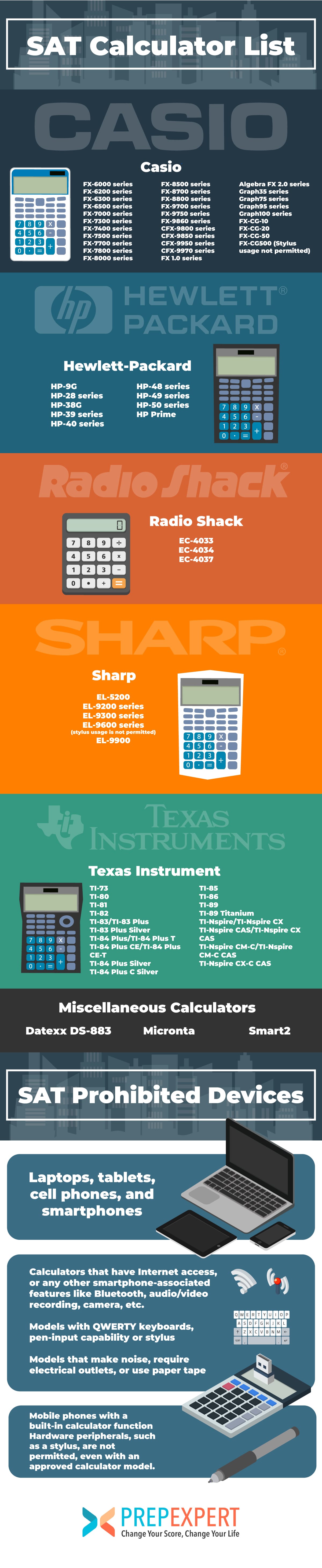
Generally, most four-function, scientific, and graphing calculators are permitted, provided they adhere to specific limitations. The key is that the calculator must not have any features that could give an unfair advantage or allow for external communication. It should primarily be a tool for computation and graphical representation, not an information storage or communication device. The College Board maintains an official list of approved and prohibited calculators, and students are strongly advised to consult this list directly on the College Board website well in advance of their test date, as policies can occasionally be updated.
Prohibited Calculator Features
Understanding what is not allowed is just as important as knowing what is permitted. The College Board explicitly prohibits several types of calculators and features:
-
Calculators with QWERTY keyboards: These are often seen on devices designed more like small computers or PDAs, and their ability to store and process text is a major concern.
-
Laptops or Tablet Computers: While these devices often have calculator apps, they are general-purpose computing machines and are strictly forbidden.
-
Cell Phones or Smartphones: These are communication devices and are absolutely not allowed in the testing room.
-
Calculators with wireless communication capabilities: Bluetooth, Wi-Fi, infrared, or any other form of wireless connectivity is prohibited to prevent external communication.
-
Calculators that can access the internet: This is a direct extension of the wireless communication rule.
-
Calculators with audio/video recording capabilities: These features are unrelated to mathematical computation and pose security risks.
-
Calculators that require an electrical outlet: Battery-powered devices are the standard to ensure portability and prevent reliance on classroom infrastructure.
-
Calculators with paper tape: Devices that print out calculations are not permitted.
-
Calculators that make noise: Any device that could disturb other test-takers is prohibited.
-
Calculators with symbolic manipulation capabilities (CAS features) that are not on the approved list: While some CAS calculators are approved (like certain TI-Nspire models), many are not because they can perform highly advanced algebraic steps that the test intends to evaluate manually. Students must check the specific model on the approved list.
Types of Approved Calculators
The range of approved calculators for the SAT broadly falls into three categories, each offering different levels of functionality suitable for various mathematical needs and preferences.
Graphing Calculators: The Powerhouses
Graphing calculators are the most sophisticated type permitted and are often the preferred choice for students tackling higher-level math. These devices excel at plotting graphs of functions, solving equations graphically, performing matrix operations, and handling statistical analysis. Their large displays can show multiple lines of input and output, making complex problem-solving more manageable. Key features include:
-
Graphical Representation: Ability to plot functions, analyze curves, find intercepts, and visualize data.
-
Advanced Algebra & Calculus: While CAS features might be restricted, standard graphing calculators can still handle symbolic differentiation, integration (numerical), and complex algebraic equations.
-
Statistical Functions: Regression analysis, probability distributions, and data plotting.
-
Programming Capabilities: Students can write short programs for specific tasks, though using pre-programmed solutions for test questions is generally prohibited and would likely require a calculator with forbidden storage capabilities.
Popular models in this category include the Texas Instruments TI-84 Plus CE, TI-Nspire CX II (non-CAS or specific approved CAS models), and Casio fx-CG50.
Scientific Calculators: Reliable & Efficient
Scientific calculators are a step below graphing calculators in complexity but are perfectly adequate for the vast majority of SAT math problems. They are designed to handle complex scientific and mathematical functions that go beyond basic arithmetic, such as trigonometry (sine, cosine, tangent), logarithms, exponents, roots, factorials, and basic statistical calculations. They typically feature a multi-line display that shows both the input expression and the result.
-
Comprehensive Functionality: Essential for trigonometry, logarithms, powers, roots, and fractions.
-
Compact Design: Often smaller and lighter than graphing calculators, making them easy to handle.
-
Cost-Effective: Generally more affordable than graphing calculators.
Examples include the Casio fx-115ES Plus, Texas Instruments TI-36X Pro, and Sharp EL-W516TBSL. Many students find these sufficient and appreciate their straightforward operation.
Four-Function Calculators: Basic but Permitted
Four-function calculators are the most basic type, capable of addition, subtraction, multiplication, and division. While permitted, they are generally not recommended for the SAT Math sections, which often require more advanced operations like square roots, percentages, or exponents. A student relying solely on a four-function calculator would need to perform many multi-step calculations manually, consuming valuable time and increasing the risk of error.
-
Fundamental Arithmetic: Useful for simple calculations.
-
Simplicity: Very easy to use.
-
Limited Utility: Insufficient for many SAT problems.
While technically allowed, students are strongly encouraged to use at least a scientific calculator to be adequately prepared for the test’s demands.
Key Features to Look for in an SAT Approved Calculator
When selecting a calculator for the SAT, focusing on specific features can significantly enhance your test-taking experience and efficiency. Beyond mere approval, usability and functionality play crucial roles.
Essential Mathematical Functions
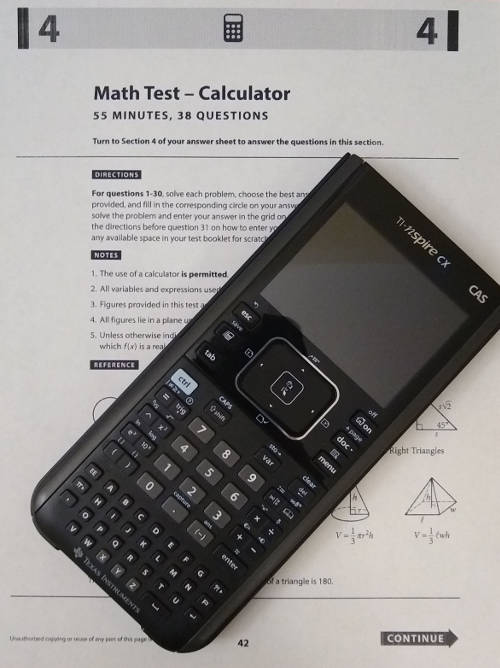
An ideal SAT calculator should readily perform all the operations commonly encountered on the test. This includes:
-
Basic Arithmetic: Addition, subtraction, multiplication, division.
-
Exponents and Roots: Square roots, cube roots, powers (x^y).
-
Fractions: The ability to input and display fractions correctly, and convert between fractions and decimals.
-
Percentages: Direct calculation of percentages.
-
Negative Numbers: Easy input and manipulation of negative values.
-
Trigonometry: Sine, cosine, tangent, and their inverses for angles (both degrees and radians, though the SAT primarily uses degrees).
-
Logarithms: Base-10 and natural logarithms.
-
Parentheses: A sufficient number of parentheses levels to accurately input complex expressions.
-
Memory Functions: The ability to store intermediate results for later recall.
For graphing calculators, the ability to clearly graph functions, find intersections, and perform regression analysis are additional invaluable features.
Display and Usability Considerations
The calculator’s display and overall user interface significantly impact speed and accuracy under pressure.
-
Multi-line Display: Essential for scientific and graphing calculators, allowing you to see the entire expression you’re inputting and the result simultaneously. This helps in catching errors before pressing “equals.”
-
Natural Display (MathPrint): Many modern scientific and graphing calculators feature a “natural display” that shows fractions, square roots, and other expressions as they would appear in a textbook, making input and interpretation much easier.
-
Clear Key Layout: An intuitive and well-spaced button layout reduces the chances of hitting the wrong key.
-
Contrast and Backlight: A clear, high-contrast display is vital. Backlighting (on some graphing calculators) can be a bonus, though test centers are typically well-lit.
-
Navigational Pad/Arrow Keys: Especially on graphing calculators, these are crucial for moving through graphs, tables, and editing complex inputs.
Battery Life and Reliability
This is a critical, often overlooked aspect. A calculator dying mid-test can be disastrous.
-
Fresh Batteries: Always insert fresh batteries (or ensure a full charge for rechargeable models) before test day.
-
Backup Batteries: Consider bringing a set of spare batteries, especially if your calculator uses standard AA or AAA cells.
-
Reliability: Choose a reputable brand known for durable and dependable products. Avoid using an old, temperamental calculator that might malfunction.
-
Auto Shut-off: A good calculator will have an auto shut-off feature to conserve battery life.
Popular Approved Calculator Models for the SAT
While many calculators are approved, a few models consistently stand out due to their robust features, widespread adoption, and reliability. Familiarity with these devices often means easier access to online tutorials and peer support.
Texas Instruments (TI) Series
TI calculators are perhaps the most ubiquitous in American high schools.
-
TI-84 Plus CE: This graphing calculator is a perennial favorite. It’s user-friendly, has a color display, and handles all necessary graphing, statistical, and algebraic functions for the SAT. Its interface is familiar to generations of students, making it a safe and reliable choice. It lacks a full CAS system, making it universally approved.
-
TI-Nspire CX II (non-CAS): A more modern and powerful graphing calculator, the CX II offers a vibrant color display and a unique ‘scratchpad’ feature. The non-CAS version is fully approved and excellent for visualizing problems. Students must be careful to bring the non-CAS version unless their specific CAS model is on the official approved list.
-
TI-36X Pro: A top-tier scientific calculator, the TI-36X Pro is highly capable and often recommended for its natural display, multi-line input, and comprehensive scientific functions. It’s a fantastic choice for students who don’t need or want a graphing calculator.
Casio Calculators
Casio offers a strong lineup of calculators known for their performance and often competitive pricing.
-
Casio fx-CG50: This color graphing calculator is a direct competitor to the TI-84 Plus CE. It features a high-resolution color display, 3D graphing capabilities, and an intuitive icon-based menu. It is fully approved for the SAT.
-
Casio fx-9750GII: A more budget-friendly graphing calculator from Casio, the fx-9750GII provides solid graphing functionality in a monochrome display. It’s a reliable workhorse for the SAT.
-
Casio fx-115ES Plus: One of the most popular scientific calculators, the fx-115ES Plus boasts a natural textbook display and a vast array of scientific, statistical, and engineering functions, making it more than capable for the SAT.
Hewlett-Packard (HP) Models
HP calculators are known for their powerful engines and often RPN (Reverse Polish Notation) input method, though many now support algebraic entry.
- HP Prime Graphing Calculator: This advanced graphing calculator features a large touchscreen, a powerful processor, and an extensive suite of mathematical tools. It supports both algebraic and RPN input. The HP Prime is approved for the SAT, offering a high-performance option for tech-savvy students.
Tips for Calculator Use on the SAT
Having an approved calculator is only half the battle; knowing how to use it effectively is just as crucial. Proper practice and preparation can significantly impact your performance.
Practice, Practice, Practice
The most important advice is to consistently use your chosen calculator during your SAT preparation. Don’t wait until test day to figure out its functions. Work through practice problems and full-length practice tests with the same calculator you plan to bring. This builds muscle memory and speed.
Familiarize Yourself with Features
Understand all the relevant functions of your calculator. Know how to:
-
Input complex expressions with parentheses.
-
Switch between decimal and fraction outputs.
-
Use memory functions.
-
Graph functions quickly (if using a graphing calculator).
-
Perform statistical calculations.
-
Change between degree and radian mode (and ensure it’s in degrees for the SAT).
Knowing these shortcuts and capabilities can save precious time during the exam.
Check Your Calculator Before Test Day
A few days before the SAT, perform a thorough check of your calculator:
-
Battery Check: Ensure it has fresh batteries or is fully charged. Bring spares if applicable.
-
Function Check: Briefly test its main functions (addition, multiplication, square roots, graphing, etc.) to confirm it’s working correctly.
-
Reset (Optional): Some students choose to reset their calculators to factory settings to clear any stored programs or data, although this isn’t strictly necessary if you know your calculator doesn’t have prohibited programs.
Know When Not to Use It
While a powerful tool, the calculator isn’t always the fastest or best approach. Many SAT problems are designed to be solved more efficiently through mental math, estimation, or algebraic manipulation. Over-reliance on a calculator can slow you down or lead to errors if you input numbers incorrectly. Develop a strategic approach: use the calculator when it genuinely saves time on complex arithmetic or graphing, but rely on your foundational math skills for simpler problems.
In conclusion, selecting and mastering an approved calculator is a significant component of SAT preparation. By understanding the College Board’s regulations, choosing a model that fits your needs and budget, and practicing extensively with it, you can transform this technological tool into a powerful asset that helps you achieve your best possible score on the SAT.
aViewFromTheCave is a participant in the Amazon Services LLC Associates Program, an affiliate advertising program designed to provide a means for sites to earn advertising fees by advertising and linking to Amazon.com. Amazon, the Amazon logo, AmazonSupply, and the AmazonSupply logo are trademarks of Amazon.com, Inc. or its affiliates. As an Amazon Associate we earn affiliate commissions from qualifying purchases.