
The ACT, a pivotal standardized test for college admissions, demands not only a strong grasp of academic subjects but also strategic preparation, which includes understanding the specific technological tools permitted during the exam. Among these tools, the calculator stands out as a critical aid for the Math section. Far from being a simple accessory, the choice and proper use of a calculator are deeply intertwined with a student’s performance, making the ACT’s calculator policy a vital piece of information for any test-taker. Navigating these regulations requires a keen understanding of technological specifications, balancing the need for advanced functionality with strict adherence to test security and fairness protocols. This guide delves into the tech nuances of the ACT calculator policy, ensuring you equip yourself with the right gadget for success.
Understanding the ACT Calculator Policy: A Tech Deep Dive
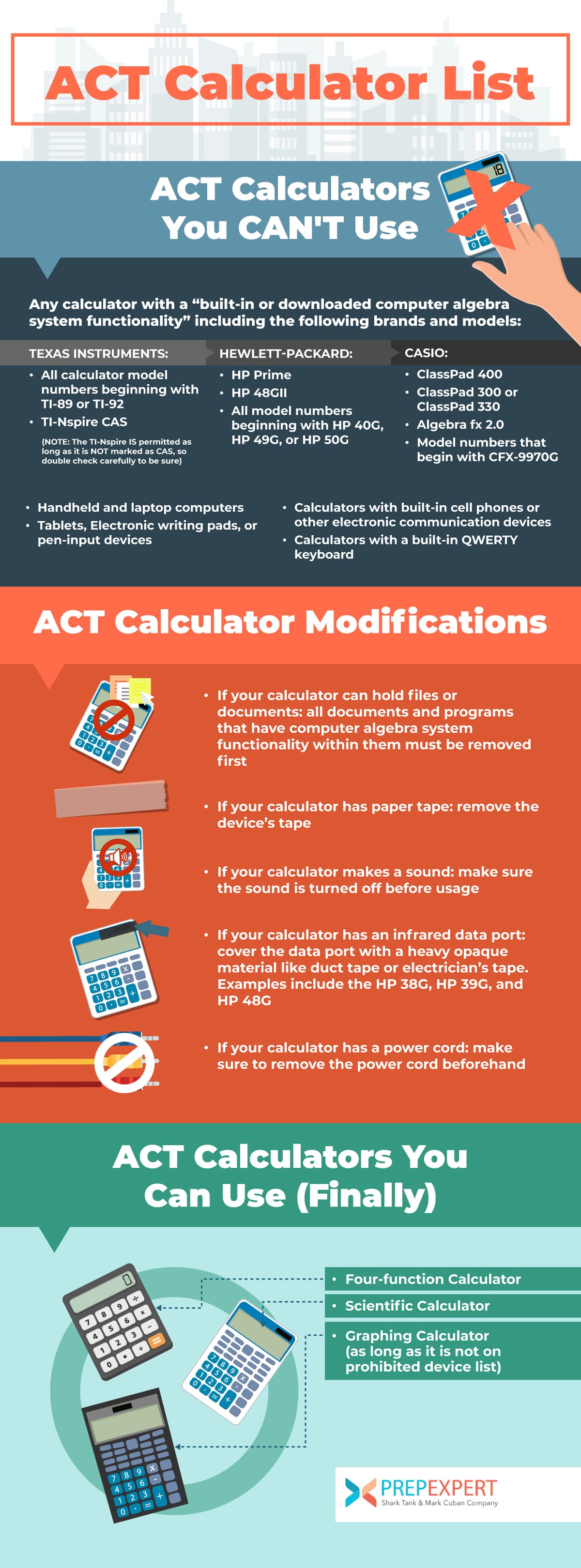
The ACT’s calculator policy isn’t arbitrary; it’s a carefully crafted set of guidelines designed to maintain fairness, prevent technological advantages, and ensure the test accurately measures a student’s mathematical reasoning rather than their proficiency with overly sophisticated devices. For students, understanding these underlying principles is key to making an informed tech choice.
The Rationale Behind Restrictions: Preventing Unfair Tech Advantages
The primary objective of the ACT’s calculator policy is to create a level playing field for all test-takers. In an era of rapid technological advancement, calculators have evolved far beyond basic arithmetic functions. Devices now exist that can store vast amounts of information, access external networks, or even run sophisticated computational software. Allowing such advanced technology would undermine the integrity of the test, as it could provide an unfair advantage to students with access to or expertise in operating these complex systems.
Specifically, the ACT aims to prevent the use of devices that could:
-
Store exam content or solutions: Calculators with extensive memory, text-editing capabilities, or external storage can be used to pre-load information, essentially creating an open-book scenario.
-
Communicate externally: Features like Wi-Fi, Bluetooth, or cellular connectivity pose a significant security risk, allowing students to receive assistance or share answers during the exam.
-
Automate complex problem-solving steps: While graphing calculators are permitted, devices that can solve highly complex equations with minimal input, or provide step-by-step solutions, could bypass the need for genuine mathematical understanding.
-
Disturb other test-takers: Any device that emits sound or light (beyond its screen) can be a distraction, hence restrictions on noisy calculators or those with excessively bright, external displays.
By prohibiting certain technological features, the ACT ensures that the test measures a student’s intrinsic mathematical knowledge and problem-solving skills, rather than their reliance on or manipulation of cutting-edge gadgetry. It’s about evaluating human intellect, not machine capability.
General Permitted Calculator Types: Core Functionality Meets Compliance
The ACT generally allows the use of scientific and most graphing calculators, provided they lack specific prohibited features. These devices are considered standard tools in high school mathematics education, balancing necessary computational power with test security.
-
Scientific Calculators: These are the workhorses of pre-algebra, algebra, and trigonometry. They typically include functions for arithmetic, exponents, roots, logarithms, and basic trigonometric operations. Their straightforward interface and limited memory make them ideal for the ACT’s requirements, as they don’t possess the features that could facilitate cheating. Models like the Texas Instruments TI-30XS Multiview or the Casio fx-115ES PLUS are excellent examples of permitted scientific calculators.
-
Graphing Calculators: These more advanced devices are widely used in algebra II, pre-calculus, and calculus. They offer the ability to plot graphs, perform matrix operations, execute statistical calculations, and often have rudimentary programming capabilities. The ACT permits most standard graphing calculators because their functions, while powerful, are generally geared towards visual representation and complex calculations that still require significant user input and understanding. Popular permitted models include various devices from the TI-83, TI-84, TI-Nspire (non-CAS), and Casio fx-9750GII series. The key distinction for graphing calculators lies in the absence of communication, internet access, or full QWERTY keypads.
Prohibited Calculator Technologies: The “Do Not Bring” List
Understanding what is not allowed is just as crucial as knowing what is. The ACT explicitly prohibits several categories of technology, primarily due to their potential for cheating or disruption.
-
Calculators with Computer-Algebra System (CAS) functionality: While powerful for advanced math, CAS calculators (like the TI-Nspire CAS or Casio ClassPad series) can perform symbolic algebra, solve equations abstractly, and simplify expressions, often providing step-by-step solutions. This essentially automates processes the test aims to evaluate.
-
Calculators with QWERTY keypads: Devices with a full typewriter-style keyboard (like some older HP models or dedicated handheld computers) are banned because they can be used for text entry and storing notes, blurring the line between a calculator and a communication/information storage device.
-
Electronic devices with communication capabilities: This includes cell phones, smartphones, smartwatches, wearable technology, iPads, iPods, laptops, and any other device capable of wireless communication, internet access, or photographic/audio recording. These are strictly forbidden due to obvious security concerns.
-
Calculators that make noise: Any calculator that emits audible clicks, beeps, or other sounds is not allowed, as it can disturb other test-takers.
-
Calculators with paper tape: Devices that print out calculations are prohibited.
-
Calculators requiring an electrical outlet: Battery-powered devices are the standard.
-
Calculators with pen input or stylus: Devices that allow for handwriting input or drawing are not permitted.
In essence, if a device can communicate, store extensive text-based information, or offers an unfair bypass of mathematical reasoning, it’s likely on the prohibited list. Test-takers should err on the side of caution when selecting their tech for the ACT.
Navigating the Specifics: Which Gadgets Make the Cut?
Choosing the right calculator for the ACT is a critical decision that balances functionality with compliance. While many models are permitted, a select few have become de facto standards due to their robust features and widespread acceptance in educational settings.
Graphing Calculators: The Preferred Tech for Advanced Math
For students tackling the higher-level math problems on the ACT, a graphing calculator is often the gadget of choice. These devices offer a significant advantage for visualizing functions, solving systems of equations, and performing complex statistical analysis quickly.
-
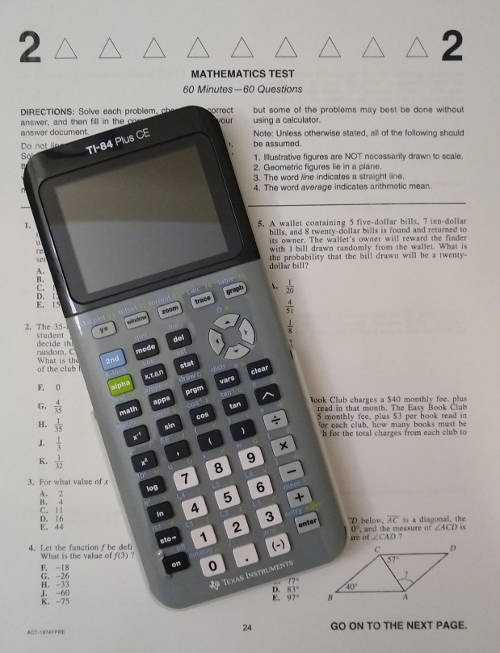
Texas Instruments (TI) TI-83 Plus and TI-84 Plus Series: These are arguably the most popular and widely recognized graphing calculators permitted on the ACT. Their intuitive interface, extensive graphing capabilities, matrix functions, and statistical tools make them incredibly versatile. Crucially, they lack a QWERTY keyboard and do not have internet or communication features, ensuring compliance. The TI-84 Plus CE, a newer iteration with a color screen and rechargeable battery, is also fully permissible and offers a modern user experience without violating any rules.
-
Casio fx-9750GII / fx-9860GII / fx-CG50: Casio’s graphing calculators are strong contenders, offering similar functionality to the TI series. They are known for their user-friendly menu systems and often boast faster processors. Like their TI counterparts, these models are designed for educational use and adhere strictly to test regulations, providing powerful graphing and calculation tools without prohibited features. The fx-CG50, with its high-resolution color screen, is a popular choice for visualizing complex graphs.
-
Hewlett-Packard (HP) Prime: The HP Prime is a powerful graphing calculator known for its elegant interface, fast performance, and touch-enabled screen (though touch functionality is disabled during ACT tests). It’s a modern, feature-rich device that is permitted as long as its CAS (Computer Algebra System) functionality is turned off or if it’s the non-CAS version, and it doesn’t have a QWERTY keyboard. Students using this sophisticated gadget should ensure they understand how to configure it for test-day compliance.
The key advantage of these graphing calculators lies in their ability to handle a wide range of mathematical tasks that appear on the ACT, from basic algebra to trigonometry and statistics, often streamlining multi-step problems that would be time-consuming with a simpler device.
Scientific Calculators: Reliable & Simple for Core Calculations
For students who don’t require graphing capabilities or prefer a more straightforward interface, scientific calculators are an excellent, compliant option. They are generally less expensive, easier to operate, and perfectly sufficient for a large portion of the ACT Math section.
-
Texas Instruments TI-30XS Multiview: This is a highly popular scientific calculator known for its “Multiview” display, which allows students to see equations as they are written in textbooks, making input and comprehension easier. It handles fractions, exponents, roots, logarithms, and basic statistical functions with ease. Its robust design and clear display make it a reliable choice.
-
Casio fx-115ES PLUS / fx-991EX ClassWiz: Casio offers excellent scientific calculators that are powerful enough for high school math. The fx-115ES PLUS is a classic, offering a natural textbook display and a comprehensive set of functions, including equation solving and matrix calculations. The newer fx-991EX ClassWiz brings an even more intuitive interface and higher resolution, making complex calculations more accessible.
These scientific calculators are always allowed, as they typically lack any of the prohibited advanced features like full QWERTY keypads or connectivity. They are a safe and effective choice, particularly if a student is comfortable with mental visualization of graphs.
Four-Function Calculators: Basic but Permitted
While technically permitted, a basic four-function calculator (addition, subtraction, multiplication, division) is generally not recommended for the ACT Math section. The test includes problems that require exponential, logarithmic, trigonometric, and statistical functions, which these basic devices simply cannot perform. While they might be useful for a few simple arithmetic tasks, relying solely on one would put a student at a significant disadvantage, making them an impractical, albeit compliant, tech choice for the ACT.
Beyond the Device: Preparing Your Tech for Test Day
Owning a permitted calculator is only half the battle. To truly leverage your technological tool effectively on test day, proper preparation and maintenance are paramount. Overlooking these steps can lead to unnecessary stress or even disqualification.
Powering Up: Battery Management is Crucial
A dead calculator is as useless as no calculator at all. This might seem obvious, but it’s a common oversight.
-
Fresh Batteries: Always insert brand new, high-quality alkaline batteries into your calculator a few days before the test. Avoid using old or rechargeable batteries that might deplete unexpectedly.
-
Fully Charged (for rechargeable models): If your calculator uses a rechargeable battery (like the TI-84 Plus CE or HP Prime), ensure it is fully charged the night before the exam.
-
Spares: Consider bringing a spare set of batteries, or even a small, permitted scientific calculator as a backup, just in case your primary device fails. A minor tech glitch should not derail your test performance.
Clearing Memory: Ensuring Compliance and Fresh Start
Many graphing calculators allow for the storage of programs, notes, or previous calculations. To prevent any appearance of impropriety and ensure a clean slate, it is essential to clear your calculator’s memory before test day.
-
Factory Reset: Familiarize yourself with how to perform a factory reset or clear all memory on your specific calculator model. This removes any stored programs, data, or settings that could be perceived as an attempt to cheat.
-
ACT Proctor Checks: Be aware that proctors may ask to inspect your calculator and instruct you to clear its memory before or during the test. Being prepared for this can prevent delays or anxiety.
Practice Makes Perfect: Tech Integration into Your Study Routine
A calculator is a tool, and like any tool, proficiency comes with practice. Simply owning an advanced graphing calculator won’t guarantee a higher score if you don’t know how to use its features efficiently under pressure.
-
Extensive Use: Integrate your permitted calculator into all your ACT Math practice sessions. Learn its shortcuts, menu navigation, and specific functions for graphing, statistics, solving equations, and dealing with matrices.
-
Time Management: Practice using the calculator to solve problems within timed conditions. Understand when it’s faster to use the calculator versus when mental math or simpler paper-and-pencil methods are more efficient.
-
Specific Features: Learn how to utilize key features relevant to the ACT, such as finding intersection points of graphs, performing regression analysis, converting fractions to decimals, or calculating probabilities. This familiarity ensures the technology enhances, rather than hinders, your problem-solving speed.
Backup Plans: Mitigating Unforeseen Tech Glitches
Technology, no matter how reliable, can sometimes fail. Having a contingency plan can save you from a major setback.
-
Secondary Calculator: As mentioned, bringing a simple, permitted scientific calculator as a backup is a smart move. It can be a lifesaver if your primary graphing calculator encounters a problem.
-
Extra Batteries/Charger: Always have spares for your calculator. For rechargeable models, ensure it’s fully charged, and if allowed, a portable power bank could be a consideration, though check ACT rules regarding power bank usage during the test.
Decoding the ACT Calculator Policy: Official Guidelines & Updates
The landscape of technology is constantly shifting, and what might be considered advanced or prohibited today could be standard tomorrow. Therefore, staying informed about the official ACT calculator policy is an ongoing responsibility for test-takers.
Staying Current: Why the Policy Evolves
Calculator technology, like all tech, undergoes continuous innovation. New models emerge with enhanced features, processing power, and even connectivity options. To maintain the integrity and fairness of the exam, the ACT board periodically reviews and updates its calculator policy. This ensures that the rules adapt to new technological developments, preventing the exploitation of new gadgets for unfair advantages. For instance, as smartwatches and advanced wearable tech became prevalent, the ACT explicitly added them to the prohibited list. Students should understand that a calculator permitted five years ago might have a newer version with prohibited features today.

The Ultimate Resource: ACT.org
While articles like this provide comprehensive guidance, the definitive and most up-to-date source for the ACT calculator policy is always the official ACT website, ACT.org.
-
Direct Source: Before your test, always visit the official ACT website and locate their specific calculator policy section. This will provide the precise list of permitted and prohibited calculator models and features.
-
Avoid Assumptions: Do not rely solely on information from third-party websites, manufacturer claims, or even school recommendations, as these might not always be current or fully accurate. What might be allowed for a classroom exam could be forbidden on the ACT.
-
Print and Review: It’s a good practice to print out the official policy and review it carefully with your chosen calculator to ensure 100% compliance. If you have any doubts about a specific model or feature, contact ACT customer service directly for clarification.
Choosing and preparing your calculator for the ACT is more than just grabbing any device; it’s a technological decision that requires careful consideration of the rules, the functionality of the device, and proactive preparation. By understanding the ACT’s rationale for restrictions, selecting a compliant yet powerful gadget, and meticulously preparing it for test day, you can ensure your calculator serves as a valuable asset rather than a source of stress or disqualification. The right tech, used wisely, can indeed be a catalyst for success on this crucial exam.
aViewFromTheCave is a participant in the Amazon Services LLC Associates Program, an affiliate advertising program designed to provide a means for sites to earn advertising fees by advertising and linking to Amazon.com. Amazon, the Amazon logo, AmazonSupply, and the AmazonSupply logo are trademarks of Amazon.com, Inc. or its affiliates. As an Amazon Associate we earn affiliate commissions from qualifying purchases.