
In the increasingly tech-driven landscape of modern education, standardized tests like the SAT present a unique intersection where digital tools meet traditional assessment. For countless students preparing to tackle the Scholastic Assessment Test, one of the most pressing questions revolves around the permissible technological aid: their calculator. Far from being a mere accessory, the right calculator can be a strategic asset, while the wrong one can lead to disqualification. Understanding the College Board’s specific regulations regarding calculator use isn’t just about following rules; it’s about leveraging technology effectively and ensuring a fair, unhindered testing experience. This guide delves into the specifics, offering insights into the types of calculators permitted, the rationale behind the policies, and how to strategically integrate your chosen device into your SAT preparation and performance.

The Critical Role of Technology in Standardized Testing
The integration of technology into educational assessments has profoundly reshaped both teaching methodologies and evaluation standards. For the SAT, specifically, the presence of calculators in one of the math sections acknowledges the practical application of these tools in solving complex problems—mirroring real-world scenarios where computational assistance is often available. However, this integration comes with a meticulous set of guidelines designed to maintain equity and test integrity.
Understanding the SAT’s Calculator Policy Rationale
The College Board’s detailed calculator policy isn’t arbitrary; it’s a carefully constructed framework built on several foundational principles. Primarily, the goal is to ensure fairness across all test-takers. By limiting the capabilities of allowed devices, the policy prevents candidates from gaining an unfair advantage through highly advanced, internet-connected, or information-storing technologies. Imagine a scenario where some students could access online solvers or vast databases of formulas—the test would no longer accurately reflect individual mathematical reasoning and problem-solving skills. The policy also aims to prevent distractions and potential avenues for cheating, which could compromise the security and validity of the entire examination. This means barring devices that could communicate with others, record audio or video, or print output, effectively closing loopholes that sophisticated technology might otherwise create. In essence, the rules strike a balance: permitting tools that enhance computational efficiency without undermining the core objective of assessing a student’s inherent mathematical abilities.
The Evolution of Calculator Use in Education
The journey of calculators in education reflects a broader technological evolution. From the rudimentary mechanical adding machines to sophisticated graphing calculators, each iteration has brought new capabilities and, consequently, new debates about their role in learning and testing. Early calculators were seen as simple computation aids, reducing tedious arithmetic. However, with the advent of scientific and then graphing calculators, their utility expanded dramatically. These devices not only compute but also visualize mathematical concepts, plot functions, and perform complex statistical analyses. This evolution has transformed how students approach problems, allowing them to explore concepts more deeply and focus on higher-order thinking rather than just manual computation. For standardized tests like the SAT, this means adapting the exam content to acknowledge the presence of these tools, crafting problems that still require conceptual understanding even when a calculator is available. The policy thus reflects an ongoing adaptation to technological progress, attempting to harness its benefits while mitigating its potential to obscure genuine understanding.
Deciphering the College Board’s Approved Calculator List
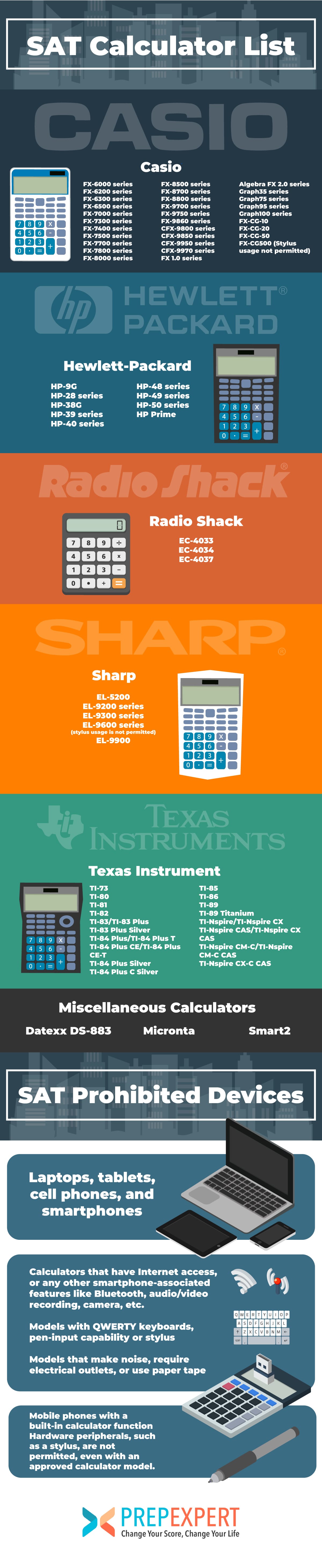
Navigating the College Board’s specific guidelines on allowed calculators is paramount for any SAT test-taker. While the general rule is to avoid devices that can communicate, record, or access the internet, understanding the nuances between permitted and prohibited models is crucial. The authorized list primarily focuses on specific categories and features, providing clarity on what students can bring into the testing room.
Graphing Calculators: The Preferred Choice
For many students, graphing calculators are the go-to choice due to their extensive capabilities that directly assist with the more complex math problems found on the SAT. These devices can plot graphs, solve equations, perform matrix operations, and handle statistical computations, often providing a visual representation of mathematical concepts. The vast majority of commonly used graphing calculators are permitted, including:
-
Texas Instruments (TI) models: This brand dominates the list, with popular models like the TI-83, TI-84 (including Plus, Silver Edition, CE, and Plus CE), and even the TI-Nspire (non-CAS models or CAS models with the appropriate mode setting). The TI-89 and TI-Nspire CAS are generally allowed, but test-takers must ensure they are not in a mode that offers prohibited functionalities or that specific features (like symbolic manipulation on the CAS) are not used in a way that violates test rules, though the safest bet is often a non-CAS model.
-
Casio models: Many Casio FX-CG series (e.g., FX-CG50, FX-CG10/20 PRIZM) and some FX-9750G series are allowed.
-
Hewlett-Packard (HP) models: HP Prime, HP 48GII, and others are typically approved.
-
Sharp models: Certain Sharp EL-9600 series and similar graphing calculators are also on the list.
It is always advisable to check the exact model number against the College Board’s official website, as policies can be updated, and specific sub-models might have unique restrictions.
Scientific Calculators: A Reliable Backup
While graphing calculators offer a broad spectrum of functionalities, a standard scientific calculator is often sufficient for a significant portion of the SAT Math section. These calculators handle arithmetic, trigonometry, logarithms, powers, roots, and basic statistics. They are generally simpler, more affordable, and less prone to being questioned by proctors. For students who are comfortable with algebra and prefer a more straightforward tool, a scientific calculator can be an excellent choice. Popular allowed models include:
-
Texas Instruments: TI-30X, TI-34 MultiView, and similar.
-
Casio: FX-115ES Plus, FX-991EX ClassWiz, and various other FX models.
-
Sharp: EL-W516, EL-520, and similar.
The key advantage of a scientific calculator is its focus on core computational tasks without the added complexity (or potential for distraction) of graphing features. They are also less likely to possess any of the advanced features that could lead to disqualification.
Prohibited Calculators: Know What to Avoid
Equally important as knowing what’s allowed is being absolutely clear on what is not permitted. Bringing a prohibited device can result in immediate dismissal from the test. The College Board explicitly bans calculators with the following characteristics:
-
QWERTY Keyboards: Any calculator with a full alphanumeric keyboard similar to a computer keyboard is forbidden, as it could be used for text messaging or storing extensive notes.
-
Devices with internet access: Smartphones, tablets, laptops, smartwatches, and any calculator with cellular, Wi-Fi, or Bluetooth capabilities are strictly prohibited. The concern here is communication with outside sources and access to online information.
-
Calculators that make noise: Devices that beep, buzz, or create any auditory distractions are not allowed.
-
Calculators with paper tape output: Any device that can print or create a physical record of calculations is banned.
-
Calculators with a camera, audio/video recording capabilities: These features are obvious security risks and are not allowed.
-
Power cords: Calculators that require an electrical outlet are not permitted.
-
Handheld, tablet, or laptop computers: General-purpose computing devices, even if they have calculator functions, are banned.
Students should meticulously check their device against these prohibitions. When in doubt, it is always safer to opt for a simpler, clearly approved model or to contact the College Board directly.
Key Features and Considerations for SAT-Approved Calculators
Choosing the right calculator for the SAT isn’t just about adherence to rules; it’s about selecting a tool that genuinely enhances your performance. Beyond the basic allowance, certain technological features and practical considerations can significantly impact your efficiency and accuracy on test day.
Essential Functions for SAT Math
While the SAT has a no-calculator section, the section where calculators are permitted often includes problems that benefit greatly from their capabilities. The most critical functions a calculator should possess for the SAT Math section include:
-
Basic Arithmetic: Addition, subtraction, multiplication, division are fundamental.
-
Fractions: The ability to work with fractions directly, converting to decimals and vice-versa.
-
Exponents and Roots: Calculating powers, square roots, and higher-order roots.
-
Logarithms: Essential for certain algebraic problems.
-
Trigonometric Functions: Sine, cosine, tangent, and their inverses (sin⁻¹, cos⁻¹, tan⁻¹). Many geometry and pre-calculus problems involve trigonometry.
-
Graphing Capabilities (for graphing calculators): Plotting linear, quadratic, exponential, and other functions is incredibly useful for visualizing solutions, finding intercepts, and understanding function behavior. This can quickly verify solutions or provide insights for complex equations.
-
Statistical Functions: Mean, median, mode, standard deviation, and regression analysis are helpful for data interpretation problems, especially those involving scatter plots or statistical reasoning.
-
Solving Equations: The ability to solve linear, quadratic, and systems of equations, either numerically or graphically, can save valuable time.
An ideal SAT calculator should offer a robust set of these features, allowing students to tackle a wide array of problem types with confidence.
User Interface and Ergonomics
Beyond raw functionality, the design and user experience of a calculator play a significant role in its effectiveness. An intuitive interface can drastically reduce the time spent navigating menus and inputting data, especially under timed test conditions.
-
Display Quality: A clear, legible display with good contrast is crucial. Graphing calculators often have larger screens, allowing for better visualization of graphs and multiple lines of input/output. Backlit displays can be a bonus, though not typically necessary in a well-lit test environment.
-
Button Layout and Responsiveness: Well-spaced, tactile buttons that register presses reliably prevent input errors. A logical layout makes it easier to locate frequently used functions quickly.
-
Battery Life and Type: Long-lasting batteries (ideally AAA, AA, or rechargeable) are essential. Students must ensure their calculator is fully charged or has fresh batteries before test day. Carrying spare batteries is also a wise precaution.
-
Physical Size and Weight: While less critical, a calculator that feels comfortable in hand and fits easily on a desk can prevent minor annoyances during a lengthy exam.
A calculator that is both powerful and user-friendly allows students to focus on the problem at hand, rather than wrestling with the technology itself.
The Advantage of Familiarity: Why Your Own Calculator Matters
Perhaps the most underrated aspect of calculator selection is familiarity. It’s not enough to simply have an allowed, feature-rich device; you must be proficient in its use. Students should use the exact calculator they plan to bring to the SAT throughout their entire preparation period.
-
Muscle Memory: Consistent use builds muscle memory, allowing for quicker input and navigation without conscious thought.
-
Understanding Specific Functions: Each calculator model has its quirks in terms of how specific functions are accessed or how input is processed. Knowing these nuances prevents confusion and errors during the test.
-
Troubleshooting: Practicing with your calculator helps you understand its limitations and how to troubleshoot common issues (e.g., syntax errors, mode settings) before the high-pressure environment of the SAT.
Relying on a brand-new or unfamiliar calculator on test day is a recipe for anxiety and lost time. The technological tool should feel like an extension of your problem-solving process, not a barrier.
Maximizing Your Calculator’s Potential on Test Day
Possessing an allowed and familiar calculator is just the first step. To truly leverage this technological advantage on the SAT, students must approach its use strategically, both in preparation and during the exam itself.
Pre-Test Checklist: Ensuring Your Calculator is Ready
The last thing any student needs on test day is a malfunctioning calculator. A thorough pre-test checklist can prevent common tech-related pitfalls:
-
Battery Check: Ensure your calculator has fresh batteries or is fully charged. If it uses disposable batteries, consider replacing them the week before the test, even if they seem fine. For rechargeable models, charge it fully the night before.
-
Spare Batteries: Pack a set of spare batteries (if applicable) and know how to quickly change them.
-
Clear Memory: Reset or clear the calculator’s memory. This is a common requirement to ensure no pre-programmed information or notes are stored, which could be misinterpreted as cheating. Familiarize yourself with how to perform a memory reset for your specific model.
-
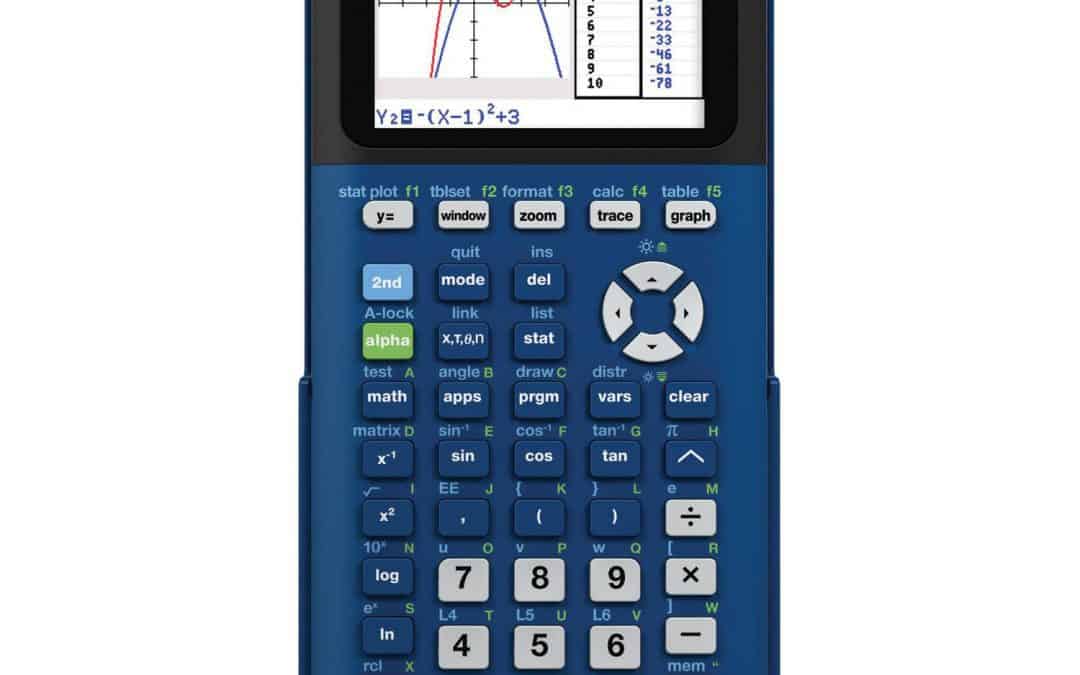
Mode Settings: Verify that your calculator is in the correct mode (e.g., “degree” mode for trigonometry, if not specified otherwise in a problem). Graphing calculators often have various modes for different types of calculations.
-
Physical Condition: Check for any physical damage, loose buttons, or a dim screen. Ensure it powers on and off reliably.
These simple checks can save invaluable time and stress during the exam, ensuring your tech tool is ready for action.
Strategic Use During the Exam: When and How to Leverage Your Tech
It’s a common misconception that every problem in the calculator-permitted section requires a calculator. Strategic use means knowing when to use it and when not to.
-
Don’t Over-rely: Some problems are designed to be solved conceptually or through estimation, where a calculator might actually slow you down. If a mental calculation or a quick algebraic manipulation is faster, go that route.
-
Verify Answers: Use your calculator to quickly double-check arithmetic, evaluate expressions, or graph functions to verify a solution found algebraically.
-
Complex Computations: For problems involving large numbers, decimals, fractions, exponents, roots, or trigonometric values, the calculator is indispensable for accuracy and speed.
-
Graphing for Insight: If a problem involves functions, inequalities, or systems of equations, use the graphing feature to visualize the problem, find intersection points, or determine behavior, which can lead to a quicker solution or verification.
-
Statistical Analysis: For data interpretation or statistics questions, input data to find means, standard deviations, or perform regression analyses efficiently.
-
Time Management: Consciously decide if the time spent inputting data into the calculator will be offset by the speed and accuracy of the calculation. Avoid using it for simple arithmetic that could be done quickly in your head.
Effective calculator use on the SAT is about intelligent integration, not constant reliance. It’s a tool to augment your mathematical reasoning, not replace it.
In conclusion, the SAT’s calculator policy is a nuanced reflection of technology’s evolving role in education. By understanding the allowed devices, their essential features, and how to use them strategically, students can transform a potentially confusing regulation into a clear advantage. The right calculator, used wisely and prepared meticulously, becomes an extension of a student’s problem-solving toolkit, empowering them to tackle the mathematical challenges of the SAT with confidence and precision.
aViewFromTheCave is a participant in the Amazon Services LLC Associates Program, an affiliate advertising program designed to provide a means for sites to earn advertising fees by advertising and linking to Amazon.com. Amazon, the Amazon logo, AmazonSupply, and the AmazonSupply logo are trademarks of Amazon.com, Inc. or its affiliates. As an Amazon Associate we earn affiliate commissions from qualifying purchases.