
Selling stocks is a fundamental aspect of investing, just as important as buying them. Whether you’re looking to lock in profits, cut losses, rebalance your portfolio, or simply access your cash, understanding the mechanics and implications of selling on a platform like Robinhood is crucial. While Robinhood has democratized access to the stock market, its user-friendly interface can sometimes oversimplify complex financial decisions. This guide will walk you through the process of selling your stocks on Robinhood, from the practical steps within the app to the strategic considerations that can impact your financial outcomes.
Successfully navigating the sell order process requires more than just a few taps on a screen; it demands a clear strategy, an understanding of market dynamics, and an awareness of the financial repercussions, particularly regarding taxes. This article aims to provide a comprehensive, insightful, and professional perspective for investors looking to make informed selling decisions on the Robinhood platform.
Understanding When and Why to Sell Your Investments
Before you even open the Robinhood app, the most important step is to understand why you are considering selling. A clear rationale will guide your decision-making and help you execute your strategy effectively. Selling, much like buying, should be driven by a well-thought-out plan, not by emotion.
Identifying Your Investment Goals and Exit Strategy
Every investment should ideally begin with an end in mind. What was the original purpose of buying this particular stock?
-
Profit Taking: If a stock has performed well and reached your target price, selling some or all of your shares to realize those gains is a common strategy. This aligns with your initial profit objective.
-
Loss Cutting (Stop-Loss): Sometimes, an investment doesn’t pan out as expected. Setting a pre-determined “stop-loss” point can help limit potential losses by automatically triggering a sell order if the stock price drops to a certain level. This is a crucial risk management technique.
-
Portfolio Rebalancing: Over time, some investments may grow to represent a larger percentage of your portfolio than you intended, throwing off your desired asset allocation. Selling a portion of these successful holdings and reinvesting in underperforming assets (or those that now fit your target allocation) can help maintain a balanced, diversified portfolio.
-
Changing Fundamentals: The underlying business or market conditions for a company might deteriorate, making its long-term prospects less appealing. If your investment thesis for a stock no longer holds true, selling might be prudent.
-
Need for Cash: Life happens. You might need funds for a down payment, an emergency, or another significant expense. In such cases, liquidating investments might be necessary, even if it’s not ideal from an investment strategy standpoint.
Having a defined exit strategy for each investment helps remove emotion from the decision and provides a framework for when to pull the trigger.
Market Conditions and Their Impact
The broader market environment plays a significant role in selling decisions.
-
Bull vs. Bear Markets: In a bull market (rising prices), you might find it easier to sell at a profit. In a bear market (falling prices), you might be selling to cut losses or reduce overall market exposure, potentially facing less favorable prices.
-
Volatility: Periods of high market volatility can make selling more challenging. Rapid price swings mean that the price at which your order executes could be significantly different from the price you saw just moments before, especially with market orders. Limit orders can help mitigate this risk.
-
Company-Specific News: Earnings reports, product launches, regulatory changes, or leadership shifts can dramatically affect a stock’s price, creating opportunities or necessities to sell. Staying informed about your holdings is key.
Tax Implications of Selling Stocks
Perhaps one of the most overlooked aspects of selling stocks is the tax consequence. In the U.S., profits from selling investments are subject to capital gains taxes.
-
Short-Term Capital Gains: If you sell a stock that you’ve held for one year or less, any profit is considered a short-term capital gain and is taxed at your ordinary income tax rate, which can be as high as 37% (as of current tax laws).
-
Long-Term Capital Gains: If you sell a stock that you’ve held for more than one year, any profit is considered a long-term capital gain and is taxed at more favorable rates, typically 0%, 15%, or 20%, depending on your income bracket.
-
Capital Losses: If you sell a stock for a loss, you can use that loss to offset capital gains. If your capital losses exceed your capital gains, you can deduct up to $3,000 of the net loss against your ordinary income in a given tax year, and carry forward any remaining losses to future years.
-
Wash Sale Rule: Be aware of the wash sale rule. If you sell a stock at a loss and then buy substantially identical stock or securities within 30 days before or after the sale, the IRS disallows the loss. This prevents investors from claiming artificial losses for tax purposes.
Understanding these tax implications can significantly influence when you decide to sell, especially for holdings nearing the one-year mark. Consulting a tax professional is always recommended for personalized advice.
A Step-by-Step Guide to Selling Stocks on Robinhood
Robinhood’s platform is designed for ease of use, making the process of placing a sell order relatively straightforward. However, understanding the nuances of different order types is critical for successful execution.
Navigating the Robinhood App
-
Open the Robinhood App: Log in to your account using your credentials.
-
Access Your Portfolio: From the main screen, you’ll see your portfolio summary. Scroll down to “My Investments” or tap on the magnifying glass icon to search for a specific stock.
-
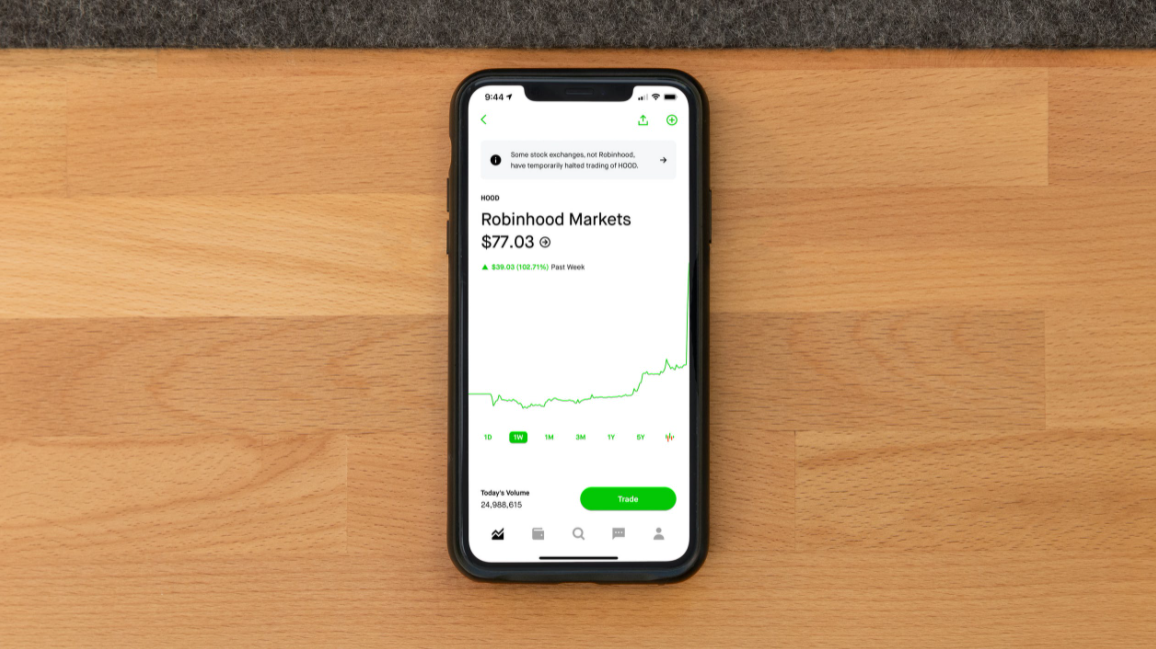
Select the Stock: Tap on the stock you wish to sell. This will take you to the stock’s detail page, showing its current price, performance charts, news, and your holdings.
-
Initiate Sell Order: On the stock’s detail page, you will see a “Trade” button (or sometimes directly a “Sell” button if you hold the stock). Tap “Trade,” then select “Sell.”
Placing a Sell Order (Market, Limit, Stop Orders)
Once you’ve selected “Sell,” you’ll be prompted to choose an order type and specify the quantity. This is where strategic thinking comes into play.
-
Market Order (Default):
-
How it works: A market order instructs Robinhood to sell your shares immediately at the best available market price.
-
Pros: Fastest execution, guarantees your order will be filled.
-
Cons: The actual price you receive may be different from the last quoted price, especially for volatile or thinly traded stocks. This is known as “slippage.”
-
When to use: When you prioritize immediate execution over a precise price, and for highly liquid stocks where price discrepancies are usually minimal.
-
Process: Select “Market Order,” enter the number of shares, review, and swipe up to submit.
-
-
Limit Order:
-
How it works: A limit order specifies the minimum price you are willing to accept for your shares. Your order will only execute if the stock’s price reaches or exceeds your specified limit price.
-
Pros: Gives you control over the selling price, protecting you from selling at an undesirably low price.
-
Cons: There’s no guarantee your order will be filled if the stock never reaches your limit price.
-
When to use: When you have a target price in mind and are willing to wait for it, or to avoid selling below a certain value in a volatile market.
-
Process: Tap “Shares” (or the current order type), select “Limit Order,” enter the number of shares and your desired limit price, choose order duration (e.g., “Good for Day” or “Good ’til Canceled”), review, and swipe up to submit.
-
-
Stop Order (Stop-Loss Order):
-
How it works: A stop order becomes a market order once the stock’s price falls to or below your specified “stop price.” It’s primarily used to limit potential losses.
-
Pros: Automates loss prevention, allowing you to define your maximum acceptable loss.
-
Cons: Once triggered, it becomes a market order, meaning the execution price might be below your stop price, especially in fast-moving markets.
-
When to use: To protect against significant downside risk, particularly for volatile holdings or when you can’t actively monitor the market.
-
Process: Tap “Shares,” select “Stop Order,” enter the number of shares and your desired stop price, choose order duration, review, and swipe up to submit.
-
-
Stop Limit Order:
-
How it works: This is a hybrid. It becomes a limit order once the stock’s price falls to or below your specified “stop price.” Then, it will only execute if the price is at or above your specified “limit price.”
-
Pros: Offers more control than a pure stop order by preventing execution at an excessively low price after the stop is triggered.
-
Cons: Like a limit order, there’s no guarantee of execution if the price drops below your limit price after the stop is triggered.
-
When to use: When you want to limit losses but also want to avoid selling at a fire-sale price if the market drops sharply through your stop level.
-
Process: Tap “Shares,” select “Stop Limit Order,” enter the number of shares, your stop price, and your limit price, choose order duration, review, and swipe up to submit.
-
Understanding Settlement Periods and Cash Availability
Once your sell order executes, the transaction isn’t immediately settled. Stock trades typically settle on a “T+2” basis, meaning the funds from the sale will be fully available in your account two business days after the trade date.
-
Trade Date (T): The day you execute the sell order.
-
Settlement Date (T+2): Two business days later, the funds officially transfer.
While Robinhood offers “Instant Settlement” for certain deposits and withdrawals (if you have Robinhood Gold or meet specific criteria), this generally applies to buying power or transferring cash to your bank. For withdrawals of funds from stock sales, the T+2 settlement period usually applies before the cash is truly available for an ACH transfer to your external bank account. You can often use the proceeds to buy other stocks immediately within Robinhood, but withdrawing to your bank will require waiting for settlement.
Advanced Selling Strategies and Considerations
Beyond the mechanics, strategic thinking can greatly enhance your selling effectiveness and overall financial well-being.
Partial Sells vs. Full Liquidations
When you decide to sell a stock, you don’t always have to sell all of your shares.
-
Partial Sell (Trimming): Selling a portion of your holdings, especially after a significant gain, can be a way to “take some money off the table” while still participating in potential future upside. It can also be used to rebalance your portfolio without completely exiting a position. This helps reduce risk exposure while maintaining some skin in the game.
-
Full Liquidation: Selling all your shares means you completely exit the position. This might be appropriate if your investment thesis has fundamentally changed, if you need the entire capital, or if you believe the stock has no further growth potential.
The choice depends on your risk tolerance, future outlook for the stock, and portfolio management goals.
The Importance of Diversification Even When Selling
While diversification is typically discussed in the context of buying, it’s also relevant when selling. If you’re selling a significant portion of a highly concentrated position, consider how the proceeds will be reinvested. Will they be used to further diversify your portfolio, reducing your reliance on a few holdings? Or will you concentrate them into another single stock, potentially shifting risk rather than mitigating it? Strategic selling can be an opportunity to re-evaluate your overall asset allocation and ensure it aligns with your long-term objectives.
Avoiding Emotional Trading
Fear and greed are powerful emotions that can derail even the best-laid investment plans.
-
Fear: Panic selling during market downturns often locks in losses that might have recovered over time.
-
Greed: Holding onto a winning stock for too long, hoping for even greater gains, can lead to missing opportunities to take profits before a correction.
Stick to your pre-defined exit strategy. If your reasons for selling are based on fundamental analysis or pre-set goals (like profit targets or stop-losses), you’re less likely to make impulsive, detrimental decisions. Reviewing your investment thesis regularly and objectively is key.
After the Sale: What Happens Next?
Once your sell order has executed and the funds have settled, you have a few options for your cash, and some administrative tasks to keep in mind.
Accessing Your Funds
-
Within Robinhood: The settled funds are available as “Buying Power” in your Robinhood account. You can use this cash immediately to purchase other stocks, options, or cryptocurrency directly through the app.
-
Withdrawing to Your Bank: If you wish to withdraw the cash to your linked bank account, navigate to the “Transfers” section within the Robinhood app, select “Transfer to Your Bank,” enter the amount, and confirm the transfer. ACH transfers typically take 1-3 business days to appear in your bank account after they’ve left Robinhood.
-
Instant Deposits: Remember that instant deposits on Robinhood are usually for funding your buying power. When withdrawing funds from stock sales, the T+2 settlement period applies, and then the ACH transfer time frame begins.
Reinvesting or Withdrawing
This decision loops back to your overall financial plan.
-
Reinvesting: If your goal is long-term wealth accumulation, reinvesting your proceeds, perhaps into other diversified assets, is often the most suitable path. This could involve rebalancing your existing portfolio or seeking new investment opportunities.
-
Withdrawing: If you sold for a specific financial need (e.g., down payment, emergency fund), then withdrawing the cash for its intended purpose is the logical next step. Ensure you’ve accounted for any tax liabilities before spending the full amount.

Record Keeping and Tax Reporting
Robinhood will provide you with tax documents, primarily Form 1099-B, which details all your stock sales (and other transactions) for the tax year. This document will show your proceeds, cost basis, and whether the gains/losses were short-term or long-term.
-
Maintain Records: It’s good practice to keep your own records of trade confirmations, which Robinhood provides in the app and via email. This includes the date of sale, number of shares, sale price, and any fees.
-
Tax Preparation: Use your 1099-B to accurately report your capital gains and losses on your annual tax return. If you have complex trades or significant capital gains, consider using tax preparation software or consulting a tax professional to ensure compliance and optimize your tax situation.
Selling stocks on Robinhood is a straightforward process from a technical standpoint, but it’s a financial decision with significant implications. By understanding the “why” and “when” behind your sell orders, choosing the appropriate order type, and being mindful of tax consequences and settlement periods, you can make informed decisions that align with your broader financial goals. Always approach investing and selling with a clear strategy and a long-term perspective.
aViewFromTheCave is a participant in the Amazon Services LLC Associates Program, an affiliate advertising program designed to provide a means for sites to earn advertising fees by advertising and linking to Amazon.com. Amazon, the Amazon logo, AmazonSupply, and the AmazonSupply logo are trademarks of Amazon.com, Inc. or its affiliates. As an Amazon Associate we earn affiliate commissions from qualifying purchases.