
In an increasingly digital economy, proficiency with essential software tools is no longer a niche skill but a fundamental requirement. Among the myriad applications that power modern businesses, QuickBooks stands out as the dominant force in small to medium-sized business (SMB) accounting and financial management. For professionals looking to validate their expertise, enhance their career prospects, or simply streamline their own business operations, obtaining QuickBooks certification is a powerful credential. This guide delves into the technical aspects of achieving certification, outlining the pathways, preparations, and inherent value of mastering this critical software.
Understanding QuickBooks Certifications and Their Value
QuickBooks certification is more than just a badge; it’s a testament to a user’s comprehensive understanding and practical ability to navigate and utilize the software effectively. Designed by Intuit, the creators of QuickBooks, these certifications serve as a benchmark for technical proficiency in various versions and functionalities of their flagship product.
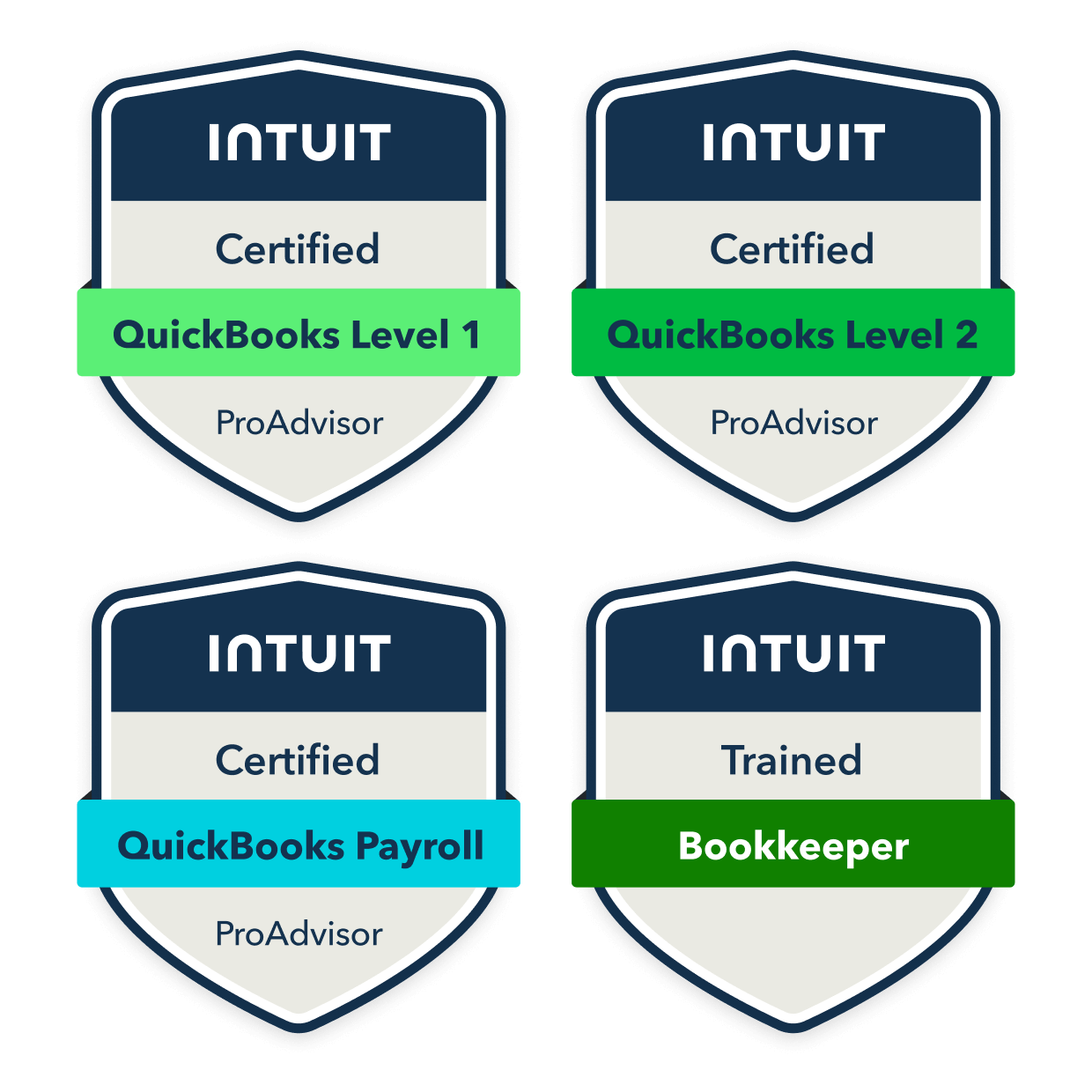
Different Certification Levels and Their Focus
Intuit offers several certification pathways, catering to different user needs and levels of expertise. The two primary categories generally recognized are:
-
QuickBooks Certified User (QBCU): This certification is often aimed at students, entry-level bookkeepers, small business owners, or anyone looking to demonstrate foundational competence in QuickBooks Desktop or Online. It validates basic skills such as setting up a company file, managing customer and vendor transactions, reconciling bank accounts, and generating standard reports. The focus here is on operational familiarity with the software’s core features for day-to-day bookkeeping tasks.
-
QuickBooks Online (QBO) ProAdvisor Certification: This is a more advanced and highly valued certification, specifically for accounting professionals, bookkeepers, and consultants who advise clients using QuickBooks Online. The ProAdvisor program offers multiple levels (e.g., Basic, Advanced) and specializations (e.g., Payroll, Self-Employed). It delves deeper into advanced features like complex bank reconciliations, managing inventory, working with apps, advanced reporting, payroll setup and processing, and best practices for managing multiple client accounts within the QBO ecosystem. ProAdvisors also gain access to exclusive training, support, and marketing tools from Intuit.
While less formally “certified” in the same way, expertise in specific QuickBooks Desktop versions (e.g., Enterprise Solutions) is often demonstrated through years of practical experience and proficiency tests provided by employers or industry bodies, rather than a universal Intuit-issued certificate. The QBCU is the closest to a general “user” certification for Desktop.
Who Benefits from QuickBooks Certification?
A wide array of professionals and entrepreneurs can significantly benefit from obtaining QuickBooks certification:
-
Bookkeepers and Accountants: For these professionals, certification is almost a prerequisite. It validates their skills to potential employers or clients, demonstrating a commitment to professional development and technical accuracy in a widely used software.
-
Small Business Owners: While they might not need the ProAdvisor level, understanding the technical ins and outs of QuickBooks through a QBCU certification empowers them to manage their own finances more effectively, make informed business decisions, and communicate better with their accounting professionals.
-
Job Seekers: In administrative, office management, or financial support roles, QuickBooks proficiency is often listed as a required or preferred skill. Certification can give candidates a significant edge in a competitive job market.
-
Consultants and Advisors: Those who guide businesses on financial processes and software implementations find certification invaluable for building trust and credibility. It signifies they possess the technical knowledge to provide accurate and effective advice.
-
Students: Pursuing business, finance, or accounting degrees can leverage certification to make their resumes stand out before even entering the workforce.
The Tangible Benefits of Technical Validation
Beyond personal satisfaction, QuickBooks certification offers concrete advantages:
-
Enhanced Credibility and Trust: A certification acts as an objective third-party validation of your skills, assuring clients and employers of your technical competence.
-
Career Advancement and Opportunities: Certified professionals are often prioritized for promotions, new roles, and higher earning potential due to their proven expertise. Many accounting firms specifically seek out ProAdvisors.
-
Increased Efficiency and Accuracy: The structured learning required for certification deepens understanding of the software’s features, leading to more efficient workflows and fewer errors in financial data management.
-
Access to Resources and Community: Especially with the ProAdvisor program, certification unlocks access to exclusive Intuit resources, training materials, priority support, and a community of peers for networking and problem-solving.
-
Business Growth for Service Providers: ProAdvisors can list their services on Intuit’s Find-a-ProAdvisor directory, directly connecting them with businesses seeking QuickBooks experts, leading to significant client acquisition.
Navigating the QuickBooks Learning Path
The journey to QuickBooks certification requires a structured approach to learning, combining official resources, self-study, and crucial hands-on experience. The technical depth of the software demands dedicated practice.
Official QuickBooks Training Resources
Intuit provides robust official training programs specifically designed to prepare candidates for their certifications:
-
Intuit Academy (for QBCU): For the QuickBooks Certified User exam, Certiport (Intuit’s certification partner) directs candidates to various learning platforms, including official Intuit-designed curriculum often integrated into academic programs or offered through authorized training centers. These curricula focus on the practical application of QuickBooks Desktop or Online features, typically broken down into modules covering setup, transactions, reporting, and basic management.
-
QuickBooks ProAdvisor Program (for QBO ProAdvisor): This is the flagship training pathway for accounting professionals. Upon signing up for free, members gain access to a comprehensive library of online courses, webinars, and study materials covering all aspects of QuickBooks Online. The program is self-paced and modular, featuring video lessons, practice exercises, and knowledge checks to reinforce learning. It systematically guides users through basic to advanced QBO features, including client management, advanced payroll, and app integrations.
These official resources are highly recommended as they align directly with the exam objectives and cover the most up-to-date software functionalities.
Self-Study Options and Supplemental Learning
While official resources are foundational, augmenting your learning with other self-study options can deepen your understanding and reinforce complex concepts:
-
Online Course Platforms: Websites like Udemy, Coursera, LinkedIn Learning, and YouTube host numerous high-quality, instructor-led courses on QuickBooks. These often provide alternative teaching styles, practical examples, and peer forums that can be beneficial. Look for courses updated for the latest QuickBooks versions.
-
Textbooks and Study Guides: Many publishers offer comprehensive textbooks and exam preparation guides specifically tailored for QuickBooks certification exams. These can be excellent for structured reading, detailed explanations, and practice questions.
-
Practice Exercise Books/Workbooks: Applying knowledge is key. Workbooks with practical scenarios and step-by-step exercises allow you to practice navigating QuickBooks features without the pressure of a real company file.
-
Intuit’s Knowledge Base and Community Forums: The official QuickBooks support site offers extensive articles, troubleshooting guides, and a vibrant community forum where users and experts discuss technical issues and solutions. This is an invaluable resource for understanding specific features or resolving challenging scenarios.
Hands-on Experience: The Key to Technical Mastery
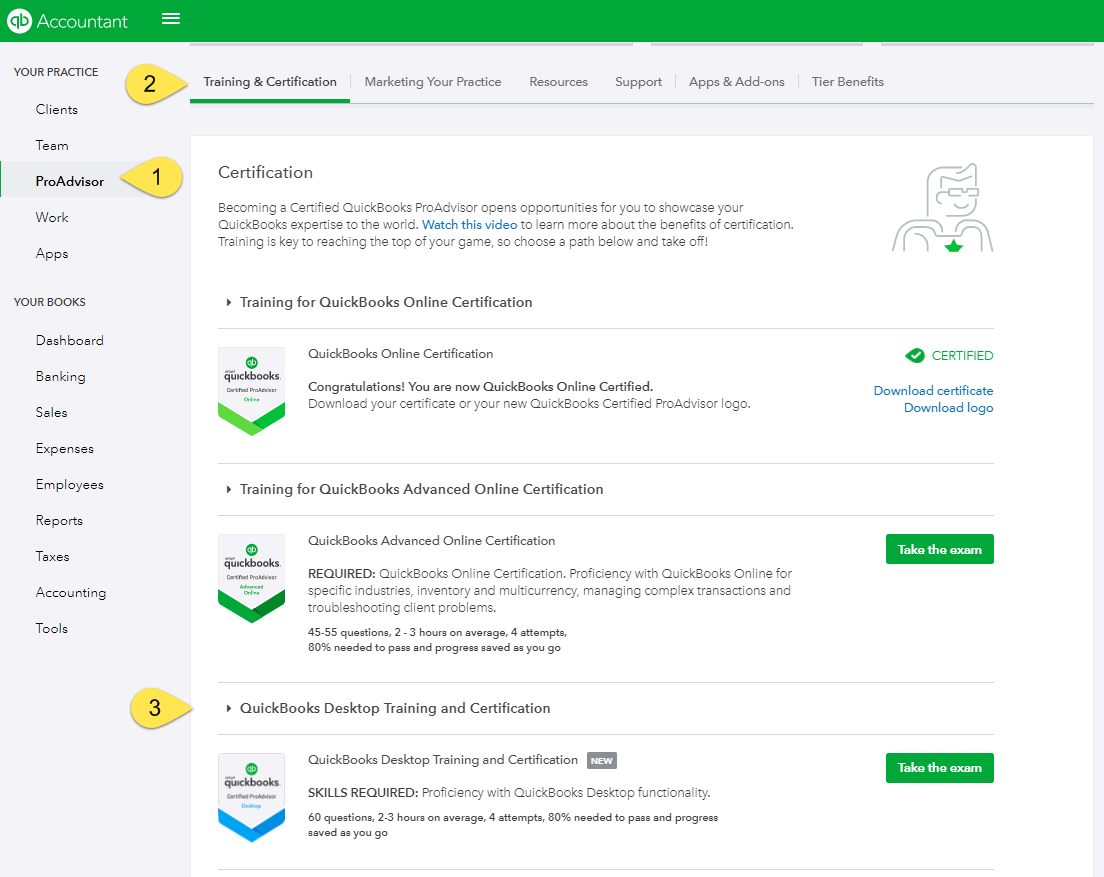
Theoretical knowledge alone is insufficient for QuickBooks certification. The exams are highly practical, testing your ability to perform tasks within the software. Hands-on experience is paramount:
-
Practice Company Files: Both QuickBooks Desktop and Online offer sample or practice company files. Utilize these extensively. Set up fake companies, enter transactions, reconcile accounts, generate reports, and intentionally make errors to learn how to correct them. The more time you spend directly interacting with the software, the more intuitive its functions will become.
-
Real-World Application: If possible, volunteer to help a small business with their bookkeeping, or manage your own personal finances using QuickBooks. There’s no substitute for grappling with real-world scenarios, even if they’re simplified.
-
Simulated Environments: Some training courses and study guides include simulated QuickBooks environments or provide detailed step-by-step instructions for completing tasks in a practice file. These are excellent for building muscle memory.
-
Explore Features Intuitively: Don’t just stick to the exam syllabus. Explore every menu, button, and report option. Click through pop-ups, read help documentation within the software, and understand the interconnectedness of different features. A deeper intrinsic understanding of the software’s architecture will serve you well.
Preparing for the Certification Exam
Success on the QuickBooks certification exam hinges on a strategic approach to preparation, combining conceptual understanding with practical application.
Understanding Exam Format and Content
Before diving into intensive study, familiarize yourself with the structure and scope of the exam you plan to take:
-
Exam Blueprint/Objectives: Intuit, through Certiport for QBCU and directly for ProAdvisor, publishes exam objectives or blueprints. These documents detail the specific topics, tasks, and functionalities that will be assessed. They are your primary guide for what to study. For QBCU, expect questions on company setup, customer/vendor management, banking, basic reporting, and payroll basics. For QBO ProAdvisor, expect much deeper dives into these areas, plus advanced topics like sales tax, inventory, budgeting, app integration, and client management.
-
Question Types: Certification exams typically include multiple-choice questions, but critically, many also feature performance-based tasks. These tasks require you to perform specific actions within a simulated QuickBooks environment or interact with a live (but sandboxed) version of the software. This is why hands-on experience is so vital.
-
Time Limits: Be aware of the allotted time for the exam. Practice completing tasks efficiently to ensure you can finish within the given timeframe. Time management is a technical skill in itself during exams.
Effective Study Strategies for Technical Exams
To maximize your chances of success, employ targeted study techniques:
-
Modular Learning: Break down the vastness of QuickBooks into manageable modules (e.g., “Customer Transactions,” “Vendor Bills,” “Bank Reconciliation,” “Reporting”). Master each module before moving on.
-
Concept-to-Application: For every feature you learn, understand why it exists, how it works conceptually, and then immediately apply it in a practice company file. For example, don’t just memorize the steps to create an invoice; understand what an invoice is, its impact on accounts receivable, and then create several invoices for different scenarios.
-
Practice Tests and Simulations: Utilize official practice tests or high-quality third-party simulations. These not only familiarize you with the exam environment but also highlight your weak areas. Analyze incorrect answers to understand the underlying concepts you missed.
-
Flashcards for Terminology: QuickBooks, like any software, has specific terminology (e.g., “chart of accounts,” “undeposited funds,” “accrual vs. cash basis”). Create flashcards for these terms and their definitions.
-
Repetition and Spaced Learning: Review topics periodically to reinforce memory. Don’t cram; instead, spread your study sessions over several weeks or months.
-
Focus on Troubleshooting: The ability to identify and correct errors is a critical skill. Practice finding and fixing common mistakes, such as incorrect journal entries, miscategorized transactions, or reconciliation discrepancies.
Leveraging the QuickBooks Software Itself for Study
The software is your most powerful study tool:
-
Deep Dive into Menus and Settings: Explore every menu, setting, and preference. Understand what each option does and how it affects the software’s behavior and financial reporting.
-
Experiment with Reports: QuickBooks offers an extensive range of reports. Run different reports, customize them, and understand how various transactions impact specific financial statements (Profit & Loss, Balance Sheet, Cash Flow). This is crucial for understanding the technical output of your data entry.
-
Utilize the Help Function: QuickBooks has an integrated help function. If you’re unsure about a feature, try using the built-in help. This teaches you how to find answers within the software, a valuable real-world skill.
-
Create Scenarios: Invent complex business scenarios (e.g., a customer returns goods, a vendor offers a discount, you need to track project costs) and then work through how you would handle them in QuickBooks.
The Certification Exam and Beyond
Successfully passing the QuickBooks certification exam is a significant achievement, but the journey doesn’t end there. Maintaining your expertise and actively applying your certification are crucial for long-term professional growth.
What to Expect on Exam Day
Knowing what to anticipate on exam day can help reduce stress and ensure a smooth experience:
-
Technical Requirements: For online proctored exams, ensure your computer meets all technical specifications (reliable internet, webcam, microphone, compatible operating system). Test your setup in advance.
-
Proctoring: Most QuickBooks certification exams are proctored, either in person at a testing center or online via live remote proctoring. Be prepared for identity verification and adherence to strict exam rules to maintain test integrity.
-
Exam Environment: Whether virtual or physical, ensure you have a quiet, distraction-free environment. Follow all instructions regarding permitted materials (usually none beyond your computer).
-
Performance-Based Questions: Be ready to navigate within the QuickBooks software (or a simulated environment) to perform actual tasks. These often involve specific steps like creating an invoice, reconciling an account, or running a custom report. Read instructions carefully and execute precisely. Don’t rush; accuracy is paramount.
-
Time Management: Keep an eye on the clock. If you get stuck on a question, flag it and move on, returning to it later if time permits. Prioritize questions you can answer quickly and accurately.
Maintaining Your Certification and Staying Current
The software landscape is constantly evolving, and QuickBooks is no exception. Intuit regularly releases updates, new features, and sometimes even changes fundamental workflows. Therefore, maintaining your certification (especially the ProAdvisor one) requires ongoing effort:
-
Annual Re-certification (for ProAdvisors): QuickBooks Online ProAdvisor certification typically requires annual renewal. This usually involves taking an updated exam that covers new features and changes introduced since your last certification. This ensures your knowledge remains current with the latest software version.
-
Continuing Education: Actively participate in webinars, workshops, and online courses offered by Intuit and other reputable providers. Stay informed about new features, industry best practices, and technological advancements related to accounting software.
-
Read Release Notes and Updates: Regularly review Intuit’s official blog, release notes, and product update announcements to understand new functionalities and changes.
-
Practice with New Features: As new features are rolled out, spend time experimenting with them in your practice company file. Understand their technical implementation and how they integrate with existing workflows.
Applying Your Certification: Career and Business Integration
Once certified, strategically leverage your credential to advance your career or grow your business:
-
Update Your Resume and Professional Profiles: Prominently display your QuickBooks certification on your resume, LinkedIn profile, and any other professional platforms. Specify the type (QBCU, QBO ProAdvisor) and version (if applicable).
-
Network with Other Professionals: Connect with other certified professionals through online forums, industry events, or professional organizations. This can lead to job opportunities, client referrals, and knowledge sharing.
-
Seek Relevant Roles: Actively look for job openings that list QuickBooks proficiency as a requirement. Your certification will make your application stand out.
-
Offer Specialized Services: If you’re a freelance bookkeeper or consultant, highlight your certification as a key differentiator. ProAdvisors should utilize the Intuit Find-a-ProAdvisor directory to attract new clients.
-
Streamline Your Business Operations: For small business owners, applying your certified knowledge directly to your own company’s finances leads to more accurate records, better financial insights, and reduced reliance on external bookkeepers for basic tasks.
-
Continuous Learning and Specialization: Consider specializing in specific areas of QuickBooks, such as payroll, inventory management, or third-party app integrations, to further enhance your expertise and marketability.
In conclusion, obtaining QuickBooks certification is a strategic investment in your technical skills and professional future. It provides verifiable proof of your ability to expertly navigate and utilize a critical piece of business software. By following a structured learning path, committing to hands-on practice, and staying current with software developments, you can unlock significant career advantages, streamline operations, and firmly establish yourself as a proficient user in the digital financial landscape.
aViewFromTheCave is a participant in the Amazon Services LLC Associates Program, an affiliate advertising program designed to provide a means for sites to earn advertising fees by advertising and linking to Amazon.com. Amazon, the Amazon logo, AmazonSupply, and the AmazonSupply logo are trademarks of Amazon.com, Inc. or its affiliates. As an Amazon Associate we earn affiliate commissions from qualifying purchases.