
In the intricate world of business, where every transaction counts and financial health dictates survival and growth, robust accounting tools are not just beneficial – they are essential. At the heart of many small to medium-sized enterprises’ financial operations lies QuickBooks, a name synonymous with accessible and powerful financial management. But what exactly is QuickBooks, and why has it become such a foundational pillar for businesses seeking to streamline their monetary affairs?
At its core, QuickBooks is an accounting software package developed and marketed by Intuit. It is designed to manage various financial tasks for businesses, from basic bookkeeping to complex financial reporting, payroll processing, and tax preparation. Far more than just a digital ledger, QuickBooks serves as a comprehensive ecosystem that empowers business owners and finance professionals to gain granular control and profound insight into their financial data, ultimately fostering smarter decision-making and sustainable growth. Understanding QuickBooks means appreciating its multifaceted role as a financial tool, a strategic partner, and a guardian of a company’s fiscal well-being.
The Core Functionality of QuickBooks: A Financial Hub
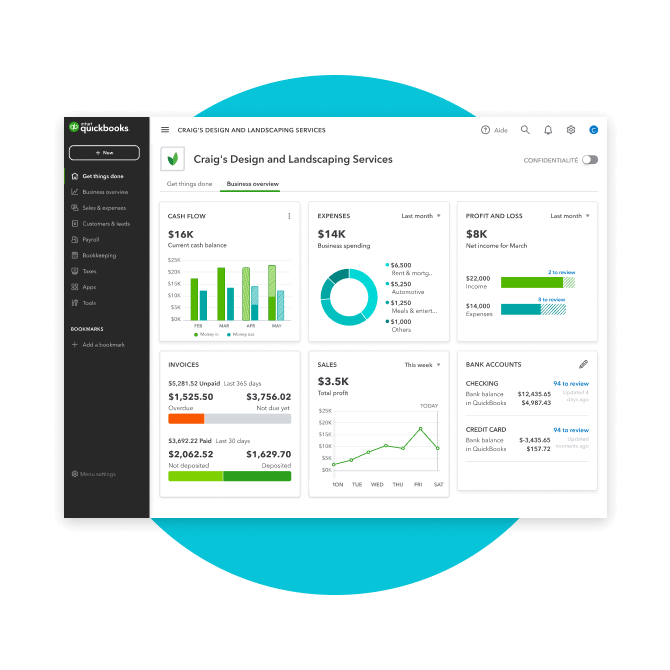
QuickBooks revolutionizes traditional accounting practices by centralizing a myriad of financial functions into one intuitive platform. It liberates businesses from the arduous, error-prone task of manual bookkeeping, offering a digital solution that enhances accuracy, saves time, and provides real-time financial snapshots. Its foundation rests on streamlining everyday financial processes, ensuring that businesses can focus more on their core operations and less on administrative burdens.
Streamlining Accounting Processes
At the very heart of QuickBooks’ appeal is its ability to automate and simplify fundamental accounting tasks. Instead of wrestling with spreadsheets and paper trails, users can record transactions, categorize expenses, and manage accounts with unprecedented ease. The software employs double-entry accounting principles in the background, ensuring balance and accuracy without requiring the user to be an accounting expert. This automation extends to reconciling bank accounts and credit cards, matching transactions, and identifying discrepancies, a process that traditionally consumes significant time and effort. By automating these core processes, QuickBooks minimizes human error, ensures data consistency, and provides a clear, auditable trail for all financial activities, establishing a bedrock of financial integrity for any business.
Tracking Income and Expenses
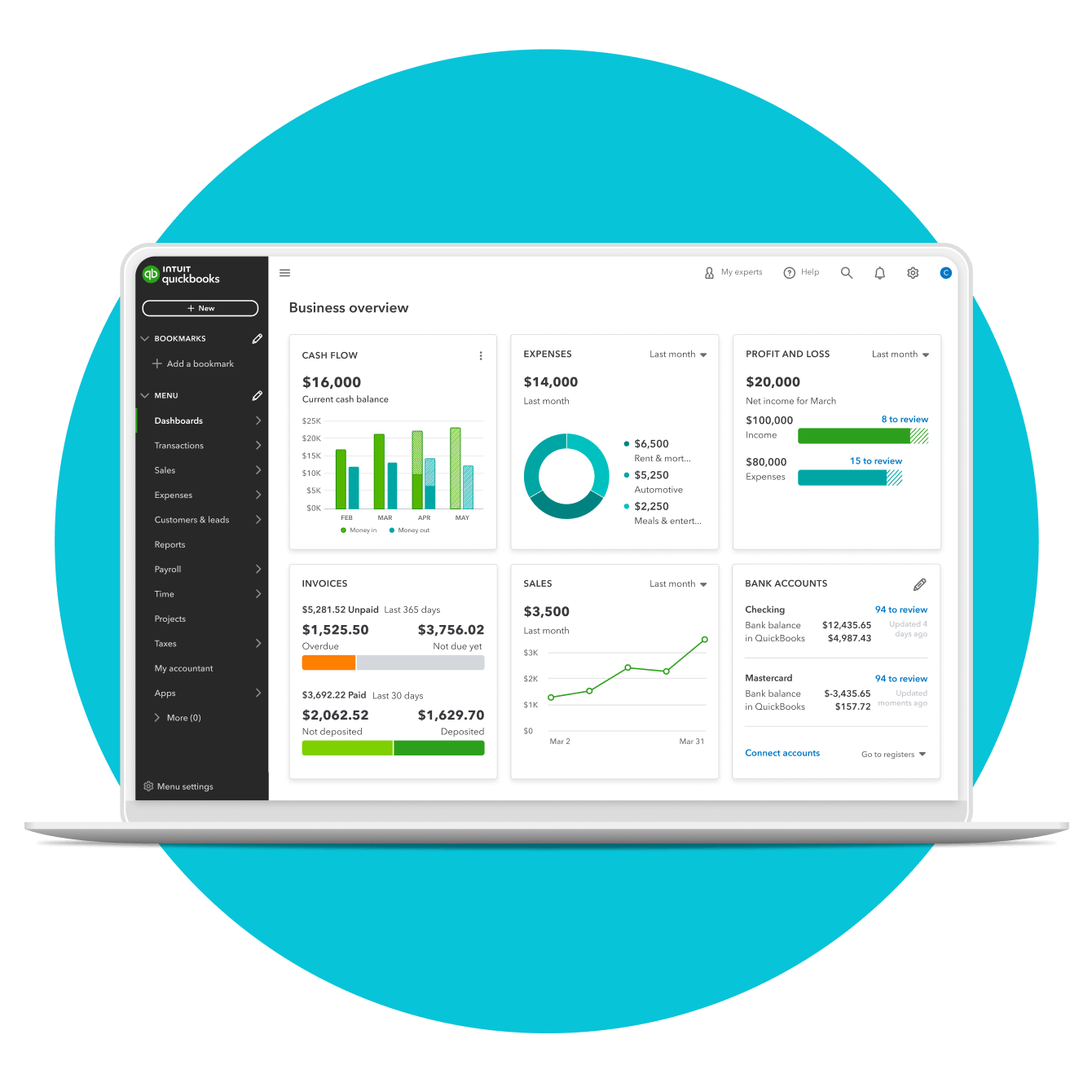
Accurate tracking of income and expenses is the lifeblood of any financially sound business, and QuickBooks excels in this domain. The software allows businesses to meticulously record every penny earned and spent, providing a transparent view of cash flow. Users can easily categorize expenses, allocate costs to specific projects or clients, and track income streams from various sources. This granular tracking capability is crucial for identifying profitable ventures, recognizing areas of overspending, and optimizing resource allocation. Whether it’s tracking sales revenue, managing utility bills, or logging travel expenses, QuickBooks offers customizable fields and robust reporting features that turn raw data into actionable insights, enabling businesses to understand where their money is coming from and where it is going with precision.
Managing Invoices and Payments
Efficient invoicing and payment management are critical for maintaining healthy cash flow and strong customer relationships. QuickBooks provides a seamless system for creating professional invoices, sending them to clients, and tracking their payment status. Businesses can customize invoice templates, set up recurring invoices for regular clients, and offer various payment options, including online payments, which significantly accelerate the payment cycle. Beyond invoicing, the software also facilitates vendor bill management, allowing businesses to enter bills, schedule payments, and track outstanding liabilities. This comprehensive approach to managing accounts receivable and payable not only streamlines operations but also helps businesses avoid late payments, optimize working capital, and maintain a positive credit standing with suppliers and customers alike.
Beyond Basic Bookkeeping: Advanced Financial Management
While QuickBooks provides an exceptional foundation for basic bookkeeping, its true power lies in its capacity to handle more sophisticated financial management tasks. It transcends simple transaction recording to offer tools that address complex operational needs, enabling businesses to integrate various financial aspects and gain deeper strategic insights. This expansion of functionality positions QuickBooks not just as an accounting tool, but as a comprehensive financial partner for growth.
Payroll Management and Tax Compliance
Managing payroll is one of the most complex and regulation-heavy aspects of business finance. QuickBooks offers integrated payroll solutions that simplify this intricate process, ensuring accuracy and compliance. From calculating employee wages, deductions, and withholdings to preparing and filing payroll taxes, QuickBooks automates many of the steps involved. It keeps track of tax regulations, helps generate W-2s and 1099s, and ensures businesses meet their statutory obligations, thereby mitigating the risk of penalties and legal issues. The integration of payroll with general ledger accounts also provides a holistic view of labor costs, allowing businesses to better manage their workforce expenses and plan for future staffing needs. This crucial feature transforms a potentially overwhelming task into a manageable and compliant process.
Inventory Management for Product-Based Businesses
For businesses dealing with physical goods, effective inventory management is paramount to profitability and operational efficiency. QuickBooks offers robust inventory tracking capabilities that allow businesses to monitor stock levels in real-time. Users can track products by quantity, cost, and sales, set reorder points, and receive alerts when stock is low. The software helps manage product variations, bundles, and assemblies, providing accurate costing for goods sold. This functionality is invaluable for optimizing purchasing decisions, reducing carrying costs, preventing stockouts, and ultimately improving customer satisfaction. By integrating inventory data with sales and purchasing, QuickBooks gives businesses a clear picture of their product life cycle and helps them make informed decisions about pricing, promotions, and procurement, directly impacting their bottom line.
Project Costing and Profitability Analysis
Understanding the true cost and profitability of individual projects or client engagements is critical for service-based businesses and project-driven companies. QuickBooks provides tools that enable detailed project costing and profitability analysis. Businesses can allocate expenses and revenues to specific projects, track time spent by employees on different tasks, and compare actual costs against budgeted figures. This detailed tracking allows for a precise understanding of each project’s financial performance. By identifying profitable projects and those that are underperforming, businesses can refine their pricing strategies, improve resource allocation, and make strategic decisions about which types of projects to pursue. This advanced analytical capability transforms raw financial data into strategic intelligence, empowering businesses to optimize their operational efficiency and maximize their earning potential on a project-by-project basis.
QuickBooks for Different Business Scales and Needs
The strength of QuickBooks lies not just in its comprehensive feature set, but also in its adaptability. Recognizing that businesses vary widely in size, structure, and operational complexity, Intuit has developed multiple versions and customization options to cater to a diverse range of financial management needs. This flexibility ensures that businesses, from sole proprietorships to burgeoning mid-sized enterprises, can find a QuickBooks solution that aligns perfectly with their current requirements and supports their future growth.
QuickBooks Online vs. Desktop: Choosing the Right Fit
The primary distinction in the QuickBooks ecosystem lies between its Online and Desktop versions, each offering distinct advantages. QuickBooks Desktop, the traditional installed software, offers robust features and local data storage, often preferred by businesses with complex inventory needs or a preference for offline access and specific industry functionalities. It typically comes in various editions (Pro, Premier, Enterprise) tailored to increasing levels of business complexity.
QuickBooks Online (QBO), on the other hand, is a cloud-based subscription service, providing unparalleled accessibility from any internet-connected device, anytime, anywhere. QBO is celebrated for its ease of use, automatic updates, and seamless integration with a vast array of third-party applications. It facilitates collaboration with accountants and team members, making it ideal for modern, remote-friendly businesses. The choice between Desktop and Online often hinges on factors such as internet reliability, preference for local vs. cloud storage, specific feature requirements, and the need for remote access and collaboration. Understanding these differences is crucial for selecting the version that best serves a business’s operational model and strategic objectives.
Industry-Specific Customization and Integrations
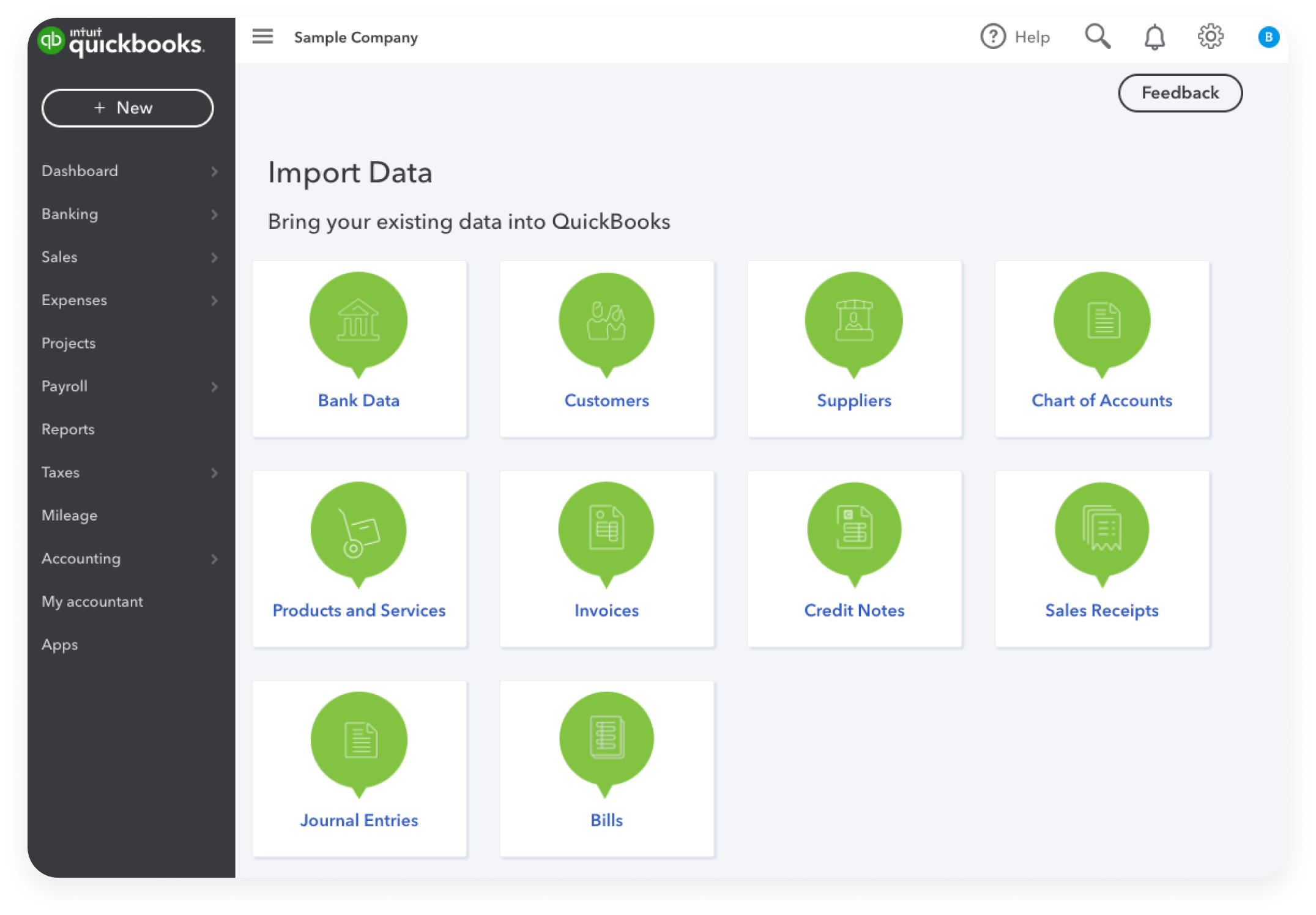
Beyond its core functionalities, QuickBooks offers significant customization capabilities and a rich ecosystem of integrations that extend its utility across various industries. While the core software provides a solid financial framework, many businesses have unique operational nuances. QuickBooks addresses this through its extensive app marketplace, featuring thousands of third-party applications that seamlessly integrate with the platform. These integrations can extend functionality for specific sectors – for instance, POS systems for retail, time-tracking tools for service businesses, or specialized inventory management for manufacturing.
Furthermore, QuickBooks Desktop’s Premier and Enterprise editions offer industry-specific versions (e.g., Contractor, Manufacturing & Wholesale, Retail, Non-Profit) with tailored reports and features. This ability to integrate with specialized tools and adapt to industry-specific workflows ensures that QuickBooks remains relevant and powerful, providing a highly personalized financial management solution that goes beyond generic accounting to meet niche demands.
Scalability for Growth: From Startups to Mid-Sized Enterprises
One of QuickBooks’ most compelling attributes is its inherent scalability. A startup can begin with a basic QuickBooks Online plan or a QuickBooks Desktop Pro version, managing fundamental income and expenses. As the business expands, requiring more advanced features such as multi-user access, enhanced reporting, advanced inventory, or even multi-company management, they can seamlessly upgrade to higher-tier QuickBooks Online subscriptions (Simple Start, Essentials, Plus, Advanced) or transition to QuickBooks Desktop Premier or Enterprise.
This seamless upgrade path ensures that a business’s financial management system can evolve alongside its growth, without the need for disruptive migrations to entirely new platforms. This scalability protects a business’s initial investment in the software and ensures that their financial tools remain adequate, powerful, and efficient, regardless of their increasing complexity or transactional volume. From a small freelancer to a multi-million-dollar enterprise, QuickBooks offers a solution designed to support progressive financial needs.
The Impact of QuickBooks on Business Financial Health
The adoption of QuickBooks extends far beyond mere administrative convenience; it profoundly impacts the overall financial health and strategic direction of a business. By providing unparalleled visibility into monetary flows and automating critical processes, QuickBooks empowers businesses to make data-driven decisions, optimize their financial structures, and build a more resilient fiscal future. Its influence is felt across multiple facets of financial management, from daily operations to long-term planning.
Enhancing Financial Reporting and Decision-Making
Perhaps the most significant impact of QuickBooks is its ability to transform raw financial data into meaningful, actionable insights through robust reporting. The software offers a wide array of customizable reports, including Profit & Loss statements, Balance Sheets, Cash Flow statements, Accounts Receivable/Payable aging reports, Sales by Customer, and Expense by Vendor summaries, among many others. These reports are not static documents but dynamic tools that can be generated and analyzed in real-time, providing an up-to-the-minute picture of a business’s financial standing.
With easy access to such comprehensive financial intelligence, business owners and managers can identify trends, spot potential issues, evaluate performance against goals, and make informed strategic decisions. This enhanced reporting capability moves businesses from reactive responses to proactive financial management, allowing them to adjust strategies, seize opportunities, and navigate challenges with greater confidence and foresight.
Optimizing Cash Flow and Budgeting
Effective cash flow management is critical for business survival, and QuickBooks plays an instrumental role in optimizing this vital aspect. By providing real-time tracking of income and expenses, accounts receivable, and accounts payable, businesses can gain a clear understanding of their current cash position and forecast future cash availability. The ability to monitor outstanding invoices, track payment dates, and manage vendor bills allows businesses to optimize their working capital, ensuring they have sufficient funds to cover operational costs and invest in growth.
Furthermore, QuickBooks facilitates comprehensive budgeting. Businesses can create detailed budgets for various periods and categories, compare actual results against budgeted figures, and identify variances. This helps in controlling spending, setting realistic financial goals, and ensuring fiscal discipline. By optimizing cash flow and maintaining diligent budgeting practices, QuickBooks directly contributes to a business’s financial stability and ability to pursue strategic initiatives without liquidity constraints.
Facilitating Tax Preparation and Audit Readiness
The often-dreaded task of tax preparation becomes significantly less daunting with QuickBooks. The software meticulously records and categorizes every financial transaction, ensuring that all necessary data for tax filings is readily available and organized. It can generate various tax reports, such as sales tax reports, expense summaries, and profit and loss statements, which are invaluable during tax season. For businesses utilizing QuickBooks Payroll, W-2s and 1099s are automatically generated, simplifying compliance with employment tax regulations.
Beyond annual tax filings, QuickBooks also promotes audit readiness. The software maintains a complete and accurate audit trail of all transactions, modifications, and user activities. This comprehensive record-keeping ensures transparency and accountability, providing easily accessible documentation for any potential audit by tax authorities or financial institutions. By reducing the complexity and stress associated with tax compliance and audits, QuickBooks allows businesses to focus their resources on growth and innovation, rather than administrative overhead and potential penalties.
Maximizing Your Investment in QuickBooks: Best Practices
To truly harness the full potential of QuickBooks and ensure it serves as a powerful engine for financial clarity, businesses must adopt specific best practices. Simply installing the software is only the first step; continuous engagement, diligent data management, and strategic utilization of its features are crucial for deriving maximum value and achieving optimal financial health. These practices transform QuickBooks from a mere tool into a strategic asset.
Regular Data Entry and Reconciliation
The accuracy and utility of QuickBooks are directly proportional to the quality and timeliness of the data entered into it. Regular and consistent data entry is paramount. This means recording all income, expenses, and other financial transactions promptly, ideally on a daily or weekly basis, rather than letting them accumulate. Delays can lead to errors, forgotten transactions, and a distorted view of the business’s financial status.
Equally important is regular reconciliation of bank and credit card accounts. This process involves comparing the transactions recorded in QuickBooks with the statements from your financial institutions. Reconciliation helps to identify discrepancies, catch errors (whether from the bank or internal entry mistakes), detect fraud, and ensure that QuickBooks accurately reflects the true cash position. Monthly reconciliation is a fundamental practice that guarantees the integrity of your financial data, providing a reliable foundation for all other financial analyses and decisions.
Leveraging Reporting Features for Insights
While QuickBooks automatically generates numerous reports, merely glancing at them is insufficient. To maximize your investment, businesses must actively leverage these reporting features to extract meaningful insights. Regularly review key financial reports such as the Profit & Loss statement, Balance Sheet, and Cash Flow statement. Pay attention to trends, compare current performance to previous periods, and analyze variances against budgets.
Go beyond the standard reports by customizing them to suit specific business needs. Filter data by customer, vendor, project, or class to gain granular insights into profitability drivers and cost centers. Utilize specific reports like “Sales by Item” or “Expenses by Vendor” to identify top-performing products/services or optimize supplier relationships. By proactively delving into the data and asking strategic questions, businesses can transform reports into powerful tools for identifying opportunities, mitigating risks, and making informed strategic adjustments that drive growth and efficiency.
Seeking Professional Support and Training
QuickBooks, while user-friendly, can have a steep learning curve, especially for advanced features or complex accounting scenarios. Investing in professional support and training is a best practice that ensures optimal utilization and prevents costly mistakes. This could involve formal training courses, webinars, or engaging with a certified QuickBooks ProAdvisor. ProAdvisors are accounting professionals specifically trained and certified by Intuit to work with QuickBooks, offering invaluable expertise in setup, ongoing support, troubleshooting, and strategic financial advice tailored to your business.
Furthermore, seeking guidance from an accountant familiar with QuickBooks can help optimize your chart of accounts, ensure proper classification of transactions, and provide strategic financial planning. This external expertise ensures that your QuickBooks setup is robust, compliant, and perfectly aligned with your business goals, allowing you to fully unlock its financial management potential and maintain a healthy, transparent fiscal operation.
aViewFromTheCave is a participant in the Amazon Services LLC Associates Program, an affiliate advertising program designed to provide a means for sites to earn advertising fees by advertising and linking to Amazon.com. Amazon, the Amazon logo, AmazonSupply, and the AmazonSupply logo are trademarks of Amazon.com, Inc. or its affiliates. As an Amazon Associate we earn affiliate commissions from qualifying purchases.