
The modern travel landscape is defined by the seamless integration of software and consumer convenience. Expedia, as one of the world’s leading Online Travel Agencies (OTAs), utilizes a complex digital ecosystem to manage millions of bookings daily. While the platform is designed for effortless acquisition, navigating the digital architecture to modify or cancel a reservation requires a technical understanding of the interface, the automated workflows, and the underlying policies that govern these digital transactions. Whether you are using the mobile application or the web-based portal, understanding the specific software steps to execute a cancellation is essential for maintaining control over your digital travel itinerary.
Navigating the Expedia Digital Ecosystem
Expedia’s platform is built on a robust multi-tenant architecture that synchronizes data across various interfaces, including their desktop site, mobile-optimized web views, and native applications for iOS and Android. When you initiate a cancellation, you are interacting with a sophisticated backend that must communicate with the hotel’s own Property Management System (PMS) via an Application Programming Interface (API).
The User Interface Layout
To begin the cancellation process, a user must first authenticate their session. On the desktop interface, the navigation bar features a prominent “Trips” icon, which serves as the primary gateway to your active database of bookings. Within the mobile application, this is typically located in the bottom navigation dock. The UI is designed using a “Card” layout, where each reservation is represented by a container holding metadata such as the Confirmation Number, Check-in/Check-out dates, and the specific property details.
Finding the specific reservation requires the system to query your account history. If the booking does not appear immediately, it is often due to a synchronization delay or the use of a different guest email address. From a technical standpoint, the “Find your booking” tool allows users to retrieve data using a specific itinerary number, which bypasses the standard account view and queries the global booking database directly.
Account Syncing and Real-Time Data
One of the most critical aspects of managing an Expedia reservation is the real-time status of the booking. When you open a specific trip, the application performs a “get” request to verify the current status of the reservation against the hotel’s live inventory. This is why you may sometimes see a loading spinner or a “Checking status” message. This step ensures that the cancellation options displayed—such as “Full Refund,” “Partial Refund,” or “Non-Refundable”—are based on the most current policy data provided by the hotel’s server.
Step-by-Step Technical Instructions for Cancellation
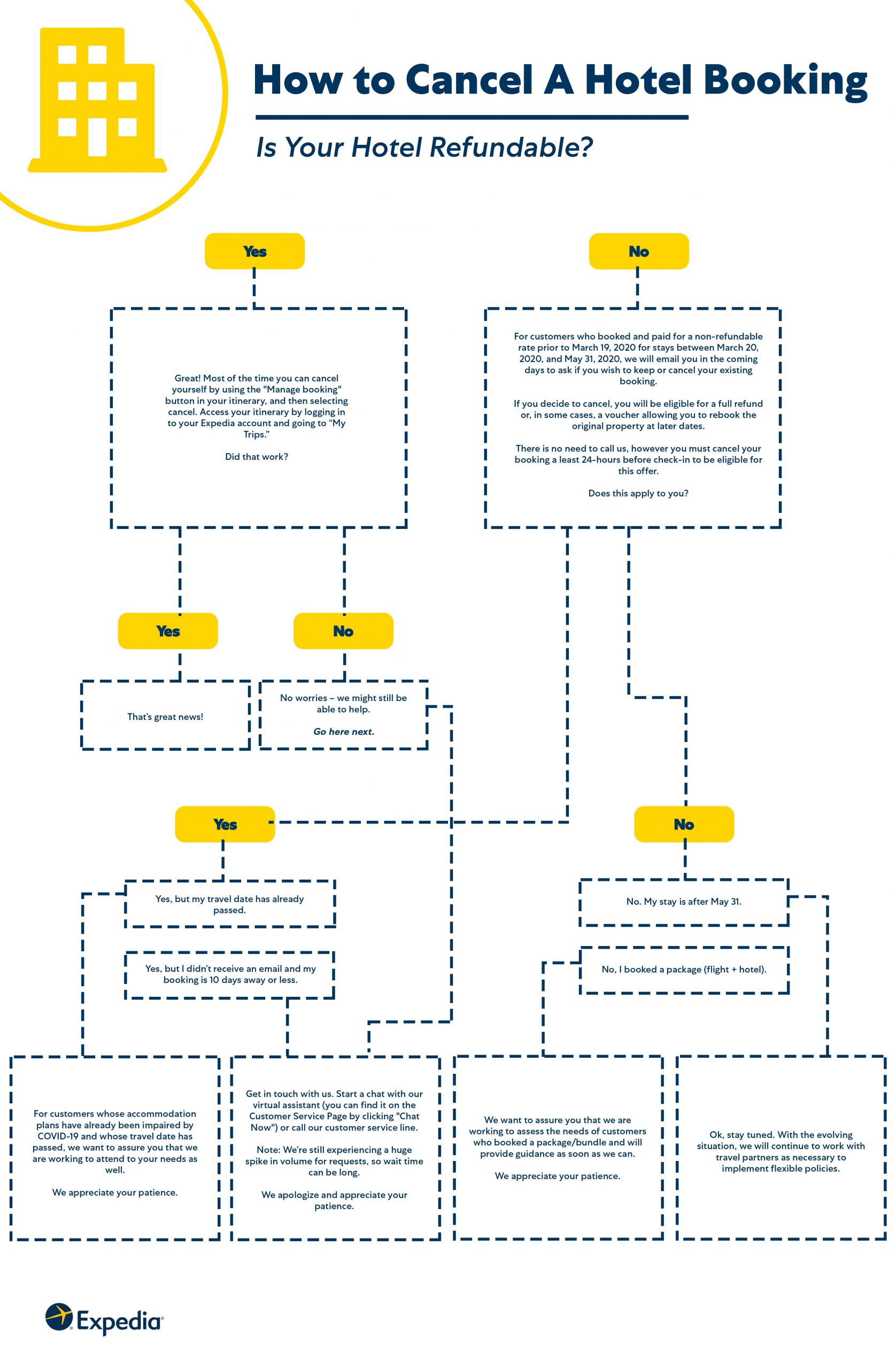
The process for canceling a hotel reservation varies slightly depending on the hardware and software environment you are using. However, the logic remains consistent: locate the record, trigger the cancellation workflow, and confirm the API response.
Cancellation via the Mobile App (iOS & Android)
For many travelers, the mobile app is the most efficient tool for management. The native app environment often provides a more streamlined UX (User Experience) than the mobile web version.
-
Launch and Authenticate: Open the Expedia app and ensure you are logged into the profile associated with the booking.
-
Access “Trips”: Tap the “Trips” icon at the bottom of the screen. This fetches your current itinerary list from the cloud.
-
Select the Property: Tap on the specific hotel reservation you wish to cancel. This opens the “Trip Details” view.
-
Initiate “Manage Booking”: Scroll down to the “Manage Booking” or “Cancel Room” section. The app will then display the cancellation policy associated with that specific digital contract.
-
Execute Cancellation: Follow the prompts to confirm. The app will send a “POST” request to Expedia’s servers, which in turn notifies the hotel.
-
Verify Receipt: Once the process is complete, the UI should update to show a “Cancelled” status, and a push notification or email trigger should be initiated.
Cancellation via Web Browser (Desktop)
The desktop version provides a more expansive view of the terms and conditions, which is helpful for reviewing fine print.
-
Sign In: Navigate to the Expedia homepage and click “Sign in” to access your centralized dashboard.
-
Navigate to “Trips”: Click on the “Trips” link in the top header.
-
Identify the Itinerary: Locate the hotel stay in your list and click “Manage Booking.”
-
Review Cancellation Windows: The web interface typically highlights the “Cancellation Deadline” in a high-contrast color. It is vital to note that these deadlines are usually based on the hotel’s local time zone, not yours.
-
Complete the Workflow: Click “Cancel Room” and select a reason from the dropdown menu (this data is used for Expedia’s internal analytics and machine learning models). Confirm the final prompt to finalize the transaction.
Utilizing the Virtual Agent (AI-Powered Assistance)
Expedia has heavily invested in Natural Language Processing (NLP) to automate customer service. Their “Virtual Agent” is an AI-driven chatbot capable of executing cancellations without human intervention. This tool is often faster than navigating menus if you have a complex itinerary. By typing “Cancel my hotel” into the chat interface, the AI identifies the most recent booking and provides a one-click cancellation button within the chat window, leveraging automated scripts to handle the backend processing.
Managing Digital Paper Trails and Security
In the digital age, a cancellation is only as good as its confirmation code. Security and verification are paramount when modifying financial agreements online.
Confirming the API Update
When a cancellation is successful, the system generates a cancellation ID. This is a unique alphanumeric string that serves as your proof of transaction. From a digital security perspective, you should always archive this code. If the hotel’s PMS fails to update despite Expedia’s API call, this ID is the primary key used by support teams to reconcile the discrepancy and ensure your refund is processed.
Data Privacy and Secure Refund Transactions
When a refund is triggered, Expedia’s payment gateway interacts with your financial institution via secure encryption protocols (SSL/TLS). It is important to understand that the refund is typically routed back to the original payment method stored in the encrypted vault. For security reasons, Expedia cannot redirect a refund to a different credit card via the standard automated interface. If your original card is expired or closed, the transaction will still usually be processed by the bank’s internal systems, but this may require manual intervention by your financial provider.
Troubleshooting Common Software Glitches during Cancellation
Despite the sophistication of the platform, technical issues can arise. Understanding how to troubleshoot these “edge cases” can prevent significant financial loss.
Cache and Cookie Conflicts
One of the most common issues on the desktop site is a “stale” session or a cache conflict. If the “Cancel” button appears greyed out or results in an error message, it is often due to a mismatch between your browser’s cached data and the server’s current state. Clearing your browser cookies or attempting the transaction in an Incognito/Private window can force the browser to fetch a “fresh” version of the page, often resolving the issue.
Server-Side Delays and Sync Issues
Occasionally, the “handshake” between Expedia and a third-party hotel’s server may fail. This is known as a synchronization error. If you receive a message stating “Cancellation could not be completed at this time,” it indicates a timeout in the API communication. In these instances, the software is unable to confirm that the hotel has released the room. The best technical approach is to wait 15 minutes for the servers to attempt a re-sync or to use the Virtual Agent, which sometimes uses a different routing path for its requests.
The Future of Automated Booking Management
As Expedia continues to iterate on its tech stack, we are seeing a shift toward proactive automation. Future updates are expected to include “Smart Cancellations” where AI predicts travel disruptions (such as flight delays or weather events) and offers a one-tap cancellation or rebooking option before the user even realizes there is a conflict.
The integration of blockchain-based smart contracts is another area of potential growth. Such technology would make cancellation policies immutable and transparent, ensuring that refunds are executed instantly and automatically once the cancellation criteria are met, removing the need for manual verification or middle-ware processing.
In summary, canceling an Expedia hotel reservation is a process managed through a sophisticated digital interface. By understanding the workflow of the app, utilizing the AI-driven Virtual Agent, and ensuring you have a digital paper trail, you can navigate the complexities of online travel management with professional efficiency. Always ensure your software is updated to the latest version to benefit from the most secure and streamlined UI improvements.# How to Cancel an Expedia Hotel Reservation: A Complete Digital Guide
The modern travel landscape is defined by the seamless integration of software and consumer convenience. Expedia, as one of the world’s leading Online Travel Agencies (OTAs), utilizes a complex digital ecosystem to manage millions of bookings daily. While the platform is designed for effortless acquisition, navigating the digital architecture to modify or cancel a reservation requires a technical understanding of the interface, the automated workflows, and the underlying policies that govern these digital transactions. Whether you are using the mobile application or the web-based portal, understanding the specific software steps to execute a cancellation is essential for maintaining control over your digital travel itinerary.
Navigating the Expedia Digital Ecosystem
Expedia’s platform is built on a robust multi-tenant architecture that synchronizes data across various interfaces, including their desktop site, mobile-optimized web views, and native applications for iOS and Android. When you initiate a cancellation, you are interacting with a sophisticated backend that must communicate with the hotel’s own Property Management System (PMS) via an Application Programming Interface (API).
The User Interface Layout
To begin the cancellation process, a user must first authenticate their session. On the desktop interface, the navigation bar features a prominent “Trips” icon, which serves as the primary gateway to your active database of bookings. Within the mobile application, this is typically located in the bottom navigation dock. The UI is designed using a “Card” layout, where each reservation is represented by a container holding metadata such as the Confirmation Number, Check-in/Check-out dates, and the specific property details.
Finding the specific reservation requires the system to query your account history. If the booking does not appear immediately, it is often due to a synchronization delay or the use of a different guest email address. From a technical standpoint, the “Find your booking” tool allows users to retrieve data using a specific itinerary number, which bypasses the standard account view and queries the global booking database directly.
Account Syncing and Real-Time Data
One of the most critical aspects of managing an Expedia reservation is the real-time status of the booking. When you open a specific trip, the application performs a “get” request to verify the current status of the reservation against the hotel’s live inventory. This is why you may sometimes see a loading spinner or a “Checking status” message. This step ensures that the cancellation options displayed—such as “Full Refund,” “Partial Refund,” or “Non-Refundable”—are based on the most current policy data provided by the hotel’s server.
Step-by-Step Technical Instructions for Cancellation
The process for canceling a hotel reservation varies slightly depending on the hardware and software environment you are using. However, the logic remains consistent: locate the record, trigger the cancellation workflow, and confirm the API response.
Cancellation via the Mobile App (iOS & Android)
For many travelers, the mobile app is the most efficient tool for management. The native app environment often provides a more streamlined UX (User Experience) than the mobile web version.
-
Launch and Authenticate: Open the Expedia app and ensure you are logged into the profile associated with the booking.
-
Access “Trips”: Tap the “Trips” icon at the bottom of the screen. This fetches your current itinerary list from the cloud.
-
Select the Property: Tap on the specific hotel reservation you wish to cancel. This opens the “Trip Details” view.
-
Initiate “Manage Booking”: Scroll down to the “Manage Booking” or “Cancel Room” section. The app will then display the cancellation policy associated with that specific digital contract.
-
Execute Cancellation: Follow the prompts to confirm. The app will send a “POST” request to Expedia’s servers, which in turn notifies the hotel.
-
Verify Receipt: Once the process is complete, the UI should update to show a “Cancelled” status, and a push notification or email trigger should be initiated.
Cancellation via Web Browser (Desktop)
The desktop version provides a more expansive view of the terms and conditions, which is helpful for reviewing fine print.
-
Sign In: Navigate to the Expedia homepage and click “Sign in” to access your centralized dashboard.
-
Navigate to “Trips”: Click on the “Trips” link in the top header.
-
Identify the Itinerary: Locate the hotel stay in your list and click “Manage Booking.”
-
Review Cancellation Windows: The web interface typically highlights the “Cancellation Deadline” in a high-contrast color. It is vital to note that these deadlines are usually based on the hotel’s local time zone, not yours.
-
Complete the Workflow: Click “Cancel Room” and select a reason from the dropdown menu (this data is used for Expedia’s internal analytics and machine learning models). Confirm the final prompt to finalize the transaction.
Utilizing the Virtual Agent (AI-Powered Assistance)
Expedia has heavily invested in Natural Language Processing (NLP) to automate customer service. Their “Virtual Agent” is an AI-driven chatbot capable of executing cancellations without human intervention. This tool is often faster than navigating menus if you have a complex itinerary. By typing “Cancel my hotel” into the chat interface, the AI identifies the most recent booking and provides a one-click cancellation button within the chat window, leveraging automated scripts to handle the backend processing.
Managing Digital Paper Trails and Security
In the digital age, a cancellation is only as good as its confirmation code. Security and verification are paramount when modifying financial agreements online.
Confirming the API Update
When a cancellation is successful, the system generates a cancellation ID. This is a unique alphanumeric string that serves as your proof of transaction. From a digital security perspective, you should always archive this code. If the hotel’s PMS fails to update despite Expedia’s API call, this ID is the primary key used by support teams to reconcile the discrepancy and ensure your refund is processed.
Data Privacy and Secure Refund Transactions
When a refund is triggered, Expedia’s payment gateway interacts with your financial institution via secure encryption protocols (SSL/TLS). It is important to understand that the refund is typically routed back to the original payment method stored in the encrypted vault. For security reasons, Expedia cannot redirect a refund to a different credit card via the standard automated interface. If your original card is expired or closed, the transaction will still usually be processed by the bank’s internal systems, but this may require manual intervention by your financial provider.
Troubleshooting Common Software Glitches during Cancellation
Despite the sophistication of the platform, technical issues can arise. Understanding how to troubleshoot these “edge cases” can prevent significant financial loss.
Cache and Cookie Conflicts
One of the most common issues on the desktop site is a “stale” session or a cache conflict. If the “Cancel” button appears greyed out or results in an error message, it is often due to a mismatch between your browser’s cached data and the server’s current state. Clearing your browser cookies or attempting the transaction in an Incognito/Private window can force the browser to fetch a “fresh” version of the page, often resolving the issue.
Server-Side Delays and Sync Issues
Occasionally, the “handshake” between Expedia and a third-party hotel’s server may fail. This is known as a synchronization error. If you receive a message stating “Cancellation could not be completed at this time,” it indicates a timeout in the API communication. In these instances, the software is unable to confirm that the hotel has released the room. The best technical approach is to wait 15 minutes for the servers to attempt a re-sync or to use the Virtual Agent, which sometimes uses a different routing path for its requests.

The Future of Automated Booking Management
As Expedia continues to iterate on its tech stack, we are seeing a shift toward proactive automation. Future updates are expected to include “Smart Cancellations” where AI predicts travel disruptions (such as flight delays or weather events) and offers a one-tap cancellation or rebooking option before the user even realizes there is a conflict.
The integration of blockchain-based smart contracts is another area of potential growth. Such technology would make cancellation policies immutable and transparent, ensuring that refunds are executed instantly and automatically once the cancellation criteria are met, removing the need for manual verification or middle-ware processing.
In summary, canceling an Expedia hotel reservation is a process managed through a sophisticated digital interface. By understanding the workflow of the app, utilizing the AI-driven Virtual Agent, and ensuring you have a digital paper trail, you can navigate the complexities of online travel management with professional efficiency. Always ensure your software is updated to the latest version to benefit from the most secure and streamlined UI improvements.
aViewFromTheCave is a participant in the Amazon Services LLC Associates Program, an affiliate advertising program designed to provide a means for sites to earn advertising fees by advertising and linking to Amazon.com. Amazon, the Amazon logo, AmazonSupply, and the AmazonSupply logo are trademarks of Amazon.com, Inc. or its affiliates. As an Amazon Associate we earn affiliate commissions from qualifying purchases.