
In an increasingly digitized world, the concept of a physical wallet often feels like a relic from a bygone era. Replacing bulky leather with sleek silicon, digital wallets have become indispensable tools for managing payments, tickets, and even identification. Among the myriad options available, Google Wallet stands out as a robust, versatile, and deeply integrated platform within the Google ecosystem. But for many, especially those who remember its previous iterations or are new to the digital payment landscape, the question remains: “Where exactly do I find Google Wallet?” This article aims to demystify its location, functionality, and the broader technological landscape it inhabits, providing a comprehensive guide to understanding and leveraging this essential digital tool.

The Evolution and Re-emergence of Google Wallet
Understanding where to find Google Wallet today necessitates a brief journey through its rich, albeit sometimes convoluted, history. Google’s foray into digital payments has seen several iterations and rebrandings, each aimed at refining the user experience and expanding functionality.
From Android Pay to Google Pay to Google Wallet
Google first launched a mobile payment system under the “Google Wallet” name in 2011, primarily focusing on NFC-based contactless payments. However, as the mobile payment landscape evolved, Google introduced “Android Pay” in 2015, specifically tailored for Android devices and offering a streamlined tap-to-pay experience. For a period, Google Wallet and Android Pay coexisted, creating some confusion in the market.
In 2018, Google decided to consolidate its payment offerings under a single, unified brand: “Google Pay.” This new platform integrated the best features of both Android Pay (for in-store payments) and the original Google Wallet (for peer-to-peer payments and online transactions), along with new capabilities for managing loyalty cards and offers. Google Pay became the umbrella term for all things payments within Google’s universe, simplifying the narrative for users.
However, the story didn’t end there. Recognizing the growing need for a dedicated, comprehensive “wallet” experience that went beyond just payments, Google decided to bring back the “Google Wallet” name in 2022. This re-emergence marked a significant strategic shift, positioning Google Wallet as a distinct app and service designed to house a much broader array of digital items—not just payment cards, but also digital keys, transit passes, event tickets, vaccine cards, and even state IDs in select regions. While Google Pay continues to exist as the overarching payment framework and is still often used for online checkouts and peer-to-peer transfers, Google Wallet is now the dedicated application for managing all these digital credentials. This distinction is crucial for understanding its current location and function.
Unifying the Digital Payment Experience
The return of Google Wallet signals a clear intent from Google to create a single, centralized hub for all digital credentials. This unification is not just about convenience; it’s a strategic move to integrate more deeply into users’ daily lives, making the smartphone an even more powerful tool for navigating the physical and digital worlds. By consolidating various forms of identification, access, and payment, Google Wallet aims to reduce clutter, enhance security, and streamline interactions, creating a seamless experience across diverse touchpoints. This technological consolidation simplifies user interaction, reduces friction, and leverages the deep integration within the Android operating system and Google’s broader suite of services.
Locating and Accessing Google Wallet
Now that the historical context is clear, the practical question remains: “Where do I find it?” The answer depends largely on your device and operating system, but Google has ensured broad accessibility.
For Android Users: Pre-installed or Play Store Download
For the vast majority of Android users, especially those with newer devices or updated software, Google Wallet is likely already present on your phone.
-
Pre-installed: On many modern Android smartphones running Android 5.0 (Lollipop) or later, Google Wallet is often pre-installed as a core system app, particularly on devices that come with Google Mobile Services (GMS). You might find it in your app drawer, sometimes nestled within a “Google” folder, or easily discoverable via your phone’s search function.
-
Play Store Download: If you can’t find it pre-installed, or if you’ve previously uninstalled it, Google Wallet is readily available for download from the Google Play Store. Simply open the Play Store app, search for “Google Wallet,” and look for the official app published by Google LLC. Ensure you’re downloading the correct app to avoid unofficial or malicious imitations. Once downloaded and installed, the app will appear in your app drawer and on your home screen if you choose to place it there.
The transition from Google Pay to Google Wallet for many Android users involved an app update rather than a completely new download. If you previously had the Google Pay app installed, it might have automatically updated to become Google Wallet, or you might have been prompted to update it. The icon itself changed from the stylized “G Pay” logo to a wallet icon featuring Google’s signature colors.
For iOS Users: The Google Pay App and Its Wallet Features
For users on Apple’s iOS platform, the situation is slightly different. While Google Wallet itself is deeply tied to the Android ecosystem for its full breadth of features (especially those involving hardware-level NFC access for tap-to-pay), iOS users can still access many of Google’s payment functionalities through the Google Pay app.
- Google Pay on iOS: On iOS, the Google Pay app primarily functions as a portal for managing payment methods associated with your Google Account, sending and receiving money, and tracking transactions. While it doesn’t offer the same level of integration with digital passes and IDs that the Android-specific Google Wallet does due to Apple’s ecosystem restrictions, it remains the gateway for Google-powered payments on iPhones. To find it, search for “Google Pay” in the Apple App Store and download the official app. This allows iOS users to leverage their saved payment methods for online purchases via Google Pay and manage their Google account’s financial settings. It’s important to note that the direct “tap-to-pay” feature using NFC on an iPhone for third-party apps like Google Pay is generally restricted by Apple, which prioritizes Apple Pay for such functionality.
Web Access and Integration with Google Services
Beyond dedicated mobile applications, aspects of Google Wallet and Google Pay are accessible and integrated across various Google services on the web.
-
pay.google.com: This web portal serves as a central hub for managing your payment methods saved to your Google Account. Here, you can add or remove credit/debit cards, update billing information, review past transactions, and manage subscriptions linked to your Google Account. While it’s not the “wallet” in the physical sense, it’s where the digital backbone of your payment information resides, accessible from any web browser.
-
Google Chrome Autofill: Your saved payment methods are also securely integrated with Google Chrome’s autofill feature, making online shopping seamless. When you encounter a payment form on a website, Chrome can automatically suggest using one of your Google Wallet-saved cards, requiring only a security verification (like a CVC or biometric authentication) to complete the transaction.
-
Google Play Store and Other Google Services: Any purchases made through the Google Play Store, Google Store (for hardware), YouTube Premium, Google Ads, or other Google services will leverage the payment methods stored in your Google Account, which are managed through the Google Wallet/Pay infrastructure. This ensures a consistent and secure payment experience across the entire Google ecosystem, regardless of the device you are using.
Setting Up Your Digital Wallet
Once you’ve located and installed the Google Wallet app, the next crucial step is to populate it with your digital credentials. This process is designed to be intuitive and secure, transforming your smartphone into a comprehensive digital wallet.
Adding Payment Methods
The primary function of any digital wallet is to house your payment cards. Google Wallet supports a wide array of credit, debit, and prepaid cards from major issuers.
-
Scan Your Card: The easiest way to add a card is to use your phone’s camera to scan the card number. The app will usually pre-fill most of the details.
-
Manual Entry: Alternatively, you can manually enter your card number, expiration date, and CVC.
-
Bank Verification: After entering card details, your bank will typically require a verification step, which might involve a one-time passcode sent via SMS, email, or a call to confirm your identity and link the card to Google Wallet. This is a critical security measure to prevent unauthorized use.
-
Default Card Selection: You can set a default card for quick payments, but it’s also easy to switch between cards at the point of transaction.
Google Wallet employs tokenization technology, meaning your actual card number is never shared with merchants during transactions. Instead, a unique, encrypted token represents your card, significantly enhancing security.
Incorporating Passes, Tickets, and IDs
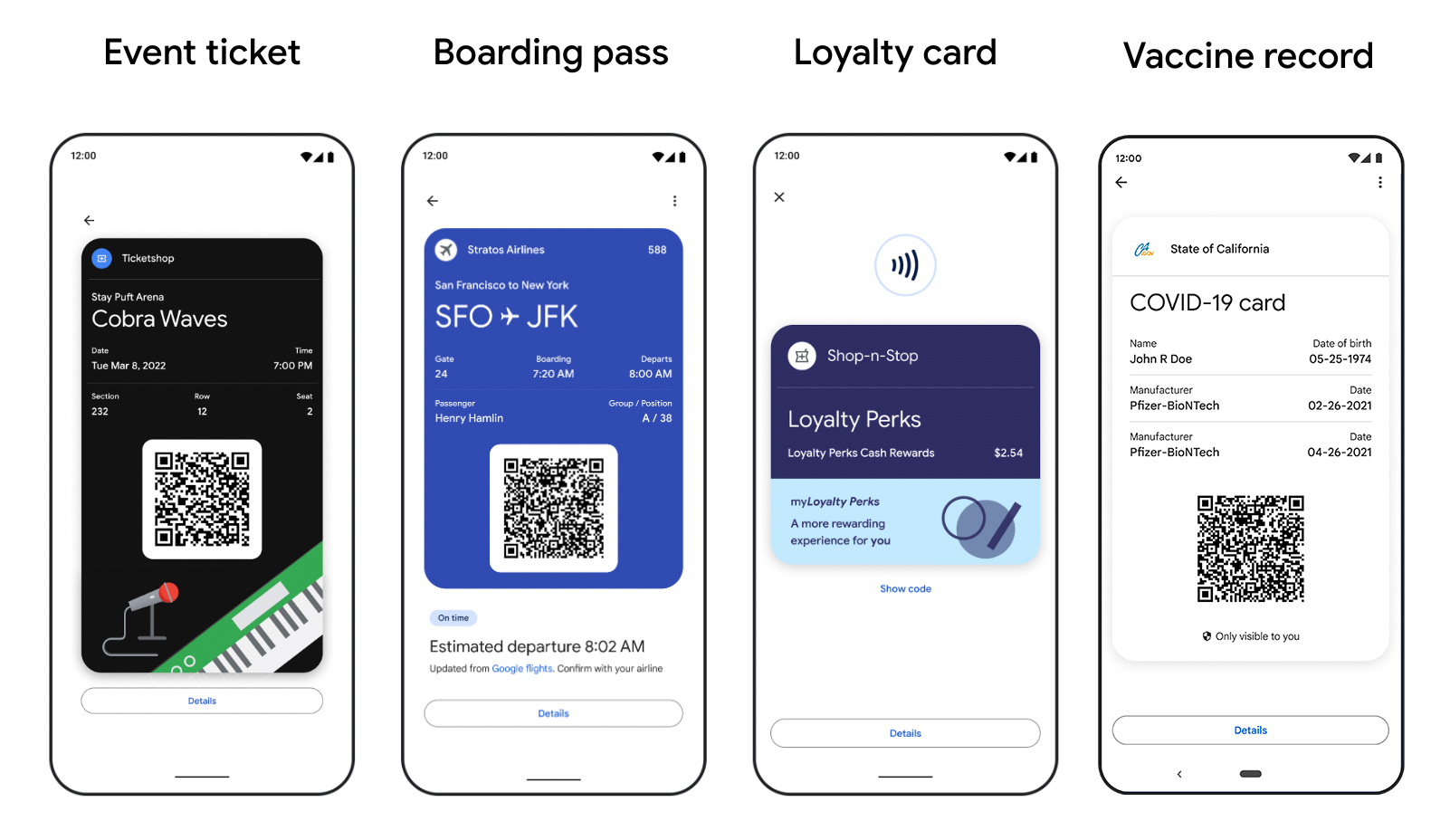
Beyond payments, Google Wallet excels in its ability to store a diverse range of digital passes and credentials.
-
Loyalty Cards: Many physical loyalty cards can be digitized by scanning their barcode or manually entering the membership number. This declutters your physical wallet and ensures you never miss out on rewards.
-
Transit Cards: In supported cities and regions, you can add public transport cards directly to Google Wallet, allowing you to tap your phone to pay for fares.
-
Event Tickets: For concerts, sports events, or flights, many ticketing providers now offer the option to add tickets directly to Google Wallet from their apps or email confirmations. These digital tickets often include dynamic QR codes or barcodes that refresh, adding an extra layer of security.
-
Vaccine Cards & Health Records: With growing emphasis on digital health credentials, Google Wallet supports adding verifiable COVID-19 vaccination records and other health passes in compatible regions.
-
Digital IDs (Future Potential): One of the most anticipated features is the integration of state-issued driver’s licenses and IDs. While this is currently rolling out in select US states, it represents a significant step towards a fully digital identity, allowing users to present identification directly from their phone in authorized situations. This requires robust security measures and governmental cooperation, highlighting the complexity and technological challenges involved.
Security Features and Privacy Controls
Google Wallet is built on a foundation of robust security and privacy protections, crucial for a platform handling sensitive personal and financial data.
-
Tokenization: As mentioned, actual card numbers are replaced with encrypted tokens during transactions.
-
Biometric Authentication: Accessing Google Wallet or authorizing transactions often requires biometric verification (fingerprint, facial recognition) or a PIN, ensuring that even if your phone is lost, your wallet remains secure.
-
Find My Device Integration: If your phone is lost or stolen, you can remotely lock, erase, or locate it using Google’s Find My Device service, protecting your digital wallet from unauthorized access.
-
Privacy Dashboard: Google provides users with tools to manage their privacy settings, including controlling what data is shared and how it’s used. Users have transparency into their transaction history and the ability to review and manage connected accounts.
-
Constant Monitoring: Google continuously monitors for suspicious activity, employing advanced fraud detection algorithms to protect users from unauthorized transactions.
Maximizing Your Google Wallet Experience
Once set up, Google Wallet unlocks a world of convenience and efficiency, integrating seamlessly into daily routines and enhancing various digital interactions.
Contactless Payments (NFC)
The cornerstone of Google Wallet is its contactless payment capability, often referred to as “tap-to-pay.”
-
How it Works: Using Near Field Communication (NFC) technology built into most modern Android phones, Google Wallet allows you to make secure payments by simply holding your device near a compatible payment terminal. When you approach a terminal, the phone’s NFC chip communicates with the terminal, transmitting the tokenized payment information.
-
Wherever You See the Logos: Look for the Google Pay logo or the universal contactless payment symbol (four curved lines) at checkout.
-
No Internet Required: For transactions, you don’t always need an active internet connection, as the payment credentials are securely stored on your device. This makes it incredibly convenient in areas with spotty Wi-Fi or mobile data.
-
Speed and Efficiency: Contactless payments are significantly faster than swiping or inserting a physical card, reducing transaction times and streamlining the checkout process.
Online Purchases and App Integrations
Google Wallet’s utility extends far beyond physical tap-to-pay terminals, making online shopping and in-app purchases a breeze.
-
“Pay with Google Pay” Button: Many e-commerce websites and apps feature a “Pay with Google Pay” button at checkout. Clicking this allows you to select a payment method from your Google Wallet, often without needing to re-enter card details or shipping information, as Google pre-fills these from your Google Account. This minimizes friction and enhances conversion rates for merchants, while providing security for consumers.
-
In-App Purchases: For many Android apps, payment for subscriptions, virtual goods, or premium features can be made directly using your Google Wallet-saved cards, offering a consistent payment experience.
-
Security for Online Transactions: Similar to physical tap-to-pay, online transactions via Google Pay benefit from the same tokenization and security protocols, protecting your financial data even when transacting remotely.
Exploring Ancillary Features and Future Potentials
Google Wallet is not a static product; it’s continually evolving with new features and integrations.
-
Integration with Google Maps: For public transport, Google Maps can show you fare estimates and direct links to add a transit pass to Google Wallet, streamlining your commute planning.
-
Google Assistant Integration: In some contexts, you can use Google Assistant to manage aspects of your Wallet or make payments, although this feature is more prevalent for specific Google services.
-
Cross-Device Functionality: While the primary focus is on smartphones, the underlying Google Pay platform allows for seamless transitions between devices. For instance, payment methods saved on your phone are accessible on your Google Chromebook or when making purchases via Google Home devices.
-
Emerging Features: The continuous rollout of digital IDs, hotel key cards, and even car keys to Google Wallet illustrates Google’s vision for a truly comprehensive digital credential hub, leveraging advancements in secure element technology and trusted execution environments on modern mobile devices. The potential for future integrations with smart home devices and IoT remains vast, making the smartphone an even more central control point for access and identity.
Troubleshooting and Support
Despite its robust design, users might occasionally encounter issues with Google Wallet. Knowing where to find help and how to troubleshoot common problems is essential for a smooth experience.
Common Issues and Quick Fixes
-
Card Not Adding: Ensure your card is supported, your billing address is correct, and your bank is not blocking the addition. Sometimes, contacting your bank directly can resolve this.
-
Tap-to-Pay Not Working: Check if NFC is enabled on your phone (Settings > Connected devices > Connection preferences > NFC). Ensure Google Wallet is set as your default payment app (Settings > Apps > Default apps > Tap & pay). Also, make sure your phone’s screen is unlocked and awake when tapping.
-
App Crashing/Freezing: Try force-stopping the app (Settings > Apps > Google Wallet > Force stop), clearing its cache (Storage & cache > Clear cache), or restarting your phone. Ensure the app is updated to the latest version via the Play Store.
-
Transaction Declines: This is often a bank-side issue. Check with your bank to ensure there are no holds, sufficient funds, or suspicious activity flags on your account.
-
Passes Not Showing Up: Verify that the pass or ticket provider supports Google Wallet integration and that you’ve correctly added it. Sometimes, re-syncing the app or reinstalling it can help.

Google’s Support Channels
For more persistent issues or specific inquiries, Google offers several avenues for support:
-
Google Wallet Help Center: The most comprehensive resource is Google’s official support website (support.google.com/wallet). It features extensive articles, FAQs, and troubleshooting guides covering a wide range of topics.
-
In-App Help: The Google Wallet app itself often includes a “Help & feedback” section in its settings menu, which can link you directly to relevant support articles or provide an option to send feedback to Google.
-
Google Support Community: Google operates community forums where users can ask questions and get answers from other users or Google product experts. This can be a good place for niche issues or general advice.
-
Direct Contact: For critical issues (e.g., unauthorized transactions), Google provides options to contact their support team directly via chat, email, or phone, though these options are often accessed through the help center for specific problem types.
In conclusion, Google Wallet has cemented its position as a central component of the digital lifestyle, evolving from a simple payment app to a comprehensive digital credential hub. Finding it is straightforward for Android users—it’s likely already on your device or a quick download away from the Play Store. For iOS users, the Google Pay app provides similar payment functionalities. By understanding its history, locating the app, and mastering its setup and usage, users can unlock a powerful tool that streamlines payments, organizes essential documents, and enhances security in an increasingly digital world. As technology continues to advance, Google Wallet is poised to integrate even more deeply into our daily interactions, further diminishing the need for a physical wallet.
aViewFromTheCave is a participant in the Amazon Services LLC Associates Program, an affiliate advertising program designed to provide a means for sites to earn advertising fees by advertising and linking to Amazon.com. Amazon, the Amazon logo, AmazonSupply, and the AmazonSupply logo are trademarks of Amazon.com, Inc. or its affiliates. As an Amazon Associate we earn affiliate commissions from qualifying purchases.