
In an increasingly digitized world, the ability to conduct secure and efficient online transactions is paramount. PayPal stands as a cornerstone of this digital financial landscape, offering a robust platform for sending and receiving money, shopping online, and managing various financial flows. For newcomers or those seeking a structured guide, understanding the technical steps to register for PayPal is the crucial first step into harnessing its extensive capabilities. This tutorial will meticulously walk you through the process, emphasizing the technological aspects, digital security considerations, and best practices for a seamless setup.
Understanding PayPal’s Core Functionality for Tech Users
Before delving into the registration specifics, it’s insightful to grasp what PayPal offers from a technological perspective. At its heart, PayPal is a sophisticated digital wallet and payment processing system designed to simplify online commerce and personal money transfers.
The Digital Wallet Paradigm
PayPal pioneered the concept of a digital wallet, allowing users to store their financial information (bank accounts, credit cards) securely in one centralized online account. This abstraction layer means you don’t have to input sensitive card details every time you make a purchase online. Instead, you log into your PayPal account, which then acts as an intermediary, facilitating the transaction without exposing your primary financial data to merchants. This technological innovation significantly enhances convenience and reduces the risk of data compromise during individual transactions. From an engineering standpoint, it’s an elegant solution to secure data transmission and user authentication.
Bridging Platforms for Seamless Transactions
PayPal’s strength lies in its widespread integration across a myriad of e-commerce platforms, apps, and services. Technologically, this involves extensive API (Application Programming Interface) development and secure data exchange protocols that allow websites and mobile applications to “talk” to PayPal’s systems. For the end-user, this translates into a universally recognized payment option that works almost everywhere online. Whether you’re buying goods on an international marketplace, subscribing to a software service, or sending money to a friend via a mobile app, PayPal often provides a unified, reliable interface, consolidating various digital payment experiences into one familiar ecosystem.
Pre-Registration Checklist: Ensuring a Smooth Setup
Embarking on any technical setup without preparation can lead to frustration. Registering for PayPal is no different. A brief checklist will ensure you have all necessary components and information readily available, streamlining the process and bolstering your account’s initial security.
Essential Information Gathering
Before you even visit PayPal’s website or download their app, gather the following critical pieces of information. This isn’t just about expedience; it’s about providing accurate data that strengthens your account’s validity and security from the outset.
-
Valid Email Address: This will be your primary login credential and the main point of contact for PayPal notifications. Choose an email address you check regularly and ensure it’s secure (strong password, two-factor authentication enabled).
-
Mobile Phone Number: For account verification and security purposes, PayPal often uses SMS to send codes or alerts.
-
Personal Information: Full legal name, date of birth, and physical address. These are required for identity verification, especially for regulatory compliance and to prevent fraud.
-
Financial Details (Optional but Recommended): While you can register without linking a financial source initially, to use PayPal effectively, you’ll need a bank account (account number and routing number) or a credit/debit card (card number, expiration date, CVV). Having these ready will allow you to complete the linking process immediately after registration.
Device and Internet Requirements
Accessing PayPal requires a device with internet connectivity.
-
Computer or Mobile Device: Ensure your computer’s operating system and web browser are up to date. For mobile registration, download the official PayPal app from your device’s app store (Google Play Store for Android, Apple App Store for iOS). Using outdated software can expose you to security vulnerabilities.
-
Stable Internet Connection: A reliable internet connection prevents timeouts or data submission errors during the registration process, which could otherwise lead to re-entering information or technical glitches. Avoid public Wi-Fi networks for initial registration due to potential security risks.
Security Best Practices Before You Begin
Digital security is paramount when setting up any financial account online.
-
Secure Network: Use a private, password-protected internet connection. Public Wi-Fi networks are generally insecure and susceptible to eavesdropping.
-
Antivirus/Anti-malware Software: Ensure your device has up-to-date antivirus and anti-malware protection to safeguard against keyloggers or other malicious software attempting to capture your personal details.
-
Strong Passwords: Begin thinking about a strong, unique password for your PayPal account, distinct from other online services. A combination of upper and lowercase letters, numbers, and symbols, at least 12-16 characters long, is recommended.
Step-by-Step Guide: Navigating the PayPal Registration Process
With your preparations complete, you’re ready to engage with the PayPal platform. The registration process is designed to be user-friendly, but understanding each step ensures a smooth journey.
Choosing Your Account Type (Personal vs. Business)
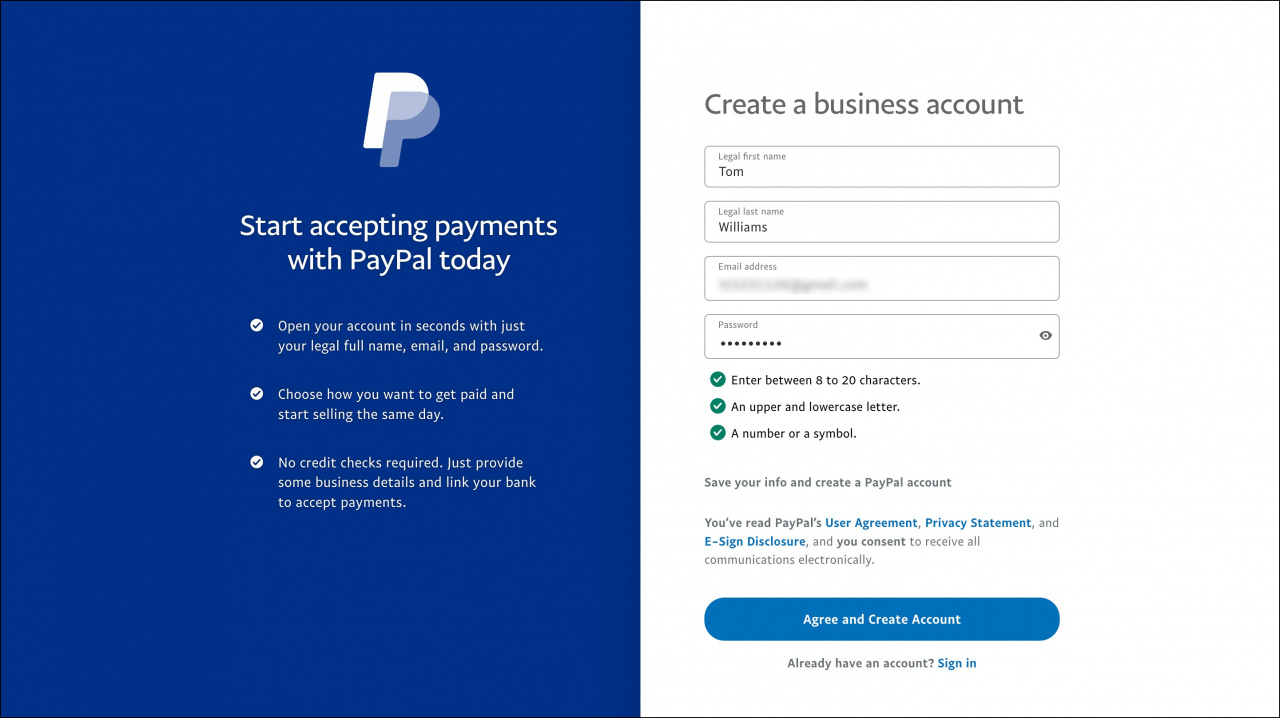
The first decision you’ll encounter is selecting the type of account you need. This choice has implications for features, fees, and the information required.
-
Personal Account: Ideal for individuals who want to shop online, send money to friends and family, or receive payments for casual sales. This is the more common choice for most users and has a simpler setup.
-
Business Account: Geared towards merchants, freelancers, and businesses of all sizes. It offers advanced features like invoicing, multiple user access, and dedicated customer service. If you plan to use PayPal primarily for commercial transactions, especially for receiving payments for goods or services, choose this option.
- Technical Note: Business accounts often require additional verification, including business registration details (EIN/VAT number), legal business name, and potentially proof of business address.
Providing Personal and Contact Details
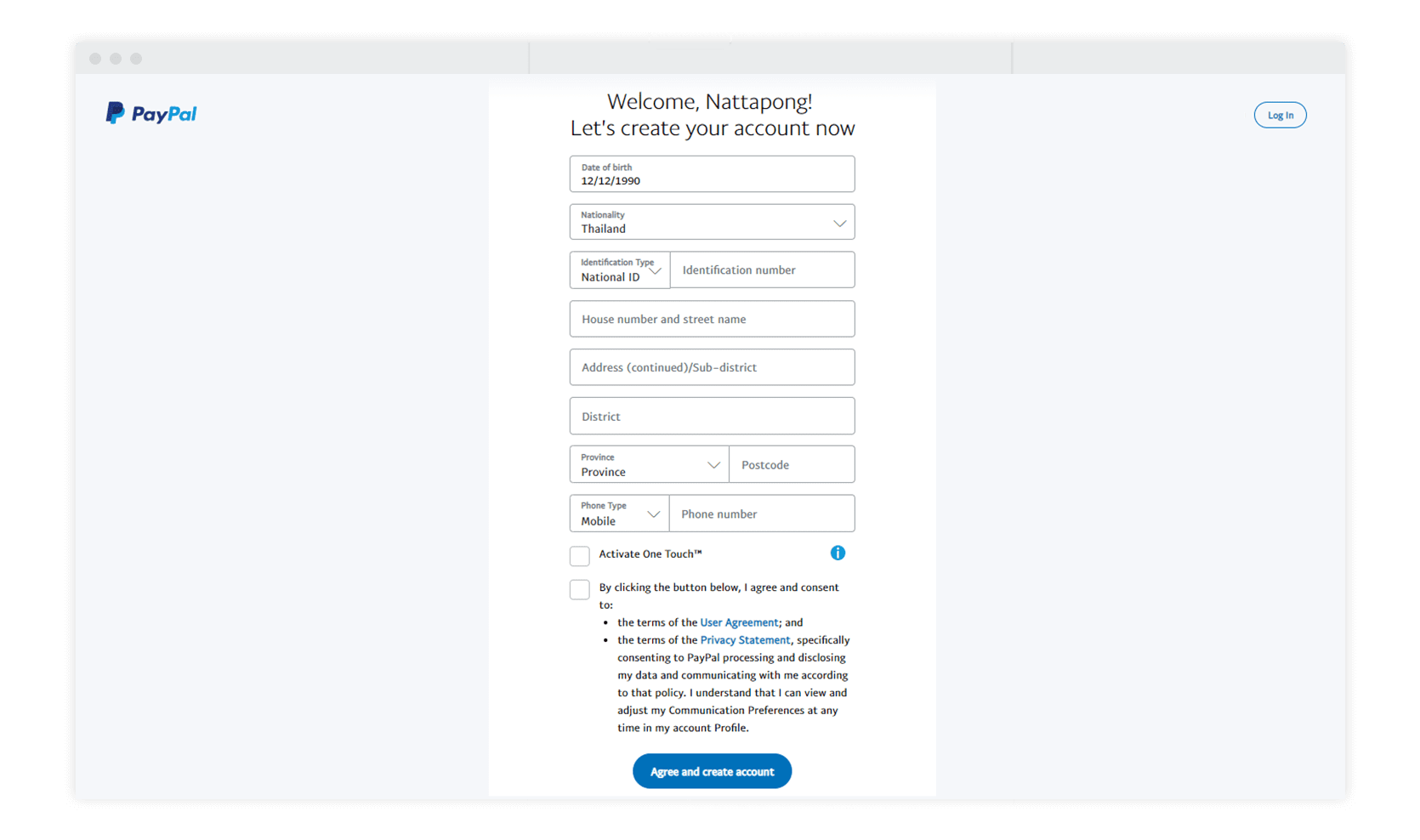
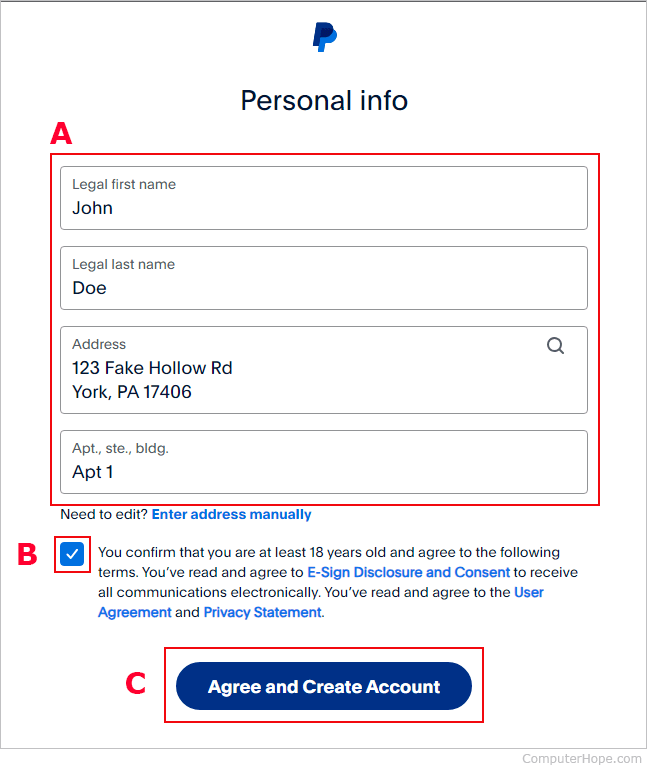
After selecting your account type, you’ll be prompted to enter your personal information.
-
Start the Process: Click on the “Sign Up” button on the PayPal website (paypal.com) or within the mobile app.
-
Enter Mobile Number: You’ll typically start by entering your mobile phone number. PayPal will send a verification code via SMS. Enter this code to confirm your number.
-
Fill in Personal Details: Provide your full legal name, email address, and create a strong password. This is where your pre-planned strong password comes in handy.
-
Enter Address Information: Input your residential address, city, state/province, and postal code. Ensure accuracy for verification purposes.
-
Agree to Terms: Read and accept PayPal’s User Agreement and Privacy Policy. It’s crucial to understand these terms, as they govern your use of the service from a legal and technical standpoint.
Linking Financial Instruments Securely
This is a critical step for making your PayPal account functional for sending and receiving money. PayPal employs robust encryption and security protocols to protect your financial data during this process.
-
Link a Debit/Credit Card: You can add a debit or credit card by entering the card number, expiration date, and the CVV (Card Verification Value) code. PayPal may perform a small temporary authorization charge (usually less than $2) to verify the card, which is then refunded. You’ll typically find a unique code on your card statement next to this charge, which you’ll need to enter back into PayPal to confirm ownership.
-
Link a Bank Account: To link a bank account, you’ll need your bank name, account number, and routing number. PayPal offers two primary methods:
-
Instant Verification (Recommended): Log into your online banking portal directly through PayPal’s secure interface. This method uses encrypted communication to quickly verify your bank account without sharing your banking credentials with PayPal directly (it’s a pass-through authentication).
-
Manual Verification: If instant verification isn’t available or preferred, PayPal will make two small deposits (e.g., $0.15 and $0.23) into your bank account, which can take 2-3 business days. Once these appear, you’ll log back into PayPal and enter the exact amounts to confirm your account ownership.
-
Verifying Your Account and Identity
For full functionality and to lift certain transaction limits, PayPal requires identity verification. This is a standard regulatory practice (Know Your Customer – KYC) and a critical security measure to prevent fraud and money laundering.
-
Confirm Email Address: PayPal will send a confirmation link to your registered email address. Click this link to activate your account.
-
Provide Identification (if requested): Depending on your transaction volume, location, or account activity, PayPal may request further identification. This could include uploading a scan of a government-issued ID (driver’s license, passport) or proof of address (utility bill). Follow the instructions carefully, ensuring clear images and matching information to your registration details. The system uses advanced image recognition and data matching technologies for this process.
Leveraging PayPal’s Features Post-Registration
Once your account is registered and verified, the real power of PayPal becomes accessible. Explore these functionalities to maximize your digital payment experience.
Exploring the User Dashboard
Upon logging in, you’ll be greeted by your PayPal dashboard. This is your command center for all things PayPal.
-
Activity Feed: View your transaction history, including payments sent, received, and purchases made.
-
Send & Request: Easily initiate payments to others using their email address or phone number, or send professional invoices.
-
Wallet: Manage your linked bank accounts and cards, set a preferred payment method, and view your PayPal balance.
-
Security & Settings: Access crucial security settings, update personal information, and manage notifications.
Integrating PayPal with Other Apps and Platforms
PayPal’s versatility extends to its integration capabilities across various digital ecosystems.
-
E-commerce Integration: Most online retailers offer PayPal as a payment option during checkout. Simply select PayPal and log in to complete your purchase securely.
-
App Ecosystems: Many mobile applications, especially those for ride-sharing, food delivery, or digital subscriptions, allow you to link your PayPal account for seamless payments. This leverages OAuth and other secure API authorization protocols.
-
Cryptocurrency Features (where available): In some regions, PayPal has integrated cryptocurrency buying, selling, and holding features directly within the platform, allowing users to interact with digital assets through their existing PayPal account.
Enhancing Account Security and Privacy
Your journey with PayPal doesn’t end with registration; ongoing security management is vital.
-
Two-Factor Authentication (2FA): Immediately enable 2FA (also known as two-step verification) for your PayPal account. This adds an extra layer of security, requiring a code from your phone in addition to your password for login.
-
Regular Password Changes: Periodically update your password to maintain robust security.
-
Monitor Activity: Regularly review your transaction history for any unauthorized activity. PayPal offers notification settings that can alert you to every transaction.
-
Beware of Phishing: Be vigilant against phishing attempts. PayPal will never ask for your password or sensitive financial information via unsolicited emails or texts. Always verify the sender and URL before clicking links.
Troubleshooting Common Registration Issues and Future-Proofing Your Account
Even with careful preparation, minor technical hiccups can occur. Knowing how to address them and maintain your account’s integrity is essential.
Addressing Verification Delays
Sometimes, linking bank accounts or identity verification can take longer than expected.
-
Bank Deposits: If manual bank verification is chosen, remember to wait 2-3 business days for the small deposits to appear before entering the amounts.
-
ID Verification: Ensure the images of your ID are clear, well-lit, and all information is legible. Inconsistencies between your submitted ID and registered personal details can cause delays. Contact PayPal support if verification extends beyond their stated timelines.
Maintaining Digital Security Post-Setup
Beyond the initial setup, proactive security measures are your best defense.
-
Update Software: Keep your operating system, web browser, and PayPal mobile app updated to benefit from the latest security patches.
-
Review Connected Apps: Regularly check the “Security” or “Settings” section of your PayPal account to see which third-party apps have permissions to access your PayPal information. Revoke access for any apps you no longer use or don’t recognize.
-
Strong, Unique Passwords: Reiterate the importance of using a unique, complex password for PayPal, distinct from all other online services, to prevent credential stuffing attacks.
Registering for PayPal is a straightforward process when approached systematically. By understanding the underlying technological principles, preparing thoroughly, and meticulously following each step, you can confidently set up your account. More importantly, by adopting robust security practices, you ensure that your PayPal experience remains secure, efficient, and fully leveraged for all your digital transaction needs. Welcome to the world of streamlined online payments.
aViewFromTheCave is a participant in the Amazon Services LLC Associates Program, an affiliate advertising program designed to provide a means for sites to earn advertising fees by advertising and linking to Amazon.com. Amazon, the Amazon logo, AmazonSupply, and the AmazonSupply logo are trademarks of Amazon.com, Inc. or its affiliates. As an Amazon Associate we earn affiliate commissions from qualifying purchases.