
In the modern economy, liquidity is the lifeblood of small and medium-sized enterprises. For business owners utilizing Square as their primary point-of-sale (POS) and payment processing solution, understanding the precise timeline of funds—from the moment a customer taps their card to the moment those funds hit a bank account—is critical for effective cash flow management. Square has revolutionized the financial services landscape by simplifying merchant accounts, but the nuances of its deposit schedules, transfer speeds, and potential delays remain a top priority for financial planning.
The duration it takes for Square to process a payment and move money into your hands depends on several variables: the type of deposit schedule selected, the time of day the transactions occur, and the specific financial tools you use within the Square ecosystem.
The Standard Square Deposit Schedule: What to Expect
For the vast majority of merchants, Square operates on a standard “Next-Business-Day” deposit schedule. This is the default setting for new accounts and is designed to provide a predictable cadence for accounting and reconciliation. Under this model, funds from transactions processed throughout the day are bundled together and sent to your linked bank account.
The Mechanics of Next-Day Deposits
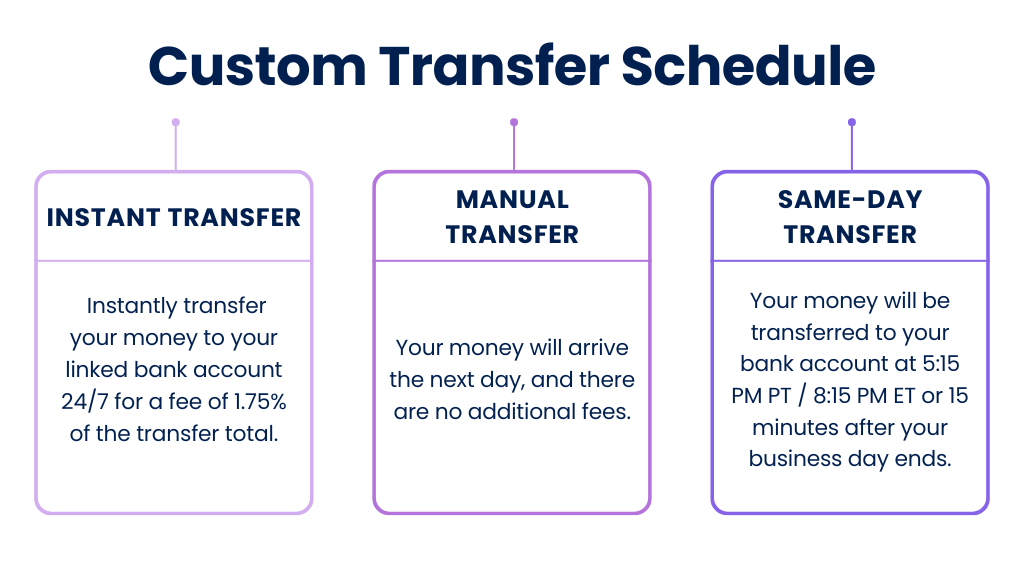
Square’s standard window is based on a “close of day” cutoff. By default, this cutoff is 5:00 PM PT (8:00 PM ET). Transactions processed before this time are grouped into a single deposit that is initiated that evening. For most financial institutions, these funds will arrive in the merchant’s bank account by the following business day, typically by the morning.
However, it is important to distinguish between “initiated” and “available.” While Square sends the instructions to the Automated Clearing House (ACH) network shortly after the cutoff, the speed at which your specific bank clears those funds can vary. Most major national banks reflect these deposits by the next morning, but smaller credit unions or regional banks may take an additional 24 hours to clear the ACH transfer.
Weekend and Holiday Exceptions
A common point of confusion in business finance is how Square handles weekend sales. Because the ACH network—the backbone of the U.S. banking system—does not operate on Saturdays, Sundays, or federal holidays, payments processed during these times are subject to delay.
If you process a transaction on a Friday evening after the 5:00 PM PT cutoff, Square will bundle that transaction with your Saturday and Sunday sales. This entire batch is typically initiated on Sunday evening and becomes available in your bank account on Monday morning (assuming it is not a bank holiday). For businesses that generate significant revenue over the weekend, such as restaurants or retail boutiques, this gap can create a temporary “liquidity crunch” that must be managed through careful budgeting.
Accelerating Your Cash Flow: Instant and Same-Day Transfers
In an era where digital banking is the norm, many business owners find the 24-to-48-hour wait for ACH transfers to be an outdated constraint. To address this, Square offers two primary methods to bypass the traditional banking lag: Instant Transfers and Same-Day Deposits. These tools are essential for businesses that need to pay vendors immediately, cover unexpected overhead, or manage tight payroll cycles.
How Instant Transfers Work
Instant Transfers allow merchants to move their earned funds into a linked bank account via a debit card within seconds. This feature utilizes the “push-to-debit” technology provided by networks like Visa and Mastercard.
The primary advantage of Instant Transfers is the 24/7 availability. Unlike the standard ACH schedule, Instant Transfers work on weekends, late at night, and on holidays. Once you initiate the transfer through the Square app or dashboard, the funds are typically available in your personal or business checking account in under 15 minutes.
The Cost-Benefit Analysis of Faster Access
While the convenience of Instant Transfers is undeniable, it comes at a price. As of current financial policy, Square charges a 1.75% fee per transfer. From a business finance perspective, this fee must be weighed against the cost of capital. If a business owner is using a high-interest credit line to cover daily expenses while waiting for standard deposits, the 1.75% fee may actually be the more cost-effective route. However, for high-volume businesses, relying exclusively on Instant Transfers can significantly erode profit margins over time.
Strategic use of these tools is key. Many savvy financial managers use standard deposits for routine operational costs but keep the Instant Transfer option available for “just-in-time” inventory purchases or urgent repairs.

Factors That Can Delay Your Square Deposits
While Square is known for its speed, there are instances where payments may take longer than the standard 24-hour window. Understanding these triggers is vital for maintaining a stable balance sheet and avoiding the frustration of “pending” funds.
Account Verification and Security Reviews
The most common cause for a delay in payment processing occurs during the early stages of a business’s relationship with Square. As a payment aggregator, Square assumes a significant amount of financial risk. To mitigate this, they may hold funds for a period of 24 to 72 hours while they verify the legitimacy of transactions.
These security reviews are often triggered by a sudden spike in sales volume, an unusually large individual transaction, or a high frequency of manually entered (keyed-in) card numbers rather than swiped or dipped cards. From a risk management standpoint, Square is checking for potential fraud or the likelihood of a chargeback. Providing documentation such as invoices or proof of delivery can often expedite this process.
Transaction Limits and High-Risk Activity
Square does not typically have a hard “cap” on how much a merchant can process, but they do monitor for activity that deviates from your established business profile. If your business usually processes $500 a day and suddenly processes a $10,000 transaction, the system may flag that payment for manual review. In these cases, the processing time can extend beyond the usual window as Square’s internal risk team investigates the source of the funds.
Furthermore, if your account experiences a high rate of chargebacks (disputes from customers), Square may implement a “reserve.” This is a common practice in merchant services where a percentage of your daily sales is held in a non-interest-bearing account for a set period (often 30 to 90 days) to cover potential future losses. This can drastically impact the “actual” time it takes for you to access the full value of your sales.
Strategic Financial Management Using Square’s Payout Tools
To truly optimize the time it takes to process payments, business owners should look beyond the standard bank transfer and consider integrating their operations more deeply into Square’s financial ecosystem.
Utilizing the Square Checking Account
One of the most effective ways to eliminate the “waiting period” entirely is by using Square Checking. This is a business checking account provided by Square (in partnership with Sutton Bank). When you use this account, the funds from your processed sales are available as soon as the transaction is completed.
This creates a “real-time” cash flow scenario. If a customer buys a product at 10:00 AM, those funds are instantly available to be spent via the Square Debit Card at 10:01 AM. For a business owner, this eliminates the reliance on the ACH network and removes the 1.75% fee associated with Instant Transfers to external banks. It is a powerful tool for micro-businesses and freelancers who need immediate access to their revenue to reinvest in their daily operations.
Customizing Your Close-of-Day
For businesses with unconventional operating hours, such as bars, late-night cafes, or 24-hour service providers, the default 5:00 PM PT cutoff can be problematic for accounting. Square allows merchants to customize their “Close of Day” settings.
By adjusting this time to match the actual end of your business day (for example, 2:00 AM), you can ensure that your daily sales reports align perfectly with your deposits. This doesn’t necessarily speed up the bank’s clearing process, but it streamlines the reconciliation process for your bookkeeper or accountant, making it easier to track the “velocity of money” within your organization.

Comparing Square’s Processing Times to Traditional Merchant Services
When evaluating how long Square takes to process payments, it is helpful to place it in the context of the broader financial industry. Traditional merchant service providers often require a dedicated merchant account, which can take days or weeks to set up and may involve a complex underwriting process.
Traditional processors often operate on a “T+2” or “T+3” schedule (Transaction date plus two or three days). In contrast, Square’s ability to offer next-day deposits as a standard feature—and instant access via Square Checking—positions it as a leader in financial speed. While traditional banks may offer slightly lower percentage fees for very high-volume businesses, the “time-cost” of waiting for funds is a factor that must be included in any total-cost-of-ownership calculation.
In conclusion, while the basic answer to “how long does it take” is usually one business day, the reality is a spectrum of options. By understanding the interaction between cutoff times, ACH limitations, and Square’s proprietary financial tools, business owners can take full control of their payment timelines. Whether you choose the reliability of standard deposits, the speed of Instant Transfers, or the real-time access of Square Checking, aligning these options with your business’s specific financial needs is the key to maintaining a healthy, agile, and well-funded operation.
aViewFromTheCave is a participant in the Amazon Services LLC Associates Program, an affiliate advertising program designed to provide a means for sites to earn advertising fees by advertising and linking to Amazon.com. Amazon, the Amazon logo, AmazonSupply, and the AmazonSupply logo are trademarks of Amazon.com, Inc. or its affiliates. As an Amazon Associate we earn affiliate commissions from qualifying purchases.