
In an increasingly digital world, the ability to accept online payments is no longer a luxury for small businesses; it’s a fundamental necessity. From burgeoning e-commerce stores to local service providers, enabling seamless digital transactions broadens customer reach, enhances convenience, and streamlines financial operations. This comprehensive guide will navigate small business owners through the technological landscape of online payment setup, focusing exclusively on the tools, processes, integrations, and security protocols required to establish a robust and efficient payment system. Embracing the right technology can transform how you conduct business, making transactions faster, safer, and more accessible for your customers.

Understanding the Core Components of Online Payment Systems
Before diving into specific solutions, it’s crucial to grasp the foundational technological components that orchestrate online transactions. These interconnected systems work behind the scenes to ensure that when a customer clicks “pay,” their funds are securely transferred to your business account. Understanding these elements is the first step in making informed decisions about your payment infrastructure.
Payment Gateways: The Digital Bridge
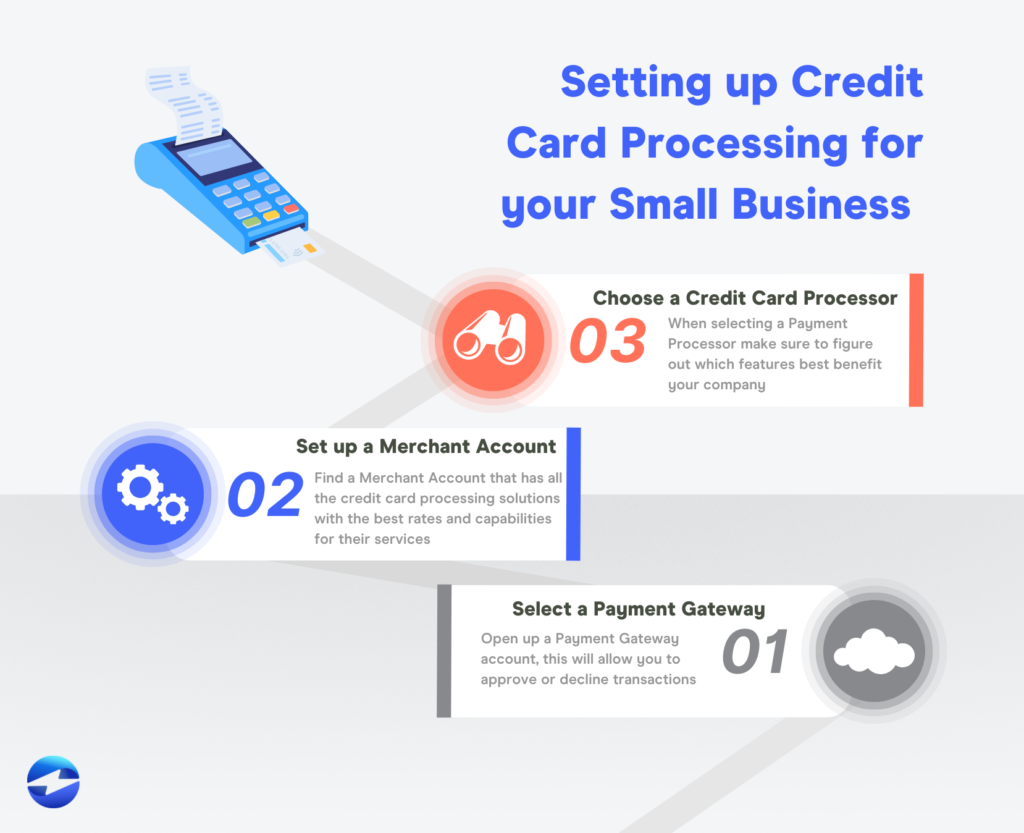
A payment gateway acts as the secure conduit between a customer’s browser (or a mobile app) and the payment processor. When a customer inputs their credit card details or selects a digital wallet option, the gateway encrypts this sensitive information and securely transmits it to the acquiring bank (via the payment processor) for authorization. It’s essentially the digital equivalent of a physical point-of-sale (POS) terminal, facilitating the secure transfer of data. Key technological features of a robust payment gateway include strong encryption standards (like SSL/TLS), fraud detection tools, and compatibility with various payment methods. Without a gateway, sensitive payment data would be exposed, rendering online transactions impossible and insecure.
Payment Processors: The Transaction Engine
Once the payment gateway transmits the encrypted data, the payment processor takes over. This technology company acts as an intermediary between the merchant, the acquiring bank (the merchant’s bank), and the issuing bank (the customer’s bank). The processor communicates with the issuing bank to verify the availability of funds and the validity of the card. Upon approval, it facilitates the movement of funds from the customer’s account to the acquiring bank, and eventually, to your merchant account. The processor handles the actual financial transaction, ensuring funds are routed correctly and securely. Advanced payment processors offer features like recurring billing, detailed transaction reporting, and multi-currency support, all built upon sophisticated financial transaction software.
Merchant Accounts: The Financial Hub (Briefly)
While leaning towards the financial aspect, a merchant account is inextricably linked to the technology of online payments. It’s a special type of bank account that allows businesses to accept credit and debit card payments. When a customer makes a purchase, the funds are temporarily held in this account by the acquiring bank before being settled into your primary business bank account. The technology here lies in the automated settlement processes and reporting tools provided by merchant account providers, which integrate with payment gateways and processors to give you a consolidated view of your transactions. Many modern all-in-one solutions bundle merchant account services, simplifying the setup for small businesses.
PCI DSS Compliance: The Security Standard
The Payment Card Industry Data Security Standard (PCI DSS) is a set of security standards designed to ensure that all companies that accept, process, store, or transmit credit card information maintain a secure environment. For any small business setting up online payments, adhering to PCI DSS is not optional; it’s mandatory. Technically, this involves implementing robust firewalls, encrypting cardholder data, using antivirus software, restricting access to sensitive data, and regularly testing security systems. Utilizing PCI-compliant payment gateways and processors significantly offloads much of this burden, as they are responsible for their own compliance and often provide tools or assurances to help merchants maintain theirs. It’s a critical technical prerequisite for safe and legal online transactions.
Choosing the Right Payment Gateway and Processor
Selecting the appropriate payment solution is a pivotal decision that impacts your operational efficiency, customer experience, and bottom line. The market offers a plethora of options, each with its own technical specifications, feature sets, and integration capabilities. The goal is to find a solution that aligns perfectly with your business model and technical expertise.
Key Factors for Selection: Fees, Features, and Integrations
When evaluating payment technology providers, several technical and operational factors come into play.
-
Transaction Fees: Understand the pricing structure – per-transaction fees, monthly fees, chargeback fees, and potential hidden costs. While a financial consideration, it dictates the technical efficiency required to process high volumes cost-effectively.
-
Supported Payment Methods: Does the solution accept major credit cards (Visa, Mastercard, Amex), debit cards, digital wallets (Apple Pay, Google Pay, PayPal), and potentially international payment methods? Broader acceptance means wider market reach.
-
Integration Capabilities: How easily does it integrate with your existing website platform (e.g., Shopify, WooCommerce, Wix) or accounting software (e.g., QuickBooks)? API documentation, available plugins, and developer support are crucial technical considerations.
-
Security Features: Beyond PCI compliance, look for advanced fraud detection tools, tokenization, and 3D Secure capabilities. These are built-in technical safeguards that protect both your business and your customers.
-
Customer Support: Technical support is vital when issues arise. Evaluate the availability (24/7?), channels (phone, email, chat), and quality of support.
Popular All-in-One Solutions (e.g., Stripe, PayPal, Square)
For small businesses, all-in-one payment solutions are often the simplest and most cost-effective entry point.
-
Stripe: Renowned for its developer-friendly APIs, Stripe offers highly customizable payment processing for online businesses. It supports a vast array of payment methods, subscriptions, and global transactions, making it ideal for tech-savvy businesses or those with custom e-commerce needs. Its documentation and SDKs are excellent for integration.
-
PayPal: One of the most recognized names, PayPal offers easy setup and a trusted brand for customers. Its business solutions include website payments, invoicing, and POS options. While sometimes having higher transaction fees, its widespread adoption and user-friendliness are significant advantages, particularly for businesses that want a quick and easy setup without deep technical dives.
-
Square: Initially known for its mobile POS systems, Square has expanded into comprehensive online payment solutions, e-commerce stores, and invoicing. It’s an excellent choice for businesses that operate both online and offline, as its hardware and software seamlessly integrate for unified sales reporting and inventory management. Its bundled services simplify managing both physical and digital transactions.
Dedicated Payment Gateways vs. Third-Party Integrations
Small businesses face a choice: use a dedicated payment gateway provider (which might require a separate merchant account) or opt for a payment service provider (PSP) that bundles all services.
-
Dedicated Gateways (e.g., Authorize.Net): Offer robust features and flexibility but typically require a separate merchant account. This setup might be more complex for small businesses but can offer lower transaction rates for high-volume merchants and greater control over the technical environment.
-
Third-Party Integrations/PSPs (e.g., Stripe, PayPal, Square): These providers often act as both the gateway and processor, and frequently provide the merchant account. This “all-in-one” approach simplifies setup and management, as you deal with a single vendor. They handle the technical complexities of PCI compliance and fund settlement, making them highly attractive for businesses without dedicated IT staff.
Considerations for Different Business Models
The best technical solution varies by business type:
-
E-commerce Stores: Require robust integration with platforms like Shopify, WooCommerce, or Magento, supporting varied payment types, recurring billing (for subscriptions), and seamless checkout experiences. Stripe and PayPal are strong contenders here.
-
Service-Based Businesses: May prioritize invoicing capabilities, appointment scheduling integration, and mobile payment acceptance. Square and PayPal often excel in these areas.
-
Subscription Businesses: Need solutions with strong recurring billing features, automated payment retries, and customer portal functionality for managing subscriptions. Stripe is particularly powerful for this model due to its advanced subscription management APIs.
Integrating Payment Solutions with Your Business Platform
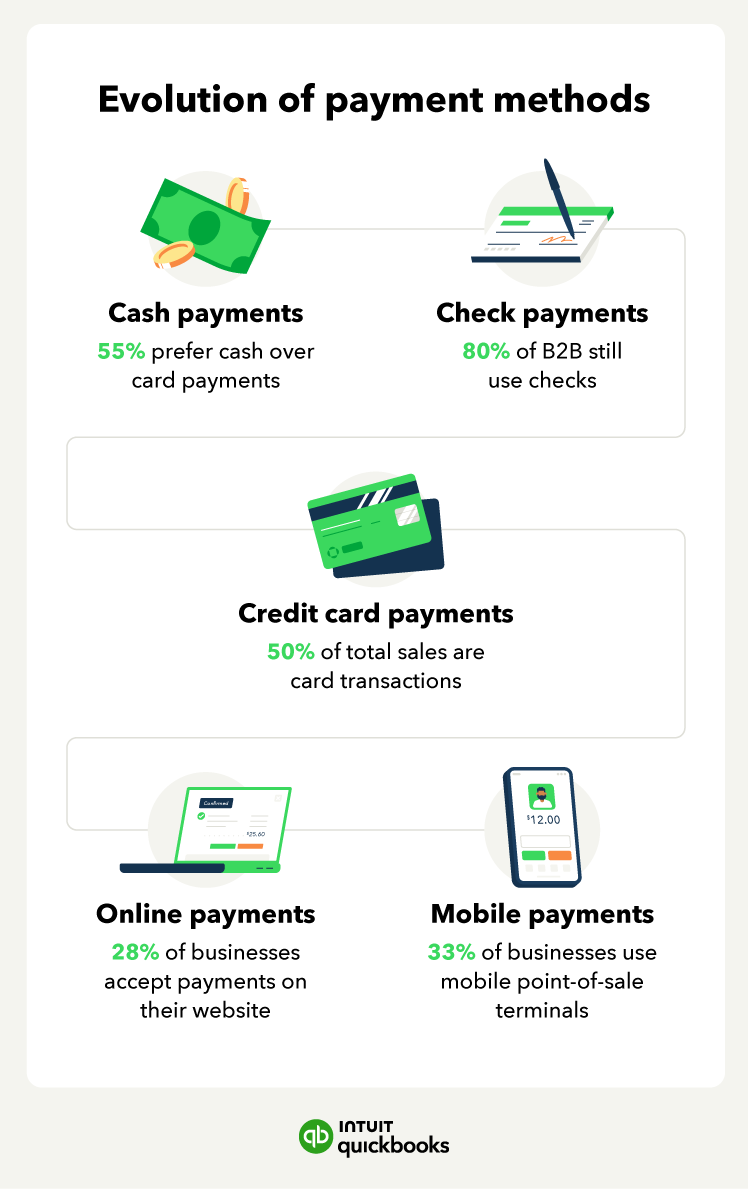
Once you’ve selected a payment solution, the next critical step is to integrate it seamlessly into your existing business infrastructure. This involves connecting the payment gateway and processor to your website, e-commerce platform, or POS system, ensuring a smooth and secure flow of transactions.
Website Builders and E-commerce Platforms
Most modern website builders and e-commerce platforms offer straightforward integrations with popular payment gateways.
-
Shopify: Features native integrations with Shopify Payments (powered by Stripe), PayPal, and dozens of third-party gateways. Setup often involves a few clicks to activate and configure the chosen provider within the Shopify admin panel. This largely abstracts away the complex technical integration, allowing businesses to focus on sales.
-
WooCommerce (WordPress): As an open-source platform, WooCommerce allows for high customizability. It offers extensions (plugins) for virtually all major payment gateways, including Stripe, PayPal, Square, and many others. Installation and configuration involve installing the plugin and entering your API keys or account credentials. It requires a bit more technical comfort than Shopify but provides immense flexibility.
-
Wix/Squarespace: These drag-and-drop website builders also provide native integrations with leading payment processors, allowing for quick setup without any coding. They prioritize ease of use, making them suitable for small businesses looking for minimal technical hassle.
API Integrations for Custom Solutions
For businesses with highly customized websites or applications, or those seeking more granular control, API (Application Programming Interface) integration is the preferred technical approach.
-
API Keys and Documentation: Payment providers like Stripe offer extensive API documentation, SDKs (Software Development Kits) in various programming languages, and robust developer tools. This allows developers to embed payment functionality directly into custom applications, offering a highly tailored checkout experience.
-
Security Best Practices: When implementing custom API integrations, it’s paramount to follow security best practices. This includes keeping API keys secure, never storing sensitive cardholder data on your servers, using tokenization (where card data is converted into a non-sensitive “token”), and ensuring all communications are encrypted via HTTPS. This approach demands a higher level of technical expertise or the engagement of a skilled developer.
Mobile Payment Options and Point-of-Sale (POS) Systems
Integrating online payments also extends to mobile and in-person transactions, particularly for businesses with both online and physical presences.
-
Mobile Apps: Many payment providers offer SDKs for mobile app development (iOS and Android), allowing businesses to embed secure payment processing directly into their native apps. This ensures a consistent brand experience and allows for features like in-app purchases and subscription management.
-
Unified POS Systems: Solutions like Square and Clover offer integrated POS systems that bridge online and offline sales. These systems can sync inventory, customer data, and sales reports across all channels. For example, a customer can buy online and return in-store, with the payment and product information seamlessly linked through the unified system. This provides a single technical dashboard for managing all sales channels.
Testing Your Payment Flow Thoroughly
Before going live, rigorous testing of your payment integration is non-negotiable.
-
Sandbox Environments: Most payment gateways provide “sandbox” or “test” environments. These allow you to simulate transactions using test credit card numbers without processing actual funds. This is crucial for verifying that the entire payment flow – from checkout to order confirmation – works as expected.
-
Edge Cases: Test various scenarios: successful payments, failed payments (e.g., incorrect card number, insufficient funds), refunds, partial refunds, and different payment methods.
-
Cross-Browser and Device Testing: Ensure the checkout experience is consistent and functional across different web browsers (Chrome, Firefox, Safari) and mobile devices (smartphones, tablets). A seamless user experience on all devices is a technical must-have.
Ensuring Security and Compliance in Online Transactions
The digital nature of online payments introduces unique security challenges. For small businesses, safeguarding customer data and complying with industry standards is paramount, not only to prevent fraud and data breaches but also to build customer trust. Technology plays a critical role in establishing these layers of defense.
Data Encryption and Tokenization
-
Encryption (SSL/TLS): Any website accepting payments must use Secure Sockets Layer (SSL) or its successor, Transport Layer Security (TLS), to encrypt data transmitted between the customer’s browser and your server. This ensures that sensitive information, such as credit card numbers, is scrambled and unreadable to unauthorized parties during transit. Your website should display “HTTPS” in the URL and a padlock icon, signaling a secure connection.
-
Tokenization: This advanced security technique replaces sensitive payment card data with a unique, non-sensitive identifier called a “token.” When a customer’s card is entered, the payment gateway tokenizes it, and only the token is stored or transmitted by your system. If a data breach were to occur on your servers, the stolen tokens would be useless to fraudsters because they don’t contain any actual card data. This significantly reduces your PCI compliance scope and enhances security.
Fraud Prevention Tools and Features
Payment processors offer various technological tools to combat online fraud.
-
Address Verification Service (AVS): Checks if the billing address provided by the customer matches the address on file with the card issuer.
-
Card Verification Value (CVV/CVC): Requires customers to enter the 3- or 4-digit security code on their card, proving they physically possess the card.
-
3D Secure (e.g., Visa Secure, Mastercard ID Check): An authentication protocol that adds an extra layer of security by requiring customers to verify their identity with their card issuer (e.g., via a password or one-time code) before completing a purchase. While it can add a step to the checkout, it significantly shifts liability for fraudulent transactions from the merchant to the issuing bank.
-
AI-Powered Fraud Detection: Many advanced payment gateways use machine learning algorithms to analyze transaction patterns and identify suspicious activities in real-time, flagging potentially fraudulent orders before they are processed.
Adhering to Regulatory Standards
Beyond PCI DSS, businesses may need to consider other data privacy regulations, particularly if operating internationally or collecting specific types of customer data.
-
GDPR (General Data Protection Regulation): While primarily focused on personal data, GDPR applies to any business processing data of EU citizens. This means your payment systems and related data storage must be configured to respect data minimization, consent, and data subject rights.
-
CCPA (California Consumer Privacy Act): Similar to GDPR, this US regulation grants California consumers specific rights regarding their personal information.
While payment processors handle much of the technical compliance burden for transaction data, businesses must ensure their overall data handling practices align with these regulations, particularly concerning how customer contact information and purchase history are stored and used.
Regular Security Audits and Updates
Maintaining security is an ongoing process.
-
Software Updates: Regularly update your e-commerce platform, plugins, and any custom code to patch vulnerabilities. Outdated software is a common entry point for attackers.
-
Vulnerability Scanning: Consider periodic vulnerability scans of your website and server infrastructure to identify potential weaknesses before they can be exploited.
-
Monitoring and Alerts: Implement monitoring tools that alert you to unusual activity on your website or payment gateway, such as suspicious login attempts or unexpected changes in transaction volume.
-
Staff Training: Educate your team on cybersecurity best practices, recognizing phishing attempts, and proper handling of sensitive customer information. Technology is only as strong as the weakest link, which can often be human error.
Optimizing the Customer Payment Experience
While security and technical robustness are paramount, the ultimate goal of setting up online payments is to facilitate sales. An optimized customer payment experience is a crucial technical consideration that directly impacts conversion rates and customer satisfaction. The technology you choose should support a smooth, intuitive, and efficient checkout process.
Streamlined Checkout Processes
A complex or lengthy checkout process is a leading cause of abandoned carts. Your online payment setup should prioritize simplicity and speed.
-
Minimal Steps: Reduce the number of clicks and pages required to complete a purchase. A single-page checkout is often ideal.
-
Guest Checkout: Offer an option for customers to check out as a guest, avoiding the need to create an account, which can be a barrier for first-time buyers.
-
Auto-Fill and Saved Information: Leverage browser auto-fill functionalities and, if securely implemented (e.g., through tokenization with customer consent), allow returning customers to save their payment and shipping details for faster future purchases.
-
Clear Calls-to-Action: Ensure buttons and prompts are clear, concise, and guide the customer effortlessly through each step of the payment process.
Mobile Responsiveness and Usability
With a significant portion of online shopping now occurring on mobile devices, your payment interface must be fully responsive and user-friendly on smartphones and tablets.
-
Responsive Design: Your checkout pages should automatically adjust to fit different screen sizes, ensuring readability and ease of interaction without requiring zooming or excessive scrolling.
-
Touch-Friendly Inputs: Form fields should be large enough to tap easily, and numeric keypads should automatically appear for credit card numbers and other numerical inputs.
-
Mobile Payment Options: Integrating popular mobile payment methods like Apple Pay, Google Pay, and PayPal One Touch dramatically simplifies the mobile checkout experience, often requiring just a fingerprint or facial recognition for authentication. This significantly reduces friction.
Multiple Payment Options and Currencies
Offering a variety of payment methods caters to a broader customer base and can significantly boost conversion rates.
-
Credit/Debit Cards: Essential for any online business. Ensure your gateway supports all major card networks.
-
Digital Wallets: Apple Pay, Google Pay, PayPal, and even local digital wallets (like WeChat Pay or AliPay for international markets) provide convenience and often higher security for customers.
-
Alternative Payment Methods: Consider options like “Buy Now, Pay Later” (BNPL) services (e.g., Affirm, Afterpay) or bank transfers, depending on your target audience and product type.
-
Multi-Currency Support: If you sell internationally, offering local currency pricing and payment options through your payment gateway can enhance customer trust and reduce conversion friction. The technology behind currency conversion and settlement should be transparent and reliable.
Post-Purchase Communication and Support
Even after a successful transaction, the payment experience continues.
-
Instant Confirmation: Provide immediate order and payment confirmation, both on-screen and via email, reassuring the customer that their transaction was successful.
-
Easy Access to Receipts and Invoices: Offer a way for customers to easily retrieve their receipts or invoices, perhaps through an account portal or a dedicated link in the confirmation email.
-
Customer Service Integration: Ensure your customer service team has access to transaction details (within security protocols) to efficiently handle inquiries, refunds, or chargebacks. Many payment processors offer merchant dashboards with comprehensive transaction logs and tools to manage these post-purchase scenarios.
Setting up online payments is a strategic technical undertaking that empowers small businesses to thrive in the digital economy. By understanding the core components, carefully selecting the right solutions, integrating them effectively, prioritizing security, and optimizing the customer experience, you can build a robust payment infrastructure that fosters growth and builds lasting customer relationships. Embrace the technology, and unlock new opportunities for your business.
aViewFromTheCave is a participant in the Amazon Services LLC Associates Program, an affiliate advertising program designed to provide a means for sites to earn advertising fees by advertising and linking to Amazon.com. Amazon, the Amazon logo, AmazonSupply, and the AmazonSupply logo are trademarks of Amazon.com, Inc. or its affiliates. As an Amazon Associate we earn affiliate commissions from qualifying purchases.