
The transition of SiriusXM from a strictly satellite-hardware-based service to a multifaceted digital streaming platform has changed the way users interact with their subscriptions. While the service offers a massive array of content ranging from high-fidelity music to exclusive talk radio, there comes a time when a user may need to terminate their service. Whether you are moving toward a different digital audio ecosystem or simply streamlining your software expenses, navigating the technical architecture of the SiriusXM cancellation process requires a clear understanding of their digital interface and backend policies.
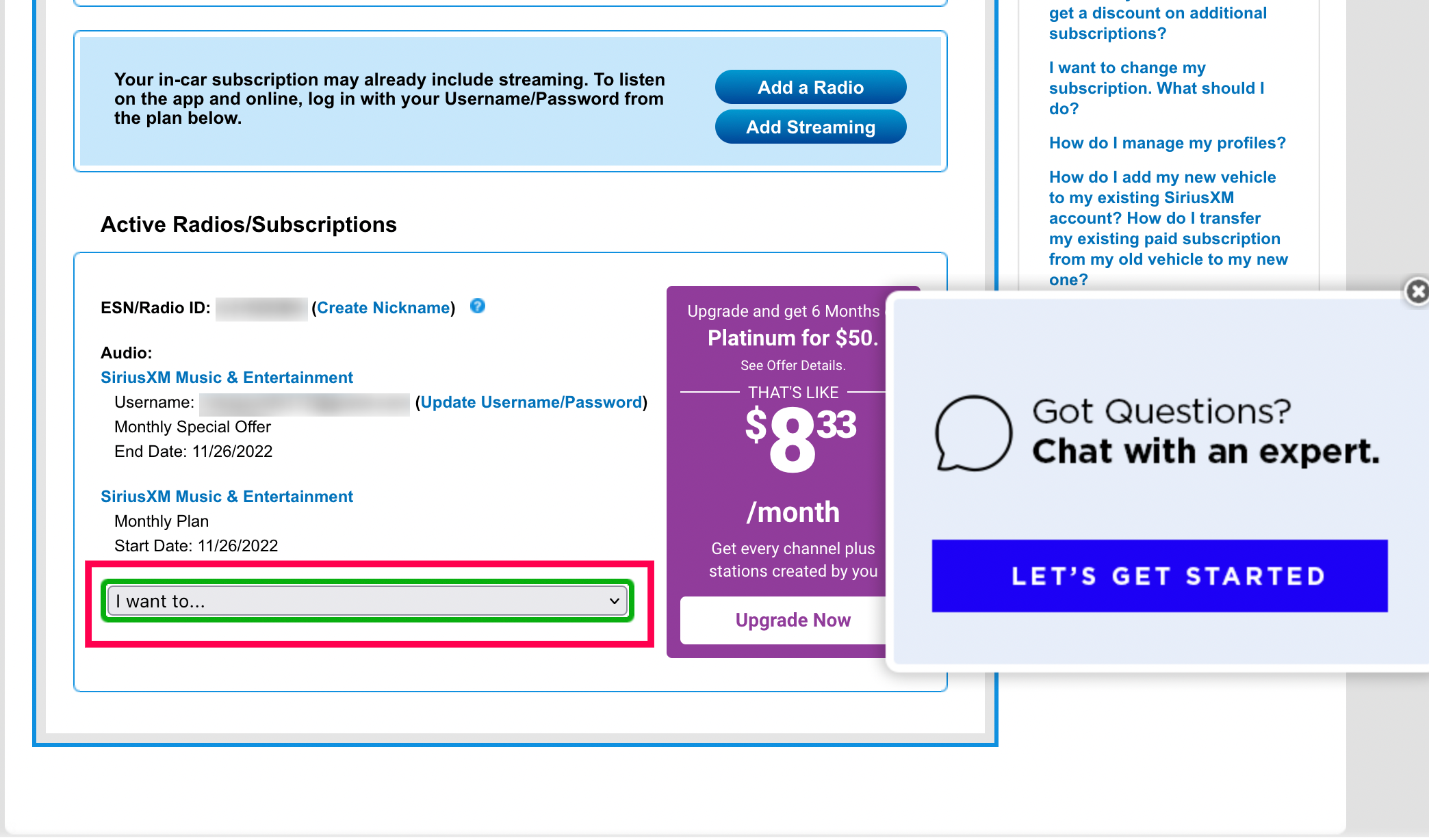
Managing a subscription in the modern era is no longer just about making a phone call; it involves navigating web portals, understanding app store API integrations, and occasionally bypassing complex user experience (UX) friction points known as “dark patterns.” This guide provides a technical walkthrough of how to effectively cancel your SiriusXM subscription across various platforms.
Navigating the Digital Interface: Steps to Cancel Online
The most common method for managing a SiriusXM subscription is through their official web portal. Because the company manages millions of active data packets and user profiles, their online account management system is designed to handle high volumes of traffic, but it is also structured with several layers of retention logic.
Accessing the Online Account Center
To begin the process, you must authenticate your identity through the SiriusXM Online Account Center. Technically, this involves logging in with your credentials—typically an email address or a username associated with your Radio ID (RID) or Electronic Serial Number (ESN). If you do not have your login information, the system allows you to retrieve it using the ESN of your hardware, which is a unique alphanumeric code assigned to your satellite tuner.
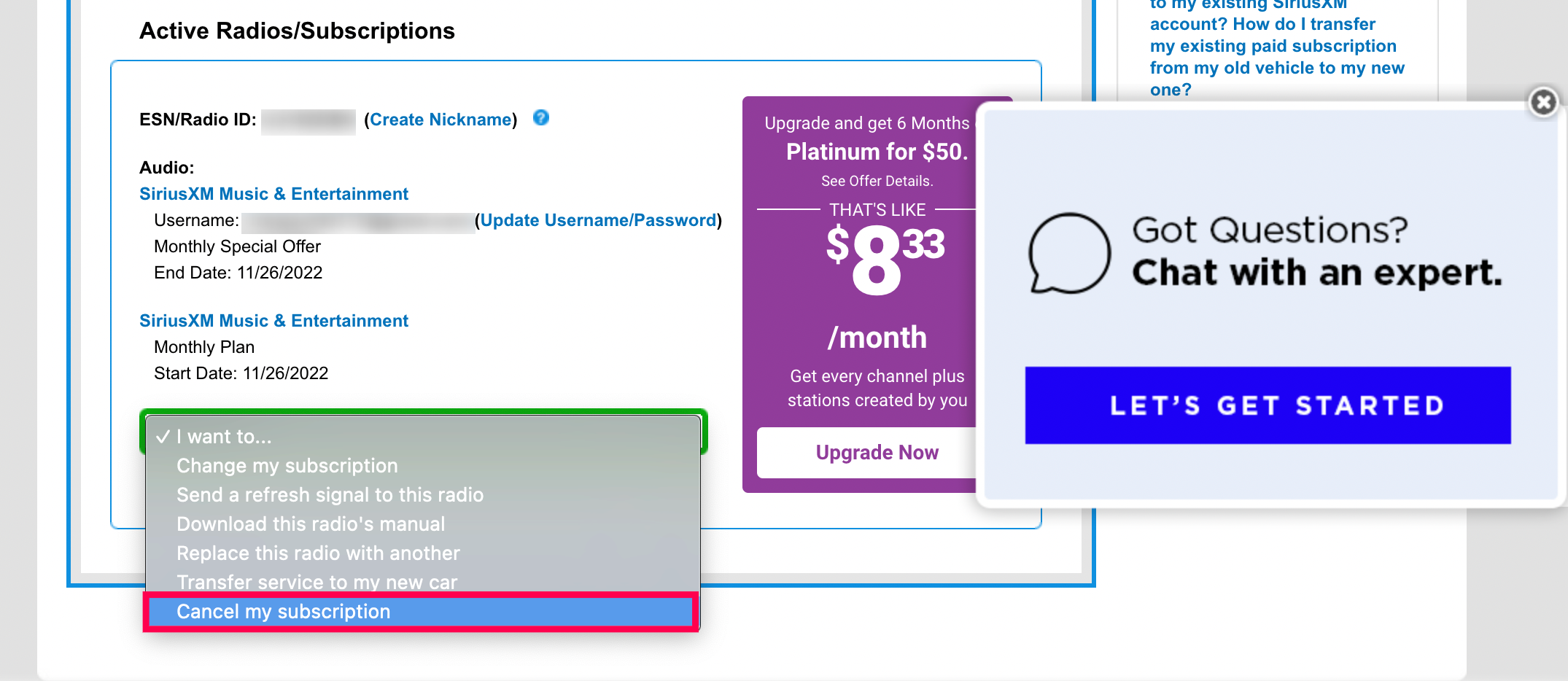
Once logged in, the dashboard serves as the primary hub for your subscription data. You will need to locate the “Manage Subscription” tab. In many UI configurations, this is found under the “My Account” dropdown menu. The system will then query its database to display your current plan, billing cycle, and associated hardware.
Utilizing the Digital Chat Assistant
In recent years, SiriusXM has integrated an automated chatbot to handle cancellation requests, moving away from a purely human-operated call center model. From a technical standpoint, this chatbot is an AI-driven interface designed to parse natural language and execute account changes via API calls.
When you initiate a chat for cancellation, the bot will first attempt to verify your account status. It will then trigger a series of retention scripts—automated logic gates designed to offer discounts or alternative packages based on your usage history and subscription tier. To proceed with the cancellation, you must consistently select options that indicate a desire to terminate the service without modification. Once the bot confirms the request, it triggers a database update that flags your account for “pending cancellation” at the end of the current billing cycle.
Browser Compatibility and Session Management
A common technical hurdle users face when attempting to cancel online is session timeouts or browser-related glitches. The SiriusXM portal utilizes heavy JavaScript and cookie-based session tracking. If you find that the “Cancel” button is unresponsive or leading to a “404 Error” page, it is often due to cached data interfering with the site’s script execution. Clearing your browser’s cache or using an Incognito/Private window can often resolve these UI hurdles, ensuring that the cancellation scripts run correctly.
Managing Subscriptions through Third-Party Ecosystems
Many modern users do not subscribe to SiriusXM directly through the company’s website but rather through mobile application stores like Apple’s App Store or the Google Play Store. When you subscribe via an app, the billing architecture is managed by the platform provider rather than SiriusXM itself.
The Apple iOS Workflow
If you signed up for SiriusXM on an iPhone or iPad, your subscription is tied to your Apple ID. This creates a technical bridge between the SiriusXM app and Apple’s Subscriptions API. To cancel:
-
Open the Settings app on your iOS device.
-
Tap on your Apple ID name at the top of the menu.
-
Select Subscriptions.
-
Locate SiriusXM in the list of active digital services.
-
Tap Cancel Subscription.
This action sends a digital handshake to SiriusXM’s servers, informing them that the auto-renewal token has been revoked. Your service will typically remain active until the end of the current paid period.
The Google Play Store Process
For Android users, the process is handled through the Google Play billing system.
-
Open the Google Play Store app.
-
Tap the Profile Icon in the top right corner.
-
Navigate to Payments & Subscriptions > Subscriptions.
-
Select SiriusXM and choose the Cancel Subscription option.
The advantage of managing cancellations through these third-party ecosystems is the transparency and ease of the UX. Unlike direct cancellations, which may involve retention scripts, app store cancellations are handled by the OS-level software, providing a one-click termination of the billing agreement.
Understanding Technical Friction and Dark Patterns
In software design, “dark patterns” refer to user interfaces that are intentionally designed to make certain actions—like canceling a subscription—more difficult than others. SiriusXM has historically utilized some of these techniques to maintain its subscriber base. Understanding these from a technical perspective can help you navigate the process more efficiently.
The Persistence of Phone Verification
One of the most notable friction points in the SiriusXM cancellation flow is the requirement for some users to speak with a “Retention Specialist” over the phone. This is a manual intervention in an otherwise digital workflow. From a system architecture perspective, this serves as a final gate. If the online portal tells you that you “must call to cancel,” it is often because your account type (frequently those bundled with a new vehicle purchase) is locked behind a specific administrative flag that requires a human agent to override.
Automated Retention Logic
When you attempt to cancel, the software behind the scenes evaluates your “Customer Lifetime Value” (CLV). If the algorithm identifies you as a high-value customer, it may trigger specific “save” offers. These are not random; they are data-driven responses based on how long you have been a subscriber and your previous interaction history. Being aware that these are automated software responses allows you to stay focused on the technical goal: the termination of the service contract.
Confirmation Security and Metadata
After any cancellation, it is critical to ensure that the system has successfully updated your status. A successful cancellation should trigger an automated “Confirmation of Cancellation” email. This email contains a confirmation number, which is a unique string in the SiriusXM database that serves as your receipt of the transaction. From a technical security standpoint, you should archive this email. If the system fails to stop billing due to a database sync error, this confirmation number is the key piece of metadata required to dispute the charge with your financial institution or SiriusXM’s support team.
Finalizing the Digital Handshake: Post-Cancellation Data Security
Once the subscription has been officially canceled, there are several technical “housekeeping” tasks you should perform to ensure your data is secure and that no residual background processes continue to run on your devices.
Revoking App Permissions
If you used the SiriusXM app, it likely has permissions to access your location, Bluetooth, and cellular data. Once your subscription is inactive, it is a best practice to revoke these permissions through your device’s privacy settings or to uninstall the application entirely. This prevents the app from continuing to collect telemetry data or pinging servers for updates in the background, which can save battery life and data overhead.
Removing Payment Tokens
If you subscribed directly through the SiriusXM website, your credit card information or PayPal token is stored in their billing vault. While you cannot always delete your billing profile entirely while an account is in a “pending cancellation” state, you should check your account settings to see if you can remove or replace the primary payment method with a generic one once the final billing cycle has concluded. This adds a layer of digital security against future unauthorized renewals.
Hardware Deactivation (The Satellite Signal)
For those using a dedicated satellite radio in a vehicle, the cancellation process involves a “deactivation signal” sent via satellite. SiriusXM broadcasts a specific data packet targeted at your Radio ID that tells the hardware to lock the encrypted channels. For this to work, your radio usually needs to be turned on and receiving a clear signal from the sky. If your car is parked in a garage during the cancellation window, the hardware might not receive the “kill signal” immediately. However, the billing stops at the server level regardless of whether the hardware receives the deactivation command.

Transitioning to Digital Alternatives
Canceling a service is often the first step in migrating to a new software stack. As you move away from SiriusXM, you may want to explore how other digital platforms handle subscription management. Platforms like Spotify, Apple Music, or even self-hosted solutions like Plexamp offer different technical advantages, such as more robust API support for smart home integration or better lossless audio codecs.
By understanding the technical nuances of the SiriusXM cancellation process—from navigating the JavaScript-heavy web portal to managing app store tokens—you can ensure a smooth transition. The key is to recognize the automated logic at play and use the platform’s own tools and confirmation systems to verify that your digital and financial footprints are exactly where you want them to be.
aViewFromTheCave is a participant in the Amazon Services LLC Associates Program, an affiliate advertising program designed to provide a means for sites to earn advertising fees by advertising and linking to Amazon.com. Amazon, the Amazon logo, AmazonSupply, and the AmazonSupply logo are trademarks of Amazon.com, Inc. or its affiliates. As an Amazon Associate we earn affiliate commissions from qualifying purchases.