
In the rapidly evolving landscape of digital services, Amazon Prime stands as a colossal ecosystem, offering an unparalleled suite of technological perks that span entertainment, e-commerce, and digital convenience. For many, the prospect of unlocking faster shipping, a vast library of streaming content, ad-free music, and cloud storage without an immediate financial commitment is incredibly appealing. This guide delves into the technicalities and strategic approaches to securing a free trial of Amazon Prime, ensuring you harness its full potential as a tech consumer. We’ll explore the underlying digital architecture, user interface navigation, and best practices for evaluating this comprehensive service before making a subscription decision.

Understanding the Amazon Prime Digital Ecosystem
Before diving into the mechanics of securing a free trial, it’s crucial to grasp the technological breadth and depth of what Amazon Prime entails. It’s not merely a shipping service; it’s a fully integrated digital platform designed to enhance various aspects of your online life.
What Amazon Prime Offers: A Multifaceted Tech Service Bundle
At its core, Amazon Prime is a bundle of digital services, meticulously engineered to work seamlessly together.
-
Expedited Shipping & Logistics (E-commerce Tech): This is perhaps the most recognized feature. Prime members gain access to free two-day, one-day, and even same-day shipping on millions of eligible items. This relies on Amazon’s sophisticated logistics network and real-time inventory management systems, a marvel of modern supply chain technology. From a user perspective, it’s a direct enhancement to your online shopping experience, streamlining delivery via smart algorithms.
-
Prime Video (Streaming Tech): A direct competitor to Netflix and Disney+, Prime Video offers an extensive library of movies, TV shows, and Amazon Originals. This service utilizes advanced streaming protocols, adaptive bitrate technology to adjust video quality based on your internet speed, and personalized recommendation engines powered by machine learning, all accessible across a multitude of devices (smart TVs, consoles, mobile apps, web browsers).
-
Amazon Music Prime (Audio Streaming Tech): While not as extensive as Amazon Music Unlimited, Prime Music provides ad-free access to millions of songs and thousands of stations and playlists. This is another example of a digital content delivery platform, leveraging cloud-based storage and streaming technology to provide on-demand audio entertainment.
-
Prime Reading (Digital Publishing Tech): For avid readers, Prime Reading offers unlimited access to a rotating selection of ebooks, magazines, and comics. This integrates with Kindle devices and apps, showcasing Amazon’s prowess in digital publishing and e-reader technology. It’s a digital library accessible at your fingertips.
-
Amazon Photos (Cloud Storage Tech): Prime members receive unlimited full-resolution photo storage, alongside 5 GB for video. This is a robust cloud storage solution, providing secure backups and easy access to your digital memories across various devices. It’s a critical component for anyone managing large volumes of digital media.
-
Twitch Prime (Gaming Tech): Gamers benefit from Twitch Prime (now Prime Gaming), offering free games, in-game content, and a free channel subscription every month. This highlights Amazon’s integration with the gaming community and its strategic use of digital incentives.
-
Whole Foods Market Discounts (Retail Tech Integration): While physical, the discounts and benefits at Whole Foods leverage a digital integration via the Amazon app or a phone number linked to your Prime account, showcasing how technology bridges online and offline retail.
These services collectively demonstrate Amazon’s commitment to building a comprehensive digital ecosystem, making the free trial an excellent opportunity to explore these distinct technological offerings.
Eligibility Requirements: Who Qualifies for this Digital Gateway?
Amazon’s free trial program is generally designed to onboard new users into its digital ecosystem.
-
First-Time Prime Members: The most straightforward path is for individuals who have never held an Amazon Prime membership before. Amazon’s systems track past membership statuses, so attempting to sign up with the same account (or even linked accounts) that previously had Prime might result in immediate charges.
-
Previous Trialists (with a caveat): In some instances, if a significant amount of time has passed since your last free trial or paid membership, Amazon might offer another trial as a promotional gesture. However, this is rare and often targeted by Amazon’s internal algorithms rather than being universally available.
-
Specific Promotions: Occasionally, Amazon partners with other companies or services to offer extended free trials (e.g., through mobile carriers, credit card companies). These are distinct from the standard 30-day trial and have their own activation processes, often involving unique digital codes or specific landing pages.
-
Age and Location: While Amazon operates globally, the specific Prime benefits and trial availability can vary by region. Generally, you must be of legal age (18 or over in most regions) to enter into a subscription agreement.
Understanding these eligibility criteria is the first step in successfully navigating the digital sign-up process without encountering unexpected hurdles.
Step-by-Step Guide to Claiming Your Free Trial
Acquiring your Amazon Prime free trial is a simple, intuitive process, designed for broad user accessibility across various digital interfaces.
Navigating the Amazon Website: Your Digital Entry Point
The most common method for initiating a free trial is through the official Amazon website.
-
Access the Amazon Homepage: Open your preferred web browser and navigate to Amazon.com (or your respective regional domain, e.g., Amazon.co.uk, Amazon.ca).
-
Locate the Prime Section: Look for the “Try Prime” or “Prime” button/link, typically located in the top navigation bar, near your account name, or prominently displayed on the homepage banner. Clicking this will direct you to the dedicated Amazon Prime landing page.
-
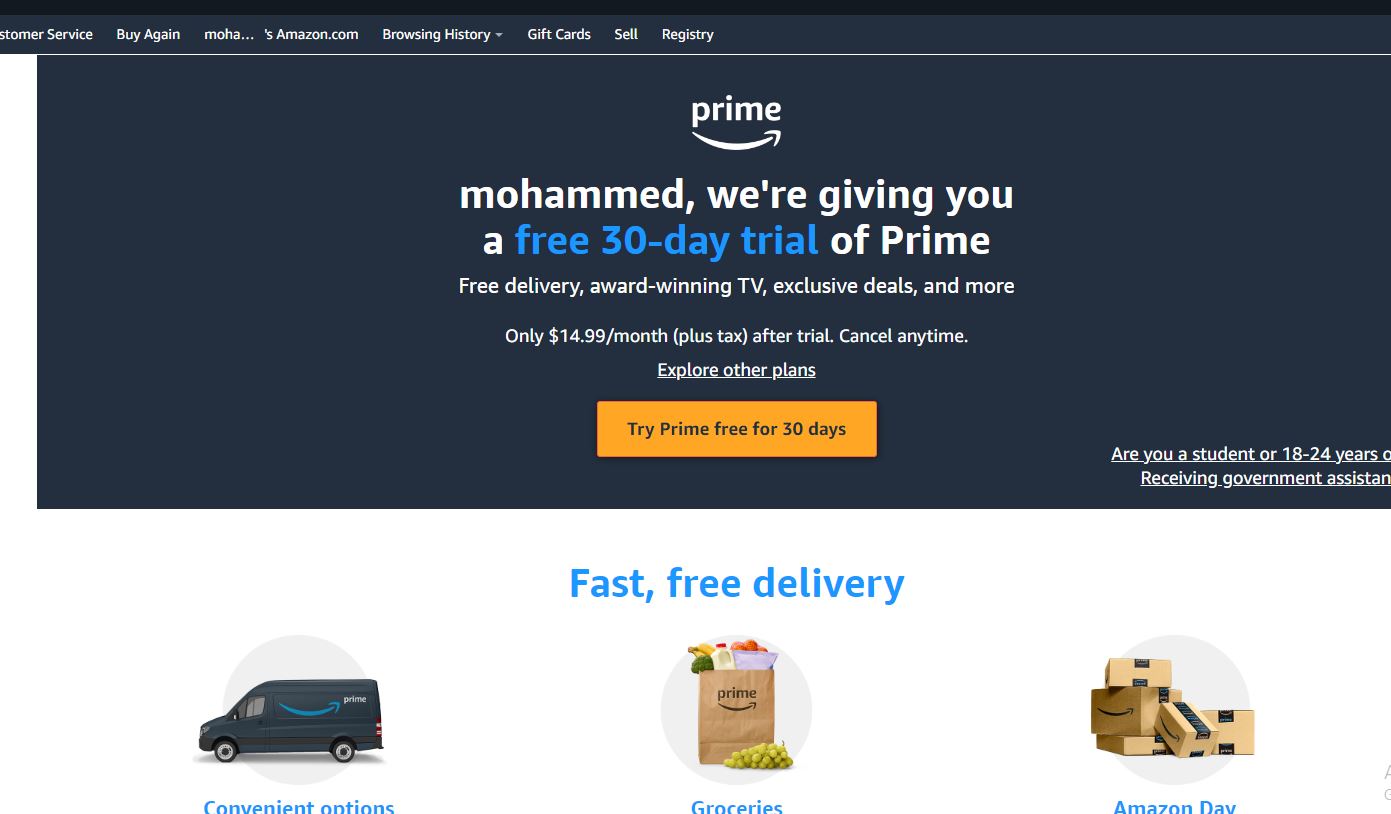
Initiate the Trial: On the Prime landing page, you’ll usually see a clear call-to-action button, such as “Start your 30-day free trial,” “Try Prime free,” or “Join Prime.” Click this button to proceed.
-
Sign In or Create an Account:
-
Existing Amazon Users: If you already have an Amazon account (even if you haven’t used Prime), you’ll be prompted to sign in with your email/phone number and password. Amazon’s system will then check your eligibility.
-
New Amazon Users: If you don’t have an Amazon account, you’ll need to create one. This involves providing your name, email address, and creating a secure password. This account will serve as your digital identity within the Amazon ecosystem.
-
-
Enter Payment Information: Amazon requires a valid payment method (credit card, debit card, etc.) to begin your free trial. This is a standard procedure across subscription services to ensure a seamless transition to a paid membership should you choose to continue after the trial period. Rest assured, you will not be charged during the free trial period. Amazon’s payment processing technology is robust and secure.
-
Confirm and Start: After entering your payment details, review the terms and conditions, and then confirm your decision. Your free trial will activate immediately, granting you instant access to all Prime benefits.
Using the Amazon App: Mobile-First Activation
For users who primarily interact with Amazon via their mobile devices, the process is equally streamlined within the Amazon Shopping app.
-
Download and Open the App: Ensure you have the latest version of the Amazon Shopping app installed on your iOS or Android device.
-
Log In: Sign in with your Amazon account credentials.
-
Navigate to Prime: Look for the “Prime” icon or menu option (often found in the main menu, usually accessible via a hamburger icon).
-
Follow On-Screen Prompts: The app will guide you through a similar process to the website, prompting you to “Try Prime free” and enter payment information if not already on file.
Essential Information Required: Digital Credentials
Regardless of the platform, the core information needed for your digital credentials remains consistent:
-
Valid Email Address: This is your primary identifier for your Amazon account.
-
Secure Password: Crucial for account security.
-
Valid Payment Method: A credit or debit card is typically required. While not charged during the trial, it authenticates your intent to subscribe and facilitates potential future payments. Amazon’s encrypted payment gateways protect your financial data.
-
Billing Address: Associated with your payment method for verification.
These data points allow Amazon’s systems to create and manage your digital identity and subscription status effectively.
Maximizing Your Prime Free Trial Experience
Once your free trial is active, the goal is to fully explore its technological advantages. A structured approach ensures you get the most out of your 30 days.
Exploring Key Prime Features: Tech Deep Dive
Dedicate time to test each major tech service Prime offers:
-
Prime Video: Download the Prime Video app on your smart TV, streaming stick (Fire TV, Roku), gaming console, or mobile device. Experiment with the streaming quality settings, download content for offline viewing (a great feature for travel), and try out the X-Ray feature (powered by IMDb) that provides actor and soundtrack information during playback. Test the recommendation engine by watching diverse genres.
-
Amazon Music Prime: Install the Amazon Music app. Create playlists, explore curated stations, and test the ad-free listening experience. Compare it to other music streaming services you might use.
-
Prime Reading/Kindle: Download the Kindle app or use a Kindle device. Browse the Prime Reading library, download a few titles, and experience the seamless reading interface. Note how your reading progress syncs across devices via cloud technology.
-
Amazon Photos: Upload a batch of photos using the Amazon Photos app from your phone or computer. Evaluate the ease of use, organization features, and the peace of mind of unlimited full-resolution storage.
-
Shopping & Shipping: Make at least one or two eligible Prime purchases to experience the expedited shipping firsthand. Track your packages using Amazon’s sophisticated tracking system, available in the app or on the website.
By actively engaging with these features, you’ll gain a comprehensive understanding of Prime’s technological utility in your daily life.
Setting Reminders for Cancellation: Leveraging Digital Tools
This is a critical step to avoid unintended charges. Amazon Prime trials automatically convert to paid memberships upon expiry.
-
Calendar Alerts: Immediately after activating your trial, use your digital calendar (Google Calendar, Outlook Calendar, Apple Calendar) to set a reminder a few days before your trial is scheduled to end. This gives you ample time to decide.
-
Smartphone Reminders: Utilize your phone’s built-in reminder app with specific alarms.
-
Third-Party Apps: Consider using subscription management apps if you manage many digital services.
-
Amazon’s Own Notification: While Amazon sends email reminders, proactive calendar management is a more reliable personal safeguard.
Understanding Auto-Renewal: The Subscription Tech Mechanism
When you sign up for a free trial, you are consenting to auto-renewal into a paid subscription unless you explicitly cancel. This is a common design pattern in the subscription economy.
-
Managing Your Membership: You can manage your Prime membership details, including cancellation, directly within your Amazon account settings. Navigate to “Account & Lists” > “Your Prime Membership” on the website or similar options in the app.
-
Turning Off Auto-Renewal: Within your Prime membership settings, there should be an option to “End Membership” or “Manage Membership.” You can often choose to let your trial run its course and then not convert to a paid membership, without immediately losing access to benefits for the remainder of your trial. This is the recommended approach if you’re unsure about subscribing.
Familiarizing yourself with Amazon’s membership management interface is key to maintaining control over your digital subscriptions.
Beyond the Standard Trial: Alternative Pathways to Prime Benefits
While the 30-day free trial is the most common entry point, Amazon offers other technologically-enabled programs and promotions to access Prime.
Student Prime and EBT Discounts: Targeted Digital Access
Amazon recognizes specific demographics and offers reduced-price or extended trial memberships:
-
Prime Student: For college students, Amazon offers a generous 6-month free trial, followed by a discounted monthly rate. This program verifies student status through academic email addresses or enrollment verification services, showcasing Amazon’s use of digital identity verification.
-
EBT & Medicaid Card Holders: Individuals receiving qualifying government assistance can often access Prime at a significantly reduced monthly rate after a brief trial. This also involves digital verification of eligibility.
These programs exemplify how Amazon leverages technology to broaden access to its services for specific user segments.
Gifting Prime: A Digital Present
You can receive an Amazon Prime membership as a gift. A purchaser buys a one-year (or sometimes three-month) membership, and Amazon sends the recipient a digital gift code or email notification. The recipient then redeems this code in their Amazon account to activate the Prime benefits. This is a digital transaction of a digital service.
Bundles and Promotions: External Partnerships
Keep an eye out for promotions from other companies. Sometimes, telecommunications providers, credit card companies, or other retailers offer Amazon Prime as part of a larger bundle or loyalty program. These promotions usually involve unique digital codes or specific activation portals, linking your account through a partner’s system.
Making an Informed Decision: To Subscribe or Not?
As your trial period nears its end, it’s time to evaluate whether Amazon Prime’s digital services justify a recurring subscription.
Evaluating the Value Proposition: Cost-Benefit Analysis for Tech Users
Consider the following from a practical tech user’s perspective:
-
Frequency of Use: How often did you utilize Prime Video, Music, Reading, or Photos? Did you find yourself regularly benefiting from expedited shipping?
-
Monetary Savings: Calculate how much you saved on shipping costs alone. Factor in the cost of separate streaming services if Prime Video satisfies many of your entertainment needs. If you buy many ebooks or use cloud storage frequently, evaluate the individual cost of those services versus Prime.
-
Convenience Factor: Did Prime simplify your online life? Was the ability to order last-minute items with quick delivery a significant advantage? Did ad-free music or unlimited photo storage provide a tangible benefit to your digital workflow?
-
Alternative Services: How does Prime’s offering compare to standalone services you might already use (e.g., Spotify for music, Dropbox for photos, Netflix for video)? Is consolidating services into Prime a more efficient digital strategy for you?
This holistic assessment, weighing the utility of each digital component against the subscription cost, will guide your decision.
Seamless Subscription Management: The Tech Interface
If you decide to continue, your membership will automatically roll over. If not, cancellation is straightforward:
-
Log In: Access your Amazon account online or via the app.
-
Navigate to Prime Membership Settings: Go to “Account & Lists” > “Your Prime Membership.”
-
End Membership: Follow the prompts to cancel. Amazon usually offers options to end immediately, or to end at the end of your current billing cycle (which, for a trial, is the end of the trial period). Choosing the latter allows you to use Prime benefits for the full trial duration without being charged.
The interface is designed for user control, allowing you to easily manage your digital subscription status without complex hurdles.
Conclusion
Securing a free trial of Amazon Prime is a gateway to experiencing a vast and integrated suite of digital services designed to enrich your online shopping, entertainment, and digital storage needs. By understanding the technological underpinnings of each service, meticulously following the sign-up process, and strategically maximizing your 30-day exploration, you can make an informed decision about its value. Whether you ultimately choose to subscribe or not, the free trial offers an invaluable opportunity to interact with Amazon’s formidable digital ecosystem firsthand, allowing you to assess its utility in your personal tech landscape. Utilize this period wisely to truly test the boundaries of what Prime can offer, ensuring your digital choices align with your lifestyle and budget.
aViewFromTheCave is a participant in the Amazon Services LLC Associates Program, an affiliate advertising program designed to provide a means for sites to earn advertising fees by advertising and linking to Amazon.com. Amazon, the Amazon logo, AmazonSupply, and the AmazonSupply logo are trademarks of Amazon.com, Inc. or its affiliates. As an Amazon Associate we earn affiliate commissions from qualifying purchases.