
Transferring money, whether to a friend, family member, another one of your accounts, or an international recipient, is a fundamental aspect of personal finance. Bank of America, as one of the largest financial institutions, offers a robust suite of options to facilitate these transfers, catering to a wide range of needs from quick digital payments to secure international wire transfers. Understanding these methods, their associated costs, limits, and security protocols, is crucial for efficient and secure financial management. This guide will walk you through the various ways to transfer money from your Bank of America account, empowering you to choose the best method for your specific situation.
Understanding Your Money Transfer Options with Bank of America
Before diving into the specifics of each method, it’s helpful to categorize the types of transfers available. Generally, money transfers can be broadly classified as internal (within Bank of America accounts) or external (to accounts at other financial institutions, or to individuals outside the bank’s direct system). Bank of America has streamlined many of these processes, making them accessible through their digital platforms, but also maintains traditional channels for specific scenarios.
Internal vs. External Transfers
An internal transfer typically refers to moving money between two Bank of America accounts. This could be between your own checking and savings accounts, or from your account to another individual’s Bank of America account. These transfers are usually instantaneous, free, and can be easily executed online or via the mobile app.
External transfers, on the other hand, involve sending money from your Bank of America account to an account at a different bank, either domestically or internationally. These transfers can take longer to process, may incur fees, and often have different security protocols and limits.
Common Scenarios for Money Transfers
The method you choose will largely depend on your specific needs:
-
Paying friends or family: For casual payments, splitting bills, or sending gifts, person-to-person (P2P) payment services are often the most convenient.
-
Funding another one of your accounts: If you have accounts at multiple banks, you’ll need a reliable way to move funds between them.
-
Making a large purchase or payment: For significant transactions, traditional methods like wire transfers or cashier’s checks offer higher security and proof of funds.
-
Sending money internationally: Global transfers require specialized services that handle currency exchange and comply with international banking regulations.
Bank of America provides solutions for all these scenarios, each with its own advantages and considerations.
Step-by-Step Guide to Bank of America’s Digital Transfers
Digital platforms have revolutionized how we manage our finances, and Bank of America is at the forefront of offering intuitive online and mobile banking tools for money transfers. These methods are generally the quickest, most convenient, and often the most cost-effective for domestic transfers.
Using Bank of America Online Banking
Bank of America’s online banking portal is a robust platform for managing nearly all aspects of your finances, including money transfers.
-
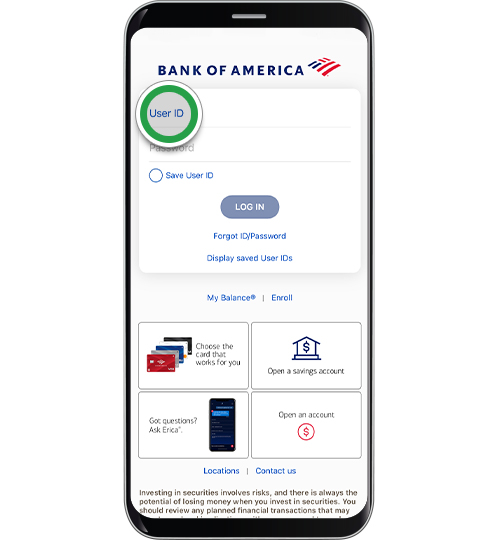
Log In: Access your account by logging into the Bank of America website with your User ID and Passcode.
-
Navigate to Transfers: Once logged in, look for a “Transfer” or “Pay & Transfer” tab or menu option.
-
Select Transfer Type: You’ll typically be presented with options like “Transfer Money,” “Send Money to an Individual,” or “Wire Transfers.”
-
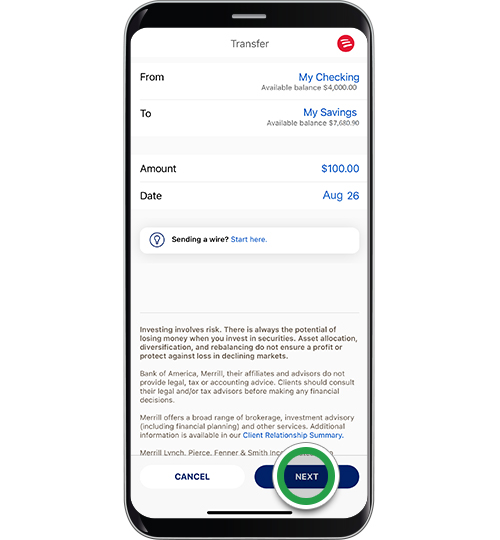
Internal Transfers: To move money between your own Bank of America accounts, select the “Transfer Between My Accounts” option. Choose the ‘From’ account, the ‘To’ account, and enter the amount. These are usually instantaneous.
-
External Transfers (to another bank): If you’re sending money to an account at a different bank, you’ll need to have the recipient’s bank account details (account number and routing number) linked to your Bank of America profile. If not already linked, you might need to add it, which can involve a verification process (e.g., small test deposits). Once linked, select the ‘From’ account, the ‘To’ external account, and the amount. These transfers typically take 1-3 business days.
-
-
Review and Confirm: Always double-check all details—recipient, amount, and accounts—before confirming the transfer.
-
Confirmation: You’ll receive a confirmation number and often an email notification once the transfer is successfully initiated.
Leveraging the Bank of America Mobile App
The Bank of America mobile app offers nearly all the functionalities of online banking, optimized for smartphones and tablets. It’s particularly convenient for on-the-go transfers.
-
Open and Log In: Launch the Bank of America mobile app and log in using your credentials, Touch ID, or Face ID.
-
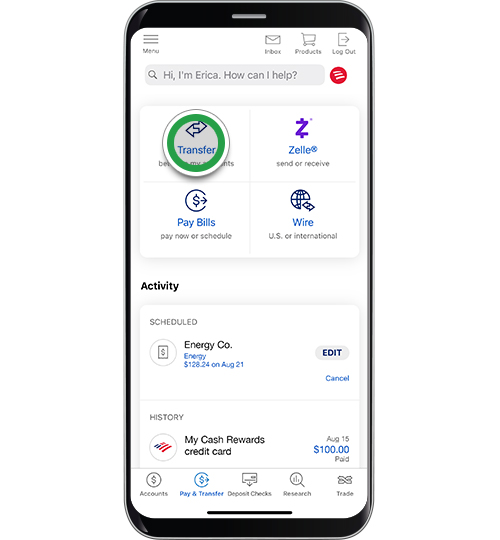
Access Transfers: Tap on the “Transfer” or “Pay & Transfer” icon, usually located at the bottom or within the main menu.
-
Choose Transfer Method: Similar to online banking, select whether you’re transferring between your own accounts, to another person, or making an external transfer.
-
Enter Details: Follow the on-screen prompts to select accounts, enter the amount, and provide recipient details if applicable. The app often allows you to select recipients from your phone’s contacts if they are also using Zelle.
-
Review and Confirm: Verify all information carefully before authorizing the transfer.
-
Confirmation: A digital receipt will be provided, and the transaction will appear in your account activity.
Setting Up Zelle for Quick Transfers
Zelle is a popular person-to-person (P2P) payment network fully integrated into Bank of America’s online and mobile banking. It allows you to send and receive money with friends, family, and others you trust, typically within minutes, using just their email address or U.S. mobile phone number.
-
Enroll in Zelle: From your Bank of America online banking or mobile app, navigate to the “Zelle” or “Send Money” section. Follow the prompts to enroll your Bank of America checking account.
-
Add Recipient: You’ll need the recipient’s email address or U.S. mobile phone number. If they are also enrolled with Zelle through their bank, the transfer will be quick. If not, they will receive a notification to enroll to claim the money.
-
Initiate Transfer: Select the ‘From’ account, enter the amount, and optionally add a memo.
-
Review and Send: Confirm the details. Funds are typically available to the recipient within minutes if they are already enrolled with Zelle.
Important Note on Zelle: Zelle is best for sending money to people you know and trust. There are no fees to send or receive money with Zelle through Bank of America, but transaction limits apply. Once a payment is sent, it cannot be canceled if the recipient is already enrolled.
Exploring Traditional and International Transfer Methods
While digital methods offer convenience, there are situations that call for more traditional approaches or specialized services, especially for larger sums, international transfers, or when a physical payment instrument is required.
Wire Transfers for Larger Sums and International Needs
Wire transfers are a reliable method for sending large amounts of money both domestically and internationally. They offer high security and are typically processed quickly, often within a day for domestic transfers, and a few days for international ones.
-
Initiating a Wire Transfer: You can usually initiate a wire transfer through Bank of America’s online banking (for domestic wires, and sometimes international to pre-approved recipients), or by visiting a branch. For first-time international wires or very large amounts, a branch visit might be required for additional verification.
-
Required Information: For domestic wires, you’ll need the recipient’s full name and address, their bank’s name and address, their account number, and their bank’s routing number. For international wires, you’ll additionally need the recipient’s bank’s SWIFT/BIC code, and potentially their IBAN (International Bank Account Number) for certain countries.
-
Fees and Limits: Wire transfers generally incur fees, which can vary based on whether it’s domestic or international, and the amount being sent. There are also daily limits for online wire transfers, which can be higher when initiated in person at a branch.
-
Tracking: You typically receive a confirmation number that can be used to track the status of the wire.
Key Consideration: Wire transfers are final. Once sent, they are very difficult to recall. Always verify recipient details meticulously.
Sending Money Orders or Cashier’s Checks
For situations where a physical, guaranteed payment is required, Bank of America offers money orders and cashier’s checks. These are useful when you don’t want to use your personal check or need certified funds.
-
Cashier’s Checks: A cashier’s check is drawn on the bank’s own funds, making it a guaranteed payment. They are commonly used for large purchases (e.g., down payment on a house, car purchase from a private seller). You can obtain a cashier’s check by visiting a Bank of America branch. There is typically a fee for this service.
-
Money Orders: Money orders are generally used for smaller amounts and can be purchased at a Bank of America branch. They are a secure alternative to cash or personal checks and are widely accepted. Fees apply.
International Transfers via Bank of America
Beyond wire transfers, Bank of America offers streamlined options for sending money abroad, especially through its international transfer services integrated into online banking.
-
Bank of America International Transfers: This service allows you to send money directly from your Bank of America checking or savings account to recipient accounts in various countries, often with competitive exchange rates and transparent fees. The process is similar to setting up an external transfer online but includes currency conversion.
-
Recipient Information: You will need comprehensive details for the international recipient, including their full name, address, bank name and address, account number, SWIFT/BIC code, and potentially an IBAN.
-
Exchange Rates and Fees: Be mindful of the exchange rate offered by Bank of America, as it can impact the final amount the recipient receives. Fees for international transfers vary by country and amount.
Fees, Limits, and Security Considerations
Regardless of the transfer method chosen, it’s essential to be aware of the financial implications and security measures to protect your funds.
Understanding Transfer Fees and Exchange Rates
-
Domestic Transfers: Most internal transfers and standard ACH transfers (external to other U.S. banks) through Bank of America’s online or mobile banking are free. Zelle transfers are also free. Domestic wire transfers typically incur a fee (e.g., $30-$35).
-
International Transfers: International wire transfers and other international transfer services will have higher fees, often ranging from $35-$50 per transaction, plus potential intermediary bank fees. Additionally, pay close attention to the exchange rate Bank of America offers. A seemingly small difference in the exchange rate can significantly impact the final amount received by your international recipient. Compare rates with other providers if sending large sums.
Daily and Transaction Limits
Bank of America imposes limits on the amount of money you can transfer per day, per transaction, or within a specific timeframe (e.g., 30 days). These limits vary by transfer method and can also depend on your account history and verification status.
-
Zelle: Typically has lower daily limits (e.g., $2,500 – $3,500 for personal accounts, potentially higher for small businesses).
-
External ACH Transfers: May have daily limits (e.g., $10,000) or monthly limits.
-
Wire Transfers: Generally have the highest limits, especially when initiated in person, but online wire transfers will still have a maximum.
It’s advisable to check the current limits within your online banking portal or by contacting Bank of America customer service if you plan to send a large amount.
Protecting Your Transfers: Security Best Practices
Security is paramount when transferring money. Bank of America employs robust security measures, but user vigilance is also critical.
-
Verify Recipient Details: This is the most crucial step. Double-check account numbers, routing numbers, names, and contact information before every transfer. A single digit error can send your money to the wrong person, and it may be difficult or impossible to recover.
-
Use Secure Connections: Always initiate transfers on a secure internet connection (e.g., your home Wi-Fi, not public Wi-Fi) and through official Bank of America channels (website or app).
-
Beware of Scams: Be highly skeptical of requests to send money, especially from unknown individuals, online romantic interests, or supposed “authorities” demanding immediate payment. Never share your login credentials or one-time passcodes. Bank of America will never ask for your full password via email or text.
-
Monitor Your Accounts: Regularly review your account statements and transaction history for any unauthorized activity. Set up alerts for transfers or large transactions.
-
Strong Passwords and Two-Factor Authentication: Use unique, strong passwords for your Bank of America account and enable two-factor authentication (e.g., a code sent to your phone) for an added layer of security.
Troubleshooting Common Issues and Maximizing Efficiency
Even with careful planning, issues can arise. Knowing how to address them and how to optimize your transfer process can save you time and stress.
What to Do if a Transfer Fails or Goes Wrong
-
Incorrect Information: If you realize you entered incorrect information before confirming, simply correct it. If the transfer has already been initiated, immediately contact Bank of America customer service. For Zelle, if the recipient is not enrolled, you might be able to cancel. If they are enrolled, the money is often gone. For wire transfers, recovery is extremely difficult.
-
Transfer Delayed: Check your account activity for a pending status. Sometimes, transfers take longer due to bank holidays, weekend processing, or additional security reviews. Contact customer service if delays are excessive.
-
Technical Issues: If you encounter technical glitches with the app or website, try clearing your browser cache, using a different browser, or reinstalling the app. If the issue persists, contact technical support.
Enhancing Your Transfer Experience
-
Save Recipient Details: For frequently used recipients, save their information within your Bank of America profile (for external accounts) or Zelle contacts. This reduces errors and speeds up future transfers.
-
Set Up Alerts: Customize alerts for transfer confirmations, withdrawals, or low balance warnings to stay informed about your account activity.
-
Understand Cut-off Times: Be aware of daily cut-off times for different transfer types. Transfers initiated after these times will be processed on the next business day.
When to Contact Bank of America Support
Don’t hesitate to reach out to Bank of America customer service for any questions or issues. They can provide guidance on:
-
Specific fees and limits for your account.
-
Troubleshooting failed or delayed transfers.
-
Setting up complex international transfers.
-
Reporting suspicious activity or potential fraud.
Their contact information is readily available on their official website and within the mobile app.
In conclusion, Bank of America provides a comprehensive ecosystem for money transfers, designed to meet diverse financial needs. By understanding the various methods—from instant digital payments via Zelle and online banking to secure wire transfers for larger or international transactions—and by adhering to best practices for security and verification, you can manage your funds effectively and with confidence. Always choose the method that best aligns with your recipient’s needs, the urgency of the transfer, and your comfort level with associated fees and security protocols.
aViewFromTheCave is a participant in the Amazon Services LLC Associates Program, an affiliate advertising program designed to provide a means for sites to earn advertising fees by advertising and linking to Amazon.com. Amazon, the Amazon logo, AmazonSupply, and the AmazonSupply logo are trademarks of Amazon.com, Inc. or its affiliates. As an Amazon Associate we earn affiliate commissions from qualifying purchases.