
Moving to a new home is often an exciting yet demanding period, filled with countless tasks from packing boxes to setting up utilities. Amidst the flurry, one crucial administrative detail often overlooked, or at least postponed, is updating your financial institutions with your new address. For customers of Bank of America, this isn’t just a matter of convenience; it’s a fundamental aspect of maintaining financial security, ensuring compliance, and guaranteeing uninterrupted access to vital account information.
Failing to update your address promptly can lead to a cascade of issues, from missed statements and important legal notices to potential security vulnerabilities if sensitive mail falls into the wrong hands. Bank of America, like all major financial entities, relies on accurate customer data to provide services, protect against fraud, and comply with regulatory requirements. This guide will walk you through the various methods available to update your address with Bank of America, offering a professional, insightful, and engaging overview to ensure a smooth transition for your finances.
The Critical Importance of Updating Your Bank Address
Changing your address with your bank isn’t merely a clerical chore; it’s a foundational step in responsible personal finance management, particularly after a significant life event like a move. The implications of an outdated address can extend far beyond simple inconvenience, touching upon security, communication, and legal compliance.
Ensuring Financial Security and Fraud Prevention
One of the most pressing reasons to update your address with Bank of America is to safeguard your financial accounts against fraud and identity theft. Bank statements, new card notifications, PINs, and other sensitive financial documents are regularly sent via mail. If these documents continue to arrive at your old address after you’ve moved, they become vulnerable to interception by new residents or malicious actors. This risk is compounded if you’ve not set up mail forwarding, or even if you have, as forwarded mail can sometimes be delayed or misplaced. An up-to-date address ensures that all official communications from Bank of America reach you directly, significantly reducing the window of opportunity for fraudsters. Moreover, your bank uses your address as a key identifier for security checks, and discrepancies can flag legitimate transactions as suspicious, potentially leading to temporary account freezes or requiring cumbersome verification processes.
Maintaining Seamless Communication and Timely Information
Your address is the primary conduit through which Bank of America communicates crucial information about your accounts. This includes monthly statements, annual tax documents (like 1099-INT for interest earned or 1098 for mortgage interest paid), notifications of policy changes, security alerts, and offers for new financial products. Missing these communications can have tangible financial consequences. For example, not receiving a statement might lead you to miss an error or an unauthorized transaction. Missing tax documents can complicate tax filing and potentially lead to penalties. Furthermore, if you’re expecting a new debit or credit card, or a replacement for an expired one, it must be sent to the correct address to ensure you receive it in a timely manner and can continue to access your funds or credit line without interruption.
Legal and Tax Compliance Benefits
Beyond personal convenience and security, an accurate address is essential for legal and tax compliance. Financial institutions are legally obligated to have current contact information for their customers, particularly for reporting purposes to government agencies such as the IRS. For instance, the address on file is used to generate tax forms like the 1099 series, which are crucial for accurately reporting your income and deductions. Discrepancies between the address on your bank records and other official documents could lead to delays or complications with tax authorities. Furthermore, in cases of legal notices, subpoena processing, or escheatment (when unclaimed funds are turned over to the state), your current address is vital for ensuring due process and that you are properly notified. Keeping your address updated helps Bank of America fulfill its regulatory responsibilities and, in turn, helps you remain compliant with your own financial obligations.
Exploring Your Options: Methods for Address Change at Bank of America
Bank of America understands the diverse needs of its vast customer base and offers several convenient methods for updating your address, catering to different preferences and situations. Whether you prefer the speed of digital solutions, the personal touch of direct interaction, or the reliability of traditional mail, there’s an option tailored for you.
The Convenience of Online Banking and Mobile App
For many, the quickest and most efficient way to change their address is through Bank of America’s robust online banking portal or their highly-rated mobile app. These digital platforms offer 24/7 access, allowing you to manage your accounts and make changes from the comfort of your home or on the go.
-
Online Banking: By logging into your Bank of America online account, you can typically navigate to the “Profile” or “Customer Service” section. Here, you’ll find options to update personal information, including your mailing and residential address. This method is secure, provides instant confirmation, and allows you to verify the change across all linked accounts.
-
Mobile App: The Bank of America mobile app offers a streamlined experience. After logging in, you can usually find the option to update your address within your profile or settings menu. The app’s intuitive interface makes it a popular choice for quick updates. Both digital methods require strong authentication, ensuring that only you can make changes to your account.
Personalized Assistance via Phone Banking
If you prefer speaking directly with a representative or encounter any issues with the digital platforms, Bank of America’s customer service line is an excellent resource. You can reach out to their dedicated support team, who can guide you through the address change process over the phone.
- Customer Service: Dialing the customer service number (typically found on the back of your debit/credit card, bank statements, or the official Bank of America website) will connect you with a representative. Be prepared to verify your identity through a series of security questions, including your account number, Social Security Number (SSN), or other personal identifiers. The representative will then be able to update your address for you. This method provides the reassurance of human interaction and allows for clarification of any specific concerns you might have.
In-Person Service at a Bank of America Branch
For those who value face-to-face interaction, or if your situation requires specific documentation or nuanced guidance, visiting a Bank of America branch is a viable option. This method provides the highest level of personal assistance and security.
- Branch Visit: Locating your nearest Bank of America branch allows you to speak with a banking specialist directly. They can help you fill out any necessary forms and ensure all your accounts are updated correctly. When visiting a branch, it’s advisable to bring a valid government-issued ID (driver’s license, passport) and any supporting documents that may verify your new address (e.g., a utility bill in your name at the new address). This ensures a smooth and efficient update process.
Traditional Mail-In Request (if applicable/recommended)
While less common due to the efficiency of digital and phone options, some customers may still prefer or require the mail-in method, particularly for certain types of accounts or if they live abroad without easy access to phone services or internet.
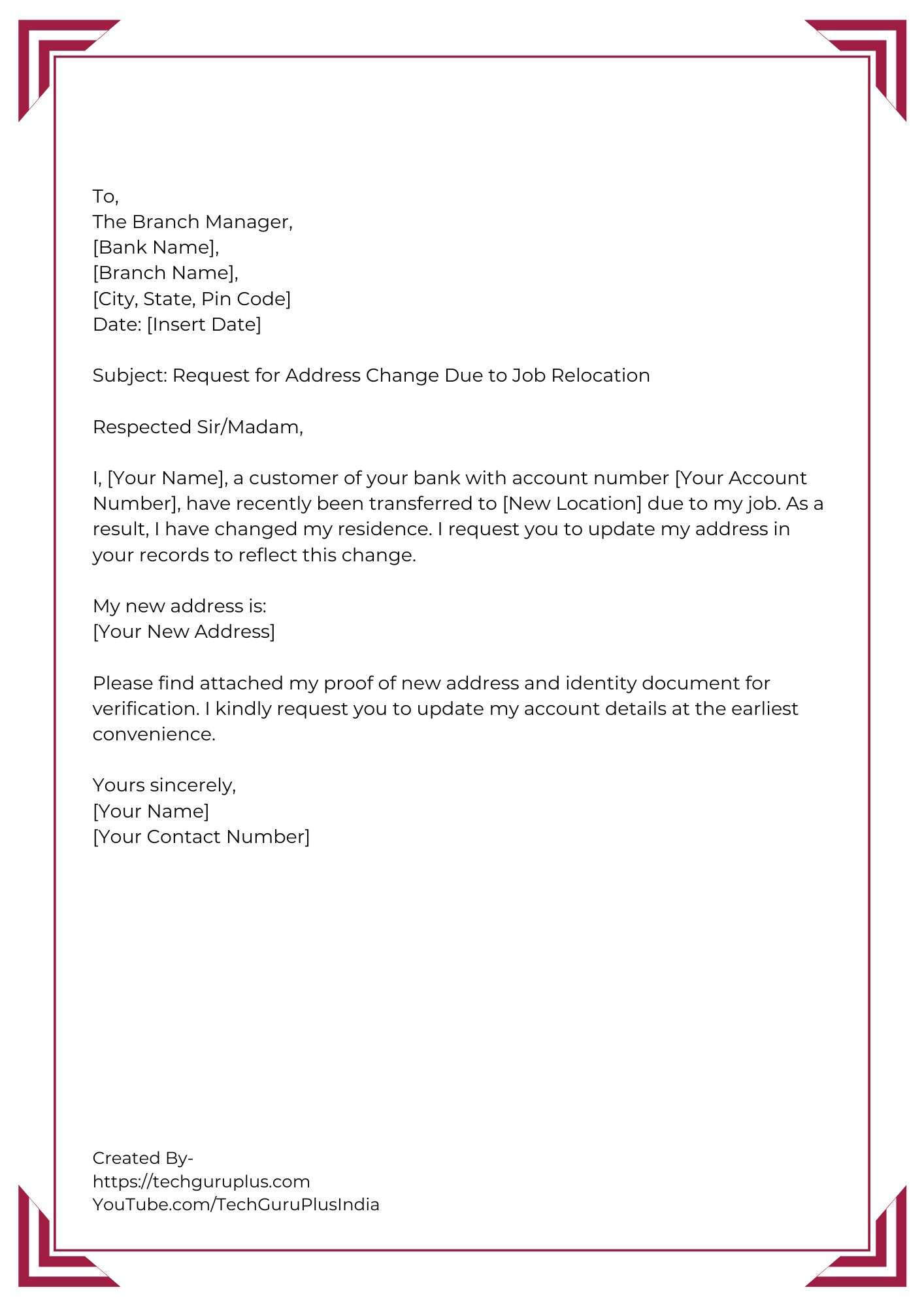
- Written Request: In some cases, Bank of America may allow or require a written request for an address change, especially for complex accounts or specific circumstances. This would typically involve sending a signed letter to a designated postal address, including your account number, old address, new address, and a copy of your valid ID. It’s always best to confirm with customer service if this method is appropriate for your specific needs, as processing times can be longer compared to other methods.
Each of these methods is designed with customer convenience and security in mind, offering flexibility to ensure your vital financial information remains current and accurate with Bank of America.
A Step-by-Step Guide to Updating Your Information
Regardless of the method you choose, a structured approach will ensure a seamless and secure address update with Bank of America. Preparation is key, followed by careful execution through your preferred channel.
Before You Begin: Gathering Necessary Information
Before you initiate the address change process, gather all relevant information to ensure a smooth and uninterrupted experience. This proactive step prevents delays and multiple contact points.
-
Account Details: Have your Bank of America account numbers readily available. This includes checking, savings, credit cards, mortgages, and any investment accounts you hold with them.
-
Personal Identification: Prepare your Social Security Number (SSN) and/or Taxpayer Identification Number (TIN).
-
Valid ID: Keep a valid government-issued identification document handy, such as a driver’s license, state ID, or passport. This will be required for identity verification, especially if you’re updating in person or over the phone.
-
New Address Details: Clearly write down your complete new mailing and residential address, including apartment or suite numbers, city, state, and ZIP code. Double-check for accuracy.
-
Old Address Details: You may need to provide your previous address for verification purposes.
Navigating the Online Portal for Address Change

The online banking portal is often the quickest way to update your address.
-
Log In Securely: Go to the official Bank of America website (bankofamerica.com) and log in to your online banking account using your User ID and Passcode. Ensure you are on a secure connection.
-
Access Profile/Settings: Once logged in, look for a section labeled “Profile,” “My Profile,” “Customer Service,” or “Settings.” This is usually found in the navigation bar or a dropdown menu after clicking your name or an avatar.
-
Find Address Update Option: Within the profile section, locate the option to “Change Address,” “Update Personal Information,” or similar.
-
Enter New Address: Carefully input your new mailing and/or residential address details into the designated fields.
-
Review and Confirm: Double-check all entered information for accuracy. The system may require you to confirm the change via a one-time passcode sent to your registered phone or email for enhanced security.
-
Submit: Confirm the changes. You should receive an instant on-screen confirmation and possibly an email notification.
Leveraging the Bank of America Mobile App
The mobile app provides a similar, streamlined experience for on-the-go updates.
-
Open and Log In: Launch the Bank of America mobile app on your smartphone or tablet and log in using your credentials.
-
Navigate to Profile: Tap on the menu icon (often three horizontal lines or dots) or your profile picture/icon to open the main menu.
-
Select Personal Info: Look for “Profile,” “Settings,” or “Personal Information.”
-
Update Address: Find the “Change Address” option.
-
Input Details: Enter your new address, ensuring all fields are correct.
-
Verify and Confirm: Follow any on-screen prompts for verification, such as entering a passcode.
-
Save Changes: Confirm to save your updated address.
Speaking to a Representative for Assistance
For those who prefer direct assistance, calling customer service is effective.
-
Dial Customer Service: Call the Bank of America customer service number (e.g., 1-800-432-1000 for general inquiries).
-
Verify Identity: Be prepared to answer security questions to verify your identity. This will typically include your SSN, date of birth, mother’s maiden name, or recent account activity.
-
Request Address Change: Clearly state that you wish to update your mailing and/or residential address.
-
Provide New Address: Dictate your new address details to the representative slowly and clearly.
-
Confirm Details: The representative will repeat the new address back to you for confirmation.
-
Confirm Update: Ask for confirmation that the change has been processed and when you can expect it to reflect on your accounts.
The In-Branch Experience
Visiting a physical branch offers personalized service.
-
Locate Branch: Use the Bank of America website or app to find your nearest branch.
-
Bring Documents: Carry a valid government-issued photo ID (driver’s license, passport) and possibly a utility bill or lease agreement with your new address for verification.
-
Speak to a Specialist: Inform the branch associate or personal banker that you need to change your address.
-
Complete Forms: You may be asked to fill out a short form.
-
Verify and Sign: Review the details, confirm the new address, and sign any necessary documents.
-
Receive Confirmation: The specialist will confirm the update and provide an estimated timeframe for it to take effect.
By following these steps, you can efficiently and securely update your address with Bank of America, ensuring your financial information remains current and your accounts stay protected.
Post-Update Essentials: What to Do After Changing Your Address
Successfully updating your address with Bank of America is a significant step, but the process doesn’t end there. To fully secure your financial profile and ensure all aspects of your personal finance are in order, several post-update actions and considerations are crucial.
Verifying the Change and Updating Other Accounts
Once you’ve submitted your address change to Bank of America, it’s prudent to perform a few verification checks and ensure consistency across all your financial dealings.
-
Confirm with Bank of America: After a few business days, log back into your online banking or mobile app to verify that your new address is reflected accurately in your profile. You might also consider calling customer service to confirm.
-
Update All Other Financial Institutions: Remember that your address change with Bank of America only affects accounts held with them. You must independently update your address with all other financial institutions, including other banks, credit card companies, brokerage firms, insurance providers, and retirement accounts (401k, IRA). Each institution will have its own process, similar to Bank of America’s, via online portals, phone, or in-person.
-
Government Agencies and Utilities: Don’t forget non-banking entities. Update your address with the Social Security Administration, the IRS, your state’s Department of Motor Vehicles, your employer’s HR department, and all utility companies (electric, gas, water, internet).
-
Subscription Services and Online Retailers: Update your shipping and billing addresses for online shopping sites, subscription boxes, and any recurring service providers.
Understanding Potential Impacts on Services
An address change, while necessary, can sometimes have minor, temporary impacts on certain services or communications.
-
Mail Forwarding vs. Direct Mail: While you should set up mail forwarding with the USPS, aim to have all future mail from Bank of America sent directly to your new address as quickly as possible. Relying solely on forwarding can lead to delays or missed critical communications.
-
New Cards and Statements: Be aware that any new debit cards, credit cards, or checks ordered after the address change will be sent to your new address. Statements will also reflect the new address from the next billing cycle.
-
Local Branch Association: If you frequently visit a specific local branch, note that your account might still be associated with your previous local branch if you haven’t explicitly requested a change of primary branch association (though this is less common with large banks like BoA where accounts are broadly accessible).
Proactive Security Measures After a Move
Moving to a new residence presents a heightened risk for identity theft if not managed carefully.
-
Monitor Accounts Closely: For a few months after your move, diligently review your Bank of America statements and online account activity for any suspicious transactions. Early detection is key to mitigating potential fraud.
-
Shred Old Documents: Before discarding any old mail or documents containing personal information, ensure they are thoroughly shredded to prevent dumpster diving identity theft.
-
Secure New Mailbox: If you have a physical mailbox at your new residence, ensure it is secure. Consider a locking mailbox if you frequently receive sensitive mail.
-
Be Wary of Phishing: Be extra vigilant about emails, texts, or phone calls claiming to be from Bank of America asking for personal information to “confirm” your address change. Bank of America will never ask for your full SSN, PIN, or online banking password via unsolicited communication. Always go directly to their official website or app, or call them using a verified number.
By taking these essential post-update steps, you not only ensure that your Bank of America accounts are correctly linked to your new home but also reinforce your overall financial security, allowing you to settle into your new residence with peace of mind.
Common Questions and Expert Tips
Updating your address with Bank of America is a straightforward process, but common questions and specific scenarios often arise. Addressing these proactively can make your transition even smoother.
What if I have multiple accounts?
One of the most frequent concerns is how an address change impacts various accounts. When you update your address through Bank of America’s online portal, mobile app, or by speaking with a representative, the change is typically applied to all your personal accounts linked under your primary profile. This usually includes your checking, savings, credit cards, and personal investment accounts (like Merrill Lynch accounts if integrated or directly through BoA). However, it is always wise to explicitly ask the representative or verify through your online profile that the change has been applied universally to all relevant accounts to avoid any oversights. For business accounts, the process might be separate, requiring a dedicated update through Bank of America’s small business or corporate banking division.
How long does the change take to reflect?
The timeframe for an address change to reflect varies depending on the method used.
-
Online/Mobile App: Changes made digitally are often reflected almost instantaneously in your online profile, though it might take 1-2 business days for the system to fully update and for new mail to be directed to your new address. You should receive an immediate on-screen confirmation and possibly an email.
-
Phone Banking: Changes made over the phone are usually processed within 1-3 business days. The representative will typically give you an estimate.
-
In-Branch: In-branch updates are often processed on the spot or within 1-2 business days, similar to online methods.
-
Mail-In: This is generally the slowest method, potentially taking 5-10 business days or even longer, not including postal delivery time.
Regardless of the method, it’s advisable to check your online profile after a few days to ensure the update has been correctly applied.
Can I change a business address through the same process?
Typically, no. Changing a business address with Bank of America involves a separate process from personal accounts. Business accounts often have different legal structures, ownership verification requirements, and documentation needs.
-
Separate Channels: You will usually need to log into your Bank of America small business online banking portal or contact their business banking customer service line directly.
-
Required Documentation: Be prepared to provide specific business documentation, such as Articles of Incorporation, business licenses, or resolutions, especially if there are changes in ownership or registered agent addresses.
-
Designated Contacts: Ensure the authorized signers or designated contacts for the business account are the ones initiating the change.
It’s best to consult Bank of America’s specific guidelines for business address changes.
Avoiding Common Pitfalls During Your Address Update
A few expert tips can help you bypass common issues:
-
Don’t Delay: Change your address as soon as you have a confirmed new address. Procrastination significantly increases security risks and chances of missing important mail.
-
Set Up USPS Mail Forwarding: Even after updating your bank, set up mail forwarding with the United States Postal Service (USPS). This acts as a crucial safety net for any mail that might still be sent to your old address from other institutions or unexpected sources.
-
Update Billing Address for Online Purchases: Many online retailers save your billing address for quick checkout. Ensure these are updated to match your new Bank of America billing address, or transactions might be declined due to mismatches.
-
Verify All Account Types: Make a checklist of all your Bank of America accounts (checking, savings, credit cards, mortgage, investments) and mentally or physically confirm the address change for each.
-
Be Security Conscious: Never provide your full account numbers, SSN, or online banking passwords via email or unsecured phone calls. Always use official channels or initiate the contact yourself.
-
Keep Records: After updating your address, take a screenshot of the confirmation page or note down the date and time of your call, along with the representative’s name, as a record of the change.
By understanding these nuances and applying these expert tips, you can navigate the address change process with Bank of America with confidence, ensuring your personal finances remain organized, secure, and fully compliant during and after your move.
aViewFromTheCave is a participant in the Amazon Services LLC Associates Program, an affiliate advertising program designed to provide a means for sites to earn advertising fees by advertising and linking to Amazon.com. Amazon, the Amazon logo, AmazonSupply, and the AmazonSupply logo are trademarks of Amazon.com, Inc. or its affiliates. As an Amazon Associate we earn affiliate commissions from qualifying purchases.