
In the modern financial landscape, the transition from physical ledger books and paper statements to mobile-first banking has revolutionized how individuals manage their wealth. Bank of America, as one of the largest financial institutions in the world, has invested heavily in its digital infrastructure to ensure that essential information is always at the user’s fingertips. However, the sheer density of features within a robust banking application can sometimes make finding basic information—like your full account number—a challenge for those accustomed to traditional methods.
Understanding how to navigate this digital environment is not merely a matter of convenience; it is a fundamental skill in personal finance management. Your account number, paired with your routing number, serves as the primary identifier for almost every electronic transaction, from setting up direct deposits to orchestrating complex wire transfers. This guide provides a comprehensive look at locating these credentials within the Bank of America app while exploring the broader implications of digital financial security and account management.
Navigating the Mobile Banking Ecosystem for Immediate Access
The Bank of America mobile app is designed with a “layered” security architecture. This means that while your balance might be visible upon login, more sensitive data, such as your full account and routing numbers, is often tucked behind additional taps to prevent accidental exposure to onlookers. To find these details, you must first ensure you are using the most updated version of the app to benefit from the latest interface refinements and security patches.
The Step-by-Step Procedure for Locating Your Account Number
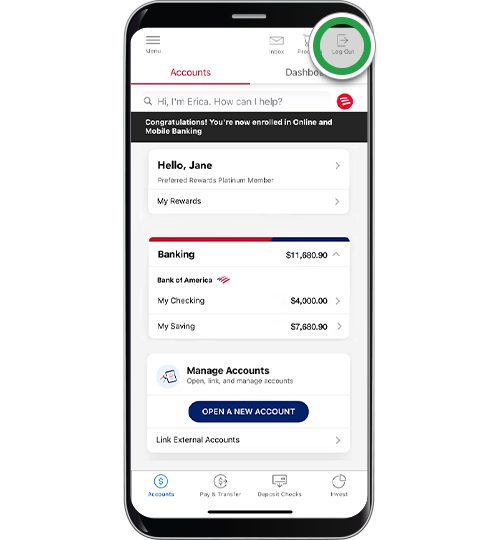
Once you have successfully logged into the app using your credentials or biometric authentication (such as FaceID or Fingerprint), the home screen will display a summary of your linked accounts, including checking, savings, and credit card accounts.
-
Select the Specific Account: Tap on the specific account (e.g., “Advantage Plus Banking”) for which you need the information. This will open the detailed transaction history for that account.
-
Access Account Details: Near the top of the screen, beneath the current and available balance display, you will see a link or tab labeled “Account Info & Details” or simply “Account Details.”
-
Reveal the Full Number: By default, Bank of America masks your account number, showing only the last four digits for security purposes. To see the full string of digits, you must tap on the “Show” link or the eye icon next to the masked number.
-
Confirm Identity: Depending on your security settings, the app may prompt you for a second biometric scan or a passcode before revealing the full number. This ensures that even if your phone is unlocked, your most sensitive banking data remains protected.
Identifying Your Routing Number Within the App
While the account number is unique to your specific pocket of funds, the routing number (also known as an ABA routing transit number) identifies Bank of America as the receiving institution. Interestingly, Bank of America uses different routing numbers depending on the state where the account was opened and the type of transaction being performed (Electronic vs. Paper).
Within the same “Account Info & Details” section where you found your account number, the app typically lists the routing number directly below or alongside it. It is crucial to distinguish between the “Electronic” routing number, used for ACH transfers and direct deposits, and the “Wire” routing number, which is required for domestic or international wire transfers. Using the incorrect routing number can lead to significant delays in fund availability or the rejection of the transfer altogether.
The Strategic Importance of Your Account and Routing Numbers in Personal Finance
In the realm of personal finance, your account and routing numbers are the DNA of your financial identity. They facilitate the movement of capital through the Automated Clearing House (ACH) network, which is the backbone of the United States’ electronic payment system. Understanding how these numbers function allows for more sophisticated financial planning and automation.
Facilitating Direct Deposits and Automatic Payments
The most common use for your account number is the establishment of direct deposits. For employees, providing an accurate account and routing number to payroll departments ensures that salaries are credited instantly on payday, bypassing the clearing times associated with physical checks. From a wealth-building perspective, this allows for the “pay yourself first” strategy, where a portion of each paycheck is automatically routed into a high-yield savings or investment account before the user has a chance to spend it.
Similarly, automatic bill payments rely on these numbers to pull funds directly from your checking account. By using your account number rather than a debit card for recurring bills—such as mortgages, utilities, or insurance—you avoid the disruption caused by card expirations or re-issuances due to fraud.
Managing Domestic and International Wire Transfers
For high-value transactions, such as a down payment on a home or an international business investment, standard ACH transfers are often insufficient due to speed constraints or lower transfer limits. In these instances, a wire transfer is required.
When you access your routing number via the Bank of America app, you must be hyper-aware of the distinction between ACH and Wire numbers. A wire transfer is a real-time gross settlement (RTGS) transaction. Because these transfers are often irreversible once initiated, ensuring the accuracy of the account number retrieved from your app is the single most important step in the process. A single digit error can result in funds being sent to an unintended recipient, requiring a complex and often unsuccessful “recall” process.
Enhancing Your Financial Security While Accessing Sensitive Information
The ability to view your account number on a mobile device brings inherent risks. As mobile banking becomes the primary interface for financial management, the “attack surface” for cybercriminals shifts toward mobile vulnerabilities and social engineering.
Best Practices for Mobile App Security
Accessing your account number should only be done in a secure environment. Avoid using public Wi-Fi networks—such as those found in cafes or airports—when viewing sensitive financial details. These networks are often unencrypted, making it possible for sophisticated actors to engage in “man-in-the-middle” attacks to intercept your data.
Furthermore, it is advisable to utilize the “Privacy Mode” features available on many modern smartphones, which blur the contents of the app when you switch between screens. This prevents your account number from being visible in the “app switcher” view if someone happens to glance at your phone screen while you are multitasking.
Understanding Bank of America’s Built-in Protection Measures
Bank of America employs several layers of digital security to protect users. Beyond the masking of account numbers, the app utilizes 128-bit encryption for all data transmissions. This means that even if data were intercepted, it would be unreadable to anyone without the decryption key.
Another critical feature is the “SafePass” or two-factor authentication (2FA) system. If the app detects a login attempt from an unrecognized device or an unusual location, it will require a one-time code sent via SMS or an authorization app. This prevents unauthorized access to your account number even if your primary password has been compromised in a third-party data breach.
Expanding Your Financial Capabilities Through the BofA App
Finding your account number is often just the first step in a broader financial workflow. The Bank of America app offers an array of tools that integrate with this information to provide a holistic view of your financial health.
Monitoring Account Activity and Cash Flow
Once you have used your account number to set up various inflows and outflows, the app’s “Cash Flow Monitor” becomes an invaluable asset. This tool categorizes transactions automatically, allowing users to see exactly where their money is going. By tracking the “Net Flow”—the difference between what comes in via direct deposit and what goes out via bill pay—users can make informed decisions about discretionary spending and long-term saving goals.
Integrating Third-Party Financial Tools
In the age of Fintech, many users connect their primary Bank of America account to third-party applications like Mint, YNAB (You Need A Budget), or investment platforms like Vanguard and Fidelity. These platforms often use “Open Banking” protocols or aggregators like Plaid to link accounts. While these services often require your login credentials rather than just an account number, knowing your account details is essential for verifying the connection via “micro-deposits,” where the third-party service sends two small amounts (pennies) to your account to confirm ownership.
Troubleshooting Access and Common Digital Banking Challenges
Occasionally, users may find that they cannot see their account number or that the “Account Info” tab is missing. This is rarely a permanent issue and is usually related to app maintenance or account status.
-
Account Status: If an account is newly opened, it may take 24 to 48 hours for the full account details to populate in the mobile interface.
-
App Cache and Updates: If the app is glitching, clearing the cache (on Android) or offloading and reinstalling the app (on iOS) can resolve display issues. Always ensure you are on the latest OS version for your device.
-
Digital Hold: In rare cases of suspected fraudulent activity, Bank of America may temporarily restrict access to sensitive account details until the user verifies their identity via a phone call to the fraud department.
By mastering the navigation of the Bank of America app, users transition from passive account holders to active managers of their financial destiny. The account number is the key that unlocks the door to a global financial network, and knowing how to access and protect it is the hallmark of modern financial literacy.
aViewFromTheCave is a participant in the Amazon Services LLC Associates Program, an affiliate advertising program designed to provide a means for sites to earn advertising fees by advertising and linking to Amazon.com. Amazon, the Amazon logo, AmazonSupply, and the AmazonSupply logo are trademarks of Amazon.com, Inc. or its affiliates. As an Amazon Associate we earn affiliate commissions from qualifying purchases.