
In the rapidly evolving landscape of digital finance, the ability to move capital fluidly between platforms is a cornerstone of effective portfolio management. Crypto.com has established itself as a primary gateway for millions of investors entering the blockchain space, offering a robust mobile interface and a suite of financial products. However, for the disciplined investor, the exchange is often just one stop in a broader financial journey. Whether you are moving assets to a hardware wallet for long-term “cold” storage, transferring funds to a decentralized finance (DeFi) protocol to earn yield, or sending payment to a third party, mastering the withdrawal process is essential.
Sending cryptocurrency from Crypto.com is not merely a technical task; it is a critical financial operation that requires precision, an understanding of network fees, and a commitment to security protocols. This guide explores the logistical and strategic nuances of transferring digital assets from the Crypto.com ecosystem to external environments.
Understanding the Crypto.com Ecosystem and Transfer Mechanics
Before initiating a transfer, it is vital to understand the infrastructure of the platform. Crypto.com operates two primary environments: the main mobile app and the Crypto.com Exchange. While they are linked, they function differently regarding liquidity and transfer protocols.
Internal vs. External Transfers
Crypto.com offers “Pay Rewards” and instant transfers to other Crypto.com users through their “Pay” feature. These are off-chain transactions, meaning they occur within the company’s internal database and typically do not incur network fees. However, when we talk about “sending crypto” in a broader financial context, we are usually referring to on-chain transfers—moving assets from the custodial environment of Crypto.com to an external blockchain address.
An external transfer involves broadcasting a transaction to a specific blockchain (like Bitcoin or Ethereum). Once the transaction is confirmed by the network’s miners or validators, the assets are no longer under the custody of Crypto.com. This shift in custody represents a transition toward financial sovereignty, where you, the user, take full responsibility for the private keys and the security of the assets.
The Importance of Network Selection
One of the most common pitfalls in digital asset management is selecting the wrong network during a transfer. Crypto.com supports multiple blockchain networks for a single asset. For example, if you are sending Tether (USDT), the platform may allow you to send it via the Ethereum network (ERC-20), the BNB Smart Chain (BEP-20), or the Polygon network.
The choice of network dictates the speed of the transaction and, more importantly, the cost. From a financial planning perspective, choosing a high-fee network like Ethereum during periods of congestion can significantly erode your capital. Conversely, sending an asset to a wallet that does not support the chosen network can result in a permanent loss of funds. Always ensure that the receiving wallet is compatible with the specific network you select on the Crypto.com interface.
Step-by-Step: Sending Crypto to an External Wallet
The process of moving funds out of the Crypto.com app is designed with several layers of friction to prevent unauthorized withdrawals. Following a disciplined step-by-step approach ensures that your capital reaches its destination safely.
Whitelisting Addresses for Enhanced Security
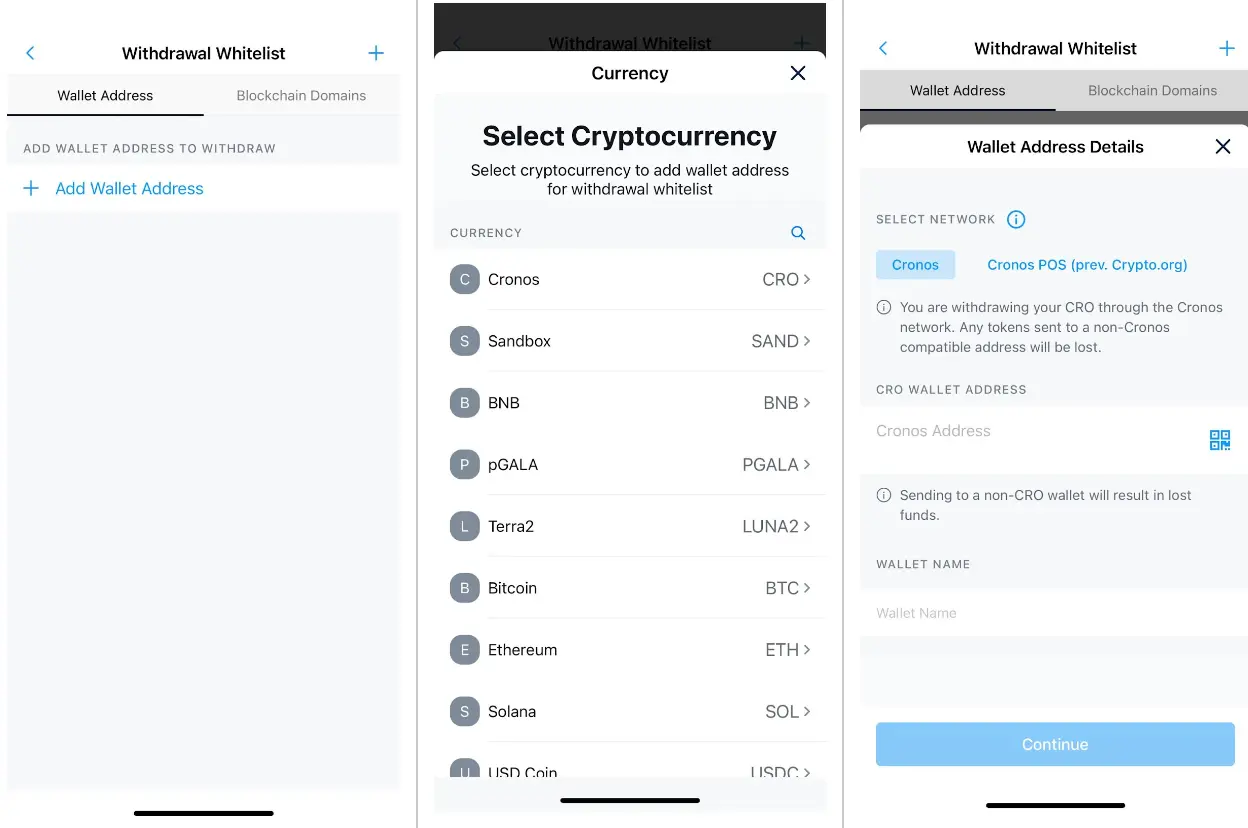
Crypto.com utilizes a mandatory address whitelisting policy. This means you cannot simply paste an address and hit “send” immediately. You must first add the recipient address to your “Address Book.”
-
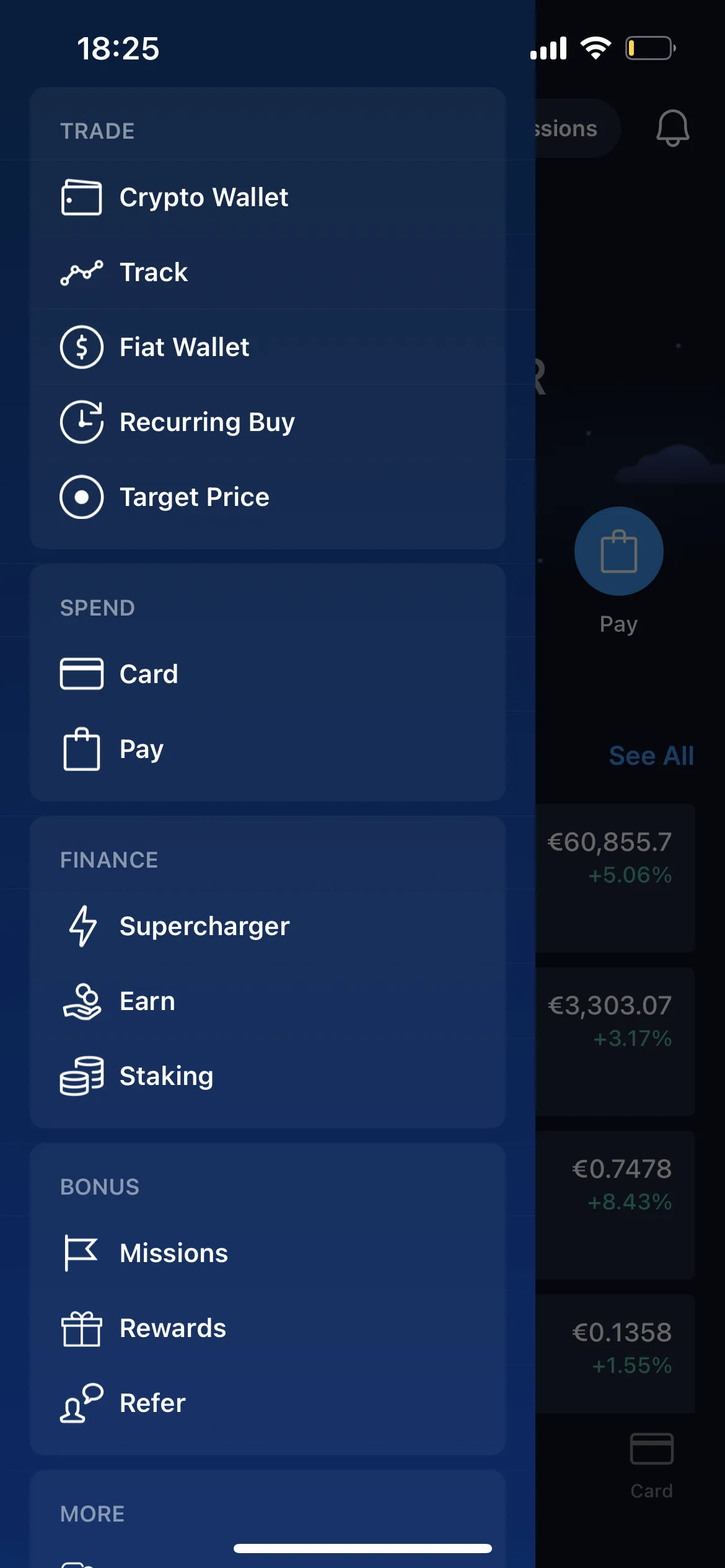
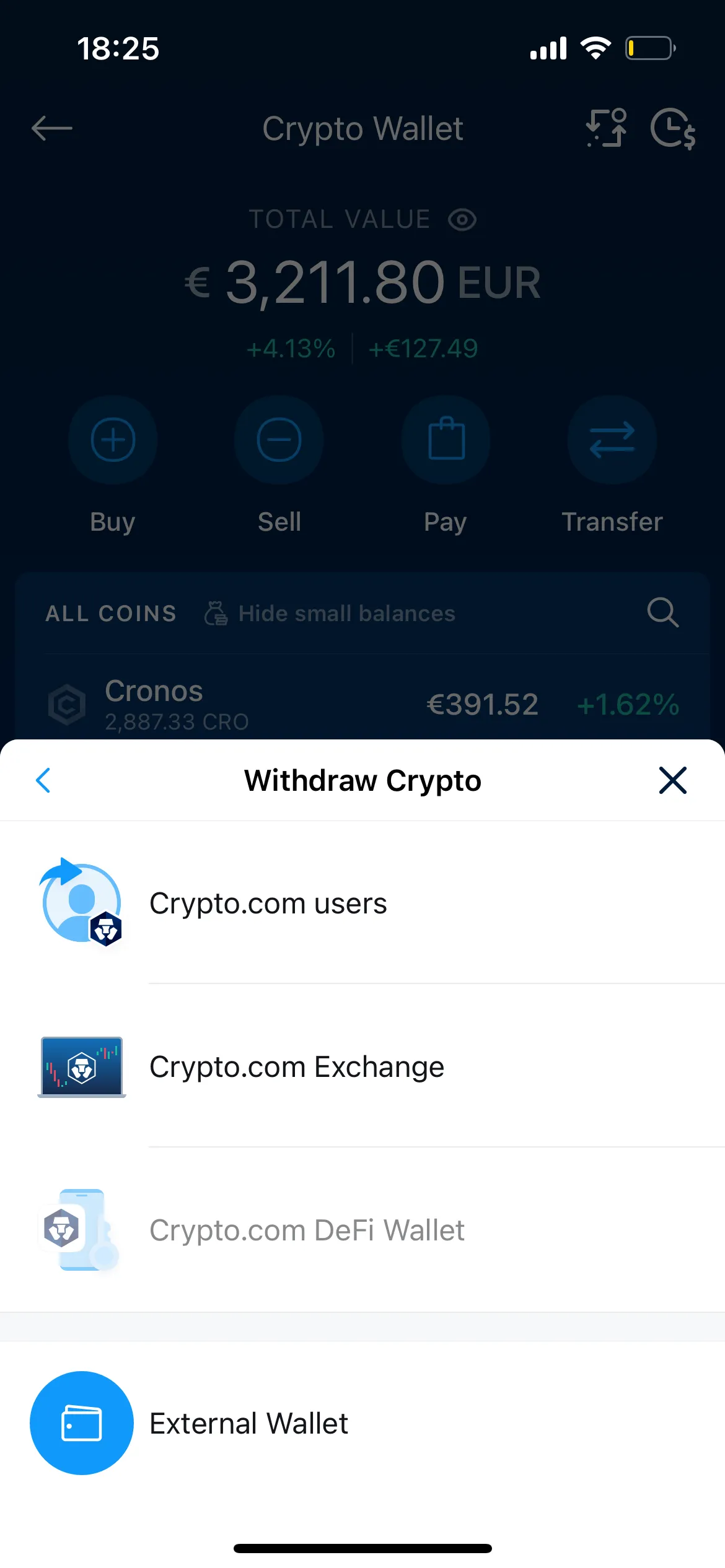
Navigate to the Transfer Menu: Open the app and select “Transfer,” then “Withdraw,” followed by “Crypto.”
-
Select External Wallet: Choose the option for an external wallet.
-
Add Withdrawal Address: Click the “+” icon or “Add Wallet Address.” You will be prompted to select the specific cryptocurrency and the network.
-
Labeling and Pasting: Provide a clear label for the wallet (e.g., “My Ledger Nano X” or “Metamask Main”) and paste the destination address. It is highly recommended to use a QR code scanner when possible to eliminate manual entry errors.
-
The 24-Hour Security Lock: For security purposes, Crypto.com often imposes a 24-hour withdrawal lock on newly whitelisted addresses. This is a critical safety feature that protects your funds if your account is ever compromised, giving you time to contact support before a malicious withdrawal can be finalized.
Executing the Withdrawal
Once the address is whitelisted and the security period has passed, you can proceed with the actual transfer.
-
Select the Whitelisted Address: Go back to your wallet address book and select the verified destination.
-
Enter the Amount: Specify the amount of cryptocurrency you wish to send. Note that there is always a “Minimum Withdrawal” amount that varies by asset.
-
Review the Fees: The app will display the fixed withdrawal fee. Ensure the remaining balance after fees aligns with your financial goals.
-
Confirm the Transaction: You will be required to enter your app passcode and, if enabled (which it should be), your 2FA (Two-Factor Authentication) code from an app like Google Authenticator or Authy.
-
Final Verification: Most withdrawals require a final confirmation via an automated email sent to your registered address. You must click the link in that email to authorize the movement of funds.
Navigating Fees and Transaction Limits
In the world of personal finance, every basis point matters. Withdrawing cryptocurrency from a custodial exchange involves “withdrawal fees,” which are separate from the standard “gas fees” or “miner fees” of the blockchain.
Withdrawal Fees and Minimums
Crypto.com charges a flat fee per withdrawal for most assets. These fees are not dynamic; they do not fluctuate with network congestion like a standard wallet fee might. Instead, they are set by the exchange to cover their operational costs and the eventual network fee.
For instance, withdrawing Bitcoin might cost 0.0005 BTC, regardless of whether you are sending $100 or $10,000. For smaller investors, these flat fees can represent a significant percentage of the total transaction. It is often more cost-effective to consolidate your holdings and perform fewer, larger transfers rather than multiple small ones.
Optimizing Your Transfers for Cost-Efficiency
If your goal is simply to move value and the specific asset doesn’t matter (for example, if you are moving funds to another exchange to trade a different pair), consider using high-speed, low-fee networks. Assets like Litecoin (LTC), Ripple (XRP), or Solana (SOL) often have withdrawal fees that amount to only a few cents, compared to the potentially high costs of Bitcoin or Ethereum.
By strategically choosing your “vehicle” for moving value, you can preserve more of your investment capital. However, remember that “swapping” one asset for another within the app to facilitate a cheaper transfer is a taxable event in many jurisdictions. Always weigh the fee savings against potential tax liabilities.
Security Protocols for Protecting Your Capital
The transfer of digital assets is irreversible. Unlike a wire transfer at a traditional bank, there is no “undo” button once a transaction is broadcast to the blockchain. Therefore, your security posture must be impeccable.
Multi-Factor Authentication (MFA)
Never rely solely on a password or a biometric lock. Enabling Two-Factor Authentication (2FA) is a non-negotiable requirement for anyone serious about their financial security. Use an app-based authenticator rather than SMS-based 2FA, as the latter is vulnerable to SIM-swapping attacks. Crypto.com allows you to require 2FA for both logins and withdrawals, adding a vital layer of defense.
Verifying the “Small Test Transaction” Strategy
A hallmark of professional crypto management is the “test transaction.” If you are moving a significant sum of money, it is a prudent financial practice to first send the minimum allowable amount. Once you confirm that the small amount has arrived safely in the destination wallet, you can proceed with the remainder of the balance. While this doubles the withdrawal fee, it serves as an insurance policy against catastrophic errors such as choosing the wrong network or pasting a corrupted address.
Troubleshooting and Best Practices for Financial Sovereignty
Even with the best preparation, issues can arise. Understanding how to navigate the post-transfer phase is just as important as the withdrawal itself.
Handling Pending Transactions
After you hit confirm, your transaction enters a “Pending” state. During this time, Crypto.com’s internal systems are processing the request. This can take anywhere from a few minutes to several hours, depending on the platform’s current security reviews and the congestion of the destination blockchain.
You can track the progress using a “TXID” (Transaction ID) or “Hash.” By pasting this hash into a blockchain explorer (like Blockchain.com for BTC or Etherscan for ETH), you can see exactly where your funds are in the confirmation process. This transparency is one of the great advantages of blockchain-based finance, providing an immutable audit trail for your assets.
Taxes and Record-Keeping for Crypto Transfers
From a financial reporting perspective, moving crypto from an exchange to a private wallet is generally not a taxable event (it is a transfer between accounts you own). However, the IRS and other global tax authorities require rigorous record-keeping. You must be able to prove that the “outgoing” transaction from Crypto.com matches the “incoming” transaction of your private wallet to avoid it being flagged as a sale or a gift.
Utilize the “Export Transaction History” feature within the Crypto.com app regularly. Download these CSV files and integrate them into financial software or provide them to your accountant. Maintaining a clear lineage of your asset movement is essential for long-term tax compliance and for calculating your cost basis accurately if you decide to sell in the future.
By approaching the process of sending crypto from Crypto.com with the same diligence you would apply to any high-value financial transaction, you ensure the safety of your capital and the efficiency of your investment strategy. Movement is the lifeblood of the digital economy; mastering it is the first step toward true financial independence in the age of blockchain.
aViewFromTheCave is a participant in the Amazon Services LLC Associates Program, an affiliate advertising program designed to provide a means for sites to earn advertising fees by advertising and linking to Amazon.com. Amazon, the Amazon logo, AmazonSupply, and the AmazonSupply logo are trademarks of Amazon.com, Inc. or its affiliates. As an Amazon Associate we earn affiliate commissions from qualifying purchases.