
In the burgeoning digital economy, Bitcoin has emerged as a revolutionary form of money, challenging traditional financial systems and opening new avenues for investment and transactions. However, to interact with this decentralized currency, you need a secure place to store and manage it: a Bitcoin wallet. Far from a physical pouch, a Bitcoin wallet is a sophisticated piece of technology—a software application or a physical device—that enables you to store your private keys, send, and receive Bitcoin. Understanding how to acquire and manage one securely is paramount for anyone entering the world of cryptocurrency. This guide will walk you through the technical intricacies and best practices for obtaining and utilizing a Bitcoin wallet, ensuring your digital assets remain safe and accessible.
Understanding Bitcoin Wallets: Your Digital Vault
At its core, a Bitcoin wallet isn’t where your Bitcoin “lives” in the way physical money resides in a bank account. Instead, Bitcoin transactions are recorded on a public ledger called the blockchain. Your wallet’s primary function is to store the cryptographic keys that prove you own a certain amount of Bitcoin on that ledger and allow you to authorize transactions.
What is a Bitcoin Wallet?
A Bitcoin wallet is essentially a software program or a hardware device designed to store your private and public keys. These keys are fundamental to the operation of Bitcoin and other cryptocurrencies.
-
Public Key: Derived from your private key, this is used to generate your Bitcoin address. Think of it like your bank account number—you can share it openly for others to send you Bitcoin.
-
Private Key: This is the secret, cryptographic key that proves ownership of your Bitcoin and allows you to sign transactions, thereby spending your Bitcoin. It’s the equivalent of your bank account password or the combination to a safe. If someone gains access to your private key, they can control your Bitcoin.
When you “send Bitcoin,” you’re not actually moving digital coins from one place to another. You’re broadcasting a message to the Bitcoin network, signed with your private key, authorizing the transfer of ownership of a specific amount of Bitcoin associated with your public address to another address on the blockchain. The wallet simply provides the interface to manage these keys and interact with the network.
The Critical Role of Private Keys
The security of your Bitcoin hinges entirely on the security of your private keys. Losing your private keys means losing access to your Bitcoin, permanently. There’s no “forgot password” button in the decentralized world of Bitcoin. Similarly, if your private keys are compromised by a malicious actor, your Bitcoin can be stolen without recourse. This profound responsibility for self-custody is both Bitcoin’s greatest strength (freedom from third-party control) and its greatest challenge for new users. Wallets are designed to manage these keys securely, either by keeping them offline or encrypting them within software.
Navigating the Landscape: Types of Bitcoin Wallets
The ecosystem of Bitcoin wallets is diverse, offering various trade-offs between convenience, security, and accessibility. Choosing the right type depends largely on your specific needs, the amount of Bitcoin you hold, and your comfort level with technology.
Software Wallets: Convenience at Your Fingertips
Software wallets, often referred to as “hot wallets” because they are connected to the internet, provide a good balance of usability and security for many users. They are generally free and easy to set up.
-
Desktop Wallets: These are applications installed directly onto your computer (e.g., Electrum, Exodus, Bitcoin Core). They offer robust features and greater control over your keys compared to web wallets, as the keys are stored locally on your machine. However, the security of your Bitcoin is tied to the security of your computer. If your computer is infected with malware or compromised, your Bitcoin could be at risk. Regular updates and strong antivirus software are crucial.
-
Mobile Wallets: Designed for smartphones, these wallets (e.g., Mycelium, Samourai Wallet, BlueWallet) allow you to send and receive Bitcoin on the go, often utilizing QR codes for easy transactions. They are convenient for everyday use but face unique security challenges, such as phone loss, theft, or malware attacks targeting mobile devices. They often feature simplified interfaces and might use Simplified Payment Verification (SPV) to quickly verify transactions without downloading the entire blockchain.
-
Web Wallets: These wallets are accessed through a web browser and can be either custodial or non-custodial.
-
Custodial Web Wallets: Offered by exchanges (e.g., Coinbase, Binance, Kraken), these wallets mean the exchange holds your private keys on your behalf. While convenient and often integrated with trading platforms, you are trusting a third party with your Bitcoin. This goes against the ethos of Bitcoin’s decentralization (“not your keys, not your coins”). If the exchange is hacked, goes bankrupt, or freezes your account, you could lose your funds. They are generally suitable for small amounts intended for active trading.
-
Non-Custodial Web Wallets: These wallets (e.g., Blockchain.com’s personal wallet option, some browser extensions) allow you to retain control of your private keys while offering web-based accessibility. They require diligent management of your seed phrase and strong passwords, as their security can still be vulnerable to phishing attacks or browser-based malware.
-
Hardware Wallets: The Gold Standard for Security
Hardware wallets are physical electronic devices designed specifically to store your private keys offline. They are considered the most secure option for storing Bitcoin, especially for larger amounts, and are often referred to as “cold storage.”
-
How They Work: When you want to send Bitcoin, you connect the hardware wallet to your computer or phone. The transaction is initiated on your computer, but the crucial step of signing the transaction with your private key occurs within the isolated, secure environment of the hardware wallet itself. This means your private key never leaves the device and is never exposed to potentially vulnerable internet-connected systems. You typically confirm the transaction directly on the hardware wallet’s screen using physical buttons.
-
Pros: Unparalleled security against online threats (malware, phishing), dedicated firmware, robust physical tamper detection. Ideal for long-term holding or significant amounts of Bitcoin.
-
Cons: Costly (ranging from $50 to $200+), less convenient for frequent, small transactions, requires physical possession and care. Examples include Ledger and Trezor.
Paper Wallets: An Analog Approach
A paper wallet is essentially a printed piece of paper containing your Bitcoin public address and its corresponding private key (often as QR codes). While they offer a form of “cold storage” by being completely offline, they come with significant risks and are generally not recommended for most users due to their fragility and the complexities of secure generation and spending.
- Risks: Susceptible to physical damage (fire, water), loss, fading ink, and the complexity of generating them truly offline and securely. Spending from a paper wallet can also be tricky and introduces new security risks. Modern hardware wallets offer superior security with far greater ease of use.
The Setup Process: A Step-by-Step Guide
Regardless of the type, setting up a Bitcoin wallet requires careful attention to detail, especially concerning the generation and safeguarding of your seed phrase.
Choosing the Right Wallet for Your Needs
Before you begin, evaluate your requirements:
-
Amount of Bitcoin: For large holdings, a hardware wallet is almost mandatory. For smaller amounts or frequent transactions, a mobile or desktop wallet might suffice.
-
Frequency of Use: If you plan to send and receive Bitcoin regularly, a mobile wallet offers convenience. For long-term storage (HODLing), a hardware wallet is ideal.
-
Technical Comfort: Software wallets are generally easier to set up, but hardware wallets, while requiring a slightly steeper learning curve, offer superior security.
-
Security Preference: If maximum self-custody and offline key storage are priorities, choose a hardware wallet.
Setting Up a Software Wallet
-
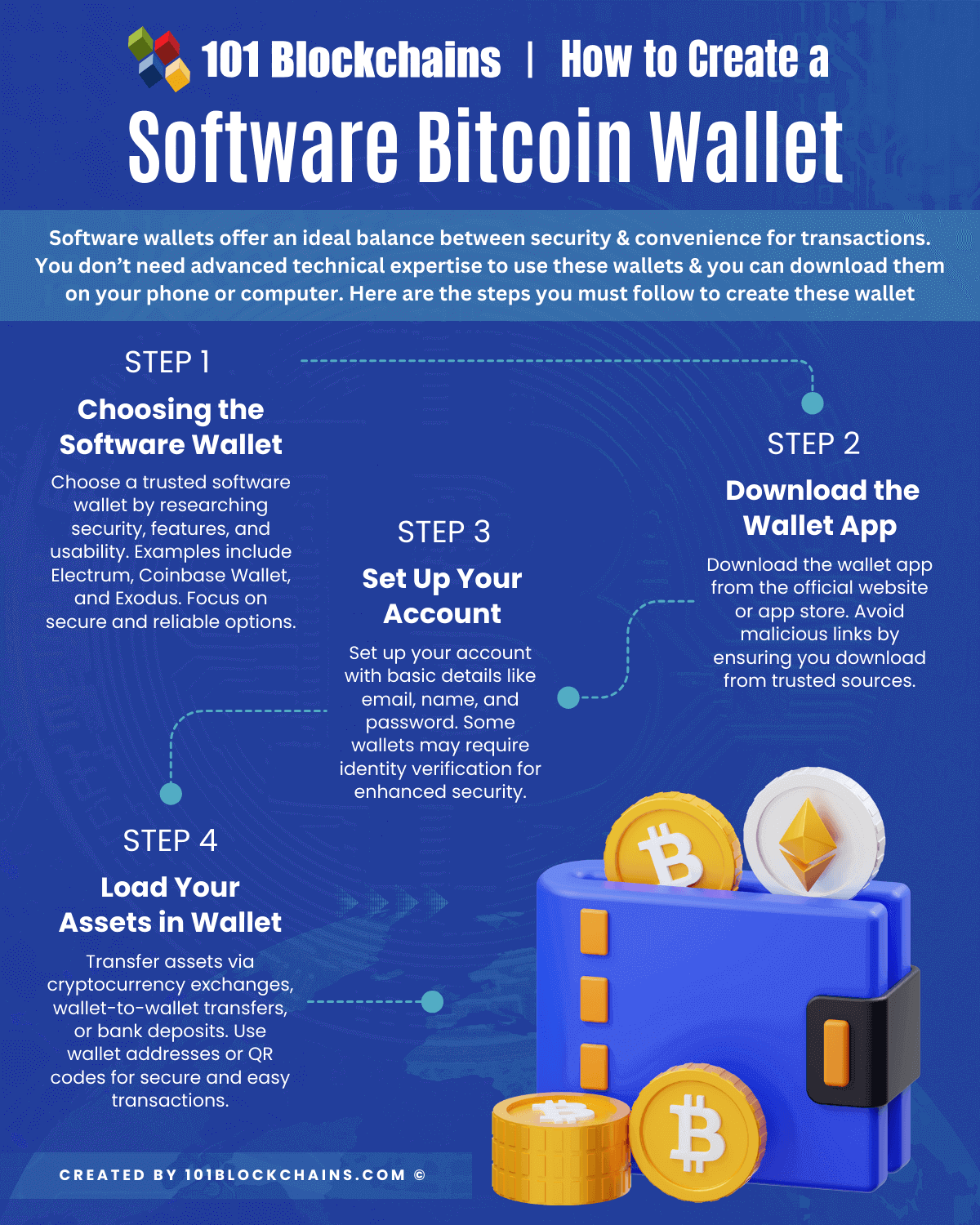
Download: Obtain the wallet application from the official website or trusted app store (e.g., Google Play Store, Apple App Store). Beware of fake apps.
-
Installation/Account Creation: Follow the on-screen prompts. For non-custodial wallets, you usually don’t “create an account” with personal details. For custodial web wallets, you’ll register with an email and password.
-
Generate Seed Phrase (Crucial Step): The wallet will present you with a series of 12 or 24 words (your “seed phrase” or “recovery phrase”). This phrase is the master key to your Bitcoin. Write it down physically on paper. Do not take a screenshot, save it digitally, or type it into any device connected to the internet. Make multiple copies and store them in separate, secure, private locations (e.g., a safe deposit box, a fireproof safe at home).
-
Confirm Seed Phrase: The wallet will typically ask you to re-enter a few words from your seed phrase to confirm you’ve recorded it correctly. Do this meticulously.
-
Set PIN/Password: Create a strong, unique PIN or password for daily access to the wallet application.
-
Generate Receive Address: Your wallet will automatically generate a Bitcoin address (or multiple addresses). This is what you share with others to receive Bitcoin.
Initializing a Hardware Wallet
-
Purchase from Official Vendor: Always buy hardware wallets directly from the manufacturer’s website or authorized resellers to avoid tampering.
-
Connect and Power On: Follow the manufacturer’s instructions to connect the device to your computer/phone.
-
Firmware Updates: Ensure the device’s firmware is up to date for optimal security.
-
Set PIN: Create a strong PIN directly on the device itself.
-
Generate Seed Phrase (Crucial Step): The device will display a 12 or 24-word seed phrase on its screen. Write this down physically. Do not let any computer or camera see it. This is even more critical than with software wallets, as the hardware wallet is designed to never expose this phrase to an online environment.
-
Confirm Seed Phrase: The device will prompt you to verify the seed phrase by entering some of the words.
-
Optional Passphrase: Some hardware wallets offer an additional “passphrase” feature. This is an extra word or phrase that you combine with your seed phrase to generate a completely new set of wallets, adding an extremely high level of plausible deniability and security. Only use this if you understand it deeply, as losing the passphrase is equivalent to losing your funds.
-
Generate Receive Address: Use the hardware wallet’s companion software or screen to generate a Bitcoin receive address.
Essential Security Practices During Setup
-
Offline Seed Phrase Storage: The importance of writing your seed phrase down offline and securing it cannot be overstated. Consider using metal plates for extreme durability.
-
Multiple Secure Locations: Distribute copies of your seed phrase in separate, secret, and secure physical locations.
-
Test Recovery (Advanced): For hardware wallets, once you’ve set it up, consider wiping the device and attempting to recover it using your written seed phrase. This confirms your backup is valid before you store significant funds.
-
Use a Clean Device: Ideally, perform wallet setup on a clean, trusted computer or device free from malware.
Advanced Considerations and Best Practices for Digital Security
Securing your Bitcoin wallet is an ongoing process that extends beyond initial setup. It requires vigilance and adherence to robust digital security practices.
The Imperative of Seed Phrase Management
Your seed phrase is the ultimate key to your Bitcoin.
-
Never Share It: No legitimate service or person will ever ask for your seed phrase. Anyone who does is a scammer.
-
Physical Security: Store it in a fireproof, waterproof, and tamper-evident container. Consider engraving it onto metal for maximum durability.
-
Passphrases (for hardware wallets): If using a passphrase, memorize it and never write it down with your seed phrase. It acts as a 25th word that changes the entire wallet derived from the seed.
Two-Factor Authentication (2FA) for Added Layers
While typically not directly applicable to non-custodial software or hardware wallets (which use PINs/passwords on the device itself), 2FA is critical for any custodial exchange accounts you might use to buy or sell Bitcoin. Implement strong 2FA methods like Authenticator apps (e.g., Google Authenticator, Authy) or hardware security keys (e.g., YubiKey), rather than less secure SMS-based 2FA.
Understanding Transaction Fees and Network Congestion
Bitcoin transactions require a small fee paid to miners for processing and confirming your transaction. This is a technical aspect of how the network operates.
-
Fee Structure: Fees fluctuate based on network demand and congestion. Higher fees can lead to faster transaction confirmation. Most wallets allow you to adjust the fee, though some simplify it to “fast,” “medium,” “slow.”
-
Confirmation Times: Transactions aren’t instant. They need to be included in a “block” and confirmed by the network, which can take anywhere from minutes to hours, depending on the fee paid and network congestion.
Regular Software Updates and System Hygiene
Keep your wallet software, operating system, and antivirus programs up-to-date. Software updates often contain critical security patches that protect against newly discovered vulnerabilities. A compromised computer or phone can render even a well-chosen software wallet insecure.
Beware of Phishing and Scams
The cryptocurrency space is unfortunately rife with scams.
-
Phishing Websites: Always double-check URLs before entering any sensitive information. Bookmark official sites.
-
Malware: Be cautious of unsolicited emails, links, or attachments that could install keyloggers or malware designed to steal your Bitcoin.
-
Social Engineering: Never give out private keys, seed phrases, or remote access to your computer to anyone, regardless of who they claim to be.
Beyond the Basics: Interacting with Your Bitcoin Wallet
Once your wallet is set up, you’ll be ready to perform its core functions: sending and receiving Bitcoin.
Sending and Receiving Bitcoin
-
Receiving: To receive Bitcoin, you simply need to provide your Bitcoin address to the sender. Most wallets generate QR codes for easy sharing. Always verify the address with the sender if possible.
-
Sending: To send Bitcoin, you’ll need the recipient’s Bitcoin address. Carefully copy and paste it, and ideally, double-check a few characters at the beginning and end of the address. Some wallets offer an address book feature for frequently used addresses. You’ll specify the amount and the transaction fee. Your wallet will then sign the transaction with your private key and broadcast it to the Bitcoin network.

Backup and Recovery Strategies
Your seed phrase is your ultimate backup. If your wallet device is lost, stolen, or damaged, you can use your seed phrase to recover access to your Bitcoin on a new compatible wallet. This highlights why physical, secure storage of your seed phrase in multiple locations is non-negotiable. Regularly review your backup strategy to ensure its continued security and accessibility.
Acquiring a Bitcoin wallet is your first essential step into the world of digital assets. By understanding the underlying technology, carefully choosing the right wallet type for your needs, meticulously following setup procedures, and adhering to robust digital security practices, you can confidently manage your Bitcoin holdings. Remember, in the decentralized realm of Bitcoin, you are your own bank—a responsibility that comes with immense freedom and the absolute necessity of self-custody and technical vigilance.
aViewFromTheCave is a participant in the Amazon Services LLC Associates Program, an affiliate advertising program designed to provide a means for sites to earn advertising fees by advertising and linking to Amazon.com. Amazon, the Amazon logo, AmazonSupply, and the AmazonSupply logo are trademarks of Amazon.com, Inc. or its affiliates. As an Amazon Associate we earn affiliate commissions from qualifying purchases.