
The landscape of modern entertainment has undergone a seismic shift over the last decade, transitioning from the rigid structures of traditional cable and satellite providers to the fluid, data-driven world of over-the-top (OTT) streaming. At the forefront of this digital revolution is YouTube TV, Google’s premier live television service. For consumers looking to “cut the cord,” the primary question is almost always: “How much does YouTube TV cost?” However, answering that requires more than a single dollar figure. It necessitates an exploration of the platform’s technical architecture, its tiered add-ons, and the hardware ecosystem that justifies its premium price point.
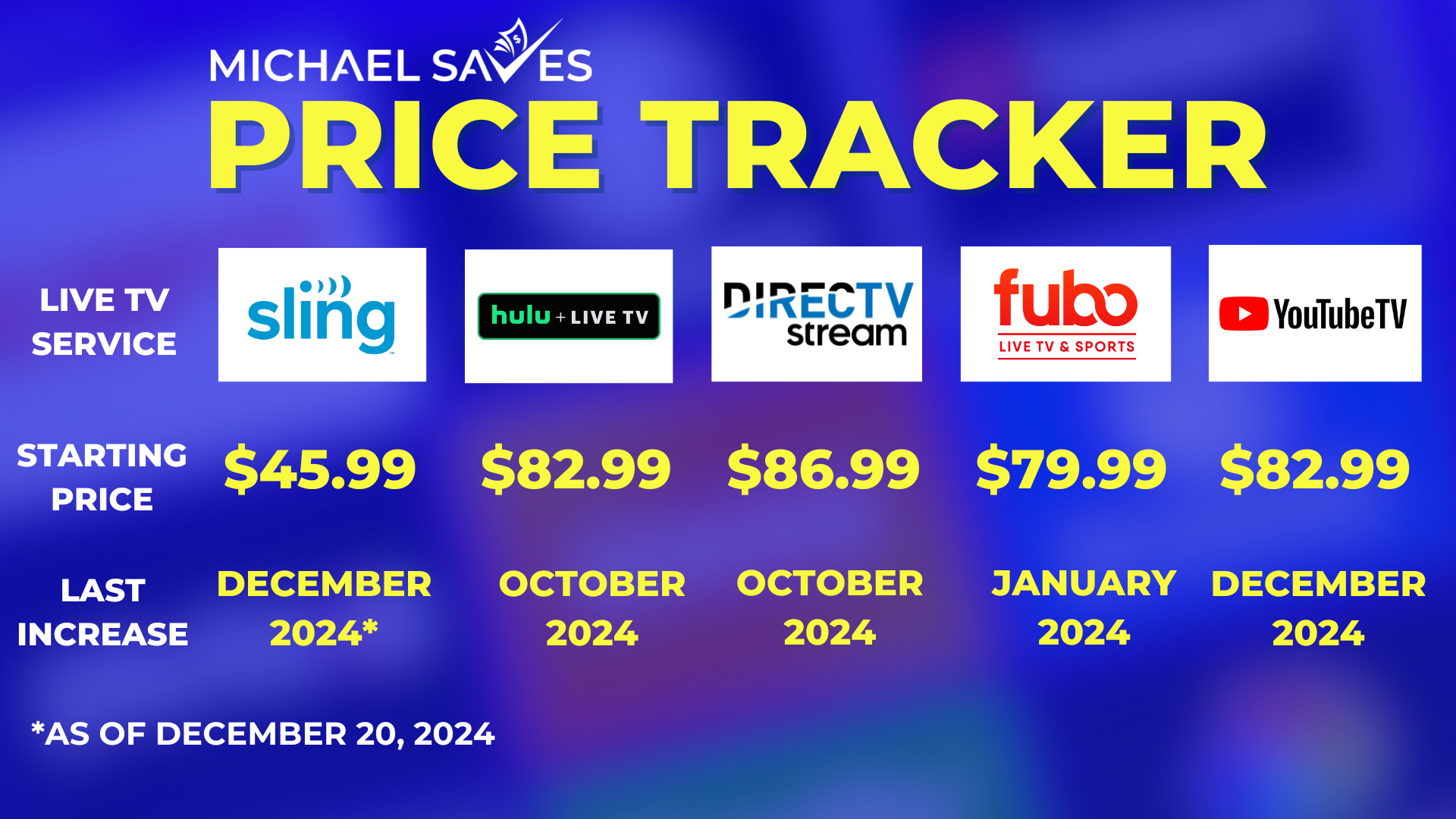
As of late 2023 and moving into 2024, the base price for YouTube TV is $72.99 per month. While this represents a significant increase from its introductory price of $35 in 2017, the evolution of the service’s software and content library explains much of this trajectory. To understand the cost, one must understand the value of the technology being delivered to the living room.
The Base Plan: Understanding the Core Subscription and Technology
The YouTube TV Base Plan is the foundation of the service, designed to replace the traditional cable box with a high-performance application. For $72.99 per month, users gain access to over 100 channels, including local broadcast networks (ABC, CBS, FOX, NBC), sports heavyweights like ESPN and FS1, and a variety of news and entertainment staples.
Current Pricing Structures and Introductory Offers
While the standard rate is $72.99, Google frequently utilizes aggressive introductory pricing to lower the barrier to entry. New subscribers often find promotions such as $52.99 for the first three months. These promotional periods serve as a “tech trial,” allowing users to stress-test the interface and streaming stability on their home networks before committing to the full monthly overhead. Unlike traditional cable contracts, YouTube TV operates on a month-to-month basis with no equipment rental fees or installation costs, which is a critical factor when calculating the total cost of ownership (TCO) for home entertainment.
What the Standard Package Includes
The price of the base plan doesn’t just buy content; it buys a sophisticated software suite. One of the most significant technical inclusions is the unlimited Cloud DVR. Unlike physical DVR hardware that is limited by hard drive space, YouTube TV leverages Google’s massive data centers to allow users to record an unlimited amount of programming. Recordings are stored for up to nine months, and the system handles simultaneous recordings across different channels without the “tuner” limitations that plagued legacy cable boxes. This cloud-native approach is a cornerstone of the service’s value proposition.
The Technical Advantage: Why the Price Reflects Superior Software
When evaluating why YouTube TV costs more than some budget-tier competitors like Sling TV, one must look at the engineering under the hood. YouTube TV is not merely a stream of video; it is a highly optimized application that integrates deeply with various operating systems.
Unlimited Cloud DVR and Data Management
From a technical standpoint, the unlimited DVR is a marvel of storage management. By virtualizing the recording process, YouTube TV removes the hardware failure risks associated with local DVRs. For the consumer, this means the $72.99 price tag covers the “rent” of server space in the cloud. The search functionality—powered by the same algorithms that drive Google Search—allows users to find shows, actors, or even specific sporting events with near-instant latency. This level of data indexing is a software feature that traditional providers simply cannot replicate.
Multi-Stream Functionality and Account Management
A single YouTube TV subscription supports up to six individual accounts per household. Each family member can have their own personalized recommendations and individual DVR libraries. Technically, the service allows for three simultaneous streams at once. This is handled through sophisticated IP tracking and account authentication, ensuring that the service remains within the household while providing the flexibility that modern families require. For those who need more, the “4K Plus” add-on expands this to unlimited streams on the home Wi-Fi network, showcasing how the service scales its pricing based on bandwidth and hardware usage.
Add-Ons and Tiered Content: Expanding the Ecosystem
For many users, the “cost” of YouTube TV extends beyond the base price as they customize their experience with specialized content “bolt-ons.” These add-ons represent the transition of streaming from a monolithic service to a modular one.

The NFL Sunday Ticket Integration
The most significant impact on the YouTube TV cost structure in recent years is the acquisition of the NFL Sunday Ticket. For football fans, this is a major technical and financial consideration. Prices for the Sunday Ticket vary depending on whether you are a YouTube TV subscriber or a standalone YouTube Primetime Channels user. For subscribers, the cost often ranges from $350 to $450 per season, though early-bird discounts are common. This integration allows for “Multiview” technology, where users can watch up to four games simultaneously on one screen—a feat of stream-stitching that requires significant backend processing power.
The 4K Plus Add-On: Worth the Upgrade?
For $9.99 per month (often discounted for the first year), users can add the “4K Plus” package. This isn’t just about resolution; it’s a technical feature pack. It includes:
-
4K Ultra High Definition: Access to live and on-demand content in 4K resolution for supported events.
-
Offline Viewing: The ability to download DVR recordings to mobile devices for offline playback, a feature that requires sophisticated DRM (Digital Rights Management) handling.
-
Unlimited Streams: The removal of the three-stream limit when connected to the home network.
For users with high-end home theater setups and robust fiber-optic internet, this add-on is often seen as a necessary cost to fully utilize their hardware’s capabilities.
YouTube TV vs. The Competition: A Comparative Technical Analysis
To understand if the cost is justified, we must compare YouTube TV with its primary competitors: Hulu + Live TV, Fubo, and Sling TV.
Hulu + Live TV vs. YouTube TV
Hulu + Live TV is priced similarly, often around $76.99. However, its value proposition is bundled. The price includes Disney+ and ESPN+ (with ads). From a technical UI perspective, many users find YouTube TV’s interface to be snappier and more intuitive. YouTube TV’s “Key Plays” feature, which uses AI to identify top moments in a sports broadcast so users can catch up quickly, is a technical differentiator that Hulu has yet to match perfectly.
Fubo and Sling TV Comparisons
Fubo is often slightly more expensive, starting around $79.99 plus a mandatory regional sports fee that can drive the price close to $90. Fubo focuses on the “sports-first” tech, offering more niche international channels. Sling TV, on the other hand, is the “budget” option, starting at $40. However, Sling lacks the unlimited DVR and the breadth of local channel support found in YouTube TV. When you add the cost of DVR storage and local channel adapters to Sling, the price gap narrows significantly, often making the seamless experience of YouTube TV a more logical technical choice.
Optimizing Your Investment: Hidden Costs and Savings Strategies
While the sticker price is $72.99, the true cost of YouTube TV is also dependent on your home’s digital infrastructure.
The Hidden Cost: Bandwidth Requirements
YouTube TV is a data-intensive service. To stream in 1080p, a stable connection of at least 7-10 Mbps is required. For 4K streaming, that jump to 25 Mbps per stream. For households with data caps on their home internet, the “cost” of YouTube TV might include overage fees from an ISP. Users should consider a robust mesh Wi-Fi system or Ethernet connections for smart TVs to ensure that the $70+ they are paying monthly isn’t wasted on buffering or low-resolution artifacts.
Managing Subscriptions and Seasonal Use
One of the greatest technical advantages of a software-based TV service is the ease of cancellation. Users can “pause” their subscription for up to six months. This is particularly useful for sports fans who may only want the service during the NFL or NBA seasons. By managing the subscription seasonally, the annual cost of YouTube TV can be significantly lower than a 12-month cable contract.
The Future of Live Streaming Costs
The trajectory of YouTube TV’s pricing suggests that as the platform incorporates more AI-driven features, higher-resolution streams, and broader content licensing, the cost will likely continue to trend upward. However, the move toward “YouTube Primetime Channels” indicates a future where the base plan might become even more modular.
In conclusion, the cost of YouTube TV—$72.99 per month—is an investment in a specific kind of digital experience. It is a price paid for the convenience of cloud storage, the power of Google’s search ecosystem, and the flexibility of a hardware-agnostic platform. For the modern consumer, the decision isn’t just about the monthly bill; it’s about whether the technical sophistication of the platform enhances their media consumption enough to justify the premium over traditional, less flexible alternatives. As the technology continues to mature, YouTube TV remains the benchmark for what a high-end, software-defined television service should look and feel like.
aViewFromTheCave is a participant in the Amazon Services LLC Associates Program, an affiliate advertising program designed to provide a means for sites to earn advertising fees by advertising and linking to Amazon.com. Amazon, the Amazon logo, AmazonSupply, and the AmazonSupply logo are trademarks of Amazon.com, Inc. or its affiliates. As an Amazon Associate we earn affiliate commissions from qualifying purchases.