
In the rapidly evolving landscape of communication technology, keeping software updated is no longer just about gaining access to new emojis or background filters. For a platform like Zoom, which has transitioned from a simple video conferencing tool to an expansive, AI-driven productivity suite known as Zoom Workplace, staying on the latest version is critical for security, performance, and cross-platform compatibility. As of late 2024, Zoom has moved into the 6.x version series, signaling a major architectural and branding shift that redefines how teams collaborate in a hybrid work environment.
Understanding the latest version of Zoom requires looking beyond the version number itself. It involves exploring the integration of generative AI, the overhaul of the user interface, and the implementation of next-generation security protocols like post-quantum cryptography. This guide provides a deep dive into the current state of Zoom software, the landmark features of the recent updates, and why maintaining the most current build is essential for modern digital workflows.
Navigating the Transition to Zoom Workplace (Version 6.0 and Beyond)
The release of version 6.0 marked one of the most significant milestones in the company’s history. With this update, the application was officially rebranded to “Zoom Workplace.” This wasn’t merely a cosmetic change; it represented a fundamental shift in the software’s identity from a meeting app to an all-in-one collaboration hub.
The Rebranding of Productivity
The latest versions of Zoom Workplace integrate various communication channels into a single, cohesive interface. Users no longer need to jump between separate apps for team chat, phone calls, meetings, and document editing. Version 6.x brings these elements together, allowing for a more fluid transition between different modes of work. The “Workplace” concept is built on the idea that the software should serve as the digital office space where all professional interactions occur.
Key Interface Improvements
One of the most noticeable changes in the latest versions is the revamped user experience (UX). The navigation bar is now more customizable, allowing users to prioritize the tools they use most, such as the AI Companion, Whiteboards, or Notes. Additionally, the latest updates have introduced “Meeting Wallpapers,” which use AI to generate professional backgrounds that blend the user into their environment more naturally than previous iterations. The “Multi-speaker View” has also been refined, using software intelligence to dynamically highlight active participants while keeping others visible in a balanced grid, which is particularly useful for large-scale corporate town halls.
The Power of AI Companion: The Latest Technological Leap
The defining characteristic of Zoom’s current version cycle is the deep integration of the Zoom AI Companion. Unlike third-party plugins that require complex API setups, the AI Companion is baked directly into the core software, providing generative AI capabilities across the entire suite without additional costs for most paid accounts.
Generative AI for Meetings and Chat
In the latest builds, the AI Companion has evolved from a simple transcription tool to a sophisticated digital assistant. During a live meeting, users who join late can ask the AI Companion for a private summary of what they missed without interrupting the flow of the conversation. Post-meeting, the software automatically generates “Smart Chapters,” highlighting key discussion points and action items. This tech-driven efficiency ensures that participants can focus on the dialogue rather than manual note-taking.
In the Team Chat function, the latest version utilizes AI to help users draft messages based on the context of a conversation. It can adjust the tone—making a message more professional or more casual—and summarize long threads that a user might have missed while away from their desk. This level of software intelligence is a hallmark of the 6.x series, positioning Zoom as a leader in the AI-assisted software market.
Smart Recording and Task Automation
Modern versions of Zoom have transformed the “Record” button into a data-gathering tool. “Smart Recording” now categorizes meeting segments by topic and even analyzes the sentiment of the discussion. For project managers, the latest updates allow for the direct export of action items into task management tools. This automation reduces the administrative burden on teams, showcasing how Zoom is leveraging AI to solve the problem of “meeting fatigue.”
How to Identify and Update Your Current Version
To ensure you are utilizing the full suite of Zoom Workplace features, it is vital to know how to check your version and trigger an update. Zoom releases updates frequently—often on a monthly or even bi-weekly basis—to patch vulnerabilities and roll out incremental feature improvements.
Manual Updates via the Desktop Client
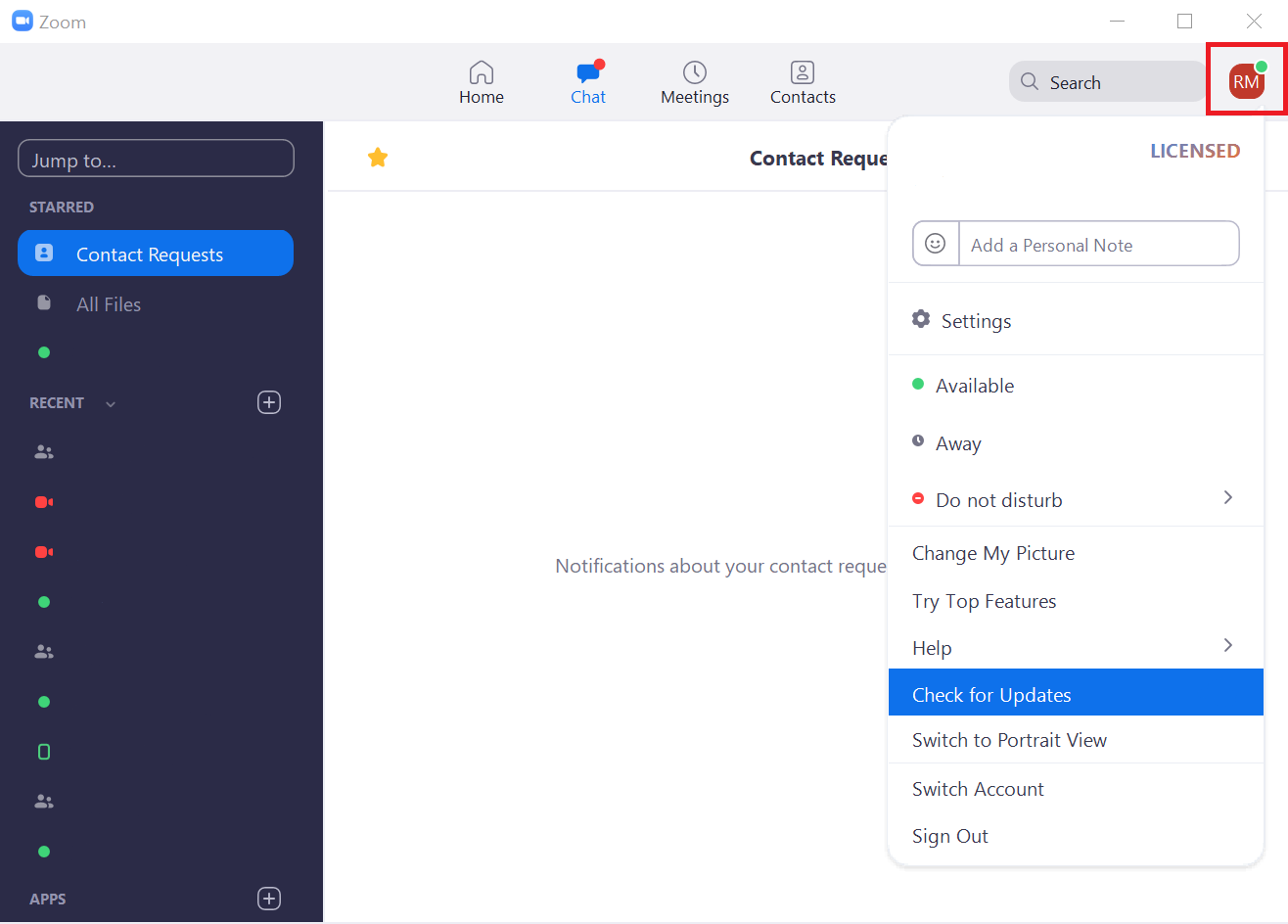
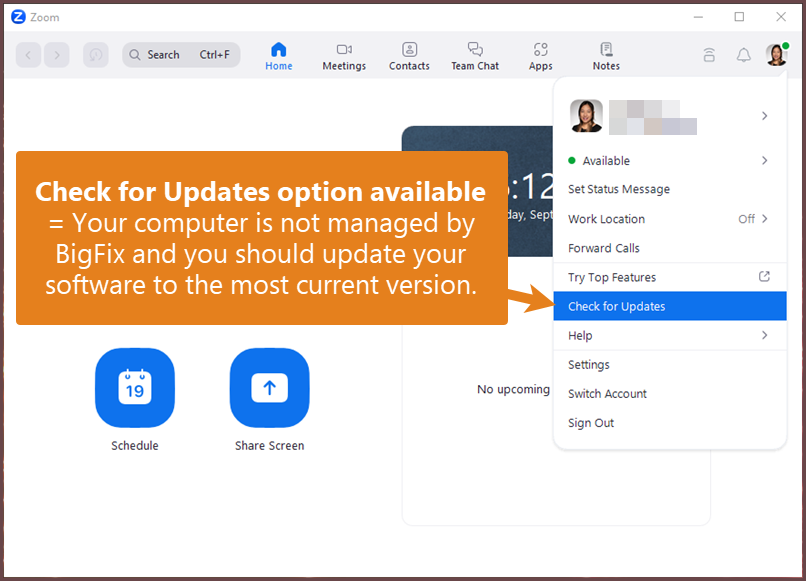
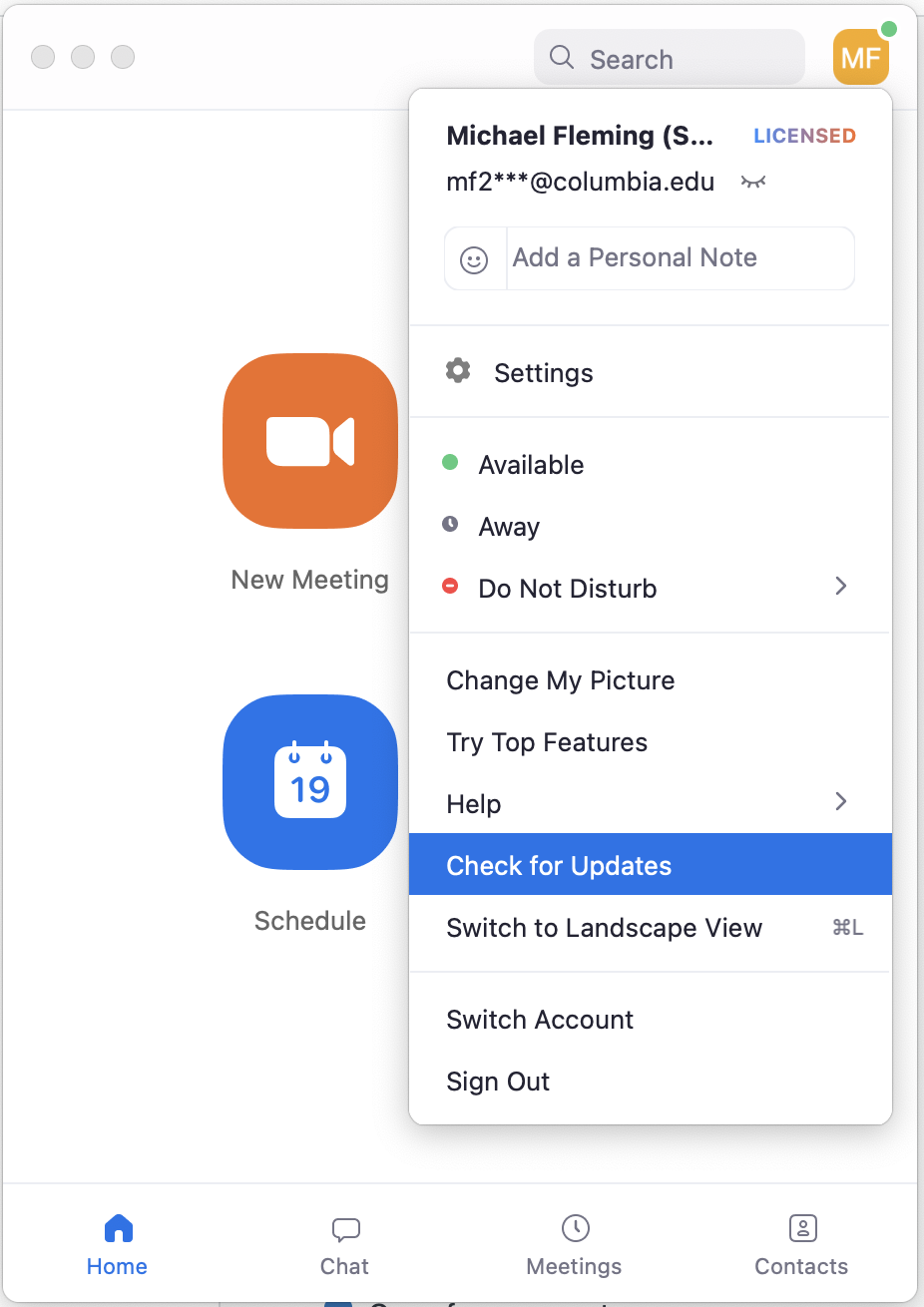
To check your version on a Windows or macOS desktop, open the Zoom application and click on your profile picture or initials in the top-right corner. From the dropdown menu, select “Check for Updates.” If a new version is available, Zoom will display a change log detailing the new features and security fixes. Clicking “Update” will download the latest build and restart the application. Staying proactive with these checks is recommended for power users who want the latest AI features as soon as they drop.
Mobile App Store Management
For users on iOS and Android, the versioning follows the release cycle of the respective app stores. The mobile version of Zoom Workplace has been optimized for touch interfaces, bringing many of the desktop’s AI Companion features to the smartphone. To stay current, ensure that “Automatic Updates” are enabled in the Apple App Store or Google Play Store. The mobile latest version often includes optimizations for 5G connectivity and improved battery management, which are crucial for users who join meetings while traveling.
VDI and Enterprise Deployment
In corporate environments, updates are often managed by IT departments using Virtual Desktop Infrastructure (VDI) or mobile device management (MDM) tools. The latest Zoom versions for VDI are specifically engineered to offload video processing from the server to the local thin client, reducing latency. IT administrators can now use the Zoom admin portal to “force” a minimum version requirement, ensuring that every employee in the organization is on a secure, supported build.
Security Protocols and the Latest Performance Standards
As digital security threats become more sophisticated, the latest version of Zoom has introduced enterprise-grade protections that were previously unavailable. The tech stack underlying Zoom’s security architecture has seen its most significant upgrade in years.
Post-Quantum End-to-End Encryption (E2EE)
Perhaps the most technically advanced feature in the recent updates is the introduction of Post-Quantum End-to-End Encryption. As quantum computing advances, traditional encryption methods face potential risks. Zoom is one of the first major communication platforms to implement cryptographic algorithms designed to withstand the processing power of future quantum computers. This move signals a “security-first” approach, ensuring that sensitive corporate data remains protected against both current and future threats.
Optimized Resource Management and App Performance
Beyond security, the latest versions focus heavily on performance optimization. Modern Zoom builds are designed to be “lighter” on system resources. The software now features improved CPU utilization, which prevents laptops from overheating during long video calls. Improved “Green Room” features allow users to test their audio and video quality in a low-power state before fully joining the call.
Furthermore, the latest version includes enhanced support for external hardware. Whether it’s a high-end DSLR camera used via a capture card or a professional-grade XLR microphone, Zoom’s latest drivers provide better compatibility and lower latency. The software can now automatically detect and suppress a wider range of background noises—from barking dogs to mechanical keyboards—using advanced machine learning algorithms that operate locally on the user’s device.
The Future Roadmap: What to Expect Next
While the current version of Zoom Workplace (6.x) is the most powerful to date, the development cycle shows no signs of slowing down. The tech world is moving toward even deeper integrations and more “spatial” experiences.
Upcoming versions are expected to further bridge the gap between physical and digital spaces. We are already seeing the beginnings of this with Zoom’s support for the Apple Vision Pro and other spatial computing headsets. Future updates will likely refine these “immersive” meeting experiences, allowing users to feel as though they are sitting in the same room as their colleagues, regardless of geographical distance.
Additionally, the expansion of the “Zoom App Marketplace” within the latest builds allows for third-party developers to create tools that live directly inside the Zoom interface. From real-time translation services to collaborative whiteboarding apps, the latest version of Zoom is not just a tool—it is an extensible platform. Staying on the latest version ensures that you are ready for this modular future of work, where the software grows and adapts to the specific needs of your industry.
By maintaining an up-to-date installation of Zoom Workplace, users leverage the pinnacle of current communication technology, ensuring that their digital interactions are secure, efficient, and powered by the latest advancements in artificial intelligence.
aViewFromTheCave is a participant in the Amazon Services LLC Associates Program, an affiliate advertising program designed to provide a means for sites to earn advertising fees by advertising and linking to Amazon.com. Amazon, the Amazon logo, AmazonSupply, and the AmazonSupply logo are trademarks of Amazon.com, Inc. or its affiliates. As an Amazon Associate we earn affiliate commissions from qualifying purchases.