
Updating your address with your bank, especially a major institution like Chase, is a critical step in managing your personal finances effectively. It’s more than just a bureaucratic formality; it directly impacts your financial security, communication, and compliance with banking regulations. Whether you’ve moved across town or across the country, ensuring your financial records are accurate is paramount to preventing fraud, receiving important financial documents, and maintaining uninterrupted access to your banking services.
Why Your Address Matters to Chase Bank
Your address serves as a cornerstone of your banking relationship, playing a vital role in several key areas of your personal finance management. Misaligned address information can lead to significant headaches and even financial vulnerabilities.

Maintaining Account Security
One of the primary reasons to keep your address updated is for security. Banks use your registered address for verification purposes, especially when dealing with suspicious activity or large transactions. If a bank detects a transaction out of your usual geographic pattern and tries to contact you at an outdated address, critical fraud alerts could be missed. Furthermore, new debit cards, credit cards, or checkbooks are often mailed to your address on file. An old address could mean these sensitive items fall into the wrong hands, compromising your accounts and potentially leading to identity theft. Promptly updating your address mitigates these risks, ensuring that all physical correspondence reaches you securely and that your bank can effectively protect your assets.
Ensuring Timely Communication
Banks regularly send out important financial documents that are essential for sound financial planning and tax purposes. These include monthly statements, annual tax forms (like 1099s for interest earned or 1098s for mortgage interest paid), year-end summaries, and notifications about changes to your account terms or services. If these documents are sent to an old address, you could miss crucial information necessary for budgeting, tax filing, or understanding changes to your financial products. Moreover, timely receipt of these documents helps you reconcile your accounts and spot any discrepancies or unauthorized transactions quickly, which is a vital component of proactive financial management.
Regulatory Compliance and KYC
Financial institutions are legally obligated to know their customers (KYC) to combat money laundering, terrorist financing, and other illicit financial activities. Part of this compliance involves maintaining accurate customer records, including your current residential address. This information is used to verify your identity and ensure that the bank is adhering to federal and state regulations. Failure to update your address can sometimes lead to temporary restrictions on your account or services until the information is corrected, potentially disrupting your access to funds or ability to conduct transactions. Staying compliant is not just for the bank; it protects you by ensuring the integrity of the financial system.
Multiple Avenues for Updating Your Information
Chase Bank, recognizing the diverse needs of its customers, offers several convenient methods to update your address. Choosing the right method depends on your preference for digital interaction, urgency, and comfort level with different communication channels.
Online Banking Portal: The Digital Approach
For many, the online banking portal is the most convenient and efficient method. It allows you to make changes from the comfort of your home or office, often with immediate effect. This method is generally secure, requiring multi-factor authentication to access your account. You can typically find the address update option within your personal profile or settings section. This digital self-service tool empowers you to manage your financial information proactively, saving time and effort.
Mobile Banking App: Convenience in Your Pocket
The Chase Mobile app offers a streamlined experience similar to the online portal, optimized for smartphones and tablets. It provides an intuitive interface to navigate to your profile settings and update your address. The app is particularly useful for those who manage their finances on the go and prefer the ease of mobile access. Ensure you are using the official Chase app and that your device’s security features are enabled for maximum protection.
Visiting a Chase Branch: In-Person Assistance
If you prefer face-to-face interaction or need assistance with the process, visiting a local Chase branch is an excellent option. A customer service representative can guide you through the update process, ensuring all details are correctly entered. This method offers the benefit of direct assistance and the ability to ask questions immediately, which can be reassuring for complex situations or if you have multiple accounts to update. Remember to bring a valid form of identification, such as a driver’s license or state ID, as it will be required for verification.
Calling Customer Service: Direct Support
For those who prefer speaking directly with a representative but cannot visit a branch, calling Chase’s customer service line is a viable alternative. After verifying your identity through a series of security questions, a representative can update your address on your behalf. This method is particularly useful if you encounter issues with the online or mobile platforms or prefer verbal confirmation of your changes. Have your account details and personal identification information ready to expedite the process.
Mail: The Traditional Method
While less common in the digital age, updating your address by mail is still an option for some banking tasks. This method typically involves sending a written request with your old and new addresses, account number, and signature to Chase’s customer service address. While reliable, it is the slowest method due to mail transit times and processing. If you choose this method, consider sending your request via certified mail with a return receipt requested for proof of delivery. This approach is generally reserved for situations where other methods are not feasible or preferred.
Step-by-Step Guide: Online Address Change
Updating your address through Chase’s online banking portal is often the quickest and most straightforward method. Here’s a detailed guide to help you navigate the process efficiently.

Logging In Securely
Begin by opening your web browser and navigating to the official Chase Bank website. Locate the “Sign In” button, usually prominently displayed. Enter your User ID and Password. Chase employs robust security measures, which may include a second layer of verification, such as a one-time passcode sent to your registered phone number or email, or a security question. Ensure you complete all security steps to gain full access to your account. Always verify that you are on the legitimate Chase website (look for “https://” and a padlock icon in the address bar) to protect against phishing attempts.
Navigating to Personal Settings
Once successfully logged in, look for a section related to your profile, settings, or personal information. This is often found under your name, an account services tab, or a gear/settings icon. Common labels include “My Profile,” “Customer Service,” or “Account Services.” Click on the relevant link to access your personal details.
Inputting New Address Details
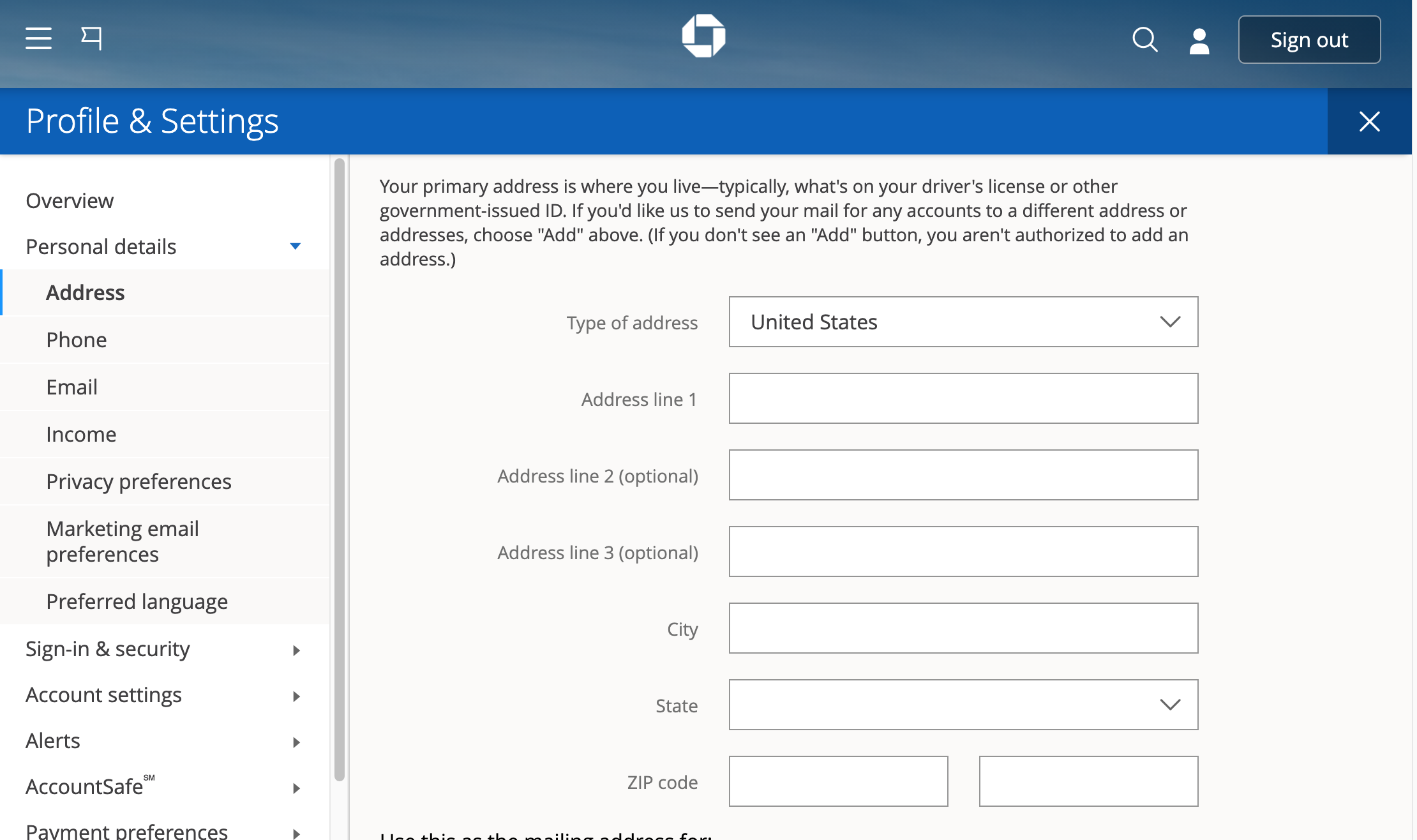
Within your personal settings, you should find an option to “Edit Address,” “Change Address,” or “Update Contact Information.” Click on this link. You will be prompted to enter your new residential address, including street number, street name, apartment/unit number (if applicable), city, state, and ZIP code. Carefully review each field for accuracy before proceeding. Some systems may require you to enter your new address twice to confirm. You may also be asked to confirm whether this change applies to all accounts linked to your profile or if you wish to update specific accounts.
Verification and Confirmation
After entering your new address, you will typically be asked to review the changes. This is a critical step to catch any typos or errors. Once you confirm the details are correct, the system may require one final verification, possibly asking for your password again or sending another security code to your phone. After successful verification, you should receive an on-screen confirmation message indicating that your address has been updated. It’s also wise to check your registered email for a confirmation notice from Chase, which further validates the change. Keep this confirmation for your records.
Essential Considerations After Your Address Change
Updating your address with Chase is an important first step, but a comprehensive approach to managing your finances after a move involves several other critical actions to ensure financial continuity and security.
Updating Other Financial Institutions
Your banking relationship with Chase is likely one of several financial connections you have. Remember to update your address with all other financial institutions, including credit card companies, investment firms (brokerages, retirement accounts), loan providers (auto, student, personal), and any other banks where you hold accounts. Each institution will have its own process, but the same principles of security and accuracy apply. Consolidating this task ensures you receive all critical financial correspondence and statements without interruption.
Reviewing Statements and Correspondence
For a few months after your address change, diligently review all incoming mail and digital statements. Verify that they reflect your new address. If any correspondence still arrives at your old address, contact Chase immediately to ensure the update has propagated correctly across all systems. This proactive review helps catch any lingering issues and ensures all your accounts are properly linked to your current residence.
Protecting Against Identity Theft
Moving can sometimes create opportunities for identity theft if not managed carefully. Ensure you’ve filed a change of address with the U.S. Post Office (or your country’s postal service) to forward mail from your old address. This acts as a temporary safeguard. Monitor your credit reports regularly (you are entitled to a free report from each of the three major credit bureaus annually) for any suspicious activity or accounts opened in your name. Update your address with credit bureaus directly if prompted or if you notice discrepancies. Regularly shred sensitive documents instead of just tossing them.
Updating Bills and Subscriptions
Beyond financial institutions, update your address with utility companies (electricity, gas, water, internet), insurance providers (home, auto, health), healthcare providers, subscription services (magazines, streaming services with physical mail), and any online retailers where you have saved shipping addresses. Missing a bill can lead to late fees, service interruptions, or negative impacts on your credit score. Updating subscriptions ensures you don’t miss out on services or deliveries.
Understanding Potential Impacts on Products
While an address change is usually straightforward, it’s worth considering if it impacts any specific financial products you hold. For instance, some credit card offers or mortgage rates might be geographically dependent. If you’ve moved to a different state, certain state-specific regulations or products might apply. While rare for a simple address change, it’s a good practice to briefly review your product terms or inquire with Chase if you have any specialized accounts, just to be fully informed.
Common Issues and Troubleshooting Tips
While updating your address with Chase is generally a smooth process, you might occasionally encounter minor hurdles. Knowing how to troubleshoot these can save you time and frustration.
Login Difficulties
If you’re having trouble logging into your online banking portal, first double-check your User ID and Password for typos. Ensure your Caps Lock key isn’t accidentally engaged. If you’ve forgotten your credentials, use the “Forgot User ID” or “Forgot Password” links provided on the login page. Chase will guide you through a secure recovery process, which typically involves identity verification questions or sending a temporary code to your registered phone or email. If issues persist, try clearing your browser’s cache and cookies, or attempt logging in from a different browser or device to rule out a browser-specific problem.
Verification Challenges
During the address update process, Chase may require additional verification steps, such as answering security questions or entering a one-time passcode. Ensure that your contact information (phone number and email) on file with Chase is current, as these codes are sent to your registered details. If you’re not receiving passcodes, check your spam/junk folder for emails or ensure your phone has signal if receiving SMS. If your contact information is outdated, you may need to call customer service or visit a branch to update it before you can complete the address change online.
Address Discrepancies
Occasionally, the system might flag an address as invalid or you might receive an error message. This could be due to a slight difference in how your address is formatted compared to postal service records, or if the system doesn’t immediately recognize a new street name or building. Double-check your spelling and ensure all components of the address (e.g., street, avenue, suite, apartment) are correctly abbreviated or spelled out as required. If the system still rejects your entry, try inputting the address in a slightly different format, or verify the exact postal format using the USPS website (for U.S. addresses). If the online system continues to present an error, it’s best to contact Chase customer service or visit a branch, as they can manually override or correct any system-related formatting issues.
aViewFromTheCave is a participant in the Amazon Services LLC Associates Program, an affiliate advertising program designed to provide a means for sites to earn advertising fees by advertising and linking to Amazon.com. Amazon, the Amazon logo, AmazonSupply, and the AmazonSupply logo are trademarks of Amazon.com, Inc. or its affiliates. As an Amazon Associate we earn affiliate commissions from qualifying purchases.