
In the rapidly evolving landscape of digital finance, understanding the fundamental components of cryptocurrency transactions is crucial for any user. Among the most essential of these components is your wallet address – a unique identifier that acts as your digital postbox for receiving cryptocurrency. For users of Coinbase, a leading platform for buying, selling, and managing digital assets, knowing precisely where to locate this address is a common query. This guide delves into the technical specifics of your Coinbase wallet address, provides a clear walkthrough for finding it, and outlines critical digital security measures to protect your assets.
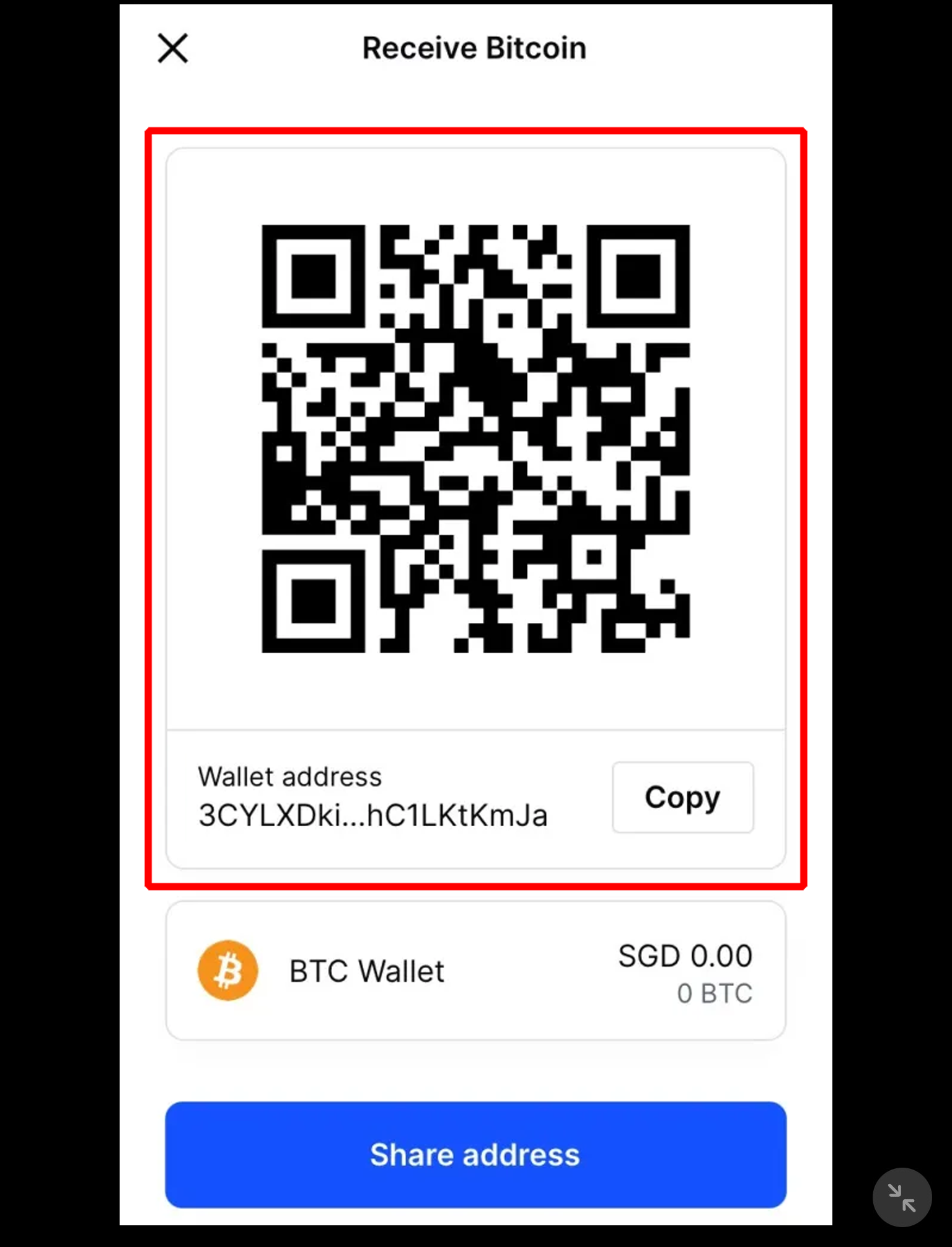
Understanding Your Digital Gateway: What is a Coinbase Wallet Address?
At its core, a cryptocurrency wallet address is a cryptographic hash, a string of alphanumeric characters that represents a specific destination on a blockchain network. Think of it as an account number for your digital currency, unique to each type of cryptocurrency (e.g., Bitcoin, Ethereum, Litecoin) and your specific wallet within the Coinbase ecosystem. This address is public and can be shared with others to receive funds, but it doesn’t grant access to your wallet itself.
The Nature of Cryptocurrency Addresses
Each cryptocurrency operates on its own blockchain, and thus, typically has its own distinct address format. For instance, a Bitcoin (BTC) address starts with ‘1’, ‘3’, or ‘bc1’, while an Ethereum (ETH) address typically begins with ‘0x’. These differences are critical because sending cryptocurrency to an incompatible address, or an address on the wrong network, can result in irreversible loss of funds. Coinbase, as a comprehensive platform, manages these various address types for you, presenting the correct one for each asset you hold.
Coinbase’s Role as a Custodial Wallet Provider
Coinbase primarily functions as a custodial exchange, meaning it holds the private keys to your cryptocurrency on your behalf. When you receive funds to your Coinbase account, they are routed to a specific address controlled by Coinbase, which then credits your individual balance within their system. This differs from a non-custodial wallet (like the standalone Coinbase Wallet app), where you maintain sole control over your private keys. Understanding this distinction is vital for appreciating how your “Coinbase wallet address” functions within the broader blockchain network. Each cryptocurrency you hold on Coinbase will have a distinct deposit address generated by the platform for your account.
Differentiating Coinbase Exchange vs. Coinbase Wallet App Addresses
It’s important to clarify the distinction between the “Coinbase exchange address” and the “Coinbase Wallet app address.”
-
Coinbase Exchange Address: This is the address within your primary Coinbase account (accessed via coinbase.com or the main Coinbase app). It’s used to deposit cryptocurrencies directly into your Coinbase trading account, where Coinbase holds the private keys.
-
Coinbase Wallet App Address: This refers to the standalone Coinbase Wallet application, which is a non-custodial wallet. In this app, you control your private keys (via a seed phrase), giving you full autonomy over your funds and direct interaction with decentralized applications (dApps). Each crypto asset within the Coinbase Wallet app also has its own unique address.
For the purpose of this guide, which addresses the common query “where is my Coinbase wallet address,” we will primarily focus on locating the deposit address within your Coinbase exchange account, as this is where most users hold and manage their primary crypto assets on the platform.
Step-by-Step: Locating Your Coinbase Wallet Address
Finding your deposit address on Coinbase is a straightforward process, whether you’re using the desktop web interface or the mobile application. The steps are designed to be intuitive, guiding you to the specific address for each supported cryptocurrency.
Accessing Via Desktop Web Browser
-
Log In to Your Coinbase Account: Navigate to coinbase.com and sign in with your credentials, completing any two-factor authentication prompts.
-
Go to “My Assets” or “Send/Receive”: Once logged in, look for the “My Assets” section or the “Send/Receive” button. Often, clicking on “My Assets” will show a list of your holdings.
-
Select the Cryptocurrency: From your list of assets, click on the specific cryptocurrency you wish to receive (e.g., Bitcoin, Ethereum, Solana). This will take you to a dedicated page for that asset.
-
Initiate “Receive”: On the asset’s page, you’ll typically find a “Send” and “Receive” option. Click on “Receive.”
-
View and Copy Your Address: A pop-up window or a dedicated section will display your unique wallet address for that specific cryptocurrency. It will also likely include a QR code for easier scanning. Crucially, pay attention to any warnings about network compatibility (e.g., “Only send Bitcoin to this address”). Click the “Copy” button to ensure accurate transfer of the address.
Locating on the Coinbase Mobile App
-
Open the Coinbase App: Launch the Coinbase application on your iOS or Android device and log in.
-
Tap the Blue Action Button: At the bottom of the screen, you’ll usually find a central blue button. Tap this to reveal options like “Buy,” “Sell,” “Send,” and “Receive.”
-
Select “Receive”: Tap on the “Receive” option.
-
Choose the Asset: A list of your supported cryptocurrencies will appear. Select the specific asset you intend to receive.
-
Review and Copy: The app will display your unique receiving address for that cryptocurrency, along with a QR code. Confirm the correct network (e.g., “Bitcoin Network” or “Ethereum ERC-20 Network”) and then tap “Copy” to save the address to your clipboard.
Specifics for Different Cryptocurrencies
It’s paramount to understand that each cryptocurrency requires its own unique address. You cannot send Bitcoin to an Ethereum address, nor can you send Ethereum to a Bitcoin address. Furthermore, some cryptocurrencies, particularly those built on the Ethereum network (ERC-20 tokens), will share the same Ethereum address. Coinbase intelligently presents the correct address for the asset you select, but it’s your responsibility to ensure you’ve chosen the right asset on both the sending and receiving ends. Always double-check the cryptocurrency selected on the Coinbase “Receive” screen matches the cryptocurrency you intend to receive.
Digital Security Best Practices for Your Wallet Address

While a wallet address is public, mishandling it or failing to observe proper security protocols can lead to significant losses. Digital security is paramount in the world of cryptocurrency, and knowing where to find your address is only the first step; securing its usage is equally vital.
Verifying the Address Every Time
Clipboard hijackers are malicious software programs that can detect when a cryptocurrency address is copied to your clipboard and surreptitiously replace it with the attacker’s address. To counter this threat, always:
-
Visually Inspect: After pasting an address, always double-check the first few characters and the last few characters of the address against the original displayed on Coinbase.
-
Consider a Small Test Transaction: For large transfers, especially if it’s your first time sending to a particular address, consider sending a minimal amount first to confirm it reaches the intended destination before sending the full amount.
Guarding Against Phishing and Scams
Scammers frequently attempt to trick users into sending cryptocurrency to their addresses through various deceptive tactics:
-
Fake Support: Be wary of individuals claiming to be Coinbase support asking you to “verify” your wallet by sending funds to an address. Legitimate support will never ask you to send cryptocurrency to them.
-
Impersonation: Phishing emails or websites may mimic Coinbase to trick you into revealing your login credentials or sending funds to a fraudulent address. Always check the URL of any Coinbase-related page to ensure it is coinbase.com.
-
Investment Scams: Never send cryptocurrency to unknown individuals promising guaranteed high returns. These are almost always scams.
Understanding Address Compatibility and Networks
As mentioned, sending crypto to the wrong network is a common and often irreversible mistake. Coinbase will typically warn you if you’re attempting to view an address for an asset on a network it doesn’t support for deposit (e.g., trying to deposit Solana on the Ethereum network). Always confirm:
-
Asset Type: Bitcoin to Bitcoin, Ethereum to Ethereum.
-
Network Type: If an asset supports multiple networks (e.g., USDT on Ethereum ERC-20 vs. Tron TRC-20), ensure you select the identical network on both the sending and receiving platforms. Coinbase will usually specify the network for your deposit address.
The Importance of Two-Factor Authentication (2FA)
While 2FA doesn’t directly protect your wallet address, it is a critical layer of security for your entire Coinbase account. Enabling 2FA (preferably using an authenticator app like Google Authenticator or Authy, rather than SMS) prevents unauthorized access to your account, even if your password is compromised. This secures the environment where your addresses are stored and managed.
Common Pitfalls and Troubleshooting
Even with clear instructions, users can encounter issues or have further questions regarding their Coinbase wallet address. Understanding common pitfalls can help prevent mistakes and clarify potential concerns.
Incorrect Network Selection
This is perhaps the most frequent and most severe mistake. If you send a token that operates on the Binance Smart Chain (BSC) to an Ethereum (ERC-20) address provided by Coinbase, your funds are likely lost and unrecoverable because Coinbase’s Ethereum address is not designed to receive BSC tokens. Always confirm the network and the asset type precisely. Coinbase explicitly states which network an address is for on its “Receive” screen.
Delayed Transactions and Confirmations
After sending funds to your Coinbase address, it won’t appear instantly. Blockchain transactions require confirmations from the network, which can take anywhere from a few seconds (for some faster blockchains) to several minutes or even longer (for Bitcoin or Ethereum during periods of high network congestion).
-
Check Transaction ID (TxID): If you sent funds from an external wallet, use the transaction ID (TxID) provided by the sending platform to check its status on a blockchain explorer (e.g., blockchain.com for Bitcoin, etherscan.io for Ethereum).
-
Coinbase Processing: Even after network confirmations, Coinbase has its own internal processing time before the funds reflect in your account balance. This is usually quick but can vary.
What if I Sent Crypto to the Wrong Address?
Unfortunately, blockchain transactions are irreversible. If you send cryptocurrency to an incorrect or unsupported address, recovery is typically not possible. This underscores the importance of the “Verify Every Time” best practice. Coinbase support cannot reverse a transaction that has already been broadcast to the blockchain.

Distinguishing Between Coinbase Wallet and Coinbase Exchange
Remember the distinction:
-
Coinbase Exchange: Your primary account on coinbase.com or the main Coinbase app. Addresses here are for depositing funds into your trading account.
-
Coinbase Wallet App: A separate, non-custodial app. Addresses here are for funds you directly control.
If you’re looking for an address to send funds to your Coinbase trading balance for immediate access to buy/sell/trade features, you need the address from the main Coinbase exchange platform. If you want to interact with dApps or hold your own private keys, you need the Coinbase Wallet app.
By understanding these technical details, following step-by-step guides, and adhering to rigorous digital security practices, users can confidently navigate the process of finding and using their Coinbase wallet address, ensuring secure and successful cryptocurrency transactions.
aViewFromTheCave is a participant in the Amazon Services LLC Associates Program, an affiliate advertising program designed to provide a means for sites to earn advertising fees by advertising and linking to Amazon.com. Amazon, the Amazon logo, AmazonSupply, and the AmazonSupply logo are trademarks of Amazon.com, Inc. or its affiliates. As an Amazon Associate we earn affiliate commissions from qualifying purchases.