
Venmo, once primarily known for its seamless peer-to-peer (P2P) payments, has rapidly expanded its footprint into the realm of online retail, transforming from a simple money-sharing app into a robust financial tool for consumer transactions. For individuals seeking to integrate their digital payment preferences with their online shopping habits, understanding where and how Venmo can be used is crucial. This evolution marks a significant shift, positioning Venmo as a contender in the broader digital payments ecosystem, impacting personal finance management and online spending strategies.
The Expanding Reach of Venmo in Online Commerce
The strategic decision by Venmo’s parent company, PayPal, to extend its functionality beyond P2P transactions has opened new avenues for users to spend their Venmo balances directly with online merchants. This expansion is driven by the growing consumer demand for versatile and convenient payment options, especially among a younger demographic that highly values digital solutions. The shift signals Venmo’s maturity as a financial tool, moving beyond incidental money transfers to become a more integral part of users’ daily spending and budgeting.
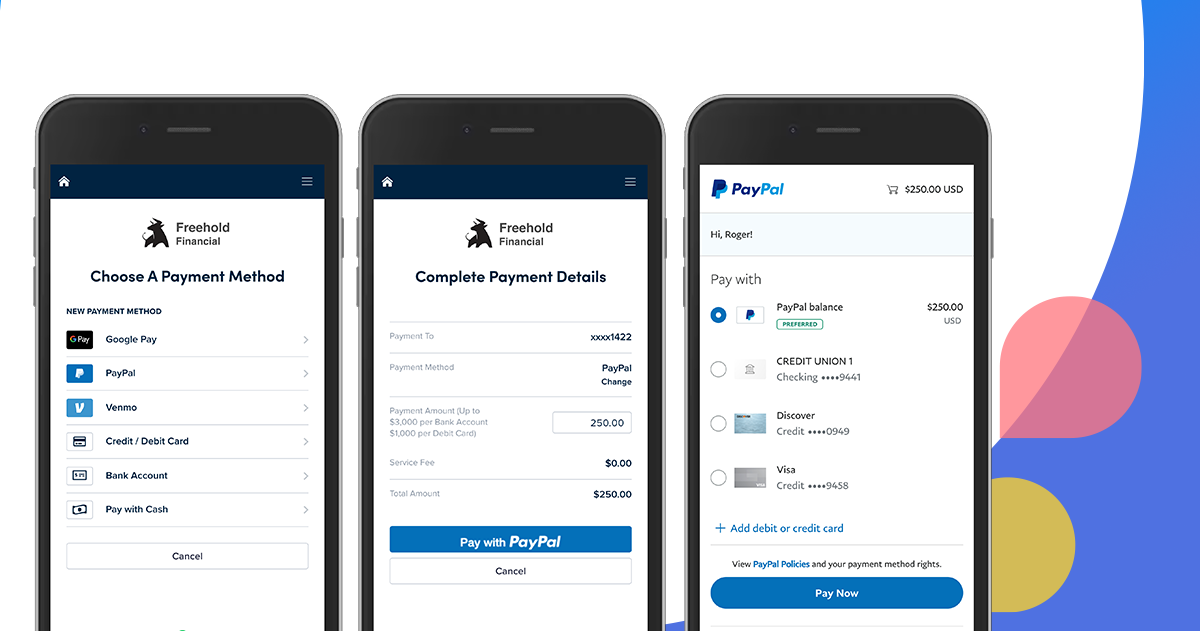
Beyond Peer-to-Peer: Venmo’s Merchant Ecosystem
Originally, the primary use case for Venmo was splitting dinner bills or sending money to friends. While this core functionality remains, the platform has proactively forged partnerships with a vast array of online retailers and service providers. This merchant ecosystem allows users to utilize their Venmo balance, linked bank accounts, or debit cards to make direct purchases. For many, this means consolidating financial activity within a single, familiar application, simplifying expense tracking and budgeting. The integration of Venmo within various checkout flows signifies a move towards a more holistic digital wallet experience, directly influencing how users manage their discretionary spending.
Why Online Retailers Embrace Venmo
For online businesses, accepting Venmo isn’t just about offering another payment method; it’s a strategic move to tap into a significant user base known for its high engagement and digital literacy. Retailers benefit from potentially increased conversion rates, as consumers are more likely to complete a purchase when their preferred payment option is available. Moreover, Venmo’s brand recognition and perceived ease of use contribute to a smoother checkout experience, reducing cart abandonment. From a financial perspective, offering diverse payment options can cater to a wider customer demographic, potentially unlocking new revenue streams and fostering customer loyalty. It also aligns businesses with modern payment trends, signaling adaptability and customer-centricity in a competitive digital marketplace.
Identifying Merchants That Accept Venmo
The key to paying with Venmo online lies in knowing where to look for its acceptance. While not universally available at every online checkout, its presence is growing rapidly across various sectors, from fashion and electronics to food delivery and travel. Recognizing the specific indicators and alternative methods for using Venmo online can greatly enhance your digital shopping experience.
Direct Venmo Buttons and QR Codes
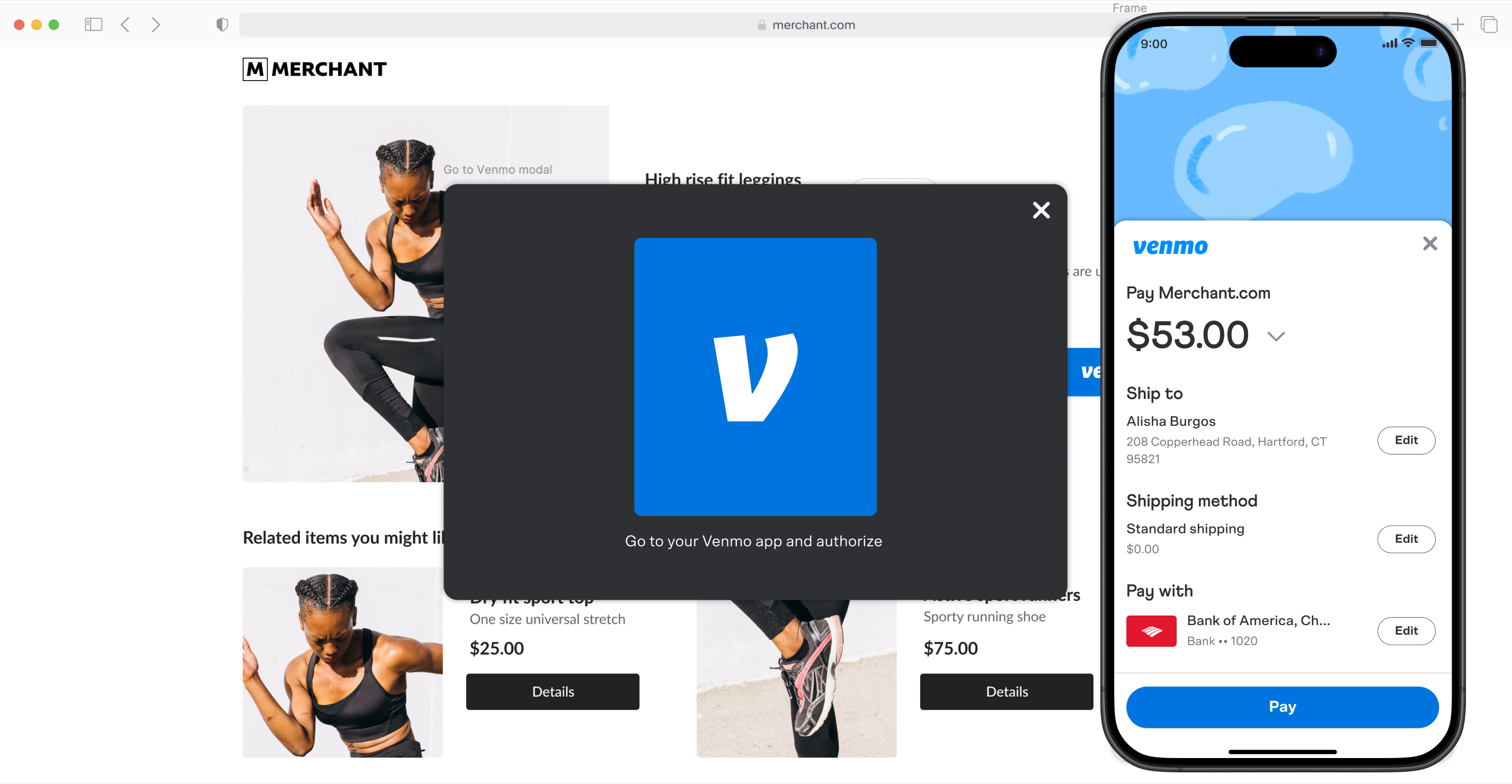
The most straightforward way to pay with Venmo online is to look for the distinct blue Venmo button or logo at a merchant’s checkout page. When you select Venmo as your payment method, you’ll typically be redirected to the Venmo app or asked to log in to your Venmo account to authorize the payment. This process is designed for security and convenience, ensuring that transactions are verified within the Venmo ecosystem. In some cases, particularly for mobile shopping experiences or at events, merchants might display a Venmo QR code that can be scanned directly from your Venmo app, instantly linking to the payment page. This direct integration streamlines the transaction, making it a quick and intuitive process for users.
Paying with Venmo via PayPal
Given that PayPal owns Venmo, there’s a significant overlap in their payment processing capabilities. Many online retailers that accept PayPal may also indirectly allow Venmo payments. When you select PayPal at checkout, you might be given the option to link or use your Venmo balance or payment methods within the PayPal interface. This symbiotic relationship broadens the scope of where Venmo can be used, often extending its reach to stores that don’t explicitly display a Venmo logo but are part of the vast PayPal merchant network. This method leverages PayPal’s extensive security infrastructure, providing an additional layer of confidence for consumers.
Utilizing the Venmo Debit Card
For scenarios where a direct Venmo button isn’t available, the Venmo Debit Card offers a versatile workaround. This Mastercard® debit card is linked directly to your Venmo balance, allowing you to spend money from your account anywhere Mastercard is accepted, online or in physical stores. This effectively transforms your Venmo balance into a universally accepted form of payment, making it an invaluable financial tool for those who prefer to keep their spending consolidated within their Venmo account. It’s a pragmatic solution for managing daily expenses and online purchases, bridging the gap between Venmo’s native integrations and the wider merchant landscape. The card often comes with features like cash-back rewards at select merchants, further enhancing its appeal as a personal finance instrument.
In-App Purchases and Partner Integrations
Beyond traditional online retailers, Venmo has also integrated itself into various mobile applications for specific services. This includes popular food delivery apps, ride-sharing services, and ticketing platforms. When making an in-app purchase, users may find Venmo listed as a payment option alongside credit cards and other digital wallets. These direct integrations provide a seamless user experience, allowing for quick and secure transactions within the native app environment. For users who frequently utilize these services, Venmo becomes a go-to payment method, streamlining their digital interactions and financial flows.
Practical Steps to Pay with Venmo Online
Using Venmo for online purchases is generally straightforward, but a few preparatory steps and considerations can ensure a smooth transaction. Understanding the nuances of the checkout process and security measures can help you leverage Venmo effectively for your online spending.
Ensuring Account Readiness
Before attempting to pay with Venmo online, ensure your account is properly set up and funded. This includes verifying your identity (which may be required by Venmo for certain transaction limits or features), linking a valid bank account or debit card, and having a sufficient balance if you intend to pay directly from your Venmo funds. If your Venmo balance is low, you might need to transfer funds from your linked bank account or enable the “reload” feature, which automatically draws money from your linked bank account when your Venmo balance isn’t sufficient for a purchase. Regularly checking your Venmo balance and linked payment methods is a good practice for proactive financial management.
Navigating the Checkout Process
When you arrive at a merchant’s checkout page and see the Venmo option:
-
Select Venmo: Click on the Venmo button or logo.
-
Redirect/Login: You will typically be redirected to a Venmo-hosted page or prompted within the checkout flow to log in to your Venmo account. If you’re on a mobile device and have the Venmo app installed, it might open automatically for authorization.
-
Authorize Payment: Review the purchase details, including the merchant, amount, and shipping information. Confirm the payment. You may need to enter your Venmo PIN or use biometric authentication (fingerprint/face ID) for security.
-
Confirmation: Once authorized, you’ll be redirected back to the merchant’s website, where you should see a confirmation of your order. You’ll also receive a payment confirmation in your Venmo app and via email.
This streamlined process makes paying with Venmo efficient and user-friendly, aligning with the expectations of modern digital consumers.
Security Considerations for Online Venmo Payments
While Venmo employs robust security measures, users also play a vital role in protecting their financial information. Always ensure you are on a secure website (look for “https://” in the URL and a padlock icon). Be wary of phishing attempts or suspicious links that redirect you to fake login pages. Use a strong, unique password for your Venmo account and enable two-factor authentication (2FA) for an added layer of security. Regularly review your transaction history within the Venmo app to spot any unauthorized activity promptly. Understanding Venmo’s buyer protection policies can also provide peace of mind, offering avenues for recourse in case of disputes with merchants. Responsible use of any financial tool is paramount for safeguarding your assets and personal data.
Integrating Venmo into Your Personal Finance Strategy
As Venmo expands its utility beyond P2P, it increasingly becomes a relevant tool for broader personal finance management. Its capabilities for online payments can be integrated into your financial habits, offering both convenience and opportunities for better spending control.
Budgeting and Tracking with Venmo
For many, Venmo’s detailed transaction history acts as an impromptu spending tracker. Every payment, whether to a friend or an online merchant, is recorded within the app, categorized by date and often with notes. This provides a clear overview of where your money is going, which can be invaluable for budgeting. By consistently using Venmo for various online purchases, users can easily review their spending patterns for specific categories or periods. While not a full-fledged budgeting app, its transaction log offers a granular view that, when regularly reviewed, can inform spending decisions and help maintain financial discipline. Integrating it with other personal finance apps that can import transaction data further enhances its utility for comprehensive financial planning.
Understanding Fees and Limits
While sending and receiving money for personal use on Venmo is generally free, certain transactions and services may incur fees. For instance, instant transfers from Venmo to a bank account typically involve a small percentage fee, whereas standard transfers are free but take longer. When using Venmo for online purchases, merchants usually cover the transaction fees, meaning consumers typically don’t pay extra. However, it’s crucial to be aware of any potential fees associated with specific services or card reloads. Furthermore, Venmo has daily and weekly spending limits, which vary depending on whether your identity is verified. Understanding these limits is essential for planning larger online purchases and avoiding unexpected payment denials, ensuring that Venmo remains a reliable financial tool for your online shopping needs.

The Future of Venmo in Digital Transactions
Venmo’s trajectory suggests an increasingly significant role in the future of digital transactions. As more consumers gravitate towards mobile-first payment solutions and businesses continue to adapt to these preferences, Venmo is well-positioned to expand its merchant network and introduce new features that enhance its utility as a financial tool. Innovations like crypto integration and business profiles signal its ambition to be more than just a payment app, evolving into a comprehensive financial ecosystem. For users, this means greater flexibility, more choice, and potentially a more integrated approach to managing their money, making Venmo an essential component of modern personal finance strategies for online engagement.
aViewFromTheCave is a participant in the Amazon Services LLC Associates Program, an affiliate advertising program designed to provide a means for sites to earn advertising fees by advertising and linking to Amazon.com. Amazon, the Amazon logo, AmazonSupply, and the AmazonSupply logo are trademarks of Amazon.com, Inc. or its affiliates. As an Amazon Associate we earn affiliate commissions from qualifying purchases.