
In an increasingly digital financial landscape, mobile payment applications like Cash App have become indispensable tools for managing money, sending funds, and making purchases. However, the convenience they offer comes with the critical responsibility of maintaining account security. Occasionally, users may find their Cash App accounts locked or restricted, a situation that can be both frustrating and disruptive. Understanding why an account might be locked and, more importantly, how to effectively unlock it, is crucial for seamless digital finance management. This guide delves into the common causes of Cash App account restrictions and outlines a comprehensive, step-by-step approach to regaining access, all while emphasizing best practices for digital security.
Understanding Cash App Account Restrictions
Cash App, like any financial platform, employs robust security protocols designed to protect user funds and data. An account lockout or restriction is typically a consequence of these protective measures being triggered. Recognizing the underlying reasons for such actions is the first step toward resolution.
Common Reasons for Account Restrictions
Several factors can lead to a Cash App account being temporarily locked or permanently restricted. These often fall into categories related to security, compliance, or user activity.
Suspected Unauthorized Activity
This is perhaps the most common reason for an account lock. If Cash App’s automated systems detect unusual login attempts, transactions outside of typical patterns, or access from unfamiliar devices or locations, it might temporarily lock the account to prevent potential fraud. This proactive measure is designed to protect users from unauthorized access and theft.
Multiple Incorrect Login Attempts
Just like many online services, repeated failed attempts to log into your Cash App account can trigger a security lockout. This mechanism is in place to deter brute-force attacks where malicious actors try numerous password combinations to gain entry. The system assumes that legitimate users would remember their credentials or use the forgotten password feature.
Violation of Terms of Service
Cash App has stringent Terms of Service (TOS) that all users must adhere to. Violations can range from engaging in prohibited transactions (e.g., related to gambling, illegal substances, or fraudulent activities) to using the app for business purposes without proper registration, or having multiple accounts under one identity. Non-compliance, once detected, can lead to account restrictions or permanent closure.
Identity Verification Issues
Cash App requires users to verify their identity to unlock full functionality, such as sending and receiving larger amounts, or withdrawing funds. If the identity verification process encounters issues—such as inconsistent personal information, outdated documents, or if the provided details don’t match governmental records—it can lead to account limitations until the discrepancies are resolved.
Dispute or Chargeback Activity
Frequent disputes with merchants or chargebacks initiated through your bank can flag your Cash App account as high-risk. Such activities suggest potential transactional issues or misuse, prompting the platform to restrict features or access to investigate.
The Role of Security Measures and Fraud Prevention
Cash App’s security infrastructure is a multi-layered defense system. It combines sophisticated algorithms for real-time transaction monitoring with manual reviews by security teams. When a potential threat or violation is identified, an account restriction serves as a critical circuit breaker. While it may inconvenience the user in the short term, its primary purpose is to safeguard funds and maintain the integrity of the platform for all users. These measures are constantly evolving to counter new cyber threats and fraud tactics.
Initial Steps to Regain Access
When faced with a locked Cash App account, a structured approach to troubleshooting can significantly expedite the unlocking process. Often, the solution begins with basic self-service checks and identity confirmations.
Verifying Identity and Contact Information
The cornerstone of regaining access is proving you are the legitimate account holder. Cash App relies heavily on the information you provided during registration.
Confirming Registered Phone Number or Email
Upon attempting to log in, if the account is locked due to suspicious activity or forgotten credentials, Cash App will often prompt you to verify your identity by sending a code to your registered phone number or email address. Ensure you have access to these linked communication channels. If your contact information is outdated, you will need to contact support to update it.
Providing Necessary Documentation
In cases where identity verification is the root cause of the lockout, or if more robust proof is required, Cash App may ask for official identification documents. This could include a government-issued photo ID (driver’s license, state ID, passport) and sometimes a selfie to compare with the document. Ensure the documents are current, clear, and accurately reflect the information on your Cash App profile.
Resetting Your PIN or Password
For lockouts stemming from incorrect login attempts, resetting your PIN (which acts as a password for transactions) or account password is a common resolution.
Utilizing the ‘Forgot PIN’ or ‘Forgot Password’ Feature
On the Cash App login screen, look for an option like “Forgot PIN” or “Having trouble signing in?”. Tapping this will initiate a recovery process. You will typically be asked to verify your identity via a code sent to your registered phone or email. Once verified, you can set a new PIN or password. Choose a strong, unique combination that you haven’t used elsewhere.
Importance of Strong, Unique Credentials
A robust PIN or password is your first line of defense. Avoid easily guessable information like birthdays, sequential numbers, or common words. Instead, use a mix of uppercase and lowercase letters, numbers, and symbols. Consider using a password manager to keep track of complex credentials securely.
The Role of Multi-Factor Authentication (MFA)
Multi-Factor Authentication adds an extra layer of security beyond just a password. While it might seem like an extra step, MFA significantly reduces the risk of unauthorized access and can often prevent lockouts by confirming your identity through a secondary method.
Setting Up or Using MFA
If you have MFA enabled, Cash App will typically send a one-time code to your registered device (usually your phone) or through an authenticator app after you enter your password. Even if someone obtains your password, they won’t be able to access your account without this second factor. If your account is locked and you have MFA enabled, ensure you can access your MFA method to complete the login process. If you’ve lost access to your MFA device, this will escalate the recovery process to Cash App support.
Engaging Cash App Support for Advanced Issues
Sometimes, self-service options aren’t sufficient, and direct intervention from Cash App support is necessary. This is especially true for complex issues like severe security breaches, persistent identity verification problems, or account restrictions due to policy violations.
In-App Support: Your First Line of Defense
Cash App’s in-app support is designed to be the primary channel for user assistance, offering a structured way to report issues and receive help.
Navigating the Support Section
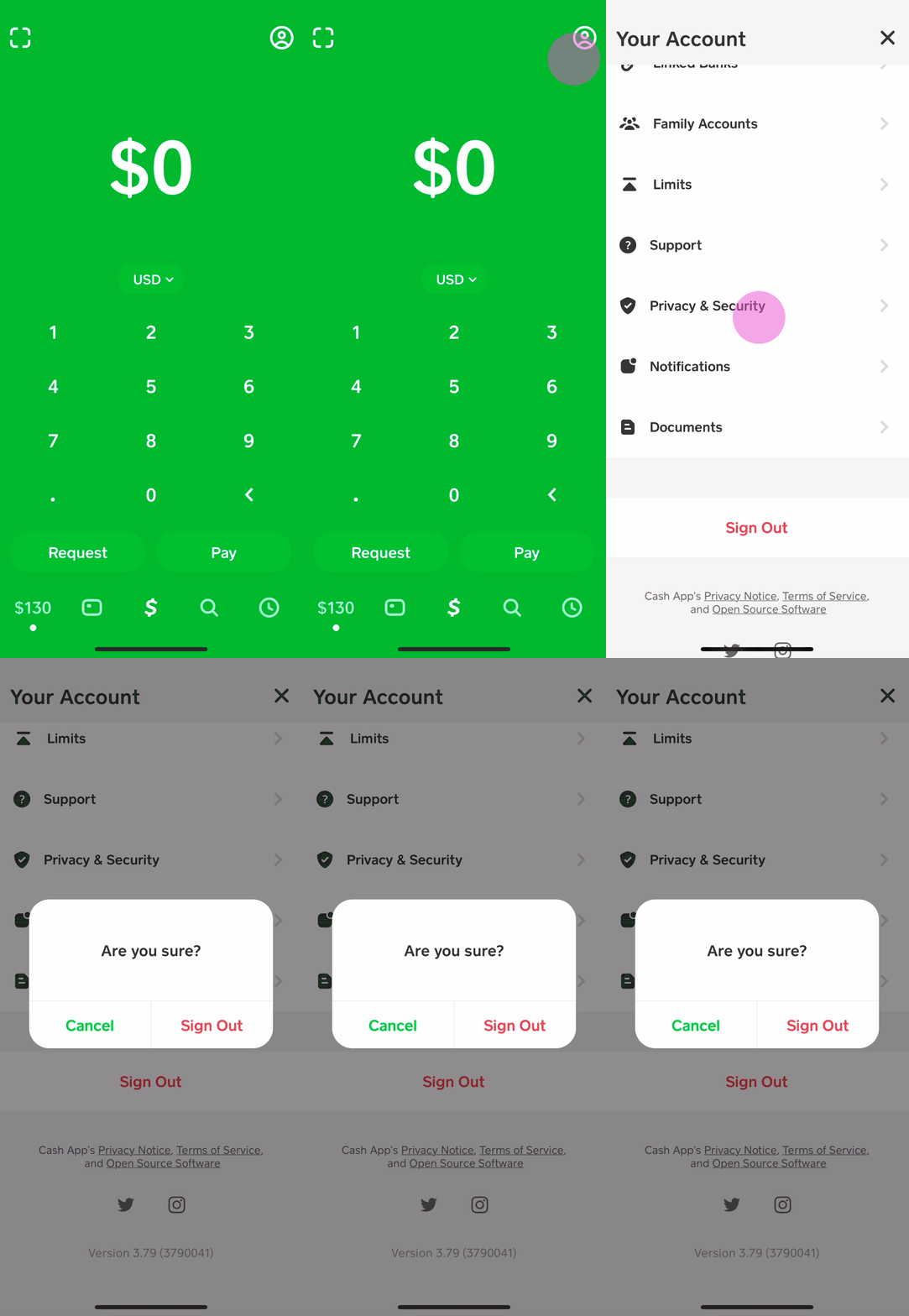
Open the Cash App, tap the profile icon (top right), scroll down and select “Support” or “Cash Support.” From there, you can browse FAQs or select “Something Else” to explain your specific issue. This initiates a conversation with a support agent, often through a chat interface. Provide clear, concise details about your account lockout, including any error messages you received.
Submitting a Support Ticket
If the initial chat doesn’t resolve the issue, the agent may escalate it into a formal support ticket. Ensure you receive a ticket number for future reference. Be prepared to provide any requested documentation or information promptly.
Contacting Cash App Via Phone or Social Media
While in-app support is preferred, alternative contact methods exist for specific circumstances or when in-app access is impossible.
The Cash App Phone Number
Cash App generally encourages in-app support for security reasons, but they do have a phone number for specific critical issues. You can usually find the most current support number by searching their official help pages or through the in-app support section. Be aware that wait times can vary, and direct phone support is often reserved for urgent cases that cannot be resolved through other channels.
Reaching Out on Social Media (with Caution)
Cash App has official presences on platforms like Twitter. While you can tweet at them or send a direct message, exercise extreme caution. Never share sensitive personal information (account numbers, full names, addresses, Social Security numbers) publicly. Social media support should primarily be used for general inquiries or to ask for direction to the appropriate private support channel. Fraudsters often impersonate Cash App support on social media, so always verify you are interacting with an official, verified account.
Preparing for Your Support Interaction
To streamline the support process and increase your chances of a swift resolution, preparation is key.
Gathering Essential Information
Before contacting support, have all relevant details ready:
-
Your full name and Cash App Cashtag.
-
The phone number and email address linked to your account.
-
Specific dates and times of failed login attempts or unusual activity.
-
Any error messages or screenshots of the issue.
-
Details of recent transactions, if relevant.
-
Documents for identity verification if requested.
Being Clear, Concise, and Patient
Explain your situation clearly and calmly. Avoid emotional language. Be patient, as resolving account lockouts, especially those involving security or compliance, can take time due to necessary investigations. Follow all instructions precisely and respond to requests promptly.
Preventing Future Account Lockouts
Proactive security measures and responsible account management are the most effective ways to avoid the inconvenience of a locked Cash App account.
Best Practices for Account Security
Adopting robust digital hygiene habits is paramount for protecting your financial apps.
Strong, Unique Passwords and PINs
Always use strong, complex passwords and PINs that are unique to your Cash App account. Do not reuse passwords from other online services. Consider using a reputable password manager.
Enabling Multi-Factor Authentication (MFA)
If you haven’t already, enable MFA on your Cash App account. This adds a critical layer of security, typically requiring a code from your phone in addition to your password.
Regular Monitoring of Account Activity
Periodically review your Cash App transaction history. Report any unfamiliar or suspicious transactions immediately through the in-app support. Early detection of unauthorized activity can prevent further issues.
Keeping Contact Information Updated
Ensure the phone number and email address linked to your Cash App account are current and accessible. These are vital for account recovery and security alerts.
Understanding Cash App’s Terms of Service
Many account restrictions stem from unintentional (or intentional) violations of Cash App’s Terms of Service. Taking the time to understand these guidelines can help you avoid pitfalls.
Prohibited Activities
Familiarize yourself with activities that Cash App explicitly prohibits, such as using the app for illegal transactions, certain business types without proper registration, or creating multiple accounts. Compliance with these terms ensures uninterrupted access to your services.

Reporting Suspicious Activity Promptly
If you receive a suspicious email, text, or phone call claiming to be from Cash App, do not click links or provide information. Instead, report it directly to Cash App through official channels. Similarly, if you notice unauthorized activity on your account, report it immediately to mitigate damage.
By understanding the technical mechanisms behind account security, engaging with support efficiently, and adopting proactive security measures, users can minimize the risk of Cash App account lockouts and ensure a smoother, more secure digital financial experience.
aViewFromTheCave is a participant in the Amazon Services LLC Associates Program, an affiliate advertising program designed to provide a means for sites to earn advertising fees by advertising and linking to Amazon.com. Amazon, the Amazon logo, AmazonSupply, and the AmazonSupply logo are trademarks of Amazon.com, Inc. or its affiliates. As an Amazon Associate we earn affiliate commissions from qualifying purchases.