
Navigating the landscape of digital financial tools has become a cornerstone of modern personal finance. With the proliferation of peer-to-peer (P2P) payment apps and challenger banks, individuals often seek seamless ways to move funds between their various accounts. Two prominent players in this ecosystem are Cash App and Chime. While both facilitate easy money management, directly sending funds from Cash App to a Chime account isn’t as straightforward as a direct P2P transfer between two Cash App users. Understanding the underlying financial mechanisms and available workarounds is crucial for effective money movement and robust personal financial management.
Understanding the Direct Transfer Challenge: Why It’s Not Straightforward
At first glance, it might seem logical that if both Cash App and Chime handle digital money, they should be able to directly transfer funds between each other. However, their operational models and the nature of their services dictate a more nuanced process. This distinction is vital for anyone managing their finances across multiple platforms.
The Nature of Peer-to-Peer Apps and Bank Accounts
Cash App primarily functions as a P2P payment service with an integrated debit card and investment features. It allows users to send, receive, and store money within its proprietary ecosystem. While it does link to external bank accounts, its core design prioritizes transactions within its own network or through its associated Cash Card. Transfers out of Cash App typically go to a linked traditional bank account. Chime, on the other hand, operates as a financial technology company offering mobile-first banking services. It provides spending accounts (similar to checking accounts) and savings accounts, complete with a Visa® debit card and credit builder card. Chime partners with FDIC-insured banks to hold customer deposits, effectively functioning as a modern digital bank. The key difference lies in Cash App being a payment app with banking-like features, while Chime is a full-fledged mobile bank. Direct app-to-app transfers usually require specific integrations that aren’t typically present between a P2P app and a mobile banking platform in the same way they exist between two identical P2P apps.
Cash App’s Wallet vs. Chime’s Spending Account
When you have money in your Cash App balance, it resides within your Cash App wallet. This wallet is distinct from a traditional bank account number and routing number. Chime’s Spending Account, conversely, provides standard bank account details (account number and routing number) that are designed to interface with the Automated Clearing House (ACH) network and other traditional banking systems. For money to move from a Cash App wallet to a Chime Spending Account, it generally needs to pass through an intermediary system that can bridge these two different types of financial holdings. This often involves a linked external bank account, which acts as the common denominator capable of receiving funds from Cash App and then sending them to Chime. This indirect routing is a critical concept in digital financial management.
The Indirect Method: Using Your Linked Bank Account as a Bridge
Given the lack of direct integration, the most reliable and widely used method to transfer money from Cash App to Chime involves using a traditional bank account as a temporary intermediary. This process leverages the existing financial infrastructure that both Cash App and Chime are designed to interact with.
Step-by-Step Guide: From Cash App to Your Bank
The first leg of this journey involves withdrawing funds from your Cash App balance to a linked external bank account. This bank account will serve as the conduit to Chime.
-
Ensure a Bank Account is Linked to Cash App: Open your Cash App and navigate to the ‘Banking’ tab (the house icon). Scroll down to ‘Linked Banks’ and ensure you have a traditional bank account linked. If not, tap ‘Link Bank’ and follow the prompts to connect your bank using your login credentials or account and routing numbers. This account will be the initial destination for your funds.
-
Initiate a Cash Out from Cash App: From the ‘Banking’ tab, tap on ‘Cash Out’.
-
Enter the Desired Amount: Input the specific amount of money you wish to send to Chime.
-
Choose Your Transfer Speed: You’ll typically be presented with two options:
-
Standard Deposit: This is usually free and takes 1-3 business days to arrive in your linked bank account via the ACH network.
-
Instant Deposit: This incurs a small fee (typically 0.5% to 1.75% of the transfer amount) but sends the money to your linked bank account almost immediately.
-
-
Confirm the Transfer: Review the details, including the amount and selected transfer speed, and confirm the transaction. The funds will now be en route to your linked traditional bank account.
Step-by-Step Guide: From Your Bank to Chime
Once the money has settled in your traditional bank account, the next step is to transfer it to your Chime Spending Account. This process is standard for moving money into Chime from an external bank.
-
Locate Your Chime Account Details: Open your Chime app. You can typically find your Chime routing number and account number in the ‘Move Money’ or ‘Settings’ section. These are essential for initiating a transfer from an external bank.
-
Initiate an External Transfer from Your Traditional Bank: Log in to your traditional bank’s online banking portal or mobile app.
-
Find the ‘Transfer’ or ‘Send Money’ Option: Look for a function that allows you to transfer money to an external account or “Add External Account.”
-
Add Chime as a Recipient Account: You will need to provide Chime’s routing number and your Chime account number. Some banks may require micro-deposits for verification, which involve sending two small deposits to Chime and then asking you to verify their amounts back in your traditional bank app. This is a security measure.
-
Enter the Transfer Amount: Once Chime is linked and verified (if necessary), enter the amount you wish to transfer from your traditional bank to your Chime Spending Account.
-
Confirm the Transfer: Review all details and confirm the transaction. This transfer typically uses the ACH network and can take 1-3 business days to complete, although some banks offer faster transfers for a fee.
Transaction Fees and Speed Considerations
Understanding the costs and timelines associated with these transfers is crucial for financial planning.
-
Cash App to Traditional Bank: Standard deposits are free but take 1-3 business days. Instant deposits incur a fee (e.g., 0.5%–1.75%) for immediate access.
-
Traditional Bank to Chime: Most standard ACH transfers are free but also take 1-3 business days. Some traditional banks might offer expedited transfer services for a fee, but this is less common for external transfers to non-partner banks.
-
Total Time: Depending on your choices, the entire process could take anywhere from 2-6 business days for free transfers or potentially less than 24 hours if you opt for all instant/expedited options and pay the associated fees. Factor these into your financial management if you have urgent needs.
Alternative Approaches and Workarounds
While the indirect bank transfer is the most common method, other strategies exist that might suit specific situations or preferences. These often involve leveraging debit cards or other P2P services.
Leveraging a Debit Card for Faster Transfers (Cash App to Chime via Debit)
This method bypasses the need to wait for ACH transfers to a traditional bank account, potentially speeding up the process significantly. It relies on the ability of Chime to receive funds from a linked debit card, and Cash App’s ability to cash out to a debit card.
-
Link Your Chime Debit Card to Cash App:
-
Open Cash App.
-
Navigate to the ‘Banking’ tab (house icon).
-
Under ‘Linked Banks’, you might see an option to ‘Link Debit Card’ or ‘Replace Card’. Use this to link your Chime Visa® Debit Card to your Cash App account. Ensure it’s linked as the primary debit card for cash outs.
-
-
Cash Out from Cash App to Your Chime Debit Card:
-
From the ‘Banking’ tab in Cash App, tap ‘Cash Out’.
-
Enter the amount you wish to transfer.
-
Select ‘Instant Deposit’. Cash App will then attempt to send the funds to your linked debit card, which in this case, is your Chime debit card.
-
A fee will apply for instant transfers (typically 0.5% to 1.75%).
-
Confirm the transfer. The money should appear in your Chime Spending Account almost immediately.
-
This method is often the quickest way to move funds, but it does involve a fee. It’s crucial for financial awareness to weigh the cost against the urgency of the transfer.
The PayPal or Venmo Detour (Less Common, But Possible)
For those who regularly use multiple P2P apps, it’s theoretically possible to use another service like PayPal or Venmo as an intermediary, although this adds more steps and potential fees.
-
Cash Out from Cash App to a Traditional Bank: (As described in the main indirect method).
-
Send Money from Traditional Bank to PayPal/Venmo: Fund your PayPal or Venmo account from your traditional bank.
-
Withdraw from PayPal/Venmo to Chime: Link your Chime Spending Account (using its routing and account numbers) to your PayPal or Venmo account and initiate a withdrawal. This will typically involve ACH transfers and their associated timelines.
This method is generally less efficient due to multiple steps and potential double fees if instant transfers are chosen at each stage. It’s usually only considered if there are specific reasons not to use the direct bank bridge or debit card method.
Physical Cash Deposits (If All Else Fails)
In situations where digital transfers are proving difficult, or for those who prefer handling physical cash, a direct deposit can be an option.
-
Cash Out from Cash App to Your Linked Traditional Bank: Withdraw the money from Cash App to your linked traditional bank account.
-
Withdraw Physical Cash: Once the funds are in your traditional bank, withdraw the money as physical cash.
-
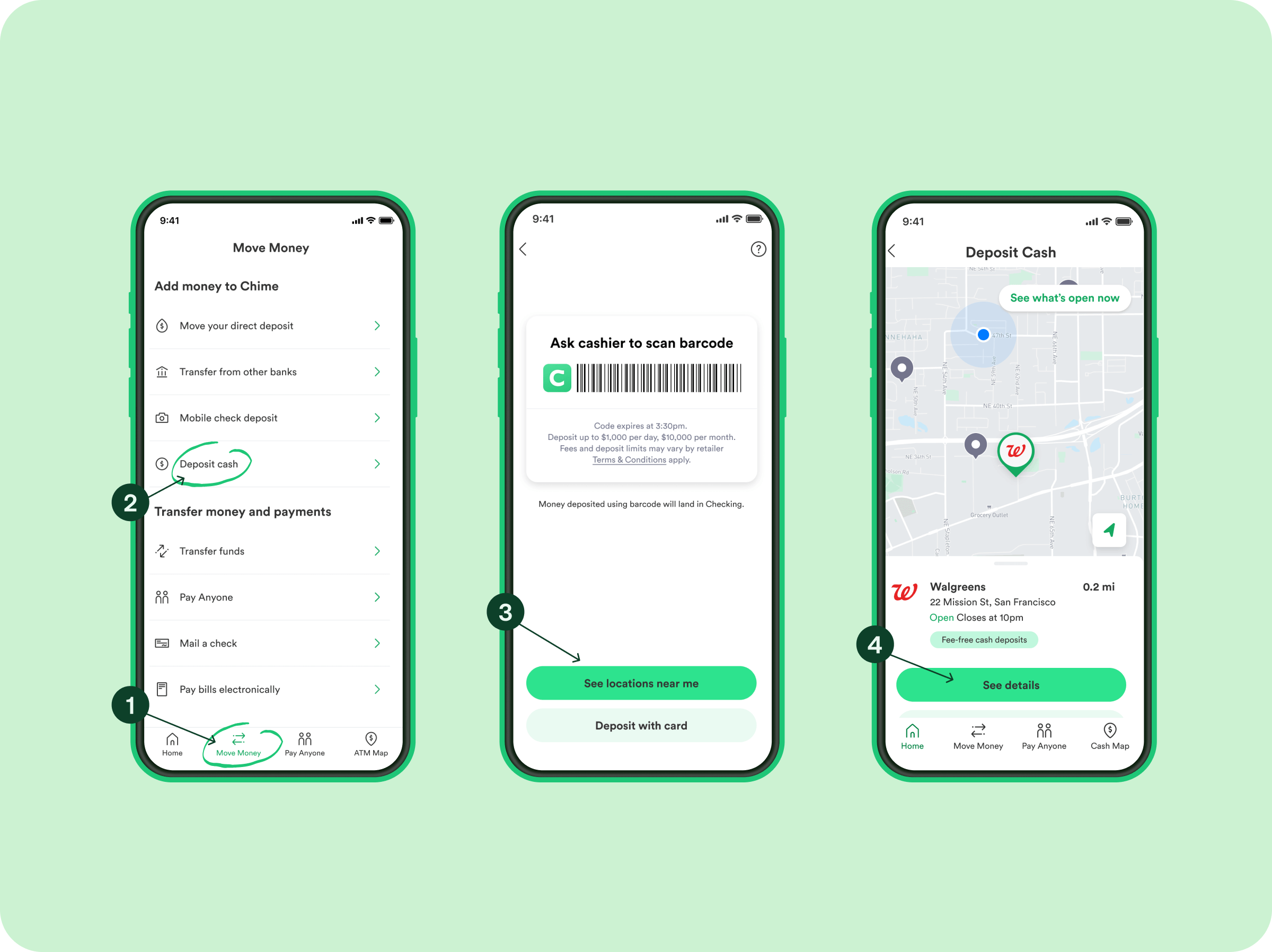
Deposit Cash into Chime: Chime allows cash deposits at over 90,000 retail locations, including Walgreens, 7-Eleven, CVS, and Rite Aid. There might be a limit on the amount and frequency of deposits, and some retailers may charge a small fee. You’ll need to use your Chime debit card at the register for these deposits.
While effective, this method is the most time-consuming and labor-intensive, often involving physical travel and potentially small fees.
Optimizing Your Financial Flow Between Apps
Effective financial management goes beyond simply moving money; it involves setting up efficient systems and maintaining security. When dealing with apps like Cash App and Chime, a strategic approach can save time, reduce fees, and enhance financial safety.
Best Practices for Linking Accounts Securely
The foundation of smooth transfers lies in securely linking your various financial accounts.
-
Use Strong, Unique Passwords: Never reuse passwords across financial apps. Employ a password manager to generate and store complex passwords.
-
Enable Two-Factor Authentication (2FA): Both Cash App and Chime offer 2FA. Always enable this layer of security, typically via an authenticator app or SMS code, to protect against unauthorized access.
-
Verify Account Details Carefully: When linking accounts or initiating transfers, double-check all routing and account numbers. A single digit error can lead to significant delays or misdirected funds.
-
Monitor Linked Accounts Regularly: Periodically review which bank accounts or debit cards are linked to your Cash App. Unlink any accounts you no longer use or recognize.
-
Be Wary of Phishing Scams: Both Cash App and Chime will never ask for your password, PIN, or full debit card number via email, text, or phone call. Always be suspicious of unsolicited communications.
Monitoring Transactions and Account Balances
Vigilant monitoring is key to preventing fraud and maintaining an accurate picture of your finances.
-
Review Transaction History: Regularly check the transaction history in both your Cash App and Chime apps. Look for any unfamiliar charges or transfers.
-
Set Up Notifications: Enable push notifications from both apps for all incoming and outgoing transactions. This provides immediate alerts for any activity.
-
Reconcile Balances: If you’re frequently moving money, periodically reconcile the balances between your various accounts to ensure everything adds up. Any discrepancies warrant immediate investigation.
Understanding Limits and Potential Delays
Both Cash App and Chime have specific limits and operational hours that can affect transfers.
-
Cash App Limits: Cash App has limits on how much you can send, receive, and cash out within certain timeframes (e.g., daily, weekly). These limits can increase if you verify your identity.
-
Chime Limits: Chime also has limits on daily spending, ATM withdrawals, and mobile check deposits. While less common for ACH transfers into Chime, large or frequent transfers might sometimes trigger security reviews.
-
Weekend and Holiday Delays: ACH transfers generally only process on business days. Transfers initiated on a Friday evening might not fully settle until the following Tuesday or Wednesday, especially if there’s a holiday. Always factor in business days when calculating transfer times.
-
Security Holds: Occasionally, large or unusual transfers might be subject to a security review by either platform or the intermediary bank, which can cause delays.
Financial Planning Implications and Best Practices
Integrating app-based financial tools like Cash App and Chime into your broader financial strategy requires thoughtful consideration of their strengths, weaknesses, and security implications.
Integrating App-Based Finances into Your Budget
Digital financial tools offer flexibility but can also complicate budgeting if not managed properly.
-
Designate Roles: Assign specific roles to each app. For example, use Chime as your primary spending account for bills and daily expenses due to its banking features, and Cash App for sending money to friends, accepting payments for small gigs, or quick, small purchases.
-
Track All Income and Expenses: Ensure that all money flowing through Cash App and Chime is accounted for in your overall budget. Many budgeting apps can link to Chime, but you may need to manually track Cash App transactions or export them.
-
Automate Savings: Leverage Chime’s automatic savings features (e.g., Round Up) to build savings effortlessly, while ensuring consistent transfers from Cash App or other income sources to fund your primary Chime account.
Security Tips for Digital Money Transfers
Protecting your funds and personal information is paramount in the digital age.
-
Only Transact with Trusted Individuals: Use Cash App for people you know and trust. Be extremely cautious about sending money to strangers or for online purchases where the seller is unverified.
-
Beware of Scams: Be vigilant against common scams, such as those promising free money, job offers requiring upfront payments, or lottery winnings. If it sounds too good to be true, it almost certainly is.
-
Keep Software Updated: Always ensure your Cash App and Chime apps, as well as your device’s operating system, are updated to the latest versions. Updates often include critical security patches.
-
Protect Your Device: Use a strong passcode, fingerprint, or facial recognition to secure your smartphone, which houses access to your financial apps.
When to Use Cash App vs. Chime for Different Needs
Understanding the primary function of each tool helps in making informed financial decisions.
-
Use Cash App For:
-
Sending money to friends and family instantly (if they also have Cash App).
-
Receiving payments from peers.
-
Small, quick transactions.
-
Investing in Bitcoin or stocks (if you choose to use those features).
-
-
Use Chime For:
-
Your primary spending and savings account (with direct deposit benefits).
-
Paying bills and managing subscriptions with its bank-level features.
-
Building credit with its Credit Builder Visa® Card.
-
Accessing an extensive ATM network for cash withdrawals.
-
Overdraft protection (SpotMe®) for eligible members.
-
By understanding these distinctions and applying the outlined methods, you can effectively manage your money across Cash App and Chime, ensuring your digital financial ecosystem works seamlessly for your personal finance goals.
aViewFromTheCave is a participant in the Amazon Services LLC Associates Program, an affiliate advertising program designed to provide a means for sites to earn advertising fees by advertising and linking to Amazon.com. Amazon, the Amazon logo, AmazonSupply, and the AmazonSupply logo are trademarks of Amazon.com, Inc. or its affiliates. As an Amazon Associate we earn affiliate commissions from qualifying purchases.