
In the evolving landscape of personal finance, digital payment platforms like Venmo have become indispensable tools for managing transactions, splitting costs, and even making everyday purchases. Central to Venmo’s utility is its “balance” feature, a digital reservoir for funds received or intentionally loaded onto the platform. Understanding how to effectively use this balance is key to optimizing your financial fluidity and leveraging Venmo beyond simple peer-to-peer transfers. This guide delves into the mechanisms, practical applications, and strategic considerations of paying with your Venmo balance, integrating it seamlessly into your broader personal finance strategy.

Understanding Your Venmo Balance: A Financial Hub
Your Venmo balance isn’t just a number; it’s an accessible pool of funds within a regulated financial ecosystem, offering a distinct advantage over constantly linking back to your primary bank account. It represents money that has been sent to you by others or money you’ve chosen to add directly, residing within your Venmo account ready for use.
The Mechanics of the Venmo Balance
When someone sends you money on Venmo, it automatically deposits into your Venmo balance. Unlike traditional bank transfers that might take a day or two to clear, these funds are typically available instantly. Similarly, you have the option to add money to your Venmo balance directly from your linked bank account or debit card. This pre-funding capability transforms Venmo from a mere transfer service into a quasi-digital wallet, allowing you to segment funds specifically for Venmo-related activities or simply to have a ready-to-spend balance. The funds held in your balance are FDIC insured up to applicable limits through Venmo’s partner banks, providing a layer of security comparable to traditional banking accounts.
Advantages of Utilizing Your Balance
There are several compelling financial advantages to actively using your Venmo balance for payments. Firstly, it offers enhanced transactional speed and convenience. When you pay using your Venmo balance, the transaction typically processes instantaneously, avoiding potential delays that can sometimes occur when funds are drawn directly from a linked bank account, especially with newer connections. Secondly, it provides a layer of financial separation. By holding funds in your Venmo balance, you can mentally (and practically) allocate specific money for social payments, online purchases, or shared expenses, without constantly exposing your primary bank account details for every transaction. This can be particularly useful for budgeting or for managing shared household expenses. Thirdly, using the balance often means avoiding potential overdraft fees that could arise if a direct debit from a linked bank account fails due to insufficient funds.
Practical Steps to Pay with Your Venmo Balance
Paying with your Venmo balance is designed to be intuitive, spanning various payment scenarios from peer-to-peer to merchant transactions. The platform prioritizes the use of your Venmo balance as the primary funding source whenever sufficient funds are available.
Initiating a Payment to Friends and Businesses
The most common use case for Venmo is sending money to friends, family, or splitting bills. When you initiate a payment:
-
Open the Venmo App: Tap the “Pay & Request” button (usually a pencil and paper icon or a dollar sign).
-
Enter Recipient and Amount: Input the recipient’s username, phone number, or email, and the amount you wish to send.
-
Add a Note: Include a descriptive note about the payment (e.g., “Dinner,” “Rent,” “Concert Tickets”). This is crucial for record-keeping and clarity.
-
Confirm Funding Source: Below the amount, Venmo will display your default funding source. If you have a sufficient Venmo balance, it will automatically be selected as the primary source. If not, it will show your linked bank account or debit card. You can usually tap on this to change it if you have multiple funding options and want to prioritize a different one (though the balance is typically prioritized by default).
-
Tap “Pay”: Once everything looks correct, hit the “Pay” button to complete the transaction. The funds will be deducted instantly from your Venmo balance.
For businesses that accept Venmo directly, the process is similar. You might scan a QR code or select their business profile, and your Venmo balance will again be the primary funding option.
Making In-App and Online Purchases
Many online retailers and mobile applications now integrate Venmo as a payment option at checkout. This streamlines the purchasing process, especially on mobile devices.
-
Select Venmo at Checkout: When shopping online or in an app, look for the “Pay with Venmo” option alongside other payment methods like credit cards or PayPal.
-
Redirect to Venmo App: Selecting Venmo will typically redirect you to the Venmo app (if on mobile) or prompt you to log in to your Venmo account on a desktop browser.
-
Review and Confirm: In the Venmo interface, you’ll see the merchant’s name, the purchase amount, and your available Venmo balance. If your balance covers the full amount, it will be automatically selected as the funding source. If not, Venmo will draw the remaining amount from your linked bank account or debit card.
-
Authorize Payment: Confirm the purchase, and the funds will be deducted from your Venmo balance first.
This method offers a quick and secure way to pay, often bypassing the need to enter lengthy credit card details.
Using the Venmo Debit Card for Everyday Spending
For those who want to use their Venmo balance like a traditional bank account, the Venmo Debit Card (issued by Bancorp Bank) is a powerful tool. This Mastercard-branded card allows you to spend your Venmo balance anywhere Mastercard is accepted, both online and in physical stores.
-
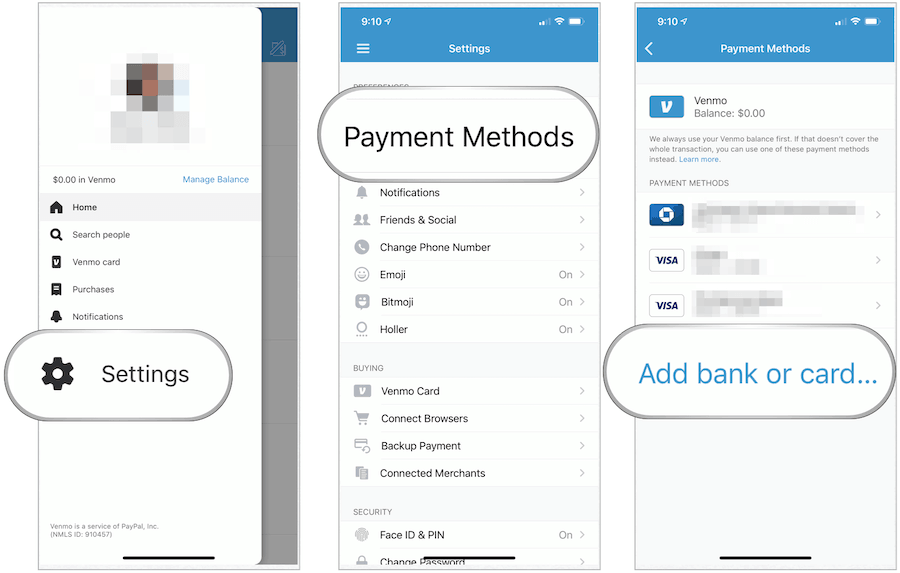
Order the Card: You can order a Venmo Debit Card directly through the Venmo app, typically under the “Cards” or “Settings” section.
-
Activate the Card: Once received, activate it via the app.
-
Spend Directly from Balance: When you make a purchase with the Venmo Debit Card, funds are drawn directly from your Venmo balance. If your balance doesn’t cover the full transaction amount, Venmo offers a “Reload” feature, which can automatically pull the remaining funds from your linked bank account. This ensures your transactions go through even if your Venmo balance is low, acting as a seamless backup.
-
ATM Access: The Venmo Debit Card also provides access to MoneyPass ATMs for cash withdrawals, further extending its utility as a comprehensive financial tool for accessing your Venmo funds.
The Venmo Debit Card bridges the gap between your digital balance and the physical world, making your Venmo funds as liquid as those in a traditional checking account.
Strategic Management of Your Venmo Balance
Beyond simply transacting, intelligent management of your Venmo balance can enhance your personal finance practices, contributing to better budgeting and security.
Autoload and Funds Management Best Practices
Venmo offers an “Autoload” feature for the Venmo Debit Card, allowing you to automatically add funds from your linked bank account if your Venmo balance falls below a certain threshold or if a transaction exceeds your current balance. While convenient, it’s crucial to manage this setting judiciously.
-
Set Realistic Thresholds: If using Autoload, set a minimum balance threshold that aligns with your spending habits to avoid unexpectedly drawing large amounts from your bank account.
-
Monitor Spending: Regularly review your Venmo transaction history. This helps in understanding where your money is going and ensures you’re not over-relying on the Autoload feature, which could obscure your actual spending patterns.
-
Manual Funding: For more disciplined control, opt for manual “Add Money” transfers from your bank account to your Venmo balance. This allows you to consciously decide how much to allocate for Venmo spending, treating it like a mini-budget.
Security and Fraud Prevention
Like any financial tool, securing your Venmo balance is paramount.
-
Strong Passwords and Biometrics: Always use a strong, unique password for your Venmo account and enable two-factor authentication (2FA) and biometric login (fingerprint/Face ID) for an added layer of security.
-
Monitor Notifications: Pay attention to Venmo’s email and in-app notifications regarding transactions or account changes. Report any suspicious activity immediately.
-
Beware of Scams: Be vigilant against phishing attempts and requests for money from unknown sources. Venmo is not designed for transactions with strangers for goods and services where you might not receive what you paid for. Stick to trusted individuals and legitimate businesses.
-
Private vs. Public: While Venmo has a social feed, consider setting your transactions to “Private” to protect your financial privacy.
Integrating Venmo Balance into Your Personal Finance Strategy
Effectively utilizing your Venmo balance means seeing it as an integrated component of your overall financial ecosystem, not just an isolated app.
Budgeting and Tracking Venmo Transactions
For robust personal finance management, all transactions—including those through Venmo—must be accounted for.
-
Categorize and Track: While Venmo provides transaction history, consider linking Venmo to a personal finance aggregation app (like Mint, YNAB, or other budgeting tools) if available. If not, manually record Venmo spending in your budget spreadsheet or app categories.
-
Allocate for Shared Expenses: Many use Venmo primarily for splitting costs. Create a budget category specifically for “Shared Expenses” or “Social Spending” to track money sent and received through Venmo, ensuring it aligns with your financial goals.
-
Regular Reconciliation: Periodically reconcile your Venmo balance with your budgeting records to ensure accuracy and identify any discrepancies.
When to Hold Funds vs. Transfer Out
A common question is whether to keep a significant balance in Venmo or transfer it to a primary bank account.
-
Convenience for Regular Use: If you frequently send money via Venmo, make in-app purchases, or use the Venmo Debit Card for daily spending, maintaining a small to moderate balance can be highly convenient. It reduces the need for constant transfers.
-
Safety and Interest: For larger sums or funds you don’t intend to spend immediately, it’s generally advisable to transfer money out of your Venmo balance to an interest-bearing savings account at a traditional bank. While Venmo funds are FDIC insured, they typically don’t earn interest, meaning your money isn’t growing.
-
Emergency Fund: Your Venmo balance should not serve as your primary emergency fund. Keep your emergency savings in a secure, easily accessible, and interest-earning account.

The Future of Digital Wallet Integration in Personal Finance
The ability to pay directly from a Venmo balance signifies a broader trend towards digital wallets becoming more central to personal finance. As these platforms evolve, they are likely to offer more sophisticated budgeting tools, direct connections to investment products, and even potentially higher-yield savings options. By mastering the use of your Venmo balance today, you’re not just simplifying payments; you’re preparing for a future where digital financial tools offer even greater control and flexibility over your money. Integrating your Venmo activity into a holistic view of your finances ensures you harness the platform’s full potential for financial empowerment.
aViewFromTheCave is a participant in the Amazon Services LLC Associates Program, an affiliate advertising program designed to provide a means for sites to earn advertising fees by advertising and linking to Amazon.com. Amazon, the Amazon logo, AmazonSupply, and the AmazonSupply logo are trademarks of Amazon.com, Inc. or its affiliates. As an Amazon Associate we earn affiliate commissions from qualifying purchases.