
Connecting your bank account to Cash App is a fundamental step for anyone looking to fully leverage this popular financial tool. Far more than just a peer-to-peer payment service, Cash App integrates seamlessly with your broader financial ecosystem once properly configured. This crucial link enables you to fund your Cash App balance, cash out funds to your primary bank, and utilize various features that streamline personal finance management, from direct deposits to investing in stocks and Bitcoin. Understanding the process and the financial implications ensures both convenience and security in your digital transactions.
The Essential Connection: Why Link Your Bank to Cash App?
Linking your bank account to Cash App isn’t merely a technical formality; it’s a strategic move that unlocks the full potential of the platform as a comprehensive financial tool. Without this connection, your Cash App experience remains limited, hindering its utility for everyday financial management and advanced features.
Seamless Transactions and Payments
At its core, Cash App facilitates instant peer-to-peer payments, making it incredibly convenient to split bills with friends, pay for services, or send money to family. However, the ability to fund these transactions directly from your primary bank account or to transfer received funds back into your traditional banking system is paramount. This integration eliminates the need for manual transfers or alternative funding methods, ensuring that your digital wallet is always ready for use. Whether you’re sending money for groceries or receiving a payment for a side hustle, the bank link ensures a smooth, uninterrupted flow of funds.
Managing Your Digital Finances
For individuals keen on managing their personal finances efficiently, Cash App offers an array of features that extend beyond simple transfers. With your bank account linked, you can easily deposit paychecks directly into Cash App, manage a virtual debit card (the Cash Card) for spending, and even engage in basic investing. This transforms Cash App into a versatile hub where you can track income, monitor expenses, and allocate funds, all while maintaining a clear connection to your primary banking institution. It acts as a bridge, allowing you to fluidly move money between your traditional financial accounts and your digital wallet, thereby enhancing your overall financial agility.
Expanding Your Financial Toolkit
The modern financial landscape is increasingly digital, with apps like Cash App playing a significant role in how individuals interact with their money. By linking your bank, you expand your personal financial toolkit, gaining access to services that might not be readily available through your traditional bank alone. This includes instant money transfers, micro-investing opportunities, and a streamlined approach to managing various payment streams. For those involved in the gig economy or running small online businesses, the ability to quickly receive payments and move them to a primary bank account is invaluable for maintaining cash flow and financial records. This connection not only simplifies individual transactions but also empowers users to leverage digital platforms for more comprehensive financial planning and execution.
A Step-by-Step Guide to Securely Linking Your Bank
Linking your bank account to Cash App is a straightforward process designed with user security and convenience in mind. Following these steps carefully will ensure a smooth and successful connection, enabling you to manage your funds effectively.
Initiating the Link: From Cash App Dashboard
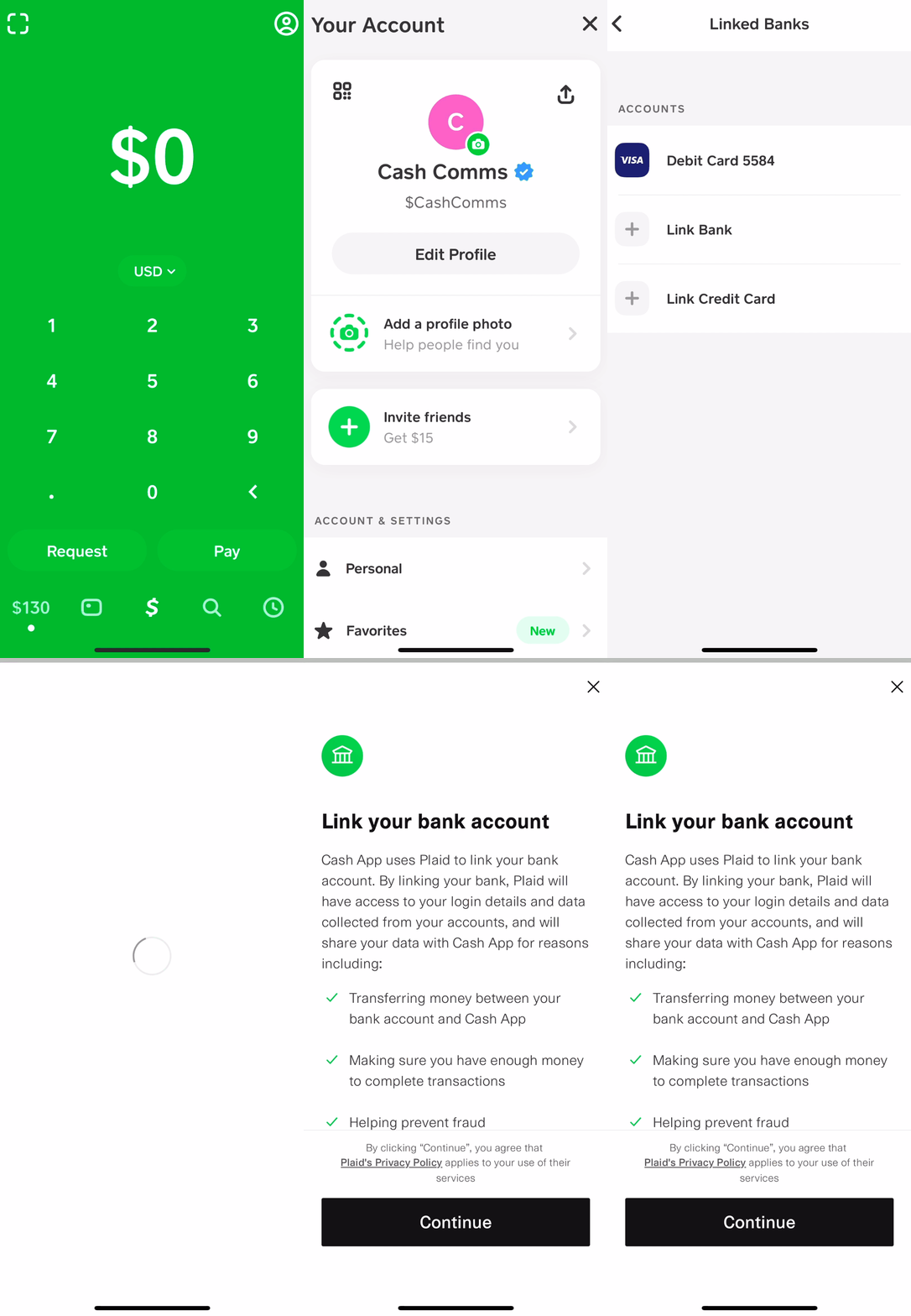
To begin, open the Cash App on your mobile device. From the main screen, which often displays your Cash App balance, locate the “Banking” tab. This icon typically looks like a bank building or a dollar sign, and is usually found in the bottom left corner. Tapping on this tab will take you to your banking section within the app.
Within the Banking section, you will see options related to your linked accounts. Look for an option that says “Link Bank” or “Add Bank.” Upon selecting this, Cash App will prompt you to enter the login credentials for your online banking portal. This is a critical step where you’ll typically use the same username and password you use to log into your bank’s website or mobile app. Cash App partners with secure third-party services, such as Plaid, to facilitate this connection, ensuring that your banking credentials are encrypted and not stored directly by Cash App.
The Verification Process: Ensuring Financial Security
After entering your online banking credentials, Cash App, through its secure linking partner, will attempt to connect to your bank account. This process involves verifying your identity and account ownership. In many cases, your bank will send a one-time passcode (OTP) to your registered phone number or email address as an additional layer of security. You will be prompted to enter this code back into Cash App to confirm your identity.
Once verified, Cash App will display a list of accounts associated with your online banking login. This might include checking accounts, savings accounts, or even credit cards. For the purpose of linking your primary funding source, you should select the checking account you wish to connect. It is generally recommended to link a checking account for everyday transactions, as savings accounts may have limits on withdrawals. Review your selection carefully before proceeding.
Confirming Your Connection: Ready for Financial Activity
After selecting the desired bank account, Cash App will confirm that your bank has been successfully linked. You will usually see a confirmation message, and your linked bank account will appear under the “Banking” tab. At this point, you are ready to start funding your Cash App balance from your bank or cashing out funds to your linked account.
It’s a good practice to perform a small test transaction, such as adding a minimal amount to your Cash App balance, to ensure the link is fully functional. This verifies that funds can move seamlessly between your bank and Cash App. Remember that while your bank account is linked, Cash App does not have direct access to your bank login credentials; it only maintains a secure connection to facilitate transfers. This distinction is vital for understanding the security framework of the platform and managing your financial assets with confidence.
Maximizing Your Cash App Experience: Beyond Basic Linking
Linking your bank to Cash App is just the starting point. To truly maximize the value of this financial tool, understanding its operational nuances, security protocols, and additional features is essential for prudent personal finance management.
Understanding Transaction Limits and Fees
Every financial platform comes with its own set of rules regarding transaction limits and associated fees, and Cash App is no exception. While linking your bank enables seamless money movement, it’s crucial to be aware of how much you can send or receive over specific periods. Cash App typically has a default sending limit, which can be increased by verifying your identity with additional personal information like your Social Security Number. Understanding these limits prevents unexpected delays or inconveniences, especially when dealing with larger sums or critical payments.
Furthermore, be mindful of any fees that may apply. Standard transfers from Cash App to your bank (e.g., standard deposits) are usually free, but instant deposits often incur a small fee (typically 0.5% to 1.75% of the transaction amount). Knowing when these fees apply allows you to make informed decisions about the speed of your transfers, optimizing your financial movements to align with your needs and budget.
Leveraging Direct Deposit and Other Features
Once your bank account is linked and your identity verified, you unlock a host of advanced features that can significantly enhance your financial management. Direct deposit is a prime example. You can obtain a unique routing and account number through Cash App, allowing you to have your paychecks, government benefits, or tax refunds deposited directly into your Cash App balance. This can be incredibly convenient for managing specific budgets or leveraging Cash App’s spending features like the Cash Card and its “Boosts” for instant discounts.
Beyond direct deposit, your linked bank account supports Cash App’s investing features, allowing you to buy stocks or Bitcoin directly from your balance or funds pulled from your linked bank. This offers an accessible entry point into investing for many, integrating a traditionally complex financial activity into a user-friendly app. Exploring these features allows you to consolidate more of your financial activities within one platform, simplifying tracking and management.
Best Practices for Account Security
With increased functionality comes increased responsibility for security. Protecting your linked bank account and Cash App balance requires diligent adherence to best practices:
-
Enable Two-Factor Authentication (2FA): This adds an extra layer of security, requiring a code from your phone in addition to your password for logins.
-
Use Strong, Unique Passwords: Never reuse passwords, especially for financial accounts.
-
Monitor Account Activity Regularly: Periodically check your Cash App and bank statements for any unauthorized transactions.
-
Be Wary of Scams: Cash App is a frequent target for scammers. Never share your PIN, sign-in code, or sensitive financial information with anyone, and be suspicious of unsolicited requests for money or offers that seem too good to be true.
-
Keep Your App Updated: Ensure your Cash App is always running the latest version to benefit from the most recent security patches and features.
By integrating these practices into your routine, you can leverage Cash App’s full potential while safeguarding your financial assets against potential threats.
Troubleshooting Common Linking Issues: Maintaining Financial Flow
While linking your bank to Cash App is typically seamless, occasional issues can arise. Understanding how to troubleshoot these common problems is essential for maintaining uninterrupted access to your funds and ensuring your financial operations run smoothly.
Incorrect Information and Typos
One of the most frequent reasons for a failed bank link is simply incorrect information. When you’re prompted to enter your online banking credentials, even a minor typo in your username or password can prevent the connection. Similarly, if your bank requires specific security questions or a one-time passcode, providing an incorrect answer will halt the process.
Solution: Double-check all entries meticulously. Ensure you are using the exact username and password you use to log directly into your bank’s online portal or mobile app. If your bank requires multi-factor authentication, ensure your phone number or email registered with the bank is current to receive verification codes. If you’ve recently changed your bank password, ensure you’re using the updated one.
Bank Compatibility Challenges
While Cash App aims to support most major banks and credit unions, there can sometimes be compatibility issues with smaller or less common financial institutions. Some banks may have stricter security protocols that prevent third-party apps like Cash App (via services like Plaid) from establishing a direct link. In other cases, a specific bank’s online banking system might not be fully compatible with the linking technology.
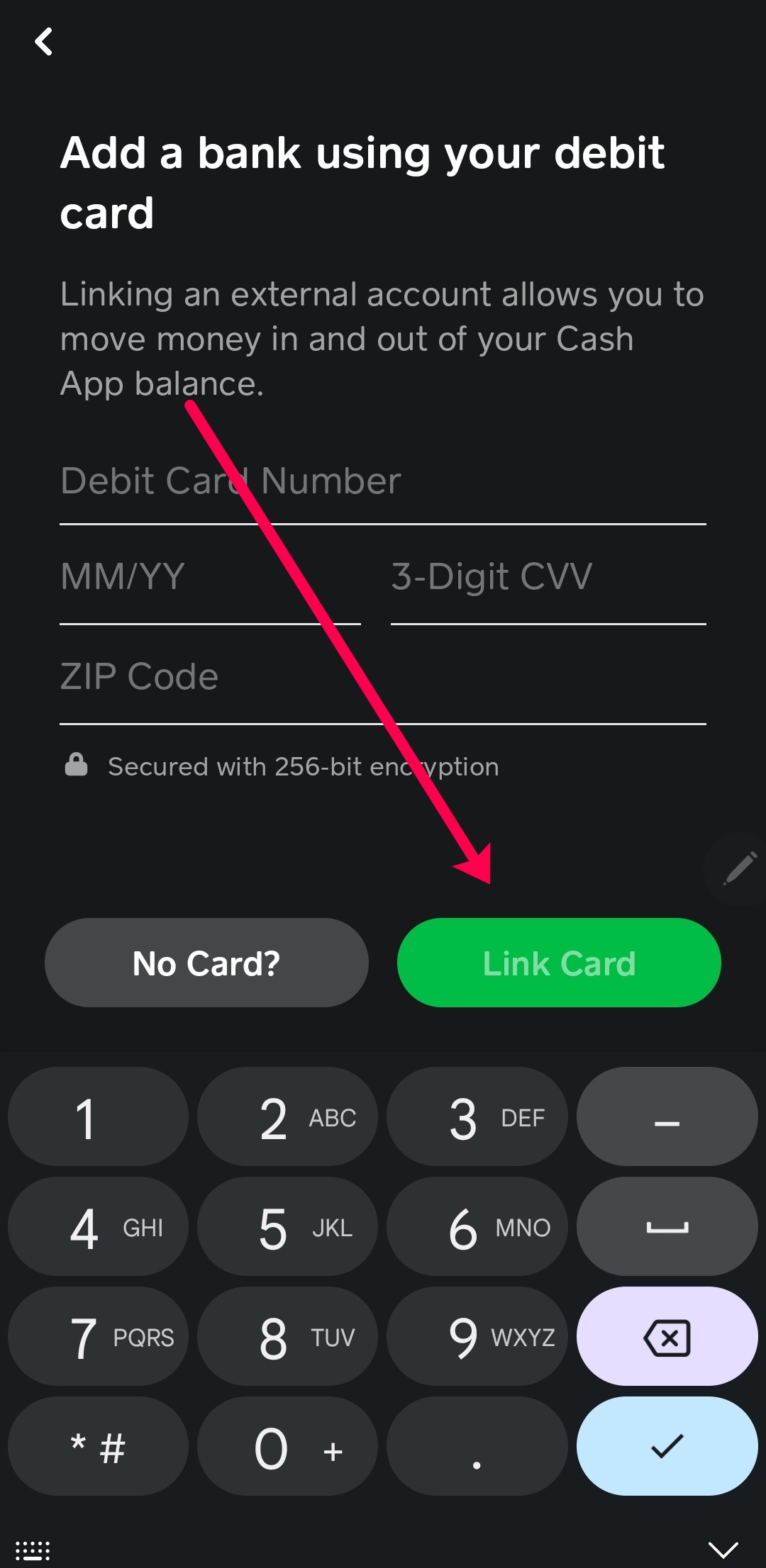
Solution: If you suspect a compatibility issue, first try reaching out to Cash App support. They may have specific guidance for your bank or be able to offer alternative linking methods. You can also contact your bank directly to inquire if they have any known issues with connecting to third-party financial apps. In rare cases where direct linking isn’t possible, you might need to use a different bank account or explore alternative ways to fund your Cash App, such as adding money via a debit card (though this usually incurs fees and may not support cashing out back to the card).
Technical Glitches and App Updates
Like any software, Cash App can occasionally experience technical glitches, server issues, or require updates that might temporarily disrupt functionality. An outdated app version might also lead to compatibility problems with your device’s operating system or the bank linking service.
Solution:
-
Restart the App: Close Cash App completely and reopen it. This can often resolve minor temporary glitches.
-
Check for App Updates: Go to your device’s app store (Google Play Store or Apple App Store) and ensure your Cash App is updated to the latest version. Developers frequently release updates that fix bugs and improve performance.
-
Check Internet Connection: Ensure you have a stable Wi-Fi or cellular data connection. A weak signal can interrupt the linking process.
-
Restart Your Device: Sometimes, simply restarting your smartphone can clear up underlying technical issues that might be affecting app performance.
-
Clear App Cache: For Android users, clearing the Cash App’s cache in your phone’s settings can sometimes resolve persistent issues without deleting important data. For iOS, a reinstallation might be necessary (ensure you remember your login credentials).
-
Contact Support: If all else fails, reaching out to Cash App customer support is the best course of action. Provide them with details of the error messages you’re receiving and the steps you’ve already taken.
By systematically addressing these potential issues, you can quickly resolve bank linking problems and ensure uninterrupted access to your financial tools within Cash App.
The Broader Implications: Cash App as a Modern Financial Tool
Integrating Cash App into your personal finance strategy by linking your bank account offers more than just convenience; it reflects a broader shift in how individuals manage their money in the digital age. This synergy highlights the evolving landscape of financial tools and their increasing role in everyday economic life.
Empowering Peer-to-Peer Transactions
The ability to seamlessly link a bank account has been instrumental in Cash App’s success as a peer-to-peer payment platform. It democratizes access to quick, digital money transfers, empowering individuals to transact with each other without the traditional delays or fees associated with bank transfers. This has significant implications for personal budgeting, allowing for instant reimbursement for shared expenses, quick payments to friends for casual services, or even immediate financial support to family members. From a personal finance perspective, this reduces friction in managing daily expenditures and informal income streams, making money movement more agile and responsive to immediate needs.
Integrating with Your Overall Financial Strategy
For a comprehensive financial strategy, Cash App, when properly linked to a primary bank, serves as an extension of your traditional banking services. It provides a flexible layer for specific financial activities:
-
Budgeting and Expense Tracking: Using Cash App for specific categories of spending (e.g., social outings, online purchases) allows for easy tracking of those funds separately from your main bank account.
-
Micro-Investing: The accessibility of stock and Bitcoin investing within Cash App provides an entry point for those looking to diversify their investment portfolio without requiring a dedicated brokerage account.
-
Side Hustle Income Management: For freelancers and gig workers, Cash App can act as a direct deposit portal for earnings, simplifying the collection of income before transferring it to a primary bank for broader financial planning, savings, or bill payments.
This integration encourages a more dynamic approach to personal finance, where various digital tools work in concert with traditional banking to create a robust financial ecosystem tailored to individual needs.

The Future of Digital Banking and Payment Solutions
The rise of platforms like Cash App and their seamless integration with traditional banking services points to the future of digital finance. Consumers increasingly expect instant, convenient, and secure ways to manage their money across multiple platforms. The ability to link bank accounts effortlessly is a cornerstone of this expectation, driving innovation in financial technology. As these tools evolve, they are likely to offer even more sophisticated features, from advanced budgeting analytics to integrated loan services and automated savings. Understanding “how to link bank to Cash App” is therefore not just about performing a simple task; it’s about engaging with a foundational element of modern financial literacy and participating in the ongoing transformation of how we interact with our money in a digitally interconnected world.
aViewFromTheCave is a participant in the Amazon Services LLC Associates Program, an affiliate advertising program designed to provide a means for sites to earn advertising fees by advertising and linking to Amazon.com. Amazon, the Amazon logo, AmazonSupply, and the AmazonSupply logo are trademarks of Amazon.com, Inc. or its affiliates. As an Amazon Associate we earn affiliate commissions from qualifying purchases.