
Deactivating an online account, especially one linked to financial transactions like Venmo, requires a methodical approach to ensure all digital assets are properly managed and personal data is secured. Closing a Venmo account is not merely about clicking a button; it involves a series of technical steps and considerations to prevent future complications and maintain digital hygiene. This guide offers a professional and insightful walkthrough of the process, focusing strictly on the technological aspects, digital security implications, and systematic execution required for a smooth account closure.
Preparing Your Venmo Account for Deactivation: A Digital Checklist
Before initiating the closure of your Venmo account, several crucial technical preparatory steps must be undertaken to ensure a seamless transition and prevent potential issues. Neglecting these digital prerequisites can lead to trapped funds, inaccessible transaction history, or lingering connections to other digital services.
Withdrawing All Funds
The most critical step is to ensure your Venmo balance is zero. Venmo does not allow account closure if there are funds remaining in your balance. Users must transfer any available balance to a linked bank account or debit card. This process typically involves initiating a standard bank transfer, which can take 1-3 business days to process, or an instant transfer, which incurs a small fee but moves funds immediately. Verify the transfer’s completion by checking your linked bank or card statement before proceeding with deactivation. Attempting to close an account with a positive balance will result in an error message, halting the closure process.
Settling Pending Transactions and Requests
All outstanding transactions, whether payments sent, received, or pending requests, must be resolved. This includes ensuring all sent payments have been successfully processed and received payments have cleared and been withdrawn. Similarly, any payment requests you have sent to others should either be fulfilled or canceled. Venmo’s system prevents account closure if there are any active or pending financial operations tied to your profile, as this could disrupt the integrity of the transaction network. A quick review of your “Feed” and “Incomplete” tabs within the app can help identify any lingering activity.
Disconnecting Linked Bank Accounts and Cards
For digital security and data privacy, it is advisable to remove all linked bank accounts, debit cards, and credit cards from your Venmo profile prior to closure. While some platforms automatically disconnect financial instruments upon account deletion, proactively removing them ensures that no digital footprint of your banking information remains associated with the platform’s database post-deactivation. Navigate to “Settings,” then “Payment Methods,” and manually remove each linked account or card. This step is also crucial if you plan to link these payment methods to a new Venmo account or another payment service in the future.
Downloading Transaction History for Records
From a digital record-keeping perspective, downloading your complete transaction history is highly recommended. Venmo typically retains user data for a period after account closure in accordance with regulatory requirements and its own data retention policies. However, direct access to your detailed transaction history via your account portal will cease upon deactivation. Your transaction history can be valuable for personal finance tracking, tax purposes, or dispute resolution. Venmo allows users to export their transaction history, usually in a CSV format, through their web portal (not typically available via the mobile app). Log into Venmo.com, navigate to your “Statement & Taxes” section, and select the desired date range for export. Store this file securely on your local device or a cloud storage service.
Executing the Closure: A Step-by-Step Technical Guide
Once all preparatory steps are complete, the actual process of closing your Venmo account involves navigating the platform’s settings. The deactivation process is designed to be straightforward but requires careful attention to confirmation prompts.
Accessing Account Deactivation Settings
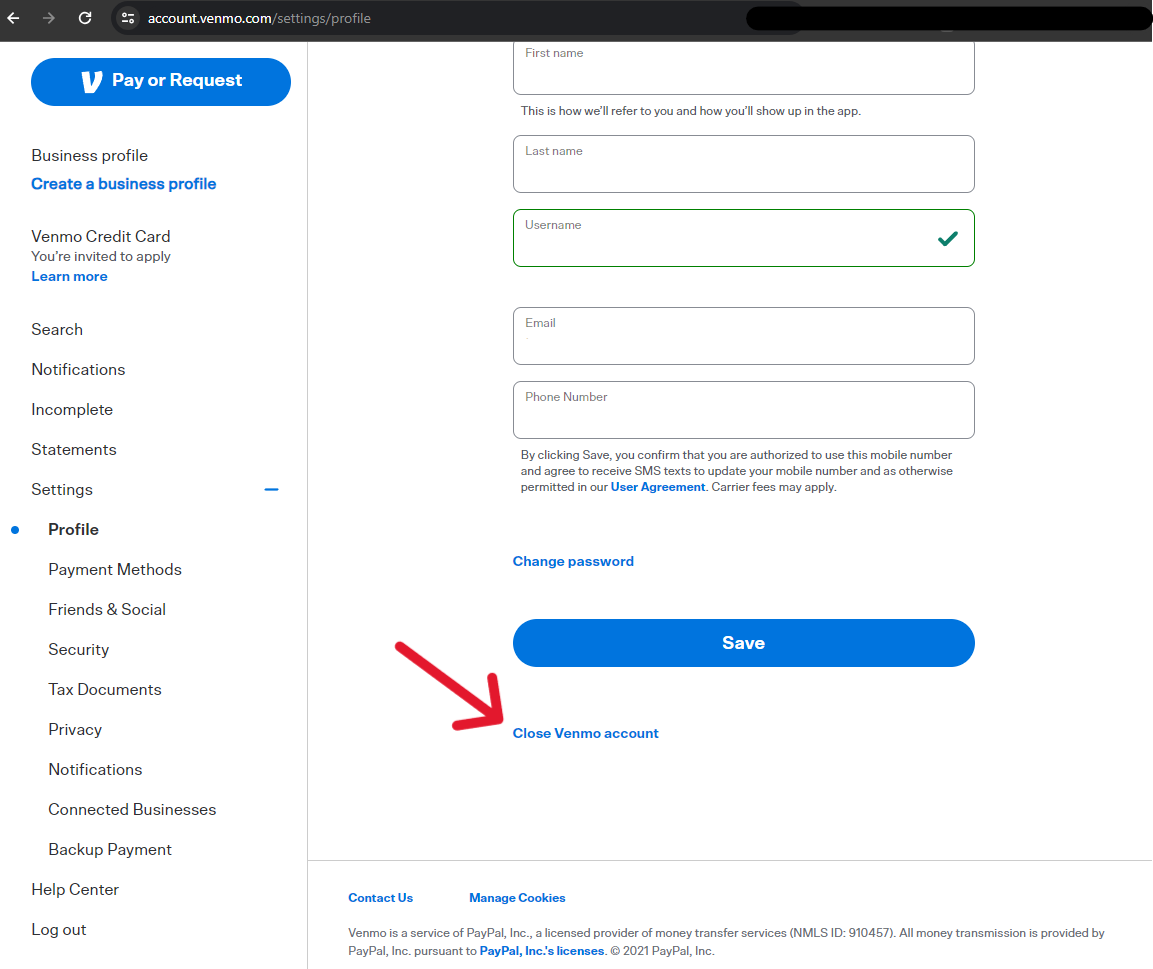
The primary method for account closure is through the Venmo website, as this functionality is not always directly accessible or fully featured within the mobile application. Log into your Venmo account via a web browser (www.venmo.com). From the main dashboard, typically locate your “Settings” or profile icon, often found in the upper right-hand corner. Within the settings menu, look for an option related to “Account” or “Privacy & Security.” The precise location may vary slightly based on website updates, but the goal is to find a section that allows for account management or deletion.
Initiating the Closure Process
Within the relevant settings section, you should find an option to “Close your Venmo account,” “Deactivate account,” or a similar phrase. Click on this option to initiate the closure sequence. Venmo will likely present you with a series of confirmation screens and warnings. These prompts are designed to ensure you understand the finality of the action and have completed all necessary pre-closure steps.

Confirming Deactivation
You will typically be asked to confirm your decision, often by re-entering your password or answering a security question. Venmo may also prompt you to provide a reason for closure, which is usually optional feedback for their service improvement. After confirming, the system will process your request. A final confirmation message, either on-screen or via email, should indicate that your account has been successfully closed. It’s advisable to retain this confirmation for your records. The account is usually deactivated immediately upon final confirmation.
Post-Closure Implications: What Happens to Your Digital Footprint?
Closing a Venmo account has several technical and digital security implications that users should be aware of. Understanding what happens to your data, the reusability of your information, and the impact on linked services is crucial for comprehensive digital management.
Data Retention and Privacy Policies
While your account will be inaccessible, Venmo, like most financial technology platforms, adheres to data retention policies. This means that certain user data, including transaction history and personal identification information, may be stored by Venmo for a period even after account closure. This retention is typically mandated by legal and regulatory requirements (e.g., anti-money laundering laws, tax regulations) and for internal operational purposes (e.g., fraud prevention, dispute resolution). Users should review Venmo’s privacy policy for specific details regarding their data retention practices. While data is retained, it is generally rendered inactive and inaccessible through standard user logins.
Inability to Reactivate the Same Account
Once a Venmo account is closed, it cannot typically be reactivated. This is a critical distinction from temporary suspensions or freezes. If you wish to use Venmo again in the future, you will need to register for a completely new account. This involves going through the full sign-up process, including identity verification and linking new payment methods. Consequently, any previous transaction history, linked friends, or personalized settings from your old account will not transfer to the new one. This “fresh start” approach underscores the importance of downloading your transaction history before closure.
Impact on Linked Services and Subscriptions
Consider any third-party services, apps, or subscriptions that might be linked to your Venmo account as a payment method. While Venmo is primarily a peer-to-peer payment platform, some services might accept it. Upon closure, any recurring payments or subscriptions linked directly to your Venmo balance will fail. It is imperative to update your payment information with these external services to an alternative method (e.g., a direct bank account or credit card) before closing your Venmo account to avoid service interruptions or missed payments. This ensures your digital ecosystem remains functional without disruption.
Troubleshooting and Common Roadblocks During Account Deactivation
Despite the straightforward nature of the process, users may encounter technical difficulties or specific scenarios that complicate account closure. Understanding these common roadblocks and their solutions is key to successfully deactivating your account.
Dealing with Remaining Funds or Pending Transactions
The most frequent issue preventing account closure is a non-zero balance or pending transactions. If you’ve attempted to withdraw funds but they haven’t appeared in your bank account, or if a transaction is stuck in “pending,” you must wait for these issues to resolve.
-
Fund Transfer Delays: Standard bank transfers can take up to 3 business days. Instant transfers are quicker but involve fees. Verify the status directly with your bank if delays persist beyond the typical timeframe.
-
Pending Transactions: Contact the other party in the transaction to resolve it. If it’s a request, they may need to fulfill or cancel it. If it’s a payment you sent that hasn’t cleared, ensure the recipient’s account is active and correctly linked. If a transaction is stuck indefinitely, proceeding to contact Venmo support is the next logical step.
Account Restrictions or Limitations
In some cases, Venmo accounts might be temporarily restricted or placed under review due to suspicious activity, policy violations, or identity verification issues. An account under restriction cannot be closed until the underlying issue is resolved and the restriction is lifted.
-
Resolution Process: If your account is restricted, Venmo typically sends an email detailing the reason and required steps for resolution. This might involve providing additional identity documentation or clarifying recent transactions. Follow their instructions diligently.
-
Contacting Support for Restrictions: If you are unsure why your account is restricted or how to resolve it, direct communication with Venmo’s customer support team is essential. They can guide you through the process of clearing the restriction, after which you can proceed with account closure.

Contacting Venmo Support for Assistance
If you encounter persistent technical issues, error messages, or unique circumstances that prevent you from closing your account through the standard process, contacting Venmo’s customer support is imperative.
-
Available Channels: Venmo typically offers support via email, in-app messaging, or sometimes a phone line. Check the “Help” or “Contact Us” section within the Venmo app or website for the most current support options.
-
Information to Provide: When contacting support, be prepared to provide your account details (email, phone number associated with the account), a clear description of the issue you’re facing, any error messages received, and the steps you’ve already taken. Being precise helps support staff diagnose and resolve the problem more efficiently, facilitating the ultimate goal of account deactivation.
By meticulously following these technical guidelines and being prepared for potential digital roadblocks, users can ensure a secure and clean closure of their Venmo account, effectively managing their digital footprint and safeguarding their financial information.
aViewFromTheCave is a participant in the Amazon Services LLC Associates Program, an affiliate advertising program designed to provide a means for sites to earn advertising fees by advertising and linking to Amazon.com. Amazon, the Amazon logo, AmazonSupply, and the AmazonSupply logo are trademarks of Amazon.com, Inc. or its affiliates. As an Amazon Associate we earn affiliate commissions from qualifying purchases.