
In the rapidly evolving landscape of personal finance, digital payment applications have become indispensable tools for managing money. Among these, Cash App stands out as a versatile platform that facilitates everything from peer-to-peer (P2P) payments to investing. For many users, the foundational step to leveraging Cash App’s full potential is understanding how to effectively fund their account. This guide delves into the various methods of adding money to your Cash App balance, framing it within the broader context of personal financial management and digital tool utilization.
Cash App as an Essential Personal Financial Tool
Cash App, developed by Block, Inc., has transcended its initial purpose as a simple P2P payment service to become a comprehensive financial ecosystem. For individuals navigating their daily finances, it offers a convenient hub for sending and receiving money, managing a debit card, investing in stocks and Bitcoin, and even filing taxes. The allure of Cash App lies in its accessibility and speed, providing an alternative to traditional banking for certain transactions.
Integrating Cash App into one’s personal finance strategy can offer several advantages. It allows for quick transfers to friends and family, often without fees for standard transactions, making it ideal for splitting bills or sharing expenses. The associated Cash Card, a customizable Visa debit card, provides a direct link to your Cash App balance, enabling spending at merchants and ATM withdrawals. Furthermore, features like direct deposit empower users to receive paychecks up to two days early, offering a significant boost to cash flow management. Understanding how to consistently fund this account is the bedrock of unlocking these benefits.
Core Methods for Funding Your Cash App Account
There are several straightforward methods for adding money to your Cash App balance, each designed to cater to different user needs and preferences. Each method integrates with your existing financial infrastructure or leverages retail partnerships to ensure convenience.
Linking a Bank Account or Debit Card
The most common and fundamental way to fund your Cash App account is by linking it directly to your existing bank account or a debit card. This method provides immediate access to funds from your primary financial institution, allowing for seamless transfers.
To link a bank account:
-
Open Cash App and tap the “Banking” tab (the house icon) on the bottom left.
-
Select “Link Bank.”
-
Follow the prompts to connect your bank account using your online banking credentials. This typically involves a secure third-party service that verifies your identity and account details without Cash App ever storing your login information.
Once linked, you can add funds:
-
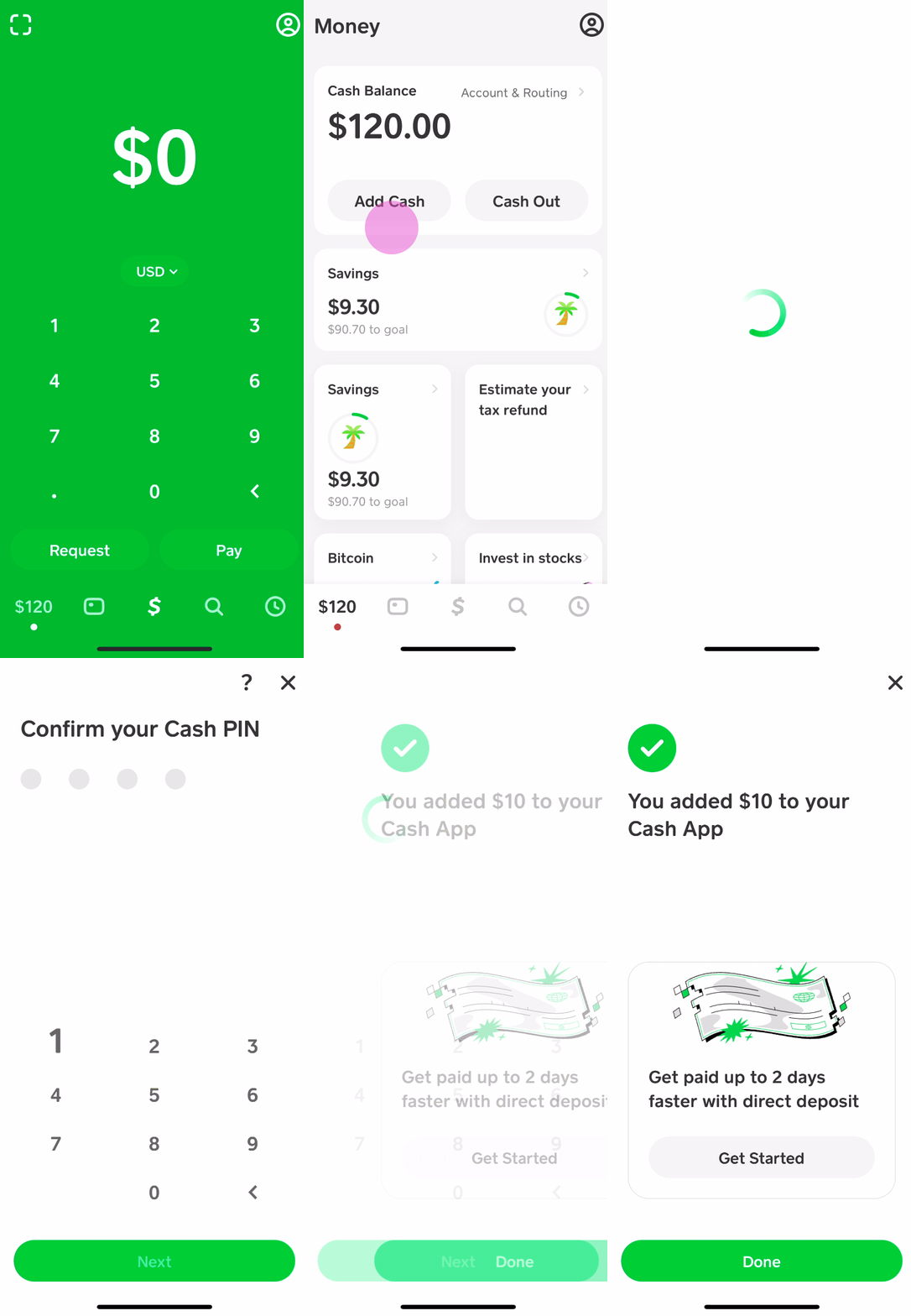
On the “Banking” tab, tap “Add Cash.”
-
Enter the desired amount.
-
Confirm the transfer from your linked bank account.
Linking a debit card follows a similar process, usually accessible through the “Link Bank” or “Add a bank” option, where you’ll have the choice to link a debit card instead. This method is often preferred for smaller, immediate transfers, as bank account transfers can sometimes take longer to process, though Cash App aims for near-instantaneity. It’s crucial to ensure your linked accounts are secure and to regularly monitor transactions for any discrepancies.
Depositing Cash at a Retail Location
For those who primarily deal in physical cash or prefer not to link a bank account, Cash App offers a convenient solution: depositing cash at participating retail stores. This feature bridges the gap between digital and physical money, making Cash App accessible to a broader user base.
Cash App has partnered with various major retailers across the United States, including Dollar General, Walmart, Walgreens, CVS, and 7-Eleven, among others. The process is generally as follows:
-
Open Cash App and tap the “Banking” tab.
-
Tap “Add Cash.”
-
Select “Cash Deposit at a Store.”
-
Cash App will generate a unique barcode for your deposit.
-
Present this barcode to the cashier at a participating retail location.
-
Hand the cashier the cash amount you wish to deposit. The cashier will scan the barcode, take your cash, and the funds should appear in your Cash App balance almost immediately, or within a few minutes.
It’s important to note that there might be daily or weekly limits on cash deposits, and some retailers may have minimum or maximum deposit amounts. While this method offers unparalleled convenience for cash users, always retain your receipt until the funds are successfully reflected in your Cash App balance.
Receiving Money from Other Cash App Users
While not a direct “funding” method in the sense of adding money from an external source you control, receiving money from other Cash App users is a fundamental way to increase your balance. This P2P functionality is at the heart of Cash App’s design, enabling seamless transfers between individuals.
If a friend, family member, or even an employer (in some cases) sends you money via Cash App, the funds are typically credited to your balance instantly. You don’t need to take any action beyond having an active account. This passive funding method often complements other active deposit strategies, keeping your balance healthy for day-to-day transactions. For individuals who frequently engage in shared expenses or freelance work paid via Cash App, this can be a primary means of account funding.
Direct Deposit from an Employer or Government Benefit
For a more consistent and substantial way to fund your Cash App account, setting up direct deposit is an excellent option. This feature allows you to receive your paycheck, tax refunds, government benefits, or other regular payments directly into your Cash App balance.
To set up direct deposit:
-
Open Cash App and navigate to the “Banking” tab.
-
Tap “Direct Deposit.”
-
You will find your Cash App routing number and account number. These are unique to your Cash App account and function like traditional bank account details.
-
Provide these numbers to your employer’s payroll department or the relevant government agency. They will typically require you to fill out a direct deposit form.
One significant advantage of Cash App’s direct deposit feature is the potential to receive funds up to two days earlier than traditional banks. This accelerated access to funds can be a critical element in personal financial planning, helping users manage bills and expenses more effectively. It’s an empowering feature that positions Cash App as a viable alternative for primary banking functions.
Maximizing Your Cash App Experience: Beyond Basic Funding
Successfully funding your Cash App account is just the first step. To truly integrate it into your personal finance strategy, understanding its additional features and how they interact with your balance is key.
Managing Your Cash App Balance
Once funded, your Cash App balance becomes the central hub for your financial activity within the app. It’s crucial to regularly monitor your transaction history to keep track of inflows and outflows. This vigilance helps in budgeting and identifying any unauthorized activity. The “Activity” tab in the app provides a detailed record of all transactions, categorized for clarity. Understanding your balance in relation to your linked bank account is also important – funds added to Cash App are separate from your bank balance until you choose to cash them out.
Utilizing the Cash Card
The Cash Card is a physical and virtual debit card directly linked to your Cash App balance. It allows you to spend the money in your Cash App account wherever Visa is accepted, both online and in physical stores. For personal finance, the Cash Card offers several benefits:
-
Spending Control: By only spending what’s in your Cash App balance, it can act as a budgeting tool, preventing overspending from your main bank account.
-
Cash Boosts: Cash Card users can select “Boosts” that offer instant discounts at specific merchants (e.g., 10% off at a coffee shop). These boosts represent real savings and can be strategically used to reduce daily expenses.
-
ATM Access: You can use your Cash Card to withdraw cash from ATMs, though fees may apply depending on the ATM and whether you meet certain direct deposit thresholds for fee-free withdrawals.
Investing with Cash App
Cash App has expanded its offerings to include basic investment features, allowing users to buy and sell fractional shares of stocks and Bitcoin directly within the app. After funding your Cash App balance, you can use those funds to:
-
Navigate to the “Investing” or “Bitcoin” tab.
-
Choose the asset you wish to buy.
-
Enter the amount you want to invest.
This integration makes investing more accessible, particularly for beginners or those interested in micro-investing. While Cash App’s investment tools are relatively simple, they represent an entry point into wealth building, directly leveraging your funded balance. This aligns perfectly with personal finance goals of growing wealth and diversifying financial activities.
Budgeting and Tracking
While Cash App isn’t a dedicated budgeting application, its transaction history can serve as a basic tracking mechanism. By regularly reviewing your activity, you can gain insights into your spending habits. For more sophisticated budgeting, users often export their Cash App data or manually input transactions into a separate budgeting app or spreadsheet. The ability to quickly add funds and clearly see spending allows for a more hands-on approach to managing daily cash flow, which is a core tenet of effective personal finance.
Security, Fees, and Best Practices for Funding
Managing your money with any digital tool requires an understanding of security protocols, potential fees, and general best practices.
Ensuring Account Security
Security is paramount when dealing with financial transactions. For Cash App, robust security measures are critical:
-
Strong, Unique Passwords: Always use a complex password that isn’t reused on other sites.
-
Two-Factor Authentication (2FA): Enable 2FA to add an extra layer of security, requiring a code from your phone in addition to your password for logins.
-
Recognizing Scams: Be vigilant against phishing attempts, fake customer support, or schemes promising unrealistic returns. Cash App will never ask for your PIN or sign-in code outside of the app.
-
Protecting Linked Information: Ensure the devices you use are secure, and avoid linking Cash App to public Wi-Fi networks where data could be intercepted.
Understanding Potential Fees and Limits
While Cash App offers many services for free, certain transactions may incur fees:
-
Instant Deposits to a Bank Account: Cashing out your Cash App balance to a linked bank account instantly typically incurs a small fee (e.g., 0.5%–1.75%). Standard deposits are free but take 1-3 business days.
-
Cash Card ATM Withdrawals: Fees may apply for ATM withdrawals unless you meet specific direct deposit criteria that waive these fees.
-
Daily/Weekly Limits: There are limits on how much cash you can add or send per day/week, which vary by account verification status. Verified accounts typically have higher limits.
Always review the fee schedule within the app or on Cash App’s official website to avoid surprises.
Troubleshooting Common Funding Issues
Occasionally, you might encounter issues when trying to add money. Common problems include:
-
Declined Transactions: This could be due to incorrect card details, insufficient funds in your linked bank account, or your bank’s security flagging the transaction. Contact your bank or Cash App support.
-
Verification Problems: If your account isn’t fully verified, you might face limits or restrictions. Ensure all required personal information is accurately provided.
-
App Glitches: Sometimes a simple app restart or update can resolve minor technical issues.
For persistent issues, Cash App’s customer support can be accessed through the app or their official website. Promptly addressing these concerns ensures uninterrupted access to your funds.

The Broader Financial Implications of Digital Wallets
The ease with which platforms like Cash App allow users to fund and manage their money reflects a broader shift in personal finance. Digital wallets are increasingly becoming central to everyday financial planning, moving society towards a more cashless and digitally integrated economy. They empower individuals with more immediate control over their funds, foster financial inclusion for those underserved by traditional banking, and streamline transactions in an increasingly interconnected world. As these tools continue to evolve, understanding their mechanics, from funding to spending and investing, will remain crucial for effective personal financial management.
aViewFromTheCave is a participant in the Amazon Services LLC Associates Program, an affiliate advertising program designed to provide a means for sites to earn advertising fees by advertising and linking to Amazon.com. Amazon, the Amazon logo, AmazonSupply, and the AmazonSupply logo are trademarks of Amazon.com, Inc. or its affiliates. As an Amazon Associate we earn affiliate commissions from qualifying purchases.