
Getting in touch with a human representative from Facebook, now Meta, can often feel like navigating a digital labyrinth. With billions of users worldwide, the sheer volume of inquiries necessitates a highly structured, predominantly automated, and self-service support system. For most users, direct phone numbers or email addresses for general customer service are not readily available or effective. Understanding how Facebook’s customer care system is designed and leveraging its robust self-help tools are key to resolving issues efficiently within the tech landscape.
The Elusive Nature of Direct Support for a Global Platform
Facebook’s operational scale is unprecedented. Supporting billions of individuals means that traditional one-on-one customer service models simply aren’t feasible for every query. This reality drives their strategy to empower users through extensive self-help resources, community support, and automated troubleshooting. The goal is to provide immediate answers to common problems, reserving more direct interaction for critical security incidents, business accounts with significant investments, or specific legal and policy concerns. Managing expectations is crucial: for routine technical glitches or account queries, a direct line to a support agent is a rare commodity.
Leveraging Facebook’s Extensive Help Center
The first and most effective port of call for nearly any issue related to your Facebook experience is the official Help Center. This comprehensive knowledge base is designed to address a vast array of topics, from basic account management to complex privacy settings and security protocols.
A-Z of Common Issues
The Help Center is meticulously organized, covering virtually every facet of the platform. You can find detailed guides on:
-
Account Management: Login problems, password resets, profile editing, notification settings, and managing active sessions.
-
Privacy Settings: Understanding audience selectors, blocking users, managing friend requests, and controlling who sees your posts.
-
Security Concerns: Identifying and reporting suspicious activity, setting up two-factor authentication (2FA), and understanding common scams.
-
Reporting Content: How to flag posts, comments, photos, or videos that violate Facebook’s Community Standards.
-
Marketplace Issues: Guidance for buying and selling, reporting problematic listings, or dealing with unresponsive sellers/buyers.
-
Page and Group Administration: Tools and tips for managing pages, groups, events, and understanding moderation features.
Search Functionality
The Help Center’s search bar is your most powerful tool. Instead of browsing categories, type in precise keywords related to your problem. For example, “hacked account,” “password reset not working,” or “how to report spam.” The system is designed to surface relevant articles and step-by-step solutions quickly.
Community Forums
Within the Help Center, you’ll also find links to community forums. These forums allow users to post questions and receive assistance from other experienced users, and sometimes even official moderators or experts. While not direct Facebook staff, community members often provide valuable insights and practical solutions, especially for less critical or niche issues that might not be covered in the primary articles.
Addressing Account Security and Access Issues
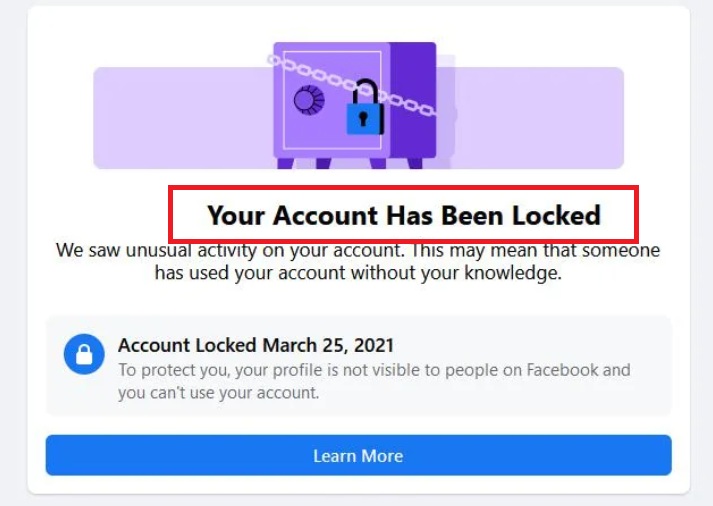
One of the most common and critical reasons users seek support is related to account security and access. Facebook prioritizes these issues, offering specific workflows for resolution.
Reporting a Hacked Account
If your account has been compromised, quick action is vital. Facebook provides a dedicated pathway for this:
-
Visit the “Report a Compromised Account” page: This is often the starting point. Search for it within the Help Center or directly via
facebook.com/hacked. -
Follow On-Screen Instructions: You will typically be asked to identify your account using an associated email or phone number.
-
Secure Your Account: Facebook will guide you through a process to change your password, review recent activity, and remove any suspicious apps or malicious posts made by the hacker. This automated process is highly effective and often the fastest way to regain control.
-
Two-Factor Authentication: Ensure 2FA is enabled immediately after regaining access to prevent future breaches.
Password Reset and Account Recovery
For forgotten passwords or inability to log in, the standard “Forgot password?” link on the login page is your primary tool.
-
Identify Your Account: Provide an email address, phone number, or username associated with your account.
-
Choose a Recovery Method: Facebook will offer options to send a verification code to your registered email or phone number.
-
Enter Code and Reset Password: Follow the prompts to enter the code and create a new, strong password.
-
Trusted Contacts: If you set up Trusted Contacts previously, this is an alternative recovery method where selected friends can help you regain access.
Reporting Impersonation
If someone is impersonating you or another individual, you can report the profile or page directly:
-
Navigate to the Impersonating Profile/Page: Go to the profile or page you wish to report.
-
Click the “…” Menu: Locate the three dots (ellipsis) usually next to the “Message” or “Add Friend” button.
-
Select “Find Support or Report Profile/Page”: Choose the most appropriate option, typically “Pretending to be someone” and then specify “Me” or “A friend.”
-
Follow Prompts: Provide any additional information Facebook requests.
Deactivating/Deleting Accounts
For users looking to take a break or permanently leave the platform, options are available within settings:
-
Access Settings & Privacy: Go to your account settings.
-
Your Facebook Information: Locate this section, which often contains options for “Deactivation and Deletion.”
-
Choose Deactivation (Temporary) or Deletion (Permanent): Understand the implications of each before proceeding. Deactivation allows you to return later, while deletion is irreversible after a short grace period.
Utilizing In-App Reporting Tools

Beyond the Help Center, Facebook integrates numerous direct reporting mechanisms within the platform itself. These tools are crucial for maintaining community standards and reporting technical glitches.
Reporting Content
If you encounter content that violates Facebook’s Community Standards (e.g., hate speech, harassment, violence, spam), you can report it directly:
-
Locate the Post/Comment/Photo: Find the specific piece of content.
-
Click the “…” Menu: For posts, this is usually in the top-right corner. For comments, hover over it and click.
-
Select “Find Support or Report Post/Comment”: Choose the reason that best fits the violation.
-
Submit Report: Provide any additional details if prompted. Facebook’s review team will assess the report and take action if necessary.
Reporting Profiles/Pages
Similar to content, entire profiles or pages can be reported for violations such as:
-
Impersonation: As detailed above.
-
Spam or Scams: Profiles dedicated to spreading malware or engaging in phishing.
-
Harassment or Bullying: Accounts solely used to target and harass others.
-
Fake Accounts: Profiles designed to spread misinformation or manipulate.
The process is similar: navigate to the profile/page, click the “…” menu, and select “Find Support or Report Profile/Page.”
Reporting Bugs/Technical Issues
If you encounter a technical bug that isn’t addressed in the Help Center, you can report it directly:
-
Shake Your Phone (Mobile App): On many versions of the mobile app, shaking your device will bring up a “Report a Problem” option.
-
Through the “Help & Support” Menu (Desktop/Mobile): In the main menu (usually accessed via the top-right arrow or hamburger icon), look for “Help & Support” and then “Report a Problem.”
-
Provide Details: Clearly describe the bug, including steps to reproduce it, screenshots, and device information. This helps Facebook’s engineering team diagnose and fix issues.
Business Support (Meta Business Suite/Ads Manager)
For businesses and advertisers, Meta offers more direct support channels, reflecting the financial investment involved.
-
Meta Business Suite Help: Within the Business Suite, there’s often a dedicated “Help” or “Support” section with options for live chat or email support for business page issues, ad account problems, and policy questions.
-
Ads Manager Support: Advertisers typically have access to more responsive support, including live chat options, especially if they meet certain ad spend thresholds. This support is focused specifically on advertising campaigns, billing, and ad policy compliance. This falls under tech as it relates to the functionality and troubleshooting of Meta’s business tools.
Exploring More Direct, Albeit Limited, Channels
While general direct support is scarce, specific circumstances or user types might unlock more traditional communication channels.
Email Support (Specific Cases)
Facebook doesn’t publish general customer service email addresses. However, for highly specific, often legal or privacy-related issues, you might find specialized contact forms or email addresses within the Help Center or associated policy pages. These are not for general inquiries and are typically for legal requests, data protection officers, or very sensitive privacy concerns. Submitting a general query to these specialized addresses will likely result in an automated response or no response at all.
Live Chat (Business Accounts/Advertisers)
As mentioned, live chat is primarily a feature for users managing business pages or running ad campaigns. It’s often accessible through Meta Business Suite or Ads Manager and may require specific eligibility criteria, such as a minimum ad spend or a verified business account. This channel is crucial for business-critical issues and demonstrates Meta’s commitment to supporting its paying users.
Social Media Channels
While not an official support channel, Meta maintains a presence on platforms like Twitter (e.g., @Meta, @FacebookApp). They sometimes monitor these channels for widespread issues or public relations purposes. However, tweeting at them is unlikely to resolve individual account problems due to privacy concerns and the volume of mentions. It’s more effective for reporting major outages or getting general updates.
Proactive Steps for Future Support Needs
Preventing issues before they arise or making it easier to resolve them is the most effective form of “customer care.”
Keeping Account Information Updated
Ensure your primary email address and phone number associated with your Facebook account are current and accessible. These are vital for account recovery processes and receiving security notifications. Consider adding a secondary email for backup.
Two-Factor Authentication (2FA)
Activating 2FA significantly boosts your account security, making it much harder for unauthorized individuals to gain access, even if they have your password. This can prevent many of the issues that lead users to seek customer care in the first place.
Downloading Your Information
Periodically download a copy of your Facebook data (Settings & Privacy > Settings > Your Facebook Information > Download Your Information). This serves as a personal backup of your posts, photos, and messages, offering peace of mind in case of irrecoverable account issues or permanent deletion.
Understanding Community Standards
Familiarize yourself with Facebook’s Community Standards. Adhering to these guidelines can prevent your account from being flagged, restricted, or even suspended, thereby avoiding the need for reactive support.

Patience and Persistence
When dealing with a platform as massive as Facebook, resolving complex issues can take time. If you’ve followed the reporting processes, be patient. For critical security issues, keep checking for updates and, if possible, utilize any available direct channels for businesses or specific reporting forms. While direct communication is rare for personal accounts, the structured self-service tools are often designed to be highly effective if used correctly.
aViewFromTheCave is a participant in the Amazon Services LLC Associates Program, an affiliate advertising program designed to provide a means for sites to earn advertising fees by advertising and linking to Amazon.com. Amazon, the Amazon logo, AmazonSupply, and the AmazonSupply logo are trademarks of Amazon.com, Inc. or its affiliates. As an Amazon Associate we earn affiliate commissions from qualifying purchases.