
In the rapidly evolving landscape of digital imaging, the quest for the “best” photo format is not merely a matter of file extension; it is a fundamental technical decision that dictates how visual data is captured, preserved, and displayed. For photographers, developers, and digital artists, understanding the nuances of image formats is the difference between a pixelated, artifact-ridden graphic and a pristine, high-fidelity masterpiece. As sensors reach higher megapixel counts and displays achieve greater color accuracy, the technical constraints of legacy formats are increasingly challenged by modern alternatives designed for maximum efficiency and quality.
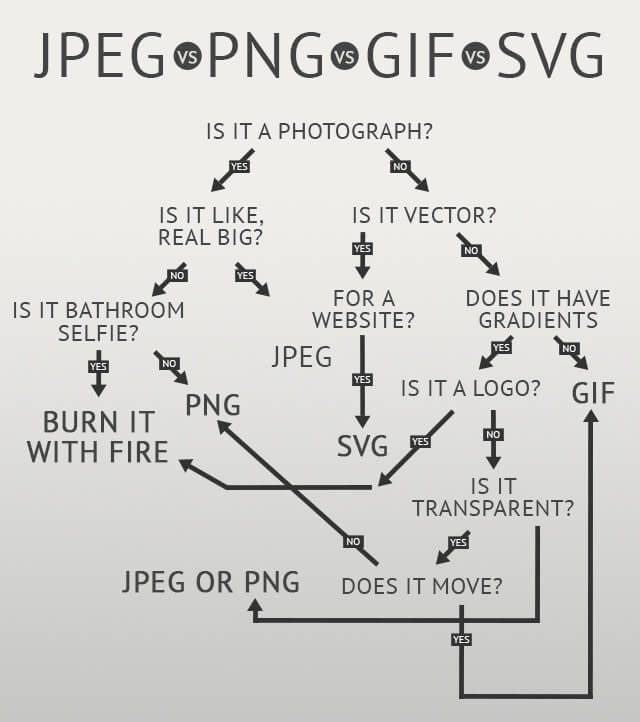
To identify the best format, one must first define “quality” within a technical framework. High-quality imaging relies on three primary pillars: resolution (pixel count), bit depth (color information per channel), and the presence or absence of compression artifacts. Choosing the right format involves navigating the trade-offs between these pillars while considering the intended use case, whether it be professional archival, high-end printing, or lightning-fast web delivery.
Understanding the Fundamentals: Bit Depth and Compression
Before diving into specific formats, it is essential to understand the underlying technology that determines image fidelity. The most critical factor in high-quality imaging is bit depth. Most consumer-grade formats, like the standard JPEG, utilize 8-bit color, providing 256 levels of brightness per color channel (Red, Green, and Blue). This results in roughly 16.7 million possible colors. While this sounds impressive, it is often insufficient for professional editing, where subtle gradients—such as a twilight sky—can suffer from “banding” if the bit depth is too low.
Professional-grade formats often utilize 10-bit, 12-bit, or even 16-bit color. A 16-bit image offers 65,536 levels of brightness per channel, allowing for trillions of color combinations. This massive overhead ensures that even aggressive color grading or exposure adjustments do not degrade the image quality.
Lossy vs. Lossless Compression
The second technical hurdle is compression. Compression algorithms are categorized into “lossy” and “lossless.” Lossy compression, utilized by JPEG and WebP, reduces file size by permanently discarding data that the human eye is less likely to perceive. While efficient, repeated saves in a lossy format lead to “generation loss,” where artifacts become increasingly visible.
Lossless compression, found in formats like TIFF and PNG, reduces file size using mathematical algorithms (such as LZW or DEFLATE) that allow the image to be reconstructed bit-for-bit. For those prioritizing absolute quality, lossless formats are the mandatory starting point.
RAW: The Professional Standard for Maximum Quality
In the hierarchy of digital imaging, the RAW format sits at the absolute peak. Technically speaking, a RAW file is not an image file in the traditional sense; it is a data container housing the unprocessed information captured by a camera’s sensor. When a camera captures an image in JPEG format, its internal processor makes permanent decisions regarding white balance, sharpening, and contrast, discarding the extra data to save space. A RAW file preserves every bit of data the sensor recorded.
The Power of Non-Destructive Editing
The primary advantage of RAW is its high bit depth, typically ranging from 12 to 14 bits. This provides an immense dynamic range, allowing photographers to recover details from deep shadows or blown-out highlights that would be lost in any other format. Because the data is “raw,” adjustments to white balance can be made after the fact with zero loss in quality.
However, the RAW format is not a singular standard. Each camera manufacturer has its own proprietary version—Canon uses .CR3, Nikon uses .NEF, and Sony uses .ARW. To address this fragmentation, Adobe created the DNG (Digital Negative) format, a publicly documented RAW specification intended for long-term archival. For anyone serious about high-quality photography, shooting in RAW is the only way to ensure the maximum possible fidelity is captured at the source.
The Workflow Cost
The trade-off for this quality is size and compatibility. RAW files are massive, often five to ten times larger than a high-quality JPEG. Furthermore, they cannot be viewed natively by most web browsers or standard image viewers without being “developed” through software like Adobe Lightroom, Capture One, or Darktable.
TIFF and PNG: High-Fidelity Formats for Archiving and Design
Once a RAW file has been processed, it must be exported into a format that maintains its quality for its next destination. For high-end print production and graphic design, the TIFF (Tagged Image File Format) remains the industry gold standard.
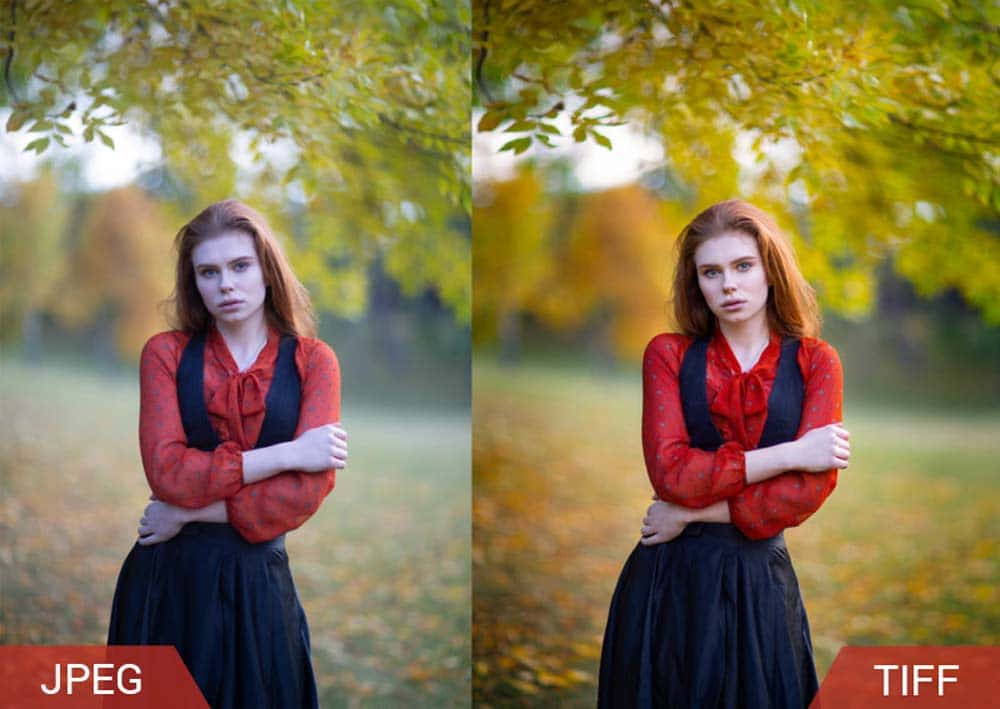
TIFF: The Uncompromising Professional
TIFF is perhaps the most versatile high-quality format available. It supports both 8-bit and 16-bit color depths and can utilize lossless LZW compression. Because TIFFs do not lose data regardless of how many times they are saved, they are the preferred format for master files in photography and publishing. Additionally, TIFFs support layers and transparency, making them a powerful tool for complex digital compositions.
The downside of TIFF is its extreme file size. A single high-resolution 16-bit TIFF can easily exceed 100MB or even 1GB for multi-layered files. While inefficient for the web, it is the only choice when the goal is a physical print or a historical archive.
PNG: The Standard for Digital Graphics
The PNG (Portable Network Graphics) format was developed as a patent-free successor to GIF, but it has evolved into a staple for high-quality digital design. Unlike JPEG, PNG is strictly lossless. Its standout feature is support for alpha channels (transparency), which allows for smooth edges on logos and UI elements.
While PNG is excellent for graphics with sharp lines and flat colors, it is less efficient than other formats for complex photographic images. A high-resolution photo saved as a PNG will be significantly larger than a high-quality JPEG or a WebP file, without offering the 16-bit depth advantages of a TIFF.
The Evolution of Efficiency: HEIF and WebP
As the world moves toward mobile-first browsing and 4K displays, the tech industry has introduced new formats that aim to provide “near-RAW” quality at a fraction of the size. These formats leverage advanced compression techniques originally developed for video.
HEIF/HEIC: Apple’s High-Efficiency Choice
HEIF (High Efficiency Image File Format), often seen with the .HEIC extension on iPhones, is based on the HEVC (H.265) video compression standard. Technically, HEIF is a significant upgrade over JPEG. It supports 10-bit color, allowing for better HDR (High Dynamic Range) representation, and it uses much more sophisticated compression algorithms to store images at roughly half the size of a JPEG of comparable quality.
For the average user, HEIF is arguably the best balance of quality and storage. However, its adoption in the professional world has been slowed by compatibility issues with older Windows systems and certain professional editing suites.
WebP: High Quality for the Modern Web
Developed by Google, WebP is designed to solve the “speed vs. quality” dilemma on the internet. It supports both lossy and lossless compression, as well as transparency and animation. In many tests, a WebP file can be 25% to 34% smaller than a JPEG of equivalent visual quality.
For developers and site owners, WebP is the best format for high-quality web images because it maintains sharpness and color accuracy while ensuring fast page load times. With the latest updates to major browsers and CMS platforms, WebP has become a mandatory part of the high-performance tech stack.
Making the Choice: Which Format Suits Your Workflow?
Determining the “best” format ultimately depends on the specific technical requirements of your project. There is no one-size-fits-all solution; instead, there is a strategic selection based on where the image will live.
- For Original Capture: RAW is the only logical choice. It captures the maximum data possible from the sensor, providing the headroom needed for professional-grade editing and future-proofing.
- For Archival and Print: TIFF stands as the best format. Its support for 16-bit color and lossless compression ensures that the image remains a perfect digital replica of the edit, ready for high-resolution large-format printing.
- For Digital Design and Logos: PNG remains the champion due to its lossless nature and superior handling of transparency.
- For Web Performance: WebP is the superior choice for delivering high-quality visuals without compromising the user experience through slow load times.
- For Mobile Storage: HEIF provides a modern alternative to JPEG, offering better color depth and smaller file footprints for the casual yet quality-conscious user.
In the modern tech ecosystem, high-quality imaging is about data management. By understanding the bit depth, compression logic, and use cases of these formats, you can ensure that your visual content maintains its integrity from the moment the shutter clicks to the moment it appears on a high-definition screen. The best format isn’t just the one with the most data—it’s the one that delivers the right data for the right platform.
aViewFromTheCave is a participant in the Amazon Services LLC Associates Program, an affiliate advertising program designed to provide a means for sites to earn advertising fees by advertising and linking to Amazon.com. Amazon, the Amazon logo, AmazonSupply, and the AmazonSupply logo are trademarks of Amazon.com, Inc. or its affiliates. As an Amazon Associate we earn affiliate commissions from qualifying purchases.