
In the world of computer hardware, the motherboard is often described as the “central nervous system” of the machine. It facilitates communication between the processor, memory, storage, and peripheral devices. However, before a builder can select a chipset or worry about clock speeds, they must first address a fundamental architectural standard: the form factor.
A motherboard form factor is a set of specifications that dictates the physical dimensions, mounting point locations, power supply type, and the general layout of components on the board. These standards ensure that hardware from different manufacturers—cases, power supplies, and motherboards—can work together seamlessly. Understanding form factors is the first step in any successful PC build, as it determines the expansion potential, cooling capabilities, and physical footprint of the final system.
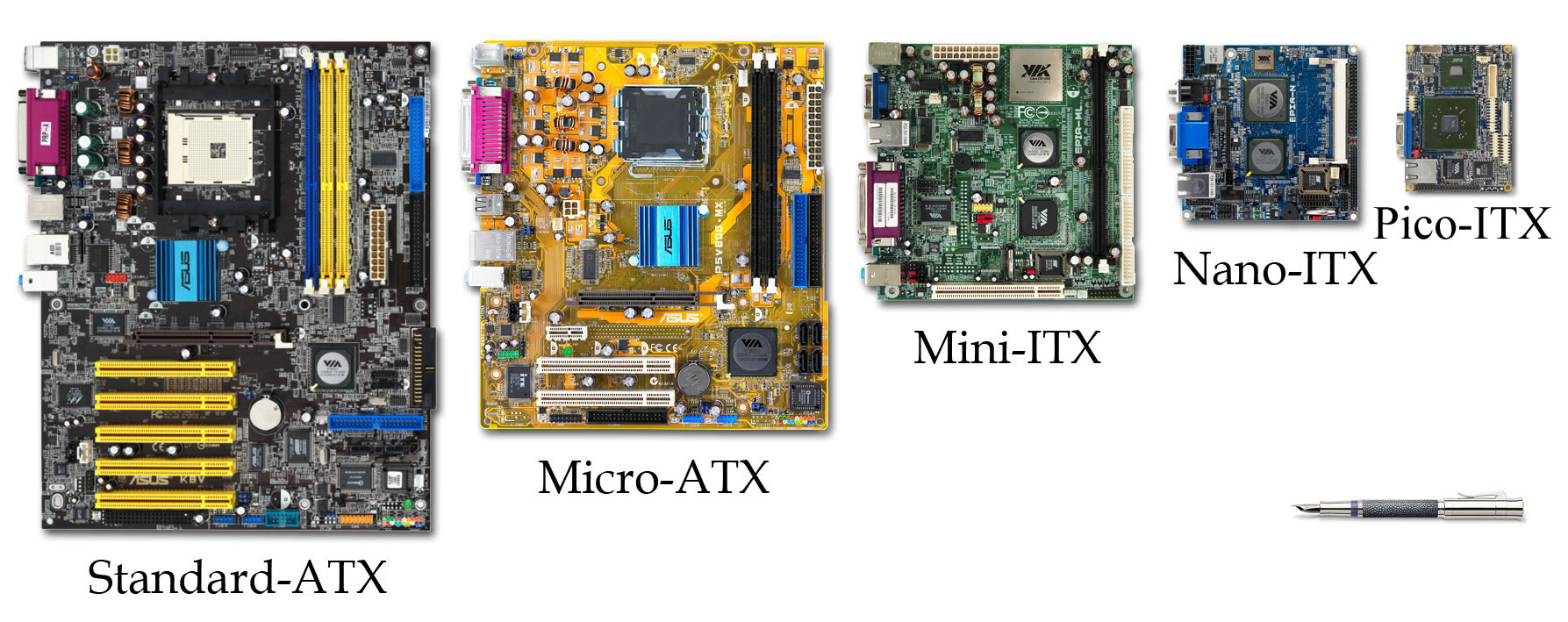
The Core Standards: ATX, Micro-ATX, and Mini-ITX
While there have been dozens of proprietary and niche standards over the decades, the modern consumer market is dominated by three primary form factors. These standards were largely pioneered and refined by Intel, starting with the introduction of the ATX standard in 1995 to replace the aging AT design.
ATX (Advanced Technology eXtended)
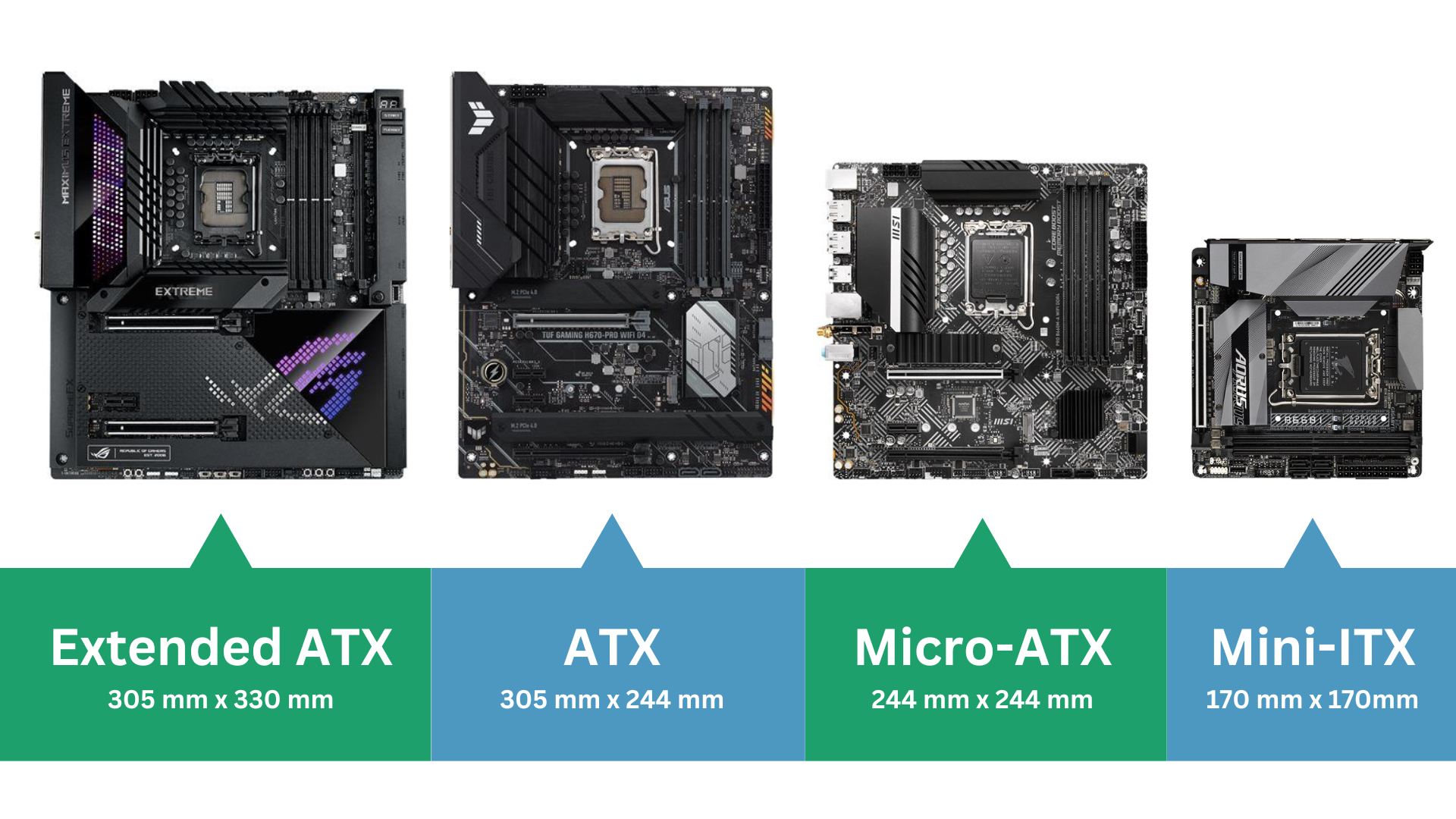
The ATX form factor is the gold standard for the PC industry. Measuring 12 x 9.6 inches (305 x 244 mm), it provides the largest canvas for hardware manufacturers to work with. Because of its size, an ATX motherboard typically offers the highest number of expansion slots—usually seven—and four to eight RAM slots.
For enthusiasts and professionals, the ATX board is the go-to choice. It allows for multiple PCIe devices, such as high-end graphics cards, capture cards, and high-speed NVMe expansion. The extra surface area also allows for better heat dissipation and more robust Voltage Regulator Modules (VRMs), which are essential for stable CPU overclocking.
Micro-ATX (mATX)
Micro-ATX is the “middle child” of the motherboard world, measuring 9.6 x 9.6 inches (244 x 244 mm). It is designed to be backwards compatible with ATX cases, meaning the mounting holes on an mATX board align with the top sections of an ATX case.
Micro-ATX boards are generally more affordable than their full-sized counterparts. They typically offer four expansion slots and four RAM slots, making them an excellent choice for budget-conscious gamers or office workstations. While they sacrifice some expansion headroom, they retain enough functionality for the vast majority of users who only plan to use a single dedicated graphics card.
Mini-ITX
The Mini-ITX form factor is the specialist of the group, measuring a compact 6.7 x 6.7 inches (170 x 170 mm). Developed by VIA Technologies in 2001, it was designed for low-power, small-footprint computing. Today, however, it is the darling of the “Small Form Factor” (SFF) enthusiast community.
Mini-ITX boards are limited to a single PCIe expansion slot and usually only two RAM slots. Despite their size, modern Mini-ITX boards are engineering marvels, often packing high-end features like Wi-Fi 7, multiple M.2 slots (often stacked vertically), and powerful power delivery systems into a tiny space. The primary challenge with Mini-ITX is the “SFF tax”—these boards are often more expensive due to the complex PCB layering required to fit all the components.
Technical Trade-offs and System Capabilities
Choosing a form factor is not just about physical size; it is a decision that impacts every technical metric of a PC’s performance and longevity. The size of the PCB directly correlates with the number of “lanes” and “traces” that can be routed across the board.
Expansion and Connectivity
The most obvious trade-off is the number of PCIe slots. In an ATX build, you might have room for a GPU, a dedicated sound card, and a 10GbE network adapter. In a Mini-ITX build, you are limited to the GPU alone. This makes ATX the mandatory choice for workstations involved in heavy video editing, 3D rendering, or AI development, where multiple GPUs or specialized accelerator cards are required.
Furthermore, the form factor influences internal storage connectivity. Larger boards have the surface area to accommodate up to five or six M.2 NVMe slots, often with massive integrated heatsinks. Smaller boards may only have two, with one sometimes located on the back of the PCB, where it receives less airflow and can be prone to thermal throttling.
Thermal Management and Power Delivery
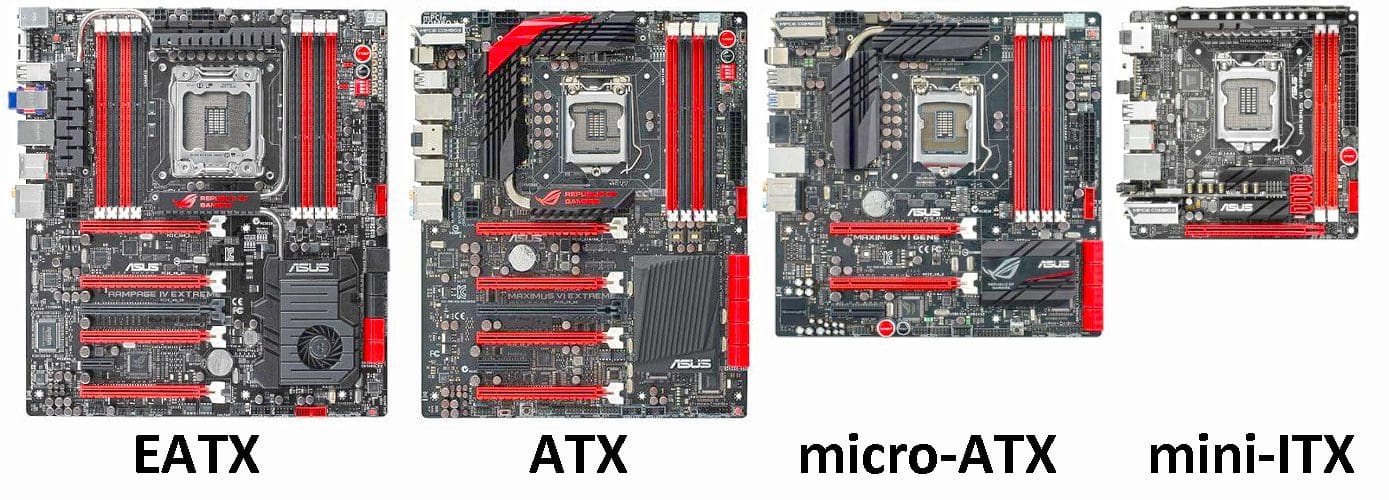
Larger motherboards allow for better spacing between components. On an ATX board, the CPU socket is further away from the primary PCIe slot, which helps prevent the heat from a massive GPU from soaking into the CPU cooler.
Additionally, high-end ATX and E-ATX (Extended ATX) boards can feature 20+ phase power delivery systems. These VRMs generate heat, and the larger surface area of an ATX board allows for larger heatsinks and better “thermal mass” to manage that heat. In contrast, Mini-ITX builders must be much more cognizant of airflow, as the high density of components creates concentrated “hot spots.”
RAM Capacity and Topology
While most users are satisfied with 32GB or 64GB of RAM, certain professional applications require much more. ATX boards typically support four DIMM slots, allowing for up to 192GB or 256GB of DDR5 memory. Mini-ITX boards, limited to two slots, effectively halve that capacity. There is also the matter of “memory topology”—on two-slot boards, the traces between the CPU and the RAM are shorter and simpler, which can sometimes lead to better memory overclocking stability compared to four-slot boards.
Matching Form Factor to Use Case
Identifying the right form factor requires a clear understanding of the intended use case for the computer. Selecting a board that is too small might limit future upgrades, while selecting one that is too large might result in a bulky, inefficient setup.
The Gaming Sweet Spot: ATX and mATX
For the average gamer, the ATX form factor remains the most logical choice. It provides ample room for the massive triple-fan GPUs that have become the industry standard. It also ensures that if a gamer decides to add a high-quality internal capture card for streaming later, the space is available.
However, if the budget is tight, Micro-ATX is the smarter play. Many mATX boards offer the same chipsets and power delivery as ATX boards but at a lower price point because they use less raw material and have fewer legacy ports.
The SFF Enthusiast: Mini-ITX
Small Form Factor builds are a niche but growing segment of the tech market. These builds are ideal for users with limited desk space, or those who want a powerful machine that can be easily transported. Mini-ITX is also the preferred choice for Home Theater PCs (HTPCs), where the goal is to have a device that fits into a media console and looks like a piece of high-end audio equipment rather than a computer tower.
Professional Workstations: E-ATX
Beyond the standard ATX lies the Extended ATX (E-ATX). Measuring 12 x 13 inches, these are typically reserved for “HEDT” (High-End Desktop) platforms like AMD Threadripper or Intel Xeon. These boards are necessary for users who need 8 channel memory and dozens of PCIe lanes for multi-GPU arrays used in data science and professional CGI rendering.
Compatibility and the Future of Motherboard Design
The motherboard form factor is the “anchor” for the rest of the build’s compatibility. When selecting a motherboard, you are effectively selecting your case and, in some cases, your power supply.
Downward Case Compatibility
A critical rule of PC building is that cases are “downward compatible” with motherboard form factors. A Full Tower case designed for ATX will almost always have the mounting points for Micro-ATX and Mini-ITX. However, the inverse is not true. You cannot fit an ATX motherboard into a Mini-ITX case. Builders must check the “Motherboard Support” section of case specifications to ensure a match.
Power Supply Standards
Most ATX and mATX builds use standard ATX power supplies. However, as form factors shrink into the ultra-compact Mini-ITX territory, standard ATX PSUs often won’t fit. This has led to the rise of SFX and SFX-L power supply standards—smaller units that deliver high wattage in a fraction of the space.
The Innovation of “Rear-Connector” Motherboards
The tech industry is currently seeing a shift in form factor evolution with the introduction of “hidden connector” standards, such as ASUS BTF (Back-to-the-Future) and MSI Project Zero. While these still follow the physical dimensions of ATX or mATX, they move all power, SATA, and fan headers to the back of the motherboard.
This requires a specific type of case with cutouts designed for rear access. While this doesn’t change the dimensions of the form factor, it represents a significant shift in how we think about the layout and aesthetics of computer hardware, prioritizing cable management and airflow more than ever before.
In conclusion, the motherboard form factor is the most consequential choice in the PC building process. It dictates the size, power, and future-proofing of the system. By choosing between the expansive ATX, the value-driven Micro-ATX, or the compact Mini-ITX, a user defines the physical and technical boundaries of their digital world. Whether you are building a high-performance workstation or a discrete living-room console, the form factor is the blueprint upon which all other hardware innovations are built.
aViewFromTheCave is a participant in the Amazon Services LLC Associates Program, an affiliate advertising program designed to provide a means for sites to earn advertising fees by advertising and linking to Amazon.com. Amazon, the Amazon logo, AmazonSupply, and the AmazonSupply logo are trademarks of Amazon.com, Inc. or its affiliates. As an Amazon Associate we earn affiliate commissions from qualifying purchases.