
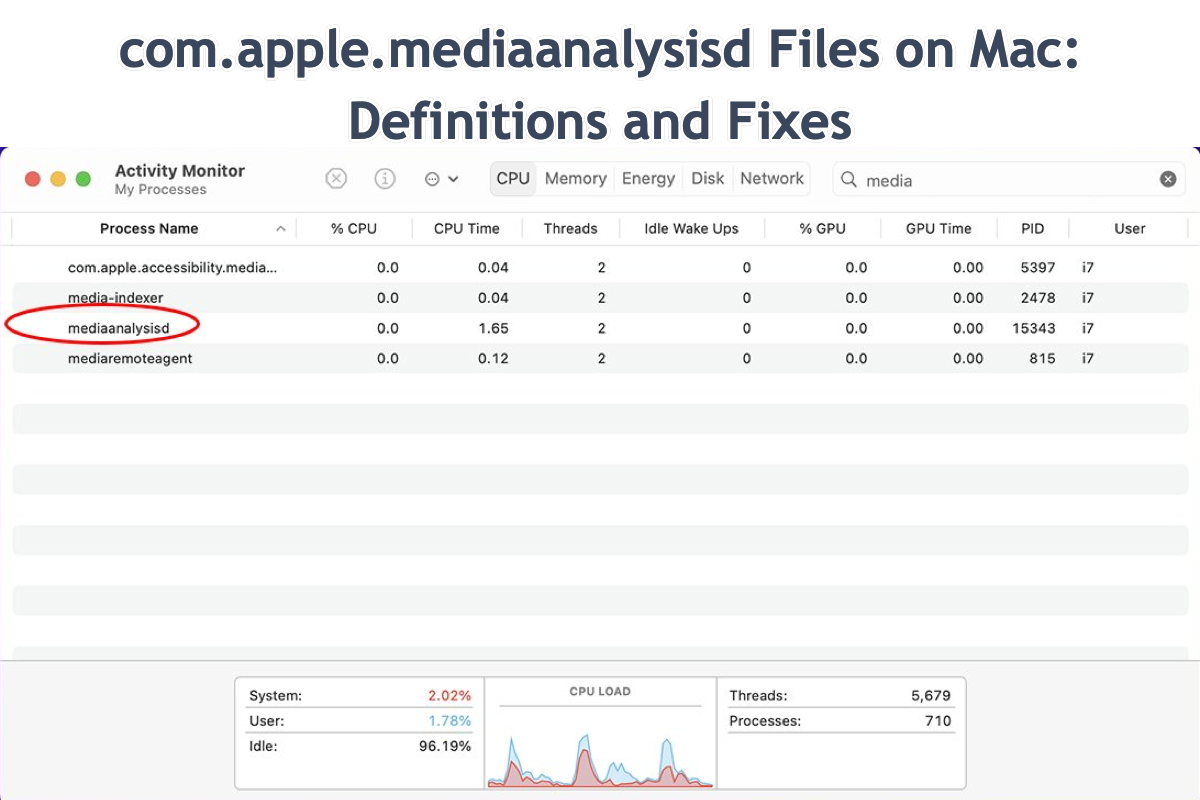
In the sophisticated ecosystem of macOS, numerous background processes work silently to ensure a seamless and “intelligent” user experience. If you have ever opened Activity Monitor and noticed a process named mediaanalysisd consuming a significant portion of your CPU or memory, you might have wondered if your system was under heavy load or if a specific app was malfunctioning. Far from being a glitch or a security threat, mediaanalysisd is a critical system daemon responsible for many of the high-level features that modern Mac users take for granted.
This technical deep dive explores the architecture, functions, and performance implications of mediaanalysisd, providing insight into why it exists and how it manages the vast amounts of media stored on your device.
The Core Functions of mediaanalysisd
The “d” at the end of mediaanalysisd stands for “daemon,” which in Unix-based operating systems like macOS refers to a program that runs in the background rather than under the direct control of a user. The primary responsibility of this specific daemon is the analysis of media files—specifically photos and videos—stored within your Photos library and other indexed locations on your system.
Visual Intelligence and Machine Learning
In recent versions of macOS, Apple has leaned heavily into on-device machine learning. mediaanalysisd is the workhorse behind this visual intelligence. It scans your images to identify objects, scenes, and even specific types of flora or fauna. When you search for “dog” or “beach” in your Photos app or via Spotlight, it is the data generated by mediaanalysisd that allows the system to return relevant results without you ever having to manually tag your photos.
Facial Recognition and People Identification
One of the most resource-intensive tasks managed by this daemon is facial recognition. As you add new photos to your library, mediaanalysisd works to identify human faces, group them together, and attempt to match them against existing profiles in your “People” album. This process involves complex geometric calculations and pattern matching, which is why it often triggers high CPU usage shortly after a large import of images.
Live Text and OCR
Introduced in more recent iterations of macOS, Live Text allows users to interact with text inside images. Whether it is a photo of a receipt, a whiteboard, or a street sign, mediaanalysisd performs Optical Character Recognition (OCR) in the background. It indexes this text so that it can be highlighted, copied, or even translated directly within the Photos app, Safari, or Quick Look.
Video Analysis and Frame Summarization
Beyond static images, the daemon also analyzes video files. It looks for “key frames” to create the short previews you see when hovering over a video file. Furthermore, it identifies the most aesthetically pleasing or significant moments in a video to assist the Photos app in generating “Memories” and “Featured Photos” montages.
Why mediaanalysisd Uses High CPU and Memory
It is common for users to encounter mediaanalysisd when it is at its most active, which usually coincides with high system resource consumption. Understanding the triggers for this behavior can help distinguish between normal system operation and a genuine technical issue.
Post-Update Re-indexing
Whenever Apple releases a major update to macOS, they often update the underlying machine learning models used for media analysis. When your Mac reboots after an update, mediaanalysisd may begin re-scanning your entire photo and video library to apply these new, more accurate models. This can lead to several hours—or even days, depending on the size of your library—of high CPU usage.
Large Media Imports
The most frequent trigger for mediaanalysisd activity is the addition of new media. If you have recently synced your iPhone with your Mac or imported a high-volume folder of professional photography, the daemon will immediately begin its analysis. Because modern media files are often high-resolution (4K video or RAW image files), the computational power required to index them is substantial.
Background Maintenance and “Power Nap”
Apple attempts to minimize the impact of mediaanalysisd on your workflow by prioritizing its tasks when the computer is idle and connected to a power source. However, if you use a MacBook primarily on battery or keep it under constant heavy use, the daemon may eventually “force” its way into the CPU cycle to prevent a massive backlog of unindexed media. This is often why you might notice your fans spinning up shortly after you stop using the computer.

The Role of the Apple Neural Engine
On modern Macs equipped with Apple Silicon (M1, M2, and M3 chips), mediaanalysisd is designed to take advantage of the Apple Neural Engine (ANE). The ANE is a specialized component of the chip dedicated to machine learning tasks. While this makes the process significantly faster and more energy-efficient than on older Intel-based Macs, the daemon still requires system memory (RAM) and coordination with the CPU, which is reflected in Activity Monitor.
Troubleshooting and Managing mediaanalysisd Performance
While mediaanalysisd is a vital part of the macOS ecosystem, there are times when it may behave unexpectedly, such as “hanging” on a corrupted file or consuming resources to the point that other applications become sluggish.
The “Wait and See” Approach
The most effective way to manage mediaanalysisd is often to simply let it finish its work. Because it is a background indexing service, it will eventually complete its task and drop to near-zero CPU usage. If you have a large library, the best practice is to leave your Mac plugged into power overnight with the “Sleep” settings adjusted so the disk does not power down.
Identifying Corrupted Media
If mediaanalysisd remains at high CPU usage for weeks without progress, it may be stuck on a corrupted image or video file. Sometimes, a malformed metadata header in a media file can cause the daemon to enter a loop. One way to diagnose this is by checking the system logs via the Console app. Searching for “mediaanalysisd” in the Console can reveal if the process is repeatedly failing on a specific file path.
Safe Interventions
While you can technically “Force Quit” the process in Activity Monitor, macOS will simply restart it moments later. To properly reset the process, some users choose to toggle certain features off and back on. For example, disabling “iCloud Photos” and then re-enabling it can sometimes clear the process cache and force a clean start. However, this should be a last resort as it triggers a full re-sync of your library.
Limitations and Library Location
The performance of mediaanalysisd is also heavily influenced by where your Photos library is stored. If your library is on an external HDD (Hard Disk Drive) rather than an SSD, the process will be significantly slower due to the lower read/write speeds. If the external drive is disconnected while the daemon is mid-analysis, it can lead to database inconsistencies that may cause the process to spike once the drive is reconnected.
Privacy and Security Implications
In an era where data privacy is a primary concern, the presence of a background process that “analyzes” all your photos and videos can raise questions. However, the architecture of mediaanalysisd is a prime example of Apple’s “On-Device Intelligence” philosophy.
Local Processing vs. Cloud Computing
Unlike many competitors who upload media to the cloud to perform AI analysis and facial recognition, mediaanalysisd performs the vast majority of its work locally on your hardware. Your faces, the text in your photos, and the objects identified are indexed on your Mac’s internal storage. This ensures that the contents of your private photos are not being “read” by a server in a remote data center for the purpose of profiling or advertising.
Data Integrity and Permissions
mediaanalysisd operates under strict System Integrity Protection (SIP) and sandbox constraints. It only has access to the media it is programmed to analyze—primarily within the Photos library and specific system-level folders. It does not have the authorization to “spy” on other sensitive documents or browse your web history. The data it generates is stored in a hidden database within your user library, protected by the same encryption and permissions as your other personal files.
The Trade-off of Modern Computing
The trade-off for the privacy provided by mediaanalysisd is the local resource consumption. Because the Mac is doing the “heavy lifting” that would otherwise be done by powerful cloud servers, the user occasionally sees the impact in their CPU and battery metrics. Understanding this helps frame mediaanalysisd not as a nuisance, but as a privacy-preserving alternative to cloud-based AI scanning.
Conclusion
mediaanalysisd is a quintessential example of the modern operating system’s complexity. It bridges the gap between raw data storage and an intuitive, intelligent user interface. By handling the intensive machine learning tasks required for facial recognition, object detection, and Live Text, it transforms a static collection of files into a searchable, interactive library.
While its appetite for CPU and RAM can be startling during peak activity, it is a necessary component of the macOS experience. For the majority of users, the daemon requires no manual intervention. As long as the system is given the time and power needed to complete its indexing, mediaanalysisd will remain a silent, efficient assistant, ensuring that your digital memories are always organized and accessible at a moment’s notice.