
In the world of Java programming, data structures are the foundation upon which efficient applications are built. Among the most fundamental of these structures is the array. Specifically, the double[] syntax represents an array of primitive double-precision 64-bit IEEE 754 floating-point numbers. For developers working on scientific computing, financial modeling (with caution), or data analysis, understanding how to leverage double[] is essential for both performance and precision.
An array in Java is a container object that holds a fixed number of values of a single type. When we speak of double[], we are referring to a linear collection of numeric values that allow for fractional precision. Unlike higher-level collection classes like ArrayList, a double[] is a low-level construct that interacts closely with the system’s memory, offering high-speed access and predictable resource consumption.
Understanding the Basics of double[] in Java
To master double[], one must first understand its syntax, how it is stored in memory, and the lifecycle of its initialization. Because Java is a statically-typed language, the type of the array must be declared before it can be used.
Definition and Declaration
The syntax double[] tells the Java compiler that the variable will hold a reference to an array of doubles. There are two ways to declare an array in Java:
double[] myData;(The preferred style)double myData[];(Legal, but less common in modern Java)
The square brackets signify that the variable is an array. At the moment of declaration, no memory is allocated for the elements; only a reference variable is created. To actually create the array, you must use the new keyword, which allocates memory on the heap.
Memory Allocation and Initialization
Arrays in Java are objects. When you execute myData = new double[10];, Java allocates a contiguous block of memory sufficient to store ten 64-bit double values.
One of the defining characteristics of Java arrays is that they have a fixed length. Once an array of size 10 is created, it cannot grow or shrink. If you need more space, you must allocate a new, larger array and copy the elements over.
Java also provides “array literals” for instances where the data is known at compile time. For example:
double[] constants = {3.14, 2.71, 1.618};
This syntax handles both declaration and initialization in one step, with the compiler automatically determining the size based on the number of elements provided.
Default Values
Unlike local primitive variables, which must be initialized before use, the elements of a double[] are automatically initialized to a default value when the array is created via the new keyword. For the double type, this default value is 0.0. This ensures that the program does not encounter “garbage” values from unallocated memory, contributing to Java’s reputation for safety and predictability.
Working with double[]: Operations and Best Practices
Once an array is initialized, the next step is performing operations such as accessing, modifying, and iterating through the data. Because double[] is a primitive array, these operations are incredibly fast.
Accessing and Modifying Elements
Elements in a double[] are accessed using a zero-based index. For an array of length N, the valid indices range from 0 to N-1.
double firstValue = myData[0];
myData[1] = 45.5;
Attempting to access an index outside this range (e.g., myData[10] for an array of size 10) will trigger an ArrayIndexOutOfBoundsException. This is a runtime check performed by the Java Virtual Machine (JVM) to prevent buffer overflow attacks and memory corruption, a common issue in lower-level languages like C++.
Iterating Through the Array
There are three primary ways to iterate through a double[]:
- The Classic For-Loop: This provides the index of each element, which is useful if you need to modify the array or track the position.
- The Enhanced For-Loop (For-Each): Introduced in Java 5, this is cleaner and more readable. It is ideal for read-only operations where the index is not required.
- The Arrays.setAll() Method: For more functional approaches, this utility can populate an array based on a generator function.
Sorting and Searching
While you could write your own sorting algorithm, the java.util.Arrays class provides a highly optimized sort() method specifically for double[]. This method typically uses a Dual-Pivot Quicksort algorithm, which offers O(n log(n)) performance.
For searching, the Arrays.binarySearch() method can be used, provided the array is already sorted. This allows for extremely fast lookups even in very large datasets.
double[] vs. Double[]: Performance and Memory Implications
A common point of confusion for Java beginners is the difference between double[] (the primitive array) and Double[] (the array of Double objects). Choosing the wrong one can lead to significant performance bottlenecks.
Primitive vs. Wrapper Classes
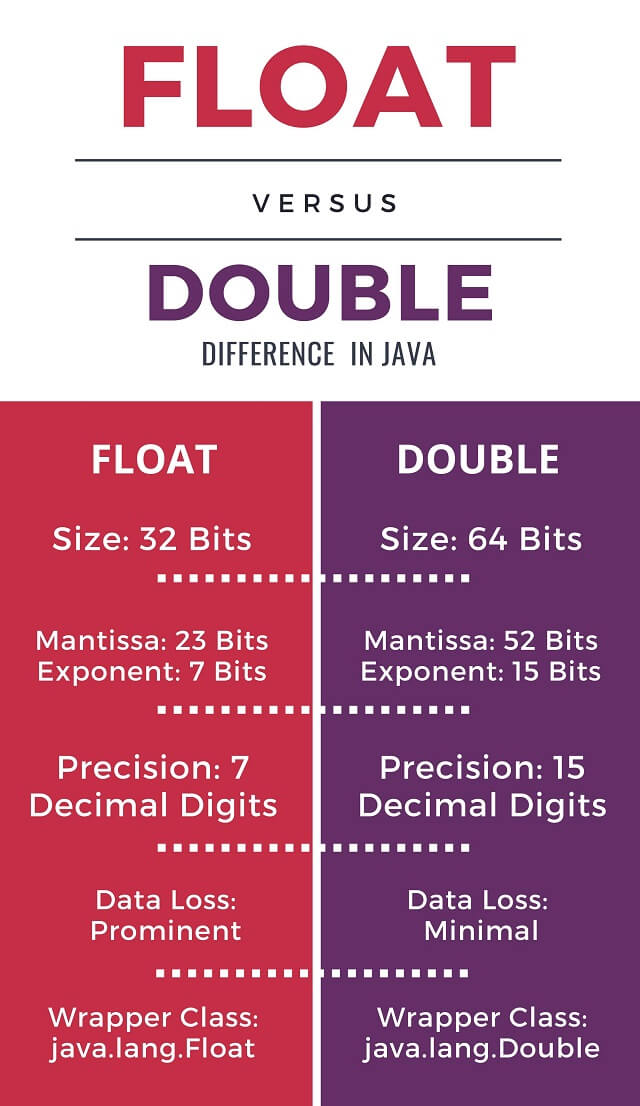
double is a primitive type, meaning it is a pure value stored in memory. Double is a wrapper class that “boxes” the primitive value into an object. An array of primitives (double[]) stores the raw numbers directly in a contiguous block of memory. An array of objects (Double[]), however, stores an array of references. Each reference points to a Double object located elsewhere on the heap.
Memory Overhead
The memory footprint of double[] is lean: 8 bytes per element plus a small overhead for the array object itself (usually 12-16 bytes).
In contrast, a Double[] is much heavier. Each Double object has its own header overhead, and each reference in the array takes up 4 to 8 bytes. For large datasets, a Double[] can consume three to five times more memory than a double[].
Autoboxing and Unboxing Overhead
When working with Double[], Java performs “autoboxing” and “unboxing”—automatically converting between the primitive and the object. This process involves creating new objects and extracting values, which puts significant pressure on the Garbage Collector (GC). If you are performing millions of calculations, the overhead of Double[] can make your application noticeably slower. Therefore, unless you need to store null values or use the array within a Generic Collection (like List<Double>), you should always prefer double[].
Advanced Applications and Common Pitfalls
As you move beyond basic tutorials, double[] appears in more complex scenarios, including multi-dimensional data and modern functional programming.
Multidimensional Arrays (double[][])
In Java, a multidimensional array is actually an “array of arrays.” A double[][] is a structure where each element of the primary array is itself a reference to another double[].
This is commonly used for representing matrices or grids. For example:
double[][] matrix = new double[3][3];
Because Java treats these as nested arrays, each “row” can technically have a different length, creating what is known as a “ragged array.” While flexible, this structure is slightly less performant than a flat 1D array due to the multiple layers of pointer indirection.
Floating-Point Precision Issues
One of the most critical things to understand about double[] is that it follows the IEEE 754 standard for floating-point arithmetic. This means that certain decimal numbers cannot be represented exactly. For instance, 0.1 + 0.2 might result in 0.30000000000000004.
If you are using double[] for high-stakes financial transactions where every cent counts, you may encounter rounding errors. In such cases, BigDecimal[] or long-based integer math is preferred. However, for scientific simulations, graphics, and general-purpose engineering, the speed of double[] far outweighs these precision nuances.
Modern Java Streams and double[]
With the introduction of Java 8, the java.util.stream package added powerful ways to process arrays. The DoubleStream interface is specifically designed to handle double[] without the overhead of boxing.
By using Arrays.stream(myData), you can perform complex operations like:
average(): Calculate the mean of all elements.sum(): Total all values.filter(): Remove values that don’t meet a criteria.map(): Transform each value (e.g., squaring every number in the array).
This functional approach leads to more readable and maintainable code, especially when dealing with data pipelines.
Conclusion
The double[] type in Java is more than just a list of numbers; it is a high-performance tool designed for efficiency and scale. By storing primitive values in contiguous memory, it minimizes overhead and maximizes CPU cache utilization.
To use double[] effectively, developers must respect its fixed-length nature and be mindful of the subtle differences between primitives and wrapper objects. While newer collection types offer more flexibility, the humble primitive array remains the gold standard for performance-critical numeric processing. Whether you are building a physics engine, a machine learning model, or a simple data logger, mastering the nuances of double[] ensures that your Java applications remain fast, stable, and resource-efficient.