
In the rapidly evolving landscape of cybersecurity and digital infrastructure, two terms frequently appear in tandem, often used interchangeably by the uninitiated: authentication and authorization. While they sound similar and are both fundamental components of identity and access management (IAM), they serve distinct roles in securing a digital environment. Understanding the nuances between these two processes is not merely an academic exercise for developers; it is a critical requirement for anyone responsible for designing, managing, or securing modern software systems.
At its core, the distinction lies in the questions they answer. Authentication asks, “Who are you?” whereas authorization asks, “What are you allowed to do?” To build a secure application, one must master both, ensuring that users are who they claim to be and that they can only access the resources necessary for their specific roles.

Understanding Authentication: The “Who Are You?” Phase
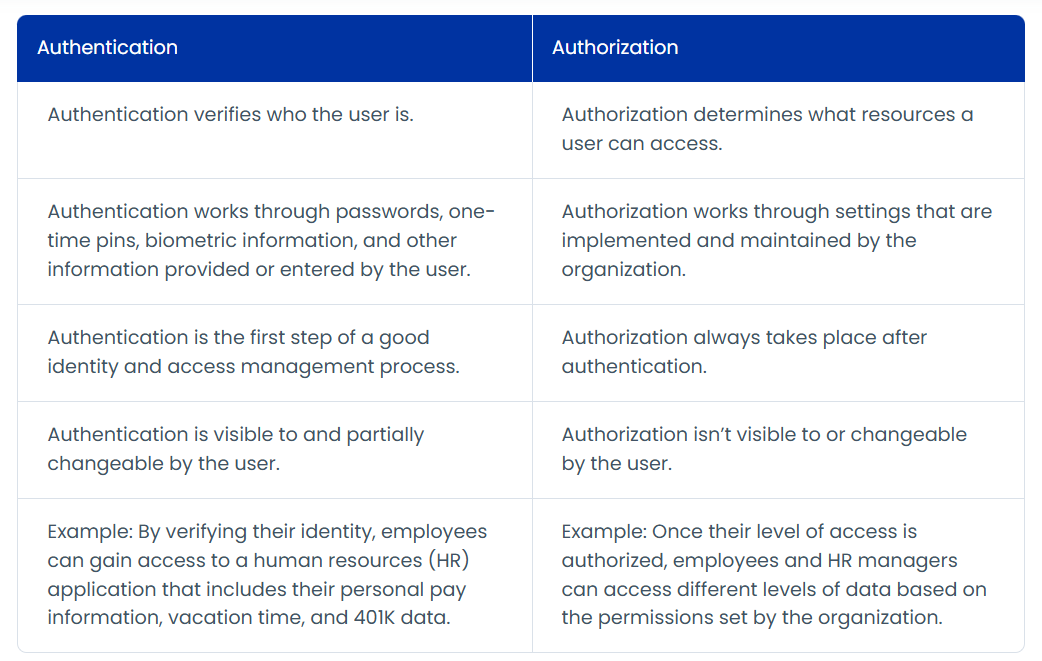
Authentication (often abbreviated as AuthN) is the process of verifying the identity of a user, device, or system. It is the digital equivalent of showing a passport at a border or an ID card at a secure facility. The goal of authentication is to ensure that the entity attempting to access a system is exactly who or what they claim to be.
The Factors of Authentication
To prove identity, systems typically rely on one or more “factors.” These factors are categorized into three primary types:
- Knowledge Factors (Something you know): This is the most common form of authentication. It includes passwords, personal identification numbers (PINs), and answers to secret security questions. While convenient, knowledge factors are the most vulnerable to social engineering, phishing, and brute-force attacks.
- Possession Factors (Something you have): This involves a physical or digital object that the user owns. Examples include hardware tokens, smart cards, or a mobile device that receives a one-time password (OTP) via SMS or a dedicated authenticator app.
- Inherence Factors (Something you are): This refers to biological traits unique to the individual. Biometric authentication, such as fingerprint scanning, facial recognition, iris scans, and voice patterns, falls into this category. Biometrics are increasingly popular due to their high level of security and user convenience.
The Evolution Toward Multi-Factor Authentication (MFA)
As cyber threats become more sophisticated, relying on a single factor—usually a password—is no longer considered sufficient. This has led to the widespread adoption of Multi-Factor Authentication (MFA). MFA requires a user to provide two or more factors from different categories before access is granted. For instance, entering a password (knowledge) and then providing a code sent to a smartphone (possession) creates a much higher barrier for attackers. If a password is stolen, the attacker still cannot gain access without the physical device.
Modern Authentication Protocols
In the world of web development and cloud services, authentication is often handled by standardized protocols designed to pass identity information securely between services.
- SAML (Security Assertion Markup Language): An XML-based standard used primarily in enterprise environments for Single Sign-On (SSO). It allows a user to authenticate with an Identity Provider (IdP) and then gain access to various Service Providers (SPs) without logging in again.
- OpenID Connect (OIDC): A simple identity layer built on top of the OAuth 2.0 protocol. It allows clients to verify the identity of an end-user based on the authentication performed by an authorization server, obtaining basic profile information in an interoperable and REST-like manner.
Deciphering Authorization: The “What Can You Do?” Phase
Once a user’s identity is successfully verified through authentication, the system must then determine what that user is permitted to do. This is the realm of authorization (often abbreviated as AuthZ). Authorization is the process of granting or denying access to specific resources, functions, or data based on the authenticated user’s permissions.
While authentication is about the individual, authorization is about the policy. It defines the boundaries within which a user can operate. For example, in a corporate file-sharing system, all employees might be authenticated to log in, but only the HR department is authorized to view payroll folders.
Common Authorization Models
Implementing authorization requires a structured approach to managing permissions. Several models have emerged to handle this complexity:
- Role-Based Access Control (RBAC): This is the most widely used model in business environments. Permissions are assigned to specific roles (e.g., Administrator, Manager, Editor, Viewer), and users are assigned to those roles. This simplifies management; when an employee’s job function changes, the administrator only needs to change their role rather than updating individual permissions for dozens of files.
- Attribute-Based Access Control (ABAC): A more granular and dynamic approach. ABAC evaluates permissions based on attributes of the user (department, seniority), the resource (sensitivity, file type), and the environment (time of day, location, device security status). This allows for highly specific policies, such as “Grant access to financial records only if the user is in the Finance department and is accessing the data during business hours from a company-owned laptop.”
- Discretionary Access Control (DAC): In this model, the owner of a resource (like a file or a folder) has the authority to decide who else can access it. While flexible, it can lead to security gaps if users are not diligent about managing their own permissions.
- Mandatory Access Control (MAC): Often used in military and high-security government settings, MAC is a non-discretionary model where a central authority regulates access based on security clearances and data classifications.
Tokens and Scopes in Authorization
In modern web applications, authorization is often communicated via tokens, most notably JSON Web Tokens (JWT). When a user logs in, the server issues a token that contains “claims” or “scopes.” These scopes act as a digital permission slip. When the user tries to access an API, the API checks the token to see if it contains the necessary scope (e.g., read:reports or write:settings) to allow the requested action.
Key Differences: A Comparative Deep Dive
To truly grasp the relationship between these two concepts, it helps to look at them side-by-side across several dimensions.
1. Sequence and Dependency
Authentication always comes first. You cannot authorize a user if you do not know who they are. In the logical flow of a secure system, the user first proves their identity (AuthN). Once identified, the system looks up their permissions and grants access accordingly (AuthZ).
2. Visibility to the User
Authentication is highly visible to the end-user. It involves login screens, password prompts, fingerprint scans, and the “Check your phone for a code” messages. It is an active interaction. Authorization, conversely, is largely invisible. It happens in the background. A user only notices authorization when they are denied access to a page or a button is greyed out.
3. Data Transmission
In the context of modern web protocols like OIDC and OAuth 2.0, different types of data are used. Authentication results in an ID Token, which contains information about the user (name, email, login time). Authorization results in an Access Token, which contains information about what the user can do (scopes, roles, expiration time).
4. Stability vs. Fluidity
Authentication is relatively stable. A person’s identity—their name, their biometrics—does not change frequently. Authorization is highly fluid. A user’s permissions may change because they were promoted, moved to a different project, or because the company’s security policy was updated.
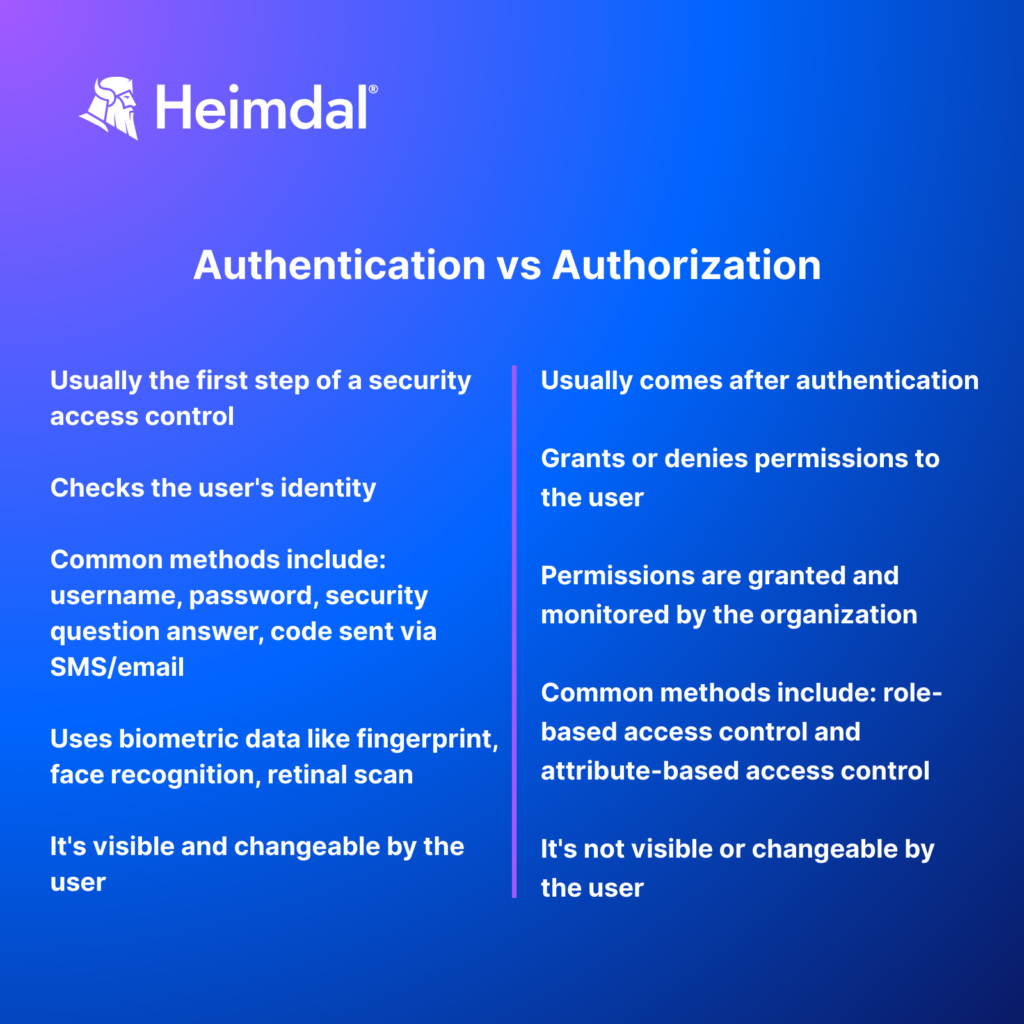
| Feature | Authentication (AuthN) | Authorization (AuthZ) |
|---|---|---|
| Primary Question | Who are you? | What can you do? |
| Method | Passwords, biometrics, tokens. | Roles, permissions, attributes. |
| User Interaction | Visible (Login forms). | Invisible (Backend checks). |
| Order | Occurs first. | Occurs after authentication. |
| Example | Entering a PIN at an ATM. | Withdrawing cash from your specific account. |
Why the Distinction Matters for Digital Security
Mixing up authentication and authorization is not just a semantic error; it can lead to significant security vulnerabilities. If a developer focuses solely on making sure a user can log in (AuthN) but fails to implement strict checks on what that user can access (AuthZ), the system becomes vulnerable to Broken Access Control.
The Principle of Least Privilege (PoLP)
The distinction is vital for implementing the Principle of Least Privilege. PoLP is a security concept where a user is granted the minimum level of access—or permissions—needed to perform their job functions. Without a clear authorization strategy, organizations often default to granting “admin” or “root” access to too many users, which significantly increases the “blast radius” if a single account is compromised.
Zero Trust Architecture
In the modern “Zero Trust” security model, the distinction between AuthN and AuthZ becomes even more critical. Zero Trust operates on the assumption that threats exist both outside and inside the network. Therefore, no user or device is trusted by default. Every single request for a resource must be both authenticated (verifying the identity) and authorized (verifying that the specific request is allowed at that exact moment under those specific conditions).
Compliance and Auditing
From a regulatory standpoint (GDPR, HIPAA, SOC2), organizations must be able to demonstrate that they have control over their data. This requires detailed audit logs that track both authentication events (who logged in and when) and authorization events (what data did they access and did they have permission). If these two processes are blurred, creating a clear audit trail becomes impossible.
Best Practices for Implementing AuthN and AuthZ
Building secure systems requires a disciplined approach to both identity and permission management. Here are the industry-standard best practices:
- Never Roll Your Own Security: Building authentication and authorization systems from scratch is incredibly difficult and prone to errors. Use established libraries, frameworks, or Identity-as-a-Service (IDaaS) providers like Auth0, Okta, or AWS Cognito. These services are built by security experts and are constantly updated to defend against new threats.
- Implement MFA Everywhere: Single-factor authentication is a relic of the past. Ensure that every entry point into your system requires multi-factor verification.
- Use Standardized Protocols: Stick to OAuth 2.0 for authorization and OpenID Connect for authentication. These protocols are the industry standard for a reason: they are well-vetted, secure, and offer interoperability between different systems.
- Centralize Identity Management: Avoid having “silos” of identity. Using a centralized Identity Provider (IdP) ensures that when a user’s permissions change or when they leave the organization, their access can be revoked across all systems simultaneously.
- Regularly Audit Permissions: Authorization is not a “set it and forget it” process. Conduct regular access reviews to ensure that users still require the permissions they have been granted and to prune any “permission creep” that occurs over time.
In conclusion, while authentication and authorization are two halves of the same security coin, they perform very different functions. Authentication validates the identity, providing the foundation of trust. Authorization builds upon that foundation by enforcing the rules and policies that keep data safe. By maintaining a clear distinction between these two processes, developers and security professionals can build more resilient, scalable, and secure digital ecosystems.
aViewFromTheCave is a participant in the Amazon Services LLC Associates Program, an affiliate advertising program designed to provide a means for sites to earn advertising fees by advertising and linking to Amazon.com. Amazon, the Amazon logo, AmazonSupply, and the AmazonSupply logo are trademarks of Amazon.com, Inc. or its affiliates. As an Amazon Associate we earn affiliate commissions from qualifying purchases.