
In the landscape of wireless communication, we are most familiar with Wi-Fi for local internet access and Bluetooth for peripheral connections like headphones or mice. However, there is a specialized subset of these technologies that bridges the gap between simple device pairing and full-scale local area networking: the Bluetooth Personal Area Network, or Bluetooth PAN. While the term might sound overly technical, it represents a fundamental shift in how small-scale digital ecosystems operate, allowing for data exchange and internet sharing that is remarkably efficient and secure.
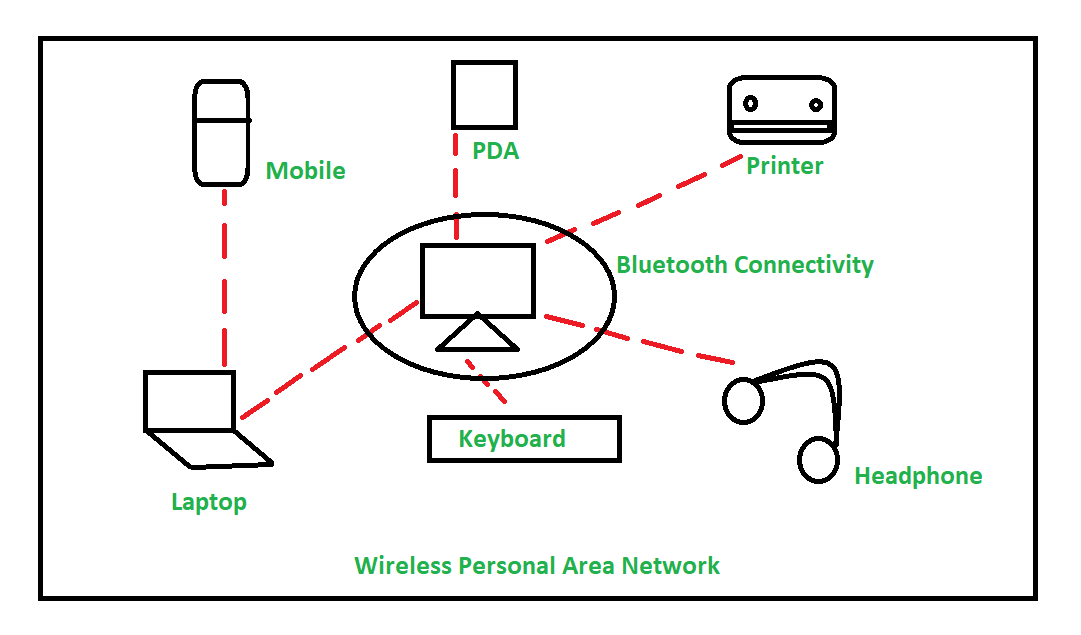
At its core, a Bluetooth PAN is a network formed by Bluetooth-enabled devices that allows them to communicate with one another as if they were connected via a traditional Ethernet cable or a Wi-Fi router. It creates an ad-hoc, low-power environment where smartphones, laptops, tablets, and wearable tech can exchange data packets, share internet connections, and synchronize information without the need for centralized infrastructure. Understanding Bluetooth PAN requires diving into the intersection of short-range radio frequency and network protocols, revealing a tool that remains essential for mobile professionals and tech enthusiasts alike.
Decoding the Technology: How Bluetooth PAN Works
To understand the mechanics of a Bluetooth PAN, one must first look at the underlying architecture of Bluetooth technology. Unlike a standard Wi-Fi network where a central Access Point (AP) dictates the flow of data to all clients, a Bluetooth PAN operates on a concept known as a “piconet.” This is an ad-hoc network structure where one device acts as the central controller, and others act as peripherals.
The Architecture of a Piconet and Scatternet
When a Bluetooth PAN is established, the initiating device creates a piconet. Within this small-scale network, the central device can theoretically connect with up to seven active peripheral devices. These devices are synchronized to the same clock and frequency-hopping sequence. When multiple piconets overlap and interconnect—such as a laptop connected to a phone via PAN while the phone is also connected to a smartwatch—they form what is known as a “scatternet.” This allows for more complex data routing, though most consumer-level Bluetooth PAN applications remain within a single piconet for simplicity and stability.
Bluetooth Network Encapsulation Protocol (BNEP)
The “magic” that allows Bluetooth to function as a network interface is the Bluetooth Network Encapsulation Protocol (BNEP). In a standard Bluetooth connection, data is sent via specific profiles like A2DP for audio or HID for keyboards. However, for a PAN to work, the system needs to transport standard network protocols—specifically IPv4 or IPv6—over the Bluetooth radio link.
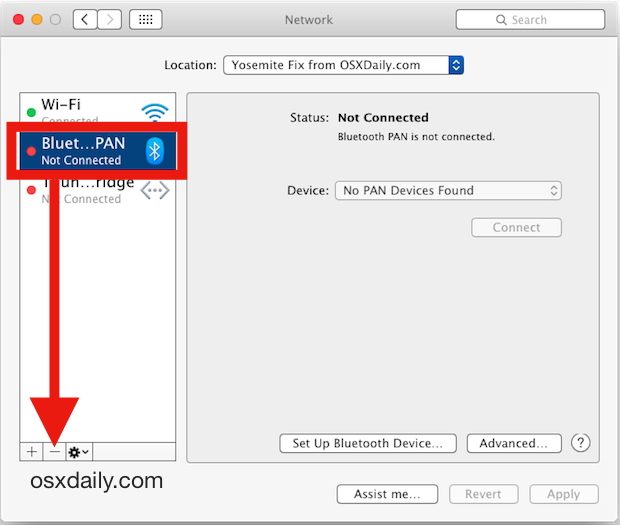
BNEP acts as a wrapper. It takes Ethernet packets and encapsulates them into a format that the Bluetooth L2CAP (Logical Link Control and Adaptation Protocol) layer can understand and transmit. This enables a computer to treat a Bluetooth connection exactly like a LAN (Local Area Network) connection. When you look at your network settings while using Bluetooth PAN, your operating system often identifies it as a “Bluetooth Network Connection,” complete with its own IP address and MAC address.
The Service Discovery Protocol (SDP)
Before data can flow, devices must identify that they are capable of networking. This is handled by the Service Discovery Protocol (SDP). When you pair a smartphone with a laptop, the SDP queries the smartphone to see if it supports the “PAN Profile” (PANP). If both devices acknowledge this profile, they negotiate the roles: the Network Access Point (NAP), which provides the connection to an external network, and the Personal Area Network User (PANU), which consumes that connection.
Practical Applications of Bluetooth PAN in Daily Tech Life
While Wi-Fi hotspots have become the dominant way to share internet connections, Bluetooth PAN offers specific advantages that make it a superior choice in various professional and recreational scenarios. Its primary appeal lies in its balance of power consumption and connectivity.
Internet Tethering and Mobile Hotspots
The most common use of Bluetooth PAN is “Bluetooth Tethering.” Most modern smartphones allow users to share their cellular data via Wi-Fi, USB, or Bluetooth. While Wi-Fi tethering offers higher speeds, it is notoriously taxing on battery life because the Wi-Fi radio must broadcast a high-power signal to maintain a wide range.
Bluetooth PAN, by contrast, uses significantly less energy. For a user working on a laptop in a coffee shop or on a train, tethering via Bluetooth PAN can extend the battery life of both the phone and the laptop by hours compared to using a Wi-Fi hotspot. While the throughput is lower (typically limited to 1–3 Mbps depending on the Bluetooth version), it is more than sufficient for checking emails, document editing in the cloud, and basic web browsing.
Synchronizing IoT Ecosystems
In the world of the Internet of Things (IoT), many devices do not require constant high-speed internet. Instead, they need a way to “check-in” with a central hub to upload small logs or receive firmware updates. Bluetooth PAN provides an ideal framework for this. A central home automation hub can maintain a PAN with various low-power sensors. This setup is more robust than simple point-to-point pairing because it allows the hub to manage the sensors as a unified network, facilitating easier data aggregation and remote management.
Ad-hoc File Sharing and Multiplayer Environments
Before the ubiquity of high-speed cloud storage, Bluetooth PAN was a go-to method for ad-hoc file transfers between computers in the same room. Today, it still serves as a fallback for local multiplayer gaming on handheld devices or mobile phones when a local Wi-Fi network is unavailable or congested. By establishing a PAN, devices can communicate with low latency, which is critical for real-time synchronization in gaming, even if the total bandwidth is limited.
Comparing Bluetooth PAN with Traditional Networking Standards
To truly appreciate the value of a Bluetooth PAN, it is necessary to compare it against its closest rivals: Wi-Fi Direct and standard Wi-Fi hotspots. Each technology has its own niche, and understanding the trade-offs is key to optimizing digital workflows.
Bluetooth PAN vs. Wi-Fi Direct
Wi-Fi Direct is often confused with Bluetooth PAN because both allow for device-to-device communication without a router. However, Wi-Fi Direct operates on the 2.4 GHz or 5 GHz Wi-Fi bands, offering speeds that can reach hundreds of megabits per second.
Bluetooth PAN is generally preferred when power efficiency is the priority. Wi-Fi Direct is the choice for high-bandwidth tasks like screencasting (Miracast) or transferring gigabytes of video files. Bluetooth PAN is the choice for persistent, low-drain connections where the “always-on” nature of the link is more important than the speed of the transfer.
Power Efficiency and Battery Conservation
The transmission power of a Bluetooth radio is significantly lower than that of a Wi-Fi radio. Bluetooth operates on “Class 2” or “Class 3” power levels in most consumer devices, intended for ranges of 10 to 30 feet. Wi-Fi is designed to penetrate walls and cover hundreds of feet. By limiting the range and the complexity of the signal, Bluetooth PAN minimizes the “wake time” of the device’s processor, leading to substantial energy savings. For mobile professionals, this means the difference between a phone dying mid-afternoon or lasting until the end of the workday.
Range and Interference
One of the limitations of Bluetooth PAN is its range. Because it operates in the heavily congested 2.4 GHz ISM band, it can be susceptible to interference from microwave ovens, older cordless phones, and even other Wi-Fi networks. Furthermore, because it is a “Personal” area network, the range is intentionally limited. If you move your laptop more than 30 feet away from your tethered phone, the connection will likely drop or become unstable. This is a design feature, not a bug, as it ensures the signal remains private and low-power.
Security Protocols and Best Practices for Bluetooth PAN
Whenever networking is involved, security is a paramount concern. Bluetooth PANs are inherently more secure than open Wi-Fi networks because of their short range; a malicious actor would physically need to be within a few meters of your devices to attempt an interception. However, security protocols are still essential to prevent unauthorized access.
Data Encryption and Device Pairing
Bluetooth PAN utilizes the standard Security Manager (SM) protocols of the Bluetooth specification. This includes Secure Simple Pairing (SSP), which uses Elliptic Curve Diffie-Hellman (ECDH) cryptography to prevent “Man-in-the-Middle” (MITM) attacks during the initial connection. Once the devices are paired and the PAN is established, data is encrypted using AES-128, a robust encryption standard that ensures that even if the radio packets are intercepted, they cannot be easily read.
Mitigating Risks in Public Spaces
Despite the encryption, there are risks associated with keeping Bluetooth in “discoverable” mode. To maintain a secure Bluetooth PAN environment, users should:
- Disable Discoverability: Once your devices are paired, turn off the “discoverable” setting. The PAN will still function, but other devices will not be able to see your hardware.
- Use Modern Bluetooth Versions: Devices supporting Bluetooth 4.2 and higher have significantly better security features, including “LE Privacy,” which prevents trackers from identifying your device via its MAC address.
- Audit Paired Devices: Regularly check your Bluetooth settings and remove any “Bonded” or “Paired” devices that you no longer use. This prevents old devices from automatically joining your PAN.
The Future of PAN: Where Bluetooth Networking is Heading
As we move toward a world of “Hyper-connectivity,” the role of the Personal Area Network is evolving. We are seeing a shift from traditional Bluetooth PAN to Bluetooth Mesh and newer iterations of the technology that offer even greater flexibility.
Bluetooth 5.x and Mesh Networking
The introduction of Bluetooth 5.0 and its successors has significantly increased the potential of PANs. With doubled speeds and four times the range of previous versions, the “low speed” stigma of Bluetooth networking is slowly fading. Furthermore, Bluetooth Mesh allows for many-to-many communication, potentially allowing hundreds of devices to form a massive PAN that covers an entire office building without a single traditional router.

Integration with 5G and Edge Computing
As 5G becomes more prevalent, the need for efficient “last-meter” connectivity grows. Bluetooth PAN is poised to act as the final link in the chain, taking the high-speed data from a 5G-enabled gateway and distributing it to a cluster of wearable and mobile devices. In this ecosystem, the PAN acts as a localized “bubble” of connectivity that moves with the user, ensuring that their personal tech stack is always synchronized and online while minimizing the impact on battery life.
In conclusion, Bluetooth PAN remains a vital, if often overlooked, tool in the modern technological arsenal. By transforming a simple peripheral connection into a sophisticated network interface, it provides a unique solution for power-efficient internet sharing and device synchronization. As our personal digital ecosystems continue to expand, the ability to create a secure, private, and efficient network right in our pockets will only become more essential. Whether you are a remote worker trying to save battery life or a tech enthusiast building a seamless IoT environment, understanding and utilizing Bluetooth PAN is a key step in mastering the art of modern connectivity.
aViewFromTheCave is a participant in the Amazon Services LLC Associates Program, an affiliate advertising program designed to provide a means for sites to earn advertising fees by advertising and linking to Amazon.com. Amazon, the Amazon logo, AmazonSupply, and the AmazonSupply logo are trademarks of Amazon.com, Inc. or its affiliates. As an Amazon Associate we earn affiliate commissions from qualifying purchases.