
In the intricate architecture of the Android operating system, users often encounter various file extensions and data structures that seem cryptic. Among these, the term “PAKS” (or .pak files) frequently surfaces, particularly when users delve into the internal storage, manage large-scale mobile games, or browse the resource folders of system applications. While the average user primarily interacts with APK files to install applications, the .pak format serves as a vital backbone for how those applications store, retrieve, and manage massive amounts of data.
Understanding what PAKS are on Android requires a journey into software engineering, resource management, and the specific ways Google’s mobile OS handles performance optimization. From the Chromium engine that powers your mobile browser to the high-end graphics of Unreal Engine games, PAK files are the silent workhorses of the digital experience.
Defining PAK Files in the Android Ecosystem
At its core, a PAK file is a specialized container or “package” format used to bundle multiple files into a single archive. Unlike a standard ZIP or RAR file, which is designed for general-purpose compression and user-facing storage, a PAK file is typically optimized for high-speed access by an application’s engine.
The Technical Purpose of .pak Files
The primary reason developers utilize PAK files on Android is to reduce “disk I/O” (input/output) overhead. In a mobile environment, reading hundreds of individual small files—such as textures, sound clips, and configuration scripts—can be incredibly slow and taxing on the processor. By bundling these assets into a single PAK archive, the application can keep a single file pointer open and quickly seek specific data points within that archive.
This method significantly improves load times. For instance, when you launch a graphic-heavy game, the engine doesn’t search for “swordtexture.png” in a folder; it looks at a specific byte offset within “gameassets.pak.” This streamlined approach is essential for maintaining the fluid performance that modern Android users expect.
PAK vs. APK: Clearing the Confusion
It is common for users to confuse PAK files with APK files. An APK (Android Package Kit) is the standard format used by the Android operating system for the distribution and installation of mobile apps. It contains the application’s code (DEX files), the manifest, and basic resources.
In contrast, a PAK file is an internal resource container found within or alongside an installed application. You don’t “install” a PAK file; rather, an installed app uses the PAK file to function. If you think of an APK as a shipping crate that delivers a new piece of furniture to your house, the PAK files are the organized drawers inside that furniture once it has been assembled and placed in your room.
How Android Uses PAK Files for Performance
Android’s versatility as an operating system stems from its ability to run everything from simple calculators to desktop-class web browsers and AAA games. This variety necessitates sophisticated resource management, which is where the .pak format shines.
Asset Compression and Quick Loading
Mobile devices have limited RAM compared to PCs. When an app needs a resource, it must be fetched from the internal storage (NAND flash). PAK files often use specific compression algorithms, such as LZ4 or Zstandard, which are designed for extremely fast decompression. This allows the Android system to keep the overall app size manageable while ensuring that the CPU isn’t overwhelmed when the user moves from one level of a game to another or opens a complex webpage.
Furthermore, PAK files allow for “atomic updates.” Instead of a developer having to update every individual asset, they can sometimes replace or patch a single PAK file, ensuring data integrity across the application’s environment.
Chromium and WebView: The Most Common PAK Users
If you use a file explorer to browse the data of the Google Chrome app or the Android System WebView, you will inevitably find files like resources.pak or chrome_100_percent.pak. This is because the Chromium project, which forms the basis of almost all modern Android browsers, relies heavily on the PAK format.
These files contain the “strings” (text elements in different languages), icons, and UI components used by the browser. By packaging these into PAK files, Google ensures that the browser remains responsive even when the device is under heavy load. If these files were corrupted or deleted, the browser’s interface would likely disappear, leaving only a blank shell.

Managing and Accessing PAK Files on Your Device
For the curious user or the mobile developer, interacting with PAK files involves navigating the hidden layers of the Android file system. Since the release of Android 11, Google has tightened security regarding the /Android/data/ and /Android/obb/ directories, making it more challenging—but not impossible—to view these packages.
Where to Find Them (File Path Directories)
Most PAK files reside in the internal storage of the device. Common paths include:
- System Apps:
/system/framework/or within the specific app folder in the root directory. - User Apps:
/storage/emulated/0/Android/data/[package.name]/files/ - Game Assets:
/storage/emulated/0/Android/obb/[package.name]/
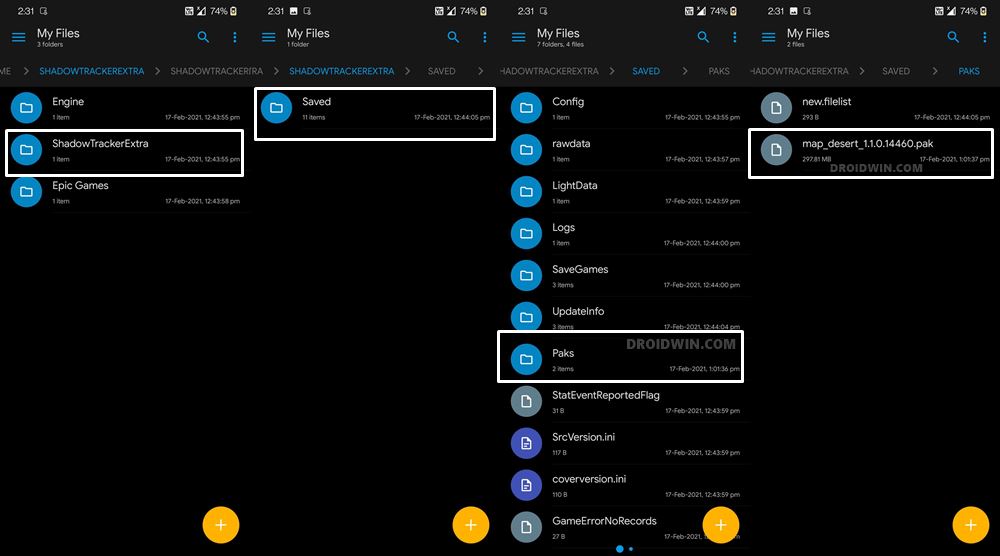
In these folders, you might see large files with the .pak extension. In high-end games like those built on the Unreal Engine (e.g., PUBG Mobile or Fortnite), these files can reach several gigabytes in size, containing the entirety of the game world’s assets.
Tools for Opening and Extracting PAK Data
Because PAK is a generic extension used by many different engines, there is no single “PAK opener” that works for every file. The method of extraction depends on the “magic bytes” or the header of the file:
- Unreal Engine PAKs: These require specialized tools like “Umodel” or “AES Key” extractors if the data is encrypted.
- Chromium PAKs: There are Python scripts and specialized “PAK extractors” available on platforms like GitHub that can unpack these resources into readable JSON or image formats.
- General Archive Tools: Sometimes, a PAK file is simply a renamed ZIP or Leadwerks archive. Applications like ZArchiver or RAR for Android can occasionally peek inside these files if they aren’t encrypted.
However, users should be cautious. Modifying or deleting these files often results in the application crashing or refusing to boot until a full reinstallation is performed.
Security and Optimization: Are PAK Files Safe?
In the context of digital security, PAK files are generally as safe as the application they belong to. Since they are data containers and not executable code, they cannot “run” like a virus on their own. However, they are not without risks in certain scenarios.
Malware Risks and Signature Verification
The danger arises when users download “modded” PAK files from untrusted third-party sources. In the world of mobile gaming, “skin mods” or “map hacks” often involve replacing the original game PAK files with modified versions. These modified files can potentially exploit vulnerabilities in the game engine’s parser. While the PAK file itself isn’t a program, a cleverly crafted malicious data packet could trigger a buffer overflow in the app, potentially giving an attacker higher privileges on the device.
Standard Android security measures, such as Play Protect, focus on the APK and the executable code. This makes the integrity of data packages a secondary layer of defense that users must manage through common sense and by avoiding unofficial “game patches.”
Storage Management and Cleaning
Large PAK files are the primary reason why “System” and “Apps” take up so much space on Android phones. When a user “Clears Cache” in settings, PAK files are usually left untouched because they are considered “Data,” not temporary files. If you are running low on storage, identifying which apps have massive PAK files can help you decide which applications to offload or uninstall.
Optimization apps often struggle with PAK files because they cannot see “inside” them to determine what is necessary. For the best maintenance, users should rely on the app’s internal “Download Manager” (often found in the settings of large games) to delete unused resources like old maps or high-resolution textures that are no longer needed.

The Future of Android Resource Management
As Android matures, the way it handles PAK-style data is evolving. We are seeing a shift toward Android App Bundles (AAB) and Play Asset Delivery. This technology allows Google Play to “split” these large packages and only deliver the parts of the PAK file that are relevant to your specific device.
For example, if your phone has a 1080p screen, the Play Store will not download the 4K texture PAK files. This “dynamic delivery” is the next evolution of the PAK format, making the files smaller, more secure, and more efficient.
In conclusion, “PAKS” on Android represent the crucial intersection of storage efficiency and software performance. Whether they are housing the UI of your favorite browser or the sprawling landscapes of a mobile RPG, these archives are essential for a modern mobile experience. While most users will never need to touch them, knowing what they are provides a deeper appreciation for the complex engineering that keeps our handheld devices running smoothly. Understanding these files empowers users to better manage their storage, secure their devices, and navigate the technical landscape of the Android OS with confidence.
aViewFromTheCave is a participant in the Amazon Services LLC Associates Program, an affiliate advertising program designed to provide a means for sites to earn advertising fees by advertising and linking to Amazon.com. Amazon, the Amazon logo, AmazonSupply, and the AmazonSupply logo are trademarks of Amazon.com, Inc. or its affiliates. As an Amazon Associate we earn affiliate commissions from qualifying purchases.