
In the rapidly evolving landscape of digital streaming, user interface (UI) elements serve as the primary language through which a platform communicates with its audience. For Apple Music users, the appearance of a star icon—whether next to a track title, on an artist’s profile, or within the library—is one of the most frequently questioned symbols. Far from being a simple decorative element, the star in Apple Music functions as a multi-faceted tool for data signaling, popularity tracking, and algorithmic personalization. Understanding what these stars mean requires a look into how Apple Music categorizes global listening data versus how it processes individual user preferences.
Decoding the Star: Popularity vs. Personalization
To understand the star in Apple Music, one must first distinguish between two distinct types of stars that appear within the app. These icons represent different data sets: one reflects the global ecosystem of Apple Music listeners, while the other represents a user’s personal curation and direct interaction with the software’s recommendation engine.
The Popularity Star: Identifying Top Tracks
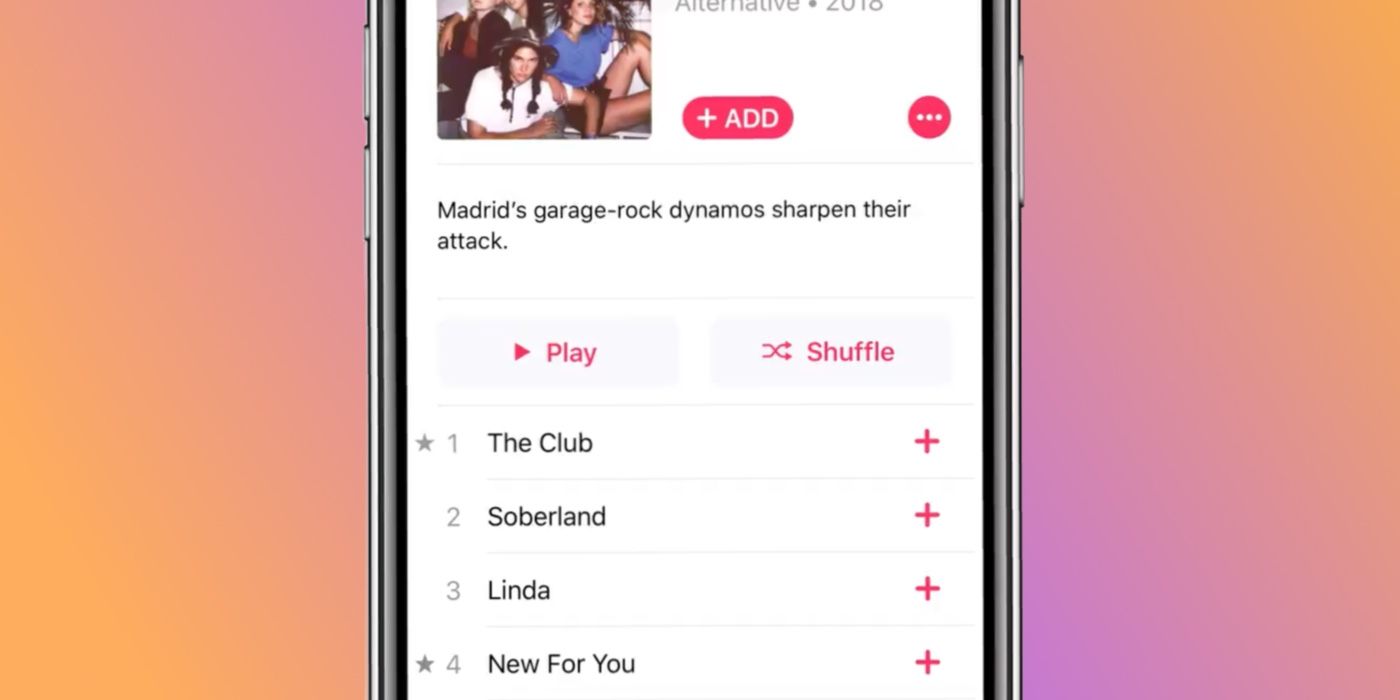
When browsing a popular album or an artist’s discography, you will often notice a small, gray star located to the left of certain track titles. In this specific context, the star is an indicator of popularity. It signifies that the track is one of the most-streamed songs on that particular album across the entire Apple Music platform.
This is a data-driven feature powered by Apple’s backend analytics. It serves as a visual guide for new listeners who may be exploring an artist’s work for the first time. By highlighting the “standout” tracks, Apple Music reduces the cognitive load on the user, allowing them to jump straight to the hits or the songs that are currently trending globally. It is important to note that these stars are dynamic; they can shift over time as listening habits change or as a deep cut from an older album goes viral on social media, prompting a surge in streams that triggers the algorithm to award it a star.
The Favorite Star: The Evolution of the “Love” Button
The second type of star is a more recent addition to the Apple Music interface, introduced in significant software updates like iOS 17.1. This star serves as the primary “Favorite” button, replacing the previous “Heart” or “Love” icon. Unlike the popularity star, which is a passive indicator of global trends, the Favorite star is an active tool for the user.
When a user taps this star on a song, album, or artist profile, they are performing a “hard signal” to the Apple Music algorithm. This action adds the content to the user’s “Favorites” playlist and ensures that the artist is prioritized in notifications and recommendations. This star is usually hollow when inactive and filled (often with a glow or color change) when selected. It is the cornerstone of personalization within the app’s software architecture.
The Technical Impact of “Favoriting” on the Recommendation Engine
From a technical perspective, clicking the star icon initiates a series of events within Apple Music’s machine learning framework. Every streaming service relies on a recommendation engine to keep users engaged, but the “Favorite” star is one of the most powerful weights in Apple’s specific algorithm.
Training the “Listen Now” Algorithm
The “Listen Now” (or Home) tab in Apple Music is a personalized feed generated by complex AI models that analyze your listening history, play counts, and explicit feedback. When you star a song, you are providing “explicit feedback.” This is significantly more valuable to the AI than “implicit feedback,” such as simply listening to a song all the way through.
Explicitly starring a track tells the system to find more music with similar metadata—such as genre, tempo, instrumentation, and even specific producers. Over time, this refines your “Discovery Station” and “New Music Mix,” ensuring that the software’s predictive capabilities become more accurate to your specific tastes.

Artist Notifications and Library Organization
Beyond the algorithm, starring an artist has a functional impact on how the software interacts with the user’s device. By starring an artist profile, users opt into a more aggressive notification tier. The Apple Music app will prioritize sending push notifications or in-app alerts when that artist releases a new single, drops a surprise album, or announces a tour.
Furthermore, the Favorite star integrates deeply with the Library’s filtering system. Users can now filter their songs, albums, and playlists to show only their “Starred” items. This allows for a more streamlined navigation experience, enabling power users to bypass their broader library of thousands of songs to find the tracks they have explicitly marked as high-priority.
Comparing Apple Music’s Star to Industry Competitors
In the broader context of the “Streaming Wars,” UI choices are a major point of differentiation. The way Apple uses the star icon reflects a specific philosophy regarding how users should interact with music metadata compared to platforms like Spotify or Tidal.
Apple Music vs. Spotify: Different Feedback Loops
For years, Spotify utilized a “Heart” icon to allow users to save songs to their “Liked Songs” library. Recently, Spotify transitioned to a “Plus” (+) icon, which serves the dual purpose of liking a song and adding it to a playlist. Apple Music’s transition from the heart to the star was a move toward a more universal “Favorite” symbol that aligns with other Apple ecosystem apps, such as Photos or Mail.
The key difference lies in how these icons are displayed. Spotify does not typically show global popularity stars next to tracks within an album in the same way Apple Music does. Apple’s decision to keep popularity indicators visible emphasizes a discovery model based on “what is trending,” whereas Spotify’s interface often focuses more on “what is tailored for you.” Apple’s dual-star system attempts to bridge the gap between global trends and personal preference.
The Metadata Advantage
Apple Music has long been praised for its superior metadata management. The star icon is a reflection of this. Because Apple allows users to edit metadata in the desktop version of the app (Music on macOS), the favorite star becomes a searchable and sortable field. This level of granular control is a legacy feature from the iTunes era that has been modernized for the streaming age. For tech-savvy users, the star isn’t just a button; it is a data point that can be used to create “Smart Playlists”—dynamic folders that automatically update based on whether a song is starred and how many times it has been played.
The Future of UI and Discovery in Apple Music
As Apple continues to integrate Artificial Intelligence more deeply into its operating systems, the role of the star icon is likely to expand. We are already seeing the beginnings of this with the “Favorite Songs” playlist, which is automatically generated and updated based on star interactions.
Integration with Siri and Voice Commands
The star is also a vital component of Apple’s voice-activated ecosystem. By using Siri, users can “Star” a song hands-free while driving or using HomePods. The command “Siri, I like this song” or “Siri, favorite this artist” translates directly into the star icon’s data field. This cross-device functionality ensures that the user’s preference map is consistent across their iPhone, Mac, Apple Watch, and CarPlay.

Predictive Playlisting and Generative AI
Looking forward, the star icon will likely serve as a training ground for Apple’s rumored advancements in generative AI. If Apple Music introduces a feature to create AI-generated playlists based on mood or prompts, the “Starred” library will serve as the primary source of truth for the model to understand the user’s core musical identity. The more a user engages with the star icon today, the better their automated experience will be as the software evolves.
Ultimately, the star in Apple Music is a sophisticated bridge between the user and the platform’s vast database. Whether it is highlighting a global hit via the gray popularity star or allowing a user to curate their musical universe via the Favorite star, the icon is central to the modern listening experience. It transforms a passive stream of audio into an interactive, data-rich environment that learns and grows alongside the listener. For anyone looking to master their digital music library, the star is the most powerful tool at their disposal.
aViewFromTheCave is a participant in the Amazon Services LLC Associates Program, an affiliate advertising program designed to provide a means for sites to earn advertising fees by advertising and linking to Amazon.com. Amazon, the Amazon logo, AmazonSupply, and the AmazonSupply logo are trademarks of Amazon.com, Inc. or its affiliates. As an Amazon Associate we earn affiliate commissions from qualifying purchases.