
In the vast landscape of spreadsheet software, few functions command as much respect and occasional confusion as SUMPRODUCT. Often described as the “Swiss Army Knife” of data analysis, SUMPRODUCT is a versatile tool that transcends simple arithmetic. Whether you are using Microsoft Excel, Google Sheets, or LibreOffice Calc, understanding this function is a rite of passage for anyone looking to transition from a basic user to a power user. At its most fundamental level, SUMPRODUCT multiplies corresponding components in given arrays and returns the sum of those products. However, its utility in modern data environments goes far beyond basic multiplication, serving as a robust engine for conditional logic, weighted averages, and complex data filtering.

Understanding the Core Logic of SUMPRODUCT
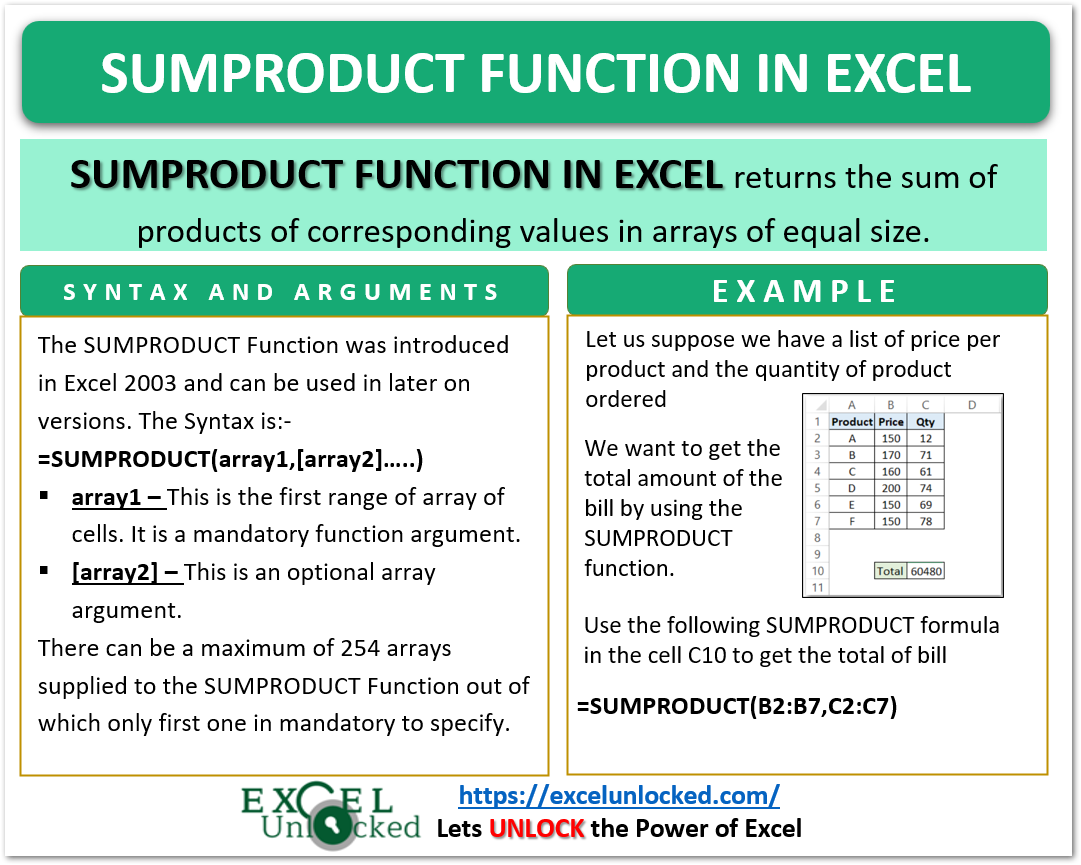
To appreciate what SUMPRODUCT does, one must first understand its syntax and the mechanical way it processes information. The basic syntax is SUMPRODUCT(array1, [array2], [array3], ...). While it looks simple, the “array” component is where the magic happens. An array is essentially a range of cells or a constant set of values arranged in a row or column.
The Fundamental Mathematical Operation
In its default state, if you provide two columns of numbers to SUMPRODUCT, it performs a row-by-row multiplication. For instance, if Column A contains quantities and Column B contains unit prices, SUMPRODUCT will multiply A1 by B1, A2 by B2, A3 by B3, and so on. After performing these individual multiplications, it aggregates the results into a single final sum. This eliminates the need for a “helper column” where you would traditionally calculate the total for each row before summing them at the bottom. In a professional tech environment where spreadsheet real estate is valuable and file size matters, reducing these extra columns is a significant efficiency gain.
Handling Non-Numeric Data
A critical technical nuance of SUMPRODUCT is how it handles non-numeric entries. By default, the function treats any non-numeric value within the arrays—such as text or empty cells—as zero. This is a double-edged sword. On one hand, it prevents the formula from breaking (returning an #VALUE! error) if a stray piece of text enters your data range. On the other hand, it requires the user to be diligent about data integrity, as a misplaced text string will simply be calculated as a zero, potentially skewing results without triggering a warning.
Array Dimension Consistency
For SUMPRODUCT to function correctly, every array provided must have the same dimensions. If your first array is A1:A10 (ten cells), your second array must also span ten cells, such as B1:B10. If the ranges are mismatched—for example, A1:A10 and B1:B11—the function will return a #VALUE! error. This requirement stems from the fact that the function performs element-wise operations; it needs a partner for every value it processes.
The Power of Conditional Logic and Boolean Algebra
While its name implies it is merely for summing products, the true power of SUMPRODUCT in a tech-driven workflow lies in its ability to process Boolean logic. This allows users to perform complex “summing if” or “counting if” operations that sometimes exceed the capabilities of standard functions like SUMIFS or COUNTIFS.
The Double Unary Operator (–)
The most advanced use of SUMPRODUCT involves the double unary operator, represented by two minus signs (--). In spreadsheet logic, a comparison (like A1:A10="Tech") returns an array of TRUE or FALSE values. SUMPRODUCT, however, is designed to work with numbers. The double unary operator forces the software to convert TRUE into 1 and FALSE into 0.
By using this technique, you can embed criteria directly into the function. For example, SUMPRODUCT(--(A1:A10="Software"), B1:B10) will only sum the values in range B where the corresponding cell in range A is exactly “Software.” The function creates an array of 1s and 0s, multiplies them by the values in B, and sums the result. This effectively filters the data mid-calculation.
Multi-Criteria Filtering
Unlike some basic functions, SUMPRODUCT can handle multiple criteria across different dimensions with ease. You can evaluate dates, categories, and numerical thresholds all within a single formula. Because it treats each criteria block as an array, you can multiply them together. In the world of Boolean algebra, TRUE * TRUE = 1, while any combination involving a FALSE (0) results in 0. This logical “AND” operation allows for surgical precision in data extraction, making it an essential tool for generating reports from massive, unorganized datasets.
Flexibility Over SUMIFS
While the SUMIFS function is faster on very large datasets, SUMPRODUCT offers a level of flexibility that SUMIFS lacks. Specifically, SUMPRODUCT can handle operations on the arrays themselves before summing them. For instance, you can use other functions inside SUMPRODUCT to modify the data on the fly, such as SUMPRODUCT(LEN(A1:A10)), which would return the total character count across a range of cells. This ability to “nest” logic makes it a superior choice for complex, customized data queries.

Practical Tech Use Cases: From Inventory to Analytics
In professional settings, SUMPRODUCT is rarely used for simple multiplication. It is the engine behind sophisticated models in finance, logistics, and data science.
Calculating Weighted Averages
One of the most common applications of SUMPRODUCT is the calculation of weighted averages. In many scenarios—such as calculating a student’s final grade or a portfolio’s return—simple averages are misleading because different data points hold different “weights.”
To calculate a weighted average, you use SUMPRODUCT to multiply the values by their respective weights and then divide the result by the sum of the weights. This formulaic approach is far more robust than manual calculation and ensures that as weights or values change, the average updates instantaneously. In tech project management, this is often used to calculate “weighted risk scores” for different software modules.
Inventory Valuation and Sales Analysis
For e-commerce and retail tech platforms, SUMPRODUCT is the standard for quick inventory valuation. By pointing the function at a column of “Stock on Hand” and a column of “Cost per Unit,” a manager can instantly see the total capital tied up in inventory. Furthermore, by adding a third array for “Category,” they can filter this valuation by product line without needing to create separate pivot tables or complex filtered views.
Counting Unique Entries and Specific Patterns
Data analysts often use SUMPRODUCT to solve problems that don’t have a dedicated function. For example, counting the number of unique values in a range or counting cells that meet specific text-based patterns (like “starts with X and ends with Y”) can be achieved by combining SUMPRODUCT with functions like COUNTIF or SEARCH. This “meta-programming” within the spreadsheet allows for the creation of dynamic dashboards that respond to user inputs in real-time.
Performance and Optimization in Large Datasets
As with any powerful tool, SUMPRODUCT must be used judiciously. In the context of “Big Data” or very large spreadsheets containing hundreds of thousands of rows, the way SUMPRODUCT calculates can impact performance.
Computational Overhead
Unlike simpler functions, SUMPRODUCT is an “array function” by nature. This means that every time a cell in the spreadsheet is changed, SUMPRODUCT may re-evaluate every single cell in its referenced ranges. In massive workbooks, having hundreds of SUMPRODUCT formulas can lead to noticeable “lag” or calculation times. Tech professionals often mitigate this by limiting the range of the function (using A1:A1000 instead of the entire column A:A) or by converting static results into values once the analysis is complete.
SUMPRODUCT vs. Dynamic Arrays
With the introduction of Dynamic Array formulas in modern spreadsheet software (like the FILTER, SORT, and UNIQUE functions in Microsoft 365), some of SUMPRODUCT’s traditional use cases are being shared with newer tools. However, SUMPRODUCT remains relevant because of its backward compatibility. If you are building a tool that needs to function across different versions of Excel or different spreadsheet platforms, SUMPRODUCT is the most reliable “advanced” function that works consistently everywhere.
Troubleshooting Common Errors
When SUMPRODUCT fails, it is usually due to one of three things: mismatched array sizes, non-numeric data that the user intended to be numeric (like numbers stored as text), or “circular references” where the formula inadvertently references its own cell. Debugging these requires a methodical look at the underlying data. In tech troubleshooting, a common trick is to use the “Evaluate Formula” tool to watch how SUMPRODUCT converts the arrays into 1s and 0s step-by-step, allowing the user to see exactly where the logic breaks down.
Conclusion: The Enduring Value of SUMPRODUCT
In an era where AI and automated data visualization tools are becoming more prevalent, the manual mastery of functions like SUMPRODUCT remains a vital skill. It represents the bridge between basic data entry and sophisticated data analysis. By understanding what SUMPRODUCT does, you gain the ability to manipulate data structures, perform complex conditional arithmetic, and build efficient models that are both transparent and robust.
The function is more than a mathematical shortcut; it is a logic engine. For the developer, the analyst, or the business owner, SUMPRODUCT offers a level of control over data that few other single functions can match. As you integrate it into your technological toolkit, you will find that the questions move from “What does this do?” to “What can’t I do with this?”, marking your arrival as a truly proficient navigator of the digital spreadsheet landscape.
aViewFromTheCave is a participant in the Amazon Services LLC Associates Program, an affiliate advertising program designed to provide a means for sites to earn advertising fees by advertising and linking to Amazon.com. Amazon, the Amazon logo, AmazonSupply, and the AmazonSupply logo are trademarks of Amazon.com, Inc. or its affiliates. As an Amazon Associate we earn affiliate commissions from qualifying purchases.