
In the modern digital landscape, the phrase “What is my IP?” is more than just a common search query; it is a fundamental question about how we interface with the global network. Every time you stream a video, send an email, or browse a website, a complex series of handshakes occurs behind the scenes, all facilitated by your Internet Protocol (IP) address. This string of numbers acts as your digital return address, ensuring that the data you request from the vast expanse of the internet finds its way back to your specific device.
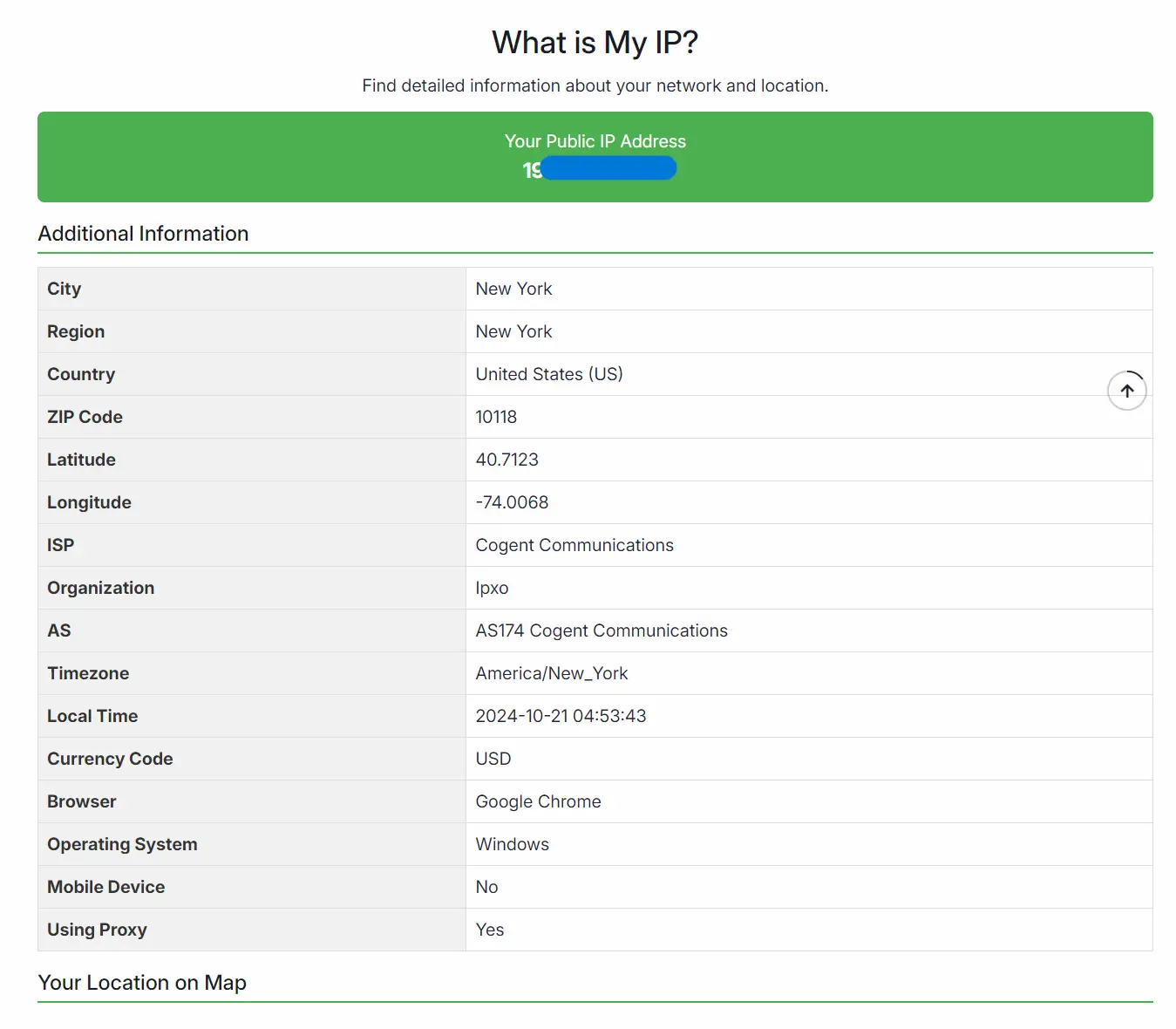
As our lives become increasingly tethered to the cloud, understanding the nuances of IP addresses—what they reveal, how they are managed, and how to secure them—has transitioned from a niche technical concern to an essential component of digital literacy. Whether you are troubleshooting a connection, setting up a remote workstation, or looking to bolster your online privacy, mastering the concept of the IP address is the first step toward total control over your digital footprint.
The Anatomy of an IP Address: How the Internet Identifies You
An IP address is a unique identifier assigned to every device connected to a computer network that uses the Internet Protocol for communication. To understand how it works, it is helpful to view it through the lens of two primary standards: IPv4 and IPv6.
IPv4 vs. IPv6: The Evolution of Addressing
For decades, the Internet Protocol version 4 (IPv4) was the gold standard. An IPv4 address consists of four sets of numbers ranging from 0 to 255, separated by periods (e.g., 192.168.1.1). While this system provided approximately 4.3 billion unique addresses, the explosion of internet-connected devices—from smartphones to smart refrigerators—led to a global shortage.
To combat this “address exhaustion,” IPv6 was introduced. IPv6 uses a 128-bit addressing scheme, represented as eight groups of four hexadecimal digits (e.g., 2001:0db8:85a3:0000:0000:8a2e:0370:7334). This leap in architecture allows for an astronomical number of addresses—340 undecillion, to be exact—ensuring that every grain of sand on earth could theoretically have its own IP address.
Static vs. Dynamic IP Addresses
Most residential internet users are assigned a dynamic IP address by their Internet Service Provider (ISP). This means your IP address can change periodically, such as when your router restarts or your ISP performs maintenance. Dynamic addressing is cost-effective for providers and sufficient for most consumers.
In contrast, a static IP address remains constant. These are typically used by businesses that host their own servers, websites, or email systems. While static IPs offer greater stability for remote access and hosting, they are more susceptible to targeted security threats because the “target” never moves.
Public vs. Private IPs: The Gateway and the Internal Network
One of the most common points of confusion for users asking “What is my IP?” is the distinction between public and private addresses. This distinction is governed by a technology called Network Address Translation (NAT).
The Role of the Router and NAT
Think of your home or office network as a large office building. The building has one main street address (the Public IP). This is the address that the outside world uses to send mail to the building. Once the mail arrives at the front desk (the Router), it is sorted and delivered to a specific office number (the Private IP).
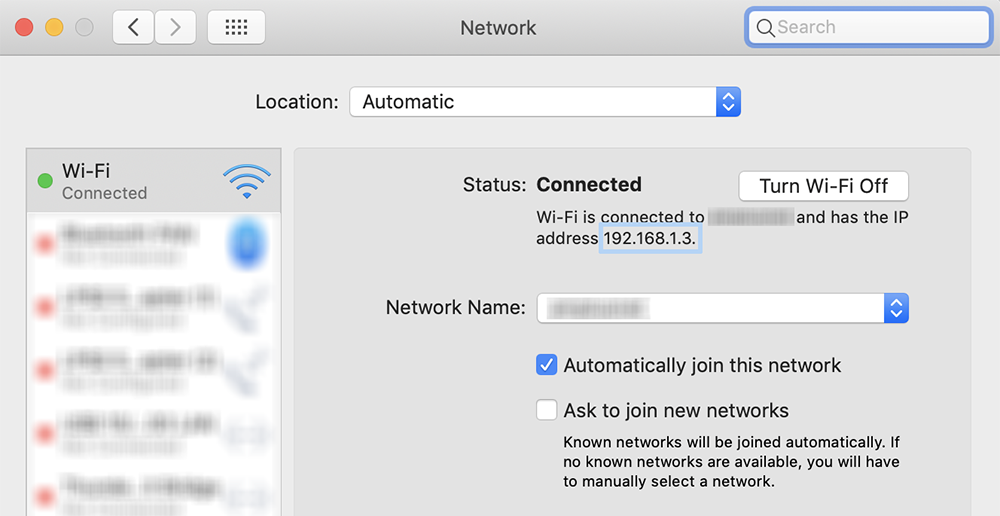
Your Public IP is the address visible to the world. It is assigned to your router by your ISP. Conversely, your Private IP is assigned by your router to your specific laptop, smartphone, or tablet within your local network. This internal numbering system allows multiple devices to share a single public connection, conserving IP addresses and providing an initial layer of security by hiding individual devices from direct exposure to the public internet.
Why Your Local IP Differs from Your Search Results
When you type “What is my IP” into a search engine, the result you see is your Public IP. This is because the search engine is looking at the request coming from your router’s gateway. However, if you check your device’s network settings, you will likely see a private address, often starting with 192.168.x.x or 10.x.x.x. Understanding this hierarchy is crucial for tasks like port forwarding or setting up local file sharing.

Why You Need to Know Your Public IP Address
Knowing your IP address is not just a technical curiosity; it is a practical necessity for several modern computing tasks.
Remote Work and Secure Access
In an era of hybrid work, many professionals need to access office servers or home workstations from remote locations. Tools like Remote Desktop Protocol (RDP) or Secure Shell (SSH) often require the user to know the specific IP address of the destination network. Furthermore, security-conscious organizations use “IP Whitelisting,” a process where access to sensitive data is only granted if the request originates from a pre-approved IP address. If your IP changes, you may find yourself locked out of critical systems until your new address is updated in the whitelist.
Troubleshooting and Network Performance
Network administrators and savvy users use IP addresses to diagnose connectivity issues. By using commands like ping or traceroute, you can determine if a delay is occurring at your router, within your ISP’s network, or at the destination server. Knowing your IP helps identify if you are being “throttled” by an ISP or if your traffic is being routed through inefficient geographical nodes.
Online Gaming and Hosting
For the gaming community, the IP address is central to the experience. Players hosting private servers for games like Minecraft or ARK need to provide their public IP to friends so they can join. Additionally, understanding your IP is the first step in configuring “Port Forwarding,” which can significantly reduce latency (ping) and improve the stability of peer-to-peer connections.
Digital Security and IP Tracking: Risks and Protections
While IP addresses are necessary for the internet to function, they also present significant privacy and security risks. Your IP address is a digital breadcrumb that can reveal more about you than you might expect.
Geolocation and Digital Fingerprinting
An IP address can pinpoint your approximate physical location, often down to the city or neighborhood level. While it rarely reveals your exact home address to a casual observer, websites use this data for “geofencing”—restricting content based on your region. More importantly, advertisers and data brokers use your IP as a key component of “digital fingerprinting.” By combining your IP with your browser type, screen resolution, and installed fonts, companies can create a unique profile to track your behavior across the web, even if you clear your cookies.
Cybersecurity Threats: DDoS and Targeting
In the hands of a malicious actor, a public IP address can be used to launch a Distributed Denial of Service (DDoS) attack. By flooding your IP with an overwhelming amount of traffic, an attacker can crash your internet connection, a tactic often used in competitive gaming or to harass individuals. Furthermore, if a device on your network has an unpatched vulnerability, an attacker who knows your IP can attempt to exploit that “open port” to gain unauthorized access to your local files.
Masking Your Identity: VPNs and Proxies
To mitigate these risks, many users employ Virtual Private Networks (VPNs) or Proxies. A VPN creates an encrypted tunnel between your device and a remote server. When you use a VPN, your “What is my IP” result will show the IP address of the VPN server rather than your actual home address. This not only hides your physical location and thwarts tracking but also encrypts your data, making it unreadable to hackers or your ISP.
The Future of Network Addressing in an IoT World
As we look toward the future, the role of the IP address is evolving alongside the Internet of Things (IoT). With billions of new devices—from smart city sensors to medical implants—joining the grid, the management of IP addresses is becoming more automated and complex.
The transition to IPv6 is the most significant shift in this space. Beyond just providing more addresses, IPv6 includes built-in security features like IPsec (Internet Protocol Security), which provides end-to-end encryption and authentication. As IPv6 becomes the default, the traditional reliance on NAT may diminish, potentially giving every single device a unique, globally reachable address. While this simplifies connectivity, it also places a renewed emphasis on device-level firewalls and robust security protocols.
Ultimately, your IP address is the cornerstone of your digital presence. It is the bridge between your physical hardware and the global data stream. By understanding “What is my IP,” you move from being a passive consumer of the internet to an informed participant, capable of navigating the digital world with greater efficiency, privacy, and security. In an age where data is the new currency, knowing how your identity is broadcast—and how to protect it—is the ultimate tech-savvy advantage.
aViewFromTheCave is a participant in the Amazon Services LLC Associates Program, an affiliate advertising program designed to provide a means for sites to earn advertising fees by advertising and linking to Amazon.com. Amazon, the Amazon logo, AmazonSupply, and the AmazonSupply logo are trademarks of Amazon.com, Inc. or its affiliates. As an Amazon Associate we earn affiliate commissions from qualifying purchases.