
In the landscape of software engineering, few tools carry as much weight or historical significance as Microsoft Visual Studio. Often referred to simply as “Visual Studio,” it is a comprehensive Integrated Development Environment (IDE) designed to facilitate the entire software development lifecycle—from initial coding and UI design to debugging, testing, and deployment. Unlike simple text editors, Visual Studio provides a massive ecosystem of tools that allow developers to build everything from mobile applications and desktop software to complex cloud-based web services.
As technology continues to shift toward cloud-native architectures and AI-driven development, Visual Studio remains a cornerstone for professional developers. It serves as the primary gateway for the .NET ecosystem while offering robust support for C++, Python, JavaScript, and more. Understanding what Visual Studio is requires looking beyond its interface and into its role as a sophisticated productivity engine for the modern programmer.

The Evolution of an Integrated Development Environment (IDE)
To understand Visual Studio, one must first distinguish between a text editor and an Integrated Development Environment. While a text editor like Notepad++ or even Visual Studio Code allows you to write code, an IDE provides a “one-stop shop” for developers. Visual Studio integrates a compiler, a debugger, graphical designers, and database management tools into a single interface. This integration minimizes the need for developers to switch between various standalone tools, significantly boosting productivity and reducing context-switching fatigue.
A Legacy of Innovation
The journey of Visual Studio began in the late 1990s, aiming to consolidate Microsoft’s various programming languages—like Visual Basic, Visual C++, and Visual FoxPro—into a unified environment. Over the decades, it has evolved from a Windows-centric tool into a powerhouse that supports cross-platform development. The introduction of the .NET Framework in the early 2000s cemented Visual Studio’s position as the essential tool for enterprise-level development. Today, it is a 64-bit application capable of handling massive solutions with thousands of projects and millions of lines of code without compromising performance.
Visual Studio vs. Visual Studio Code
A common point of confusion for those entering the tech space is the difference between Visual Studio and Visual Studio Code (VS Code). While they share a brand name, they are fundamentally different. VS Code is a lightweight, open-source, and highly extensible code editor that runs on Windows, macOS, and Linux. In contrast, the full Visual Studio IDE is a much larger, more powerful suite geared toward complex, large-scale projects. While VS Code relies on extensions for most functionality, Visual Studio comes “batteries included” with advanced features for profiling, architectural analysis, and deep integration with enterprise services.
Core Features and Capabilities
The true value of Visual Studio lies in its feature set, which is designed to handle the “inner loop” of development—the repetitive cycle of writing, running, and fixing code. By automating mundane tasks and providing deep insights into how code executes, it allows developers to focus on solving complex logic problems rather than managing their environment.
IntelliSense and AI-Powered Coding
At the heart of the Visual Studio editor is IntelliSense, a sophisticated code-completion tool. IntelliSense does more than just suggest variable names; it provides API references, documentation snippets, and parameter lists in real-time. In recent versions, this has evolved into “IntelliCode,” which uses machine learning models trained on thousands of open-source projects to suggest entire lines of code based on the current context. This AI-driven approach significantly reduces typos and helps developers discover library functions they might not have known existed.
Advanced Debugging and Diagnostics
Debugging is arguably where Visual Studio shines brightest. It provides a world-class debugger that allows developers to pause execution at any point (breakpoints), inspect the values of variables, and even change code on the fly without restarting the application—a feature known as “Hot Reload.”
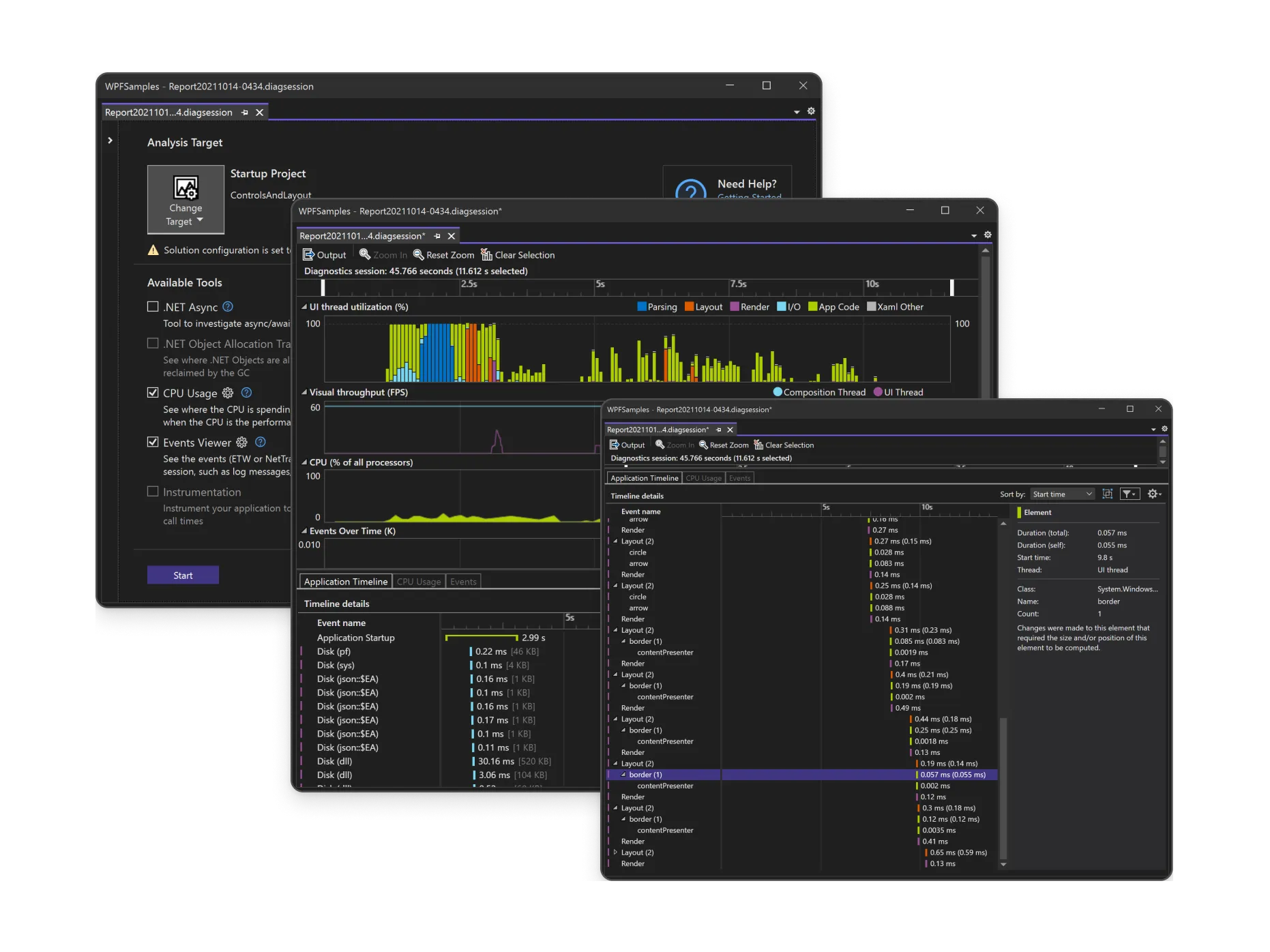
Beyond basic debugging, Visual Studio includes diagnostic tools that monitor CPU and memory usage in real-time. For developers building high-performance applications, these tools are essential for identifying memory leaks or bottlenecks that could slow down an application in a production environment. The “Time Travel Debugging” feature in certain editions even allows developers to record a process and play it back, making it possible to catch intermittent bugs that are notoriously difficult to reproduce.
Graphical Designers and Testing Tools
Visual Studio is not just about text. It includes a variety of graphical designers for building user interfaces. Whether you are using Windows Forms, WPF (Windows Presentation Foundation), or MAUI (Multi-platform App UI), the drag-and-drop interfaces allow for rapid prototyping. Furthermore, the IDE includes built-in unit testing frameworks. Developers can write tests to verify their code’s logic, and Visual Studio can automatically run these tests every time the code is changed, ensuring that new updates do not break existing functionality.
Supported Languages and Frameworks
One of Visual Studio’s greatest strengths is its versatility. While it is the flagship IDE for Microsoft’s own languages, it has grown to become a multilingual powerhouse that supports a vast array of programming paradigms.
C#, .NET, and the Microsoft Stack
Visual Studio is the native home for C#, F#, and the .NET platform. It provides the most comprehensive support for building Windows desktop applications, ASP.NET web APIs, and microservices. Because the IDE is developed alongside the .NET framework, developers always have access to the latest language features and performance optimizations the moment they are released.
C++ and High-Performance Development
For those working in game development, systems programming, or high-frequency trading, Visual Studio offers one of the most mature C++ environments available. It includes powerful compilers and deep integration with the LLVM and Clang toolchains. Many of the world’s most popular AAA video games are built using Visual Studio in conjunction with engines like Unreal Engine, thanks to its ability to manage massive C++ codebases and provide detailed memory profiling.
Web and Cloud Integration
Modern development is increasingly web-centric, and Visual Studio has adapted accordingly. It offers first-class support for JavaScript, TypeScript, and popular frameworks like Angular, React, and Vue. Furthermore, the integration with Microsoft Azure is seamless. Developers can publish their applications directly to the cloud, manage remote databases, and debug applications running in the cloud—all without leaving the IDE. This “Cloud-First” approach makes it an essential tool for DevOps workflows and continuous integration/continuous deployment (CI/CD) pipelines.
Visual Studio Editions and the Developer Ecosystem
Microsoft offers Visual Studio in several editions to cater to different segments of the market, from hobbyists to global corporations.
- Visual Studio Community: This is a free, fully-featured version intended for students, open-source contributors, and small professional teams. It includes almost all the functionality of the paid versions, making professional-grade tools accessible to everyone.
- Visual Studio Professional: Aimed at individual professional developers or smaller teams, this edition includes additional features for collaboration and provides subscription benefits like access to software for testing and training.
- Visual Studio Enterprise: This is the flagship version designed for large-scale organizations. It includes advanced architectural tools, automated testing suites, and comprehensive “CodeLens” features that show the history of a code block, who changed it, and whether its tests are passing, directly within the editor.
Extensions and Customization
The Visual Studio Marketplace hosts thousands of extensions created by both Microsoft and the community. These extensions allow developers to customize their environment, adding support for new languages, integrating third-party services like Jira or GitHub, and adding UI themes. This extensibility ensures that the IDE can be tailored to the specific needs of any project, no matter how niche.
Visual Studio in the Modern Era: AI and Collaboration
As we look toward the future of software development, Visual Studio is positioning itself at the intersection of AI and collaborative engineering. The integration of GitHub Copilot into the Visual Studio environment represents a paradigm shift. Rather than just completing lines of code, AI can now help refactor complex logic, write unit tests, and explain confusing code blocks.
Collaborative Development with Live Share
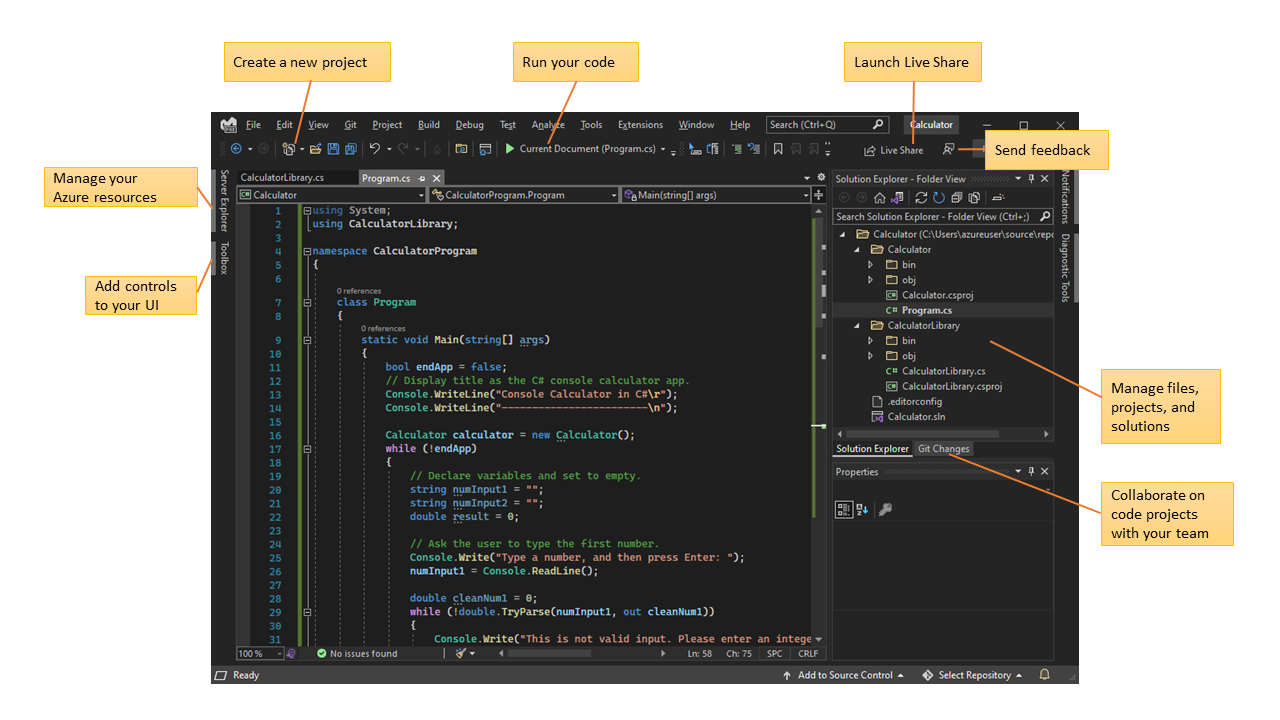
The modern workplace is often remote, and Visual Studio addresses this through “Live Share.” This feature allows developers to share their project and debugging session with a teammate in real-time. Unlike simple screen sharing, Live Share allows both participants to navigate the code independently, edit files, and use the debugger on the host’s machine. It is a game-changer for pair programming and technical mentoring, breaking down the barriers of physical distance.
Containers and Modern DevOps
Finally, Visual Studio’s deep integration with Docker and Kubernetes reflects the industry’s move toward containerization. Developers can containerize their applications with a single click, allowing them to run their code in a consistent environment from their local machine all the way to the production server. By streamlining the path from “Code” to “Cloud,” Visual Studio ensures it remains the most relevant tool in a developer’s arsenal.
In conclusion, Microsoft Visual Studio is far more than a simple code editor; it is a sophisticated, AI-enhanced environment that empowers developers to build the world’s most complex software. Its blend of historical reliability and cutting-edge innovation makes it the definitive choice for anyone serious about professional software development. Whether you are a student writing your first “Hello World” in C# or a senior architect managing a global cloud infrastructure, Visual Studio provides the tools, intelligence, and scalability required to turn code into reality.
aViewFromTheCave is a participant in the Amazon Services LLC Associates Program, an affiliate advertising program designed to provide a means for sites to earn advertising fees by advertising and linking to Amazon.com. Amazon, the Amazon logo, AmazonSupply, and the AmazonSupply logo are trademarks of Amazon.com, Inc. or its affiliates. As an Amazon Associate we earn affiliate commissions from qualifying purchases.