
In the rapidly evolving landscape of cloud computing and mobile productivity, Google has transitioned its service model from fragmented storage solutions to a comprehensive, unified subscription known as Google One. While many users initially mistake Google One for a simple replacement for Google Drive, it is, in fact, a sophisticated management layer that spans the entire Google ecosystem. The Google One app serves as the central hub for this experience, offering users a streamlined interface to manage cloud storage, enhance digital security, and access cutting-edge artificial intelligence tools.

To understand what the Google One app is, one must first look at how Google’s services have matured. In the early days of the internet, storage was siloed—users had a specific quota for Gmail and another for Drive. Today, Google One aggregates these resources into a single pool, providing a more fluid and flexible approach to data management. This article explores the technical intricacies, features, and strategic importance of the Google One app in the modern digital workflow.
Understanding the Foundation: Beyond Simple Cloud Storage
At its core, Google One is a membership plan that provides expanded storage that is shared across Google Drive, Gmail, and Google Photos. However, the app itself is far more than a storage meter. It acts as a command center for a user’s digital life, consolidating several high-level functions that were previously scattered across different settings menus or third-party applications.
The Transition from Google Drive to Google One
There is often confusion regarding the difference between Google Drive and Google One. To clarify, Google Drive is a service—a place to store, share, and collaborate on files. Google One is the subscription plan that powers that service and adds extra benefits. When a user exceeds the free 15GB limit provided to every Google Account, they subscribe to Google One to increase that capacity. The Google One app is the dedicated tool designed to manage this subscription and its associated perks.
How the Google One App Acts as a Control Center
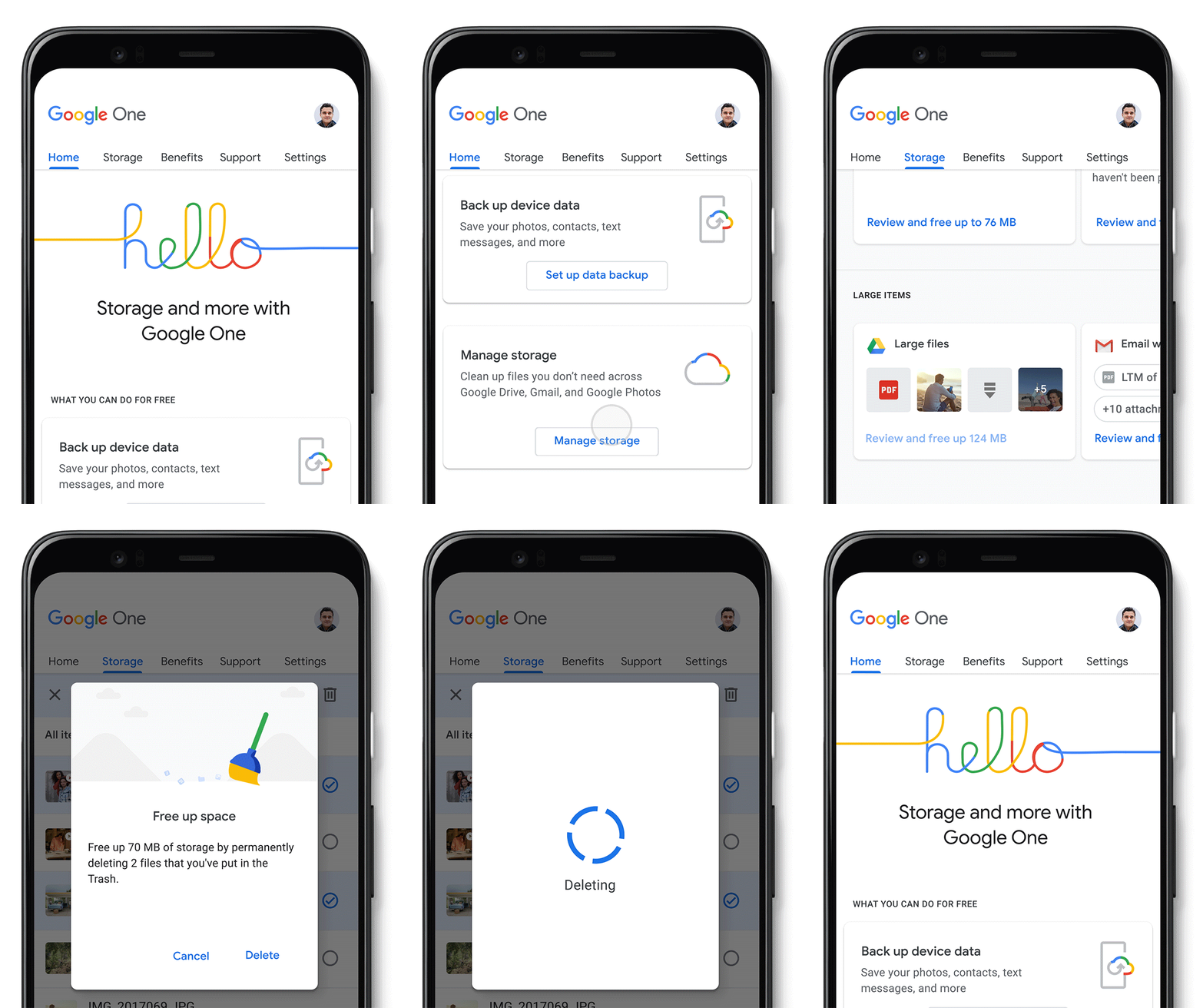
The Google One app provides a granular look at how your storage is being utilized. Instead of guessing which service is eating up your quota, the app offers a color-coded breakdown. This transparency is crucial for power users who manage thousands of high-resolution photos and large video files. Beyond visual reporting, the app provides “clean-up” suggestions, identifying large files, blurry photos, or spam emails that can be deleted to reclaim space. This technical optimization ensures that users are getting the most out of their paid tiers.
Core Features and Functional Capabilities
The Google One app is packed with features that extend the utility of a standard Google account. These features are designed to improve the mobile experience, particularly for Android users, though many benefits extend to the web and iOS platforms.
Unified Storage Management and Cleanup
The most immediate benefit of the Google One app is the “Storage Management” tool. This is a sophisticated algorithm-driven feature that scans your entire Google account. It identifies discarded items, such as emails in the trash, large attachments in Gmail, and “unsupported videos” that take up space without being viewable. By consolidating these management tasks into a single interface, Google has simplified a process that used to require manual digging through multiple apps.
Seamless Device Backup and Restoration
For Android users, the Google One app provides a robust backup solution. While Android has long had built-in backup features, the Google One app brings them to the forefront with more control. Users can back up their photos, videos, contacts, messages, and even device settings directly to the cloud. This is particularly vital when switching to a new smartphone. By logging into the Google One app on a new device, a user can trigger a restoration process that brings back their digital environment almost exactly as it was on the previous hardware.
Advanced Photo Editing Tools
One of the most popular “pro” features hidden within the Google One ecosystem is the suite of advanced editing tools in Google Photos, unlocked via a Google One subscription. Through the app, users gain access to the Magic Eraser, which uses AI to remove unwanted objects from photos, and HDR effects for video. While these tools are used within the Photos app, the Google One app is where these permissions are managed and where users can discover new additions to the creative suite.
Security and Privacy in the Digital Age
As digital security becomes a primary concern for consumers, Google has leveraged the Google One app to provide tools that go beyond basic account protection. This shifts the value proposition of the app from mere storage to a security-as-a-service model.
Dark Web Monitoring
One of the more recent and highly relevant additions to the Google One app is the Dark Web Report. This feature allows users to scan the dark web for their personal information, such as email addresses, birth dates, and phone numbers, that may have been leaked in third-party data breaches. If the app finds a match, it provides a detailed report and actionable advice on how to secure the compromised accounts. This proactive approach to digital identity protection is a significant step forward in consumer-level security.
The Integration of Google’s Security Infrastructure
While Google recently announced changes to its VPN service (transitioning some of its features), the Google One app remains the primary touchpoint for Google’s broader security infrastructure. This includes advanced monitoring for suspicious activity and enhanced support features. Subscribers often get direct access to “Google Experts”—a dedicated support team that can help resolve technical issues across Google’s suite of products. This direct line of communication is a major differentiator from the standard, automated help centers available to free users.
The AI Revolution: Gemini and Google One
The most significant shift in the Google One app’s recent history is its integration with Google’s artificial intelligence, Gemini. This represents the next frontier for the app, moving it from a utility tool to an AI-powered productivity engine.
Empowering Productivity with Generative AI
Google has introduced specific tiers within Google One that include “Gemini Advanced.” This integration allows subscribers to use Google’s most capable AI models directly within their existing workflow. By subscribing through the Google One app, users unlock Gemini features in Gmail, Docs, and Slides. This might include using AI to draft complex emails, summarize long document threads, or generate high-quality images for presentations.
The Google One AI Premium Plan
The “AI Premium” plan is currently the flagship offering within the Google One app. It demonstrates Google’s strategy of bundling high-end computing resources with storage. For tech-savvy users and professionals, this plan provides a 2TB storage quota alongside the latest AI breakthroughs. This convergence of storage and intelligence suggests that the Google One app is evolving into a personal AI management platform, where the data you store is empowered by the AI you subscribe to.
Maximizing Value: Family Sharing and Member Benefits
Google One is designed to be a collaborative experience. The app makes it easy to manage a “Family Group,” which allows up to five additional people to share the same storage plan without extra cost.
Managing Family Groups with Privacy
A common technical question regarding Google One is whether family members can see each other’s files. The Google One app is built with a strict privacy architecture: storage is shared, but files are not. Each family member uses their portion of the total storage quota with their own private Google account. The app provides the primary account holder with a dashboard to see how much storage each person is using, making it an excellent tool for household digital management.
Google Store Rewards and Exclusive Perks
Finally, the Google One app serves as a gateway to various “Member Benefits.” Depending on the plan level, users can receive up to 10% back in Google Store credit on hardware purchases, such as Pixel phones or Nest devices. Additionally, the app occasionally offers “Pro” trials for other services like YouTube Premium or Google Play Pass. These perks are tracked and claimed directly within the app, reinforcing its role as the central hub for the entire Google brand experience.

The Strategic Importance of the Google One App
When we look at the Google One app through a technical lens, it is clear that it represents the “unification” era of Google. No longer are users expected to manage disparate services; instead, the app provides a high-level view of one’s digital footprint. It bridges the gap between hardware (backups), software (storage and AI), and security (dark web monitoring).
For the modern user, the Google One app is an essential utility. It ensures that memories stored in Photos are safe, professional documents in Drive are accessible, and the personal data underlying it all is protected from emerging threats. As AI continues to integrate more deeply into our daily tasks, the Google One app will likely remain the primary interface where users manage the intersection of their data and the intelligent tools that process it. Whether you are a casual user looking to save more photos or a professional seeking the latest in generative AI, the Google One app is the key to unlocking the full potential of the Google ecosystem.
aViewFromTheCave is a participant in the Amazon Services LLC Associates Program, an affiliate advertising program designed to provide a means for sites to earn advertising fees by advertising and linking to Amazon.com. Amazon, the Amazon logo, AmazonSupply, and the AmazonSupply logo are trademarks of Amazon.com, Inc. or its affiliates. As an Amazon Associate we earn affiliate commissions from qualifying purchases.